FitNotes 2 - Gym Workout Log

FitNotes 2 - Gym Workout Log

FitNotes Workout Tracker

Ginger Technologies Pte LtdΒ·Health & Fitness
β˜…4.6 / 5Β·539 ratings
View on App Store

ASO Rewrite Report Β· πŸ‡ΊπŸ‡Έ United States

65
Current
+17 pts
82
Potential

FitNotes 2 is a technically strong gym logger with a solid 4.6-star rating and 10 screenshots on both iPhone and iPad β€” the metadata foundation is decent but not optimized. The two biggest leaks are the subtitle (repeating 'FitNotes' and 'workout' from the title, burning 30 high-weight characters on duplicates Apple ignores) and the description (3,982 chars of dense feature bullets with no closing CTA and weak conversion structure). Fixing the subtitle alone unlocks six untapped keyword clusters; restructuring the description's first three lines and closing section should measurably lift product-page conversion.

Listing Rewrites

Each field shows what's on your App Store page today, what's wrong, and the paste-ready rewrite that fixes it.

7/10

Title

Section score

Current

FitNotes 2 - Gym Workout Log

28 / 30 chars

Problem

  • 'FitNotes 2' leads the title, occupying 10 of 28 characters on a brand token that has near-zero organic search volume. Users who don't already know the app will not type 'FitNotes' into the App Store search bar β€” they will type 'gym workout log,' 'gym tracker,' or 'workout journal.'

Solution

FitNotes 2 - Gym Workout Log

28 / 30 chars

The current title is already at 7/10 with 28/30 chars and contains the three highest-value non-brand keyword tokens for this category: 'gym,' 'workout,' and 'log.' Changing the title would sacrifice name recognition among the existing Android-to-iOS migrant audience (a documented user segment in the reviews) without a clear keyword gain. The title is retained as-is; the subtitle rewrite is where the meaningful keyword expansion happens.

5/10

Subtitle

Section score

Current

FitNotes Workout Tracker

24 / 30 chars

Problem

  • 'FitNotes' appears in both the title and subtitle β€” Apple ignores the duplicate, meaning the first 8 characters of the subtitle provide zero keyword value.
  • 'Workout' also duplicates the title β€” another 7 characters wasted. Of the subtitle's 24 characters, 15 (63%) are invisible to Apple's search index because they repeat title tokens.

Solution

Planner, Journal & Rep Timer

28 / 30 chars

Eliminates both duplicate tokens ('FitNotes' and 'workout') that were burning the entire subtitle budget. Deploys three high-popularity keywords with zero title overlap: 'planner' (popularity 67, opportunity 19), 'journal' (popularity 67, opportunity 17), and 'timer' (popularity 63, opportunity 18). The combination also indexes for compound searches: 'workout planner,' 'workout journal,' 'rep timer,' 'planner journal,' and 'gym timer' without any extra characters. 'Rep' is a distinct fitness-native modifier that qualifies 'timer' for lifting-specific searches. 28 chars β€” within the 30-char limit.

4/10

Description

Section score

Solution

Every set logged. Every PR earned. See exactly how much stronger you are getting β€” session by session. FitNotes 2 is a gym workout log built for lifters who care about real progress. Log your sets, track your personal records, and watch your strength climb on clear, color-coded charts. No fluff. No distractions. Just your lifts, your numbers, and your history. TRY FREE β€” NO ACCOUNT NEEDED The free version saves up to 12 workouts. All features are fully unlocked β€” the only limit is workout count. Upgrade to lifetime access or a subscription to save unlimited workouts. CORE FEATURES β€’ Workout Log: Record every set with weight, reps, distance, or time. Supports lbs and kg β€” mix them freely. β€’ Personal Records: Automatically tracked for every exercise. Know your all-time bests at a glance. β€’ Routines & Templates: Save your programs as templates and log them in one tap. Program by percentages of training max. β€’ Progress Charts: Color-coded graphs across all time ranges. See the trend, plan the next cycle. β€’ Plate Calculator: Know exactly which plates to load before you walk to the bar. Multiple barbell profiles per gym. β€’ 1RM & Percent Calculator: Calculate your one-rep max and percentage-based working sets instantly. β€’ Rest Timer: Configurable rest timer with lock screen and Live Activity support. EMOM, AMRAP, and Tabata modes included. β€’ RPE & RIR: Log rate of perceived exertion and reps in reserve to train by feel, not just numbers. β€’ Body Tracker: Log weight, body fat, and any custom measurement. Syncs with Apple Health. β€’ Goal Tracker: Set strength goals for any exercise and track your progress toward them. β€’ Apple Watch: Full Apple Watch app. Log sets, control the rest timer, and adjust RPE from your wrist. β€’ Warmup Sets: Flag warmup sets to exclude them from graphs, statistics, and goals β€” only working sets count. FLEXIBLE & PRIVATE β€’ No account required β€” your data stays on your device. β€’ Manual and automatic iCloud backups. β€’ Export workouts as CSV. Export back to the original FitNotes app β€” no lock-in. β€’ Import CSV from the original FitNotes app, FitNotes Android, HeavySet, and other fitness apps. β€’ Import workout JSON and text. β€’ Attach photos and videos to sets and notes. β€’ Exercise video library for form reference. β€’ Dark Mode and full iOS system integration. BUILT FOR SERIOUS LIFTERS Over seven years of lifting history lives in FitNotes. If you used FitNotes on Android, import your full database and continue exactly where you left off β€” every set, every PR, every note. FitNotes 2 is the iOS companion to the original FitNotes app. Purchase of FitNotes 2 does not transfer to other platforms. Questions or issues? Reach us at getfitnotes.com

2401 chars

Removed the ~1,200-char version history changelog (belongs in What's New, not description). Rewrote the opening three lines to lead with the user outcome ('See exactly how much stronger you are getting') rather than a self-referential brand claim. Moved the freemium model explanation to an explicit, prominent 'TRY FREE' section near the top β€” this directly addresses the negative review pattern around paywall surprise. Reformatted all features with benefit framing rather than bare feature names. Added a closing support CTA. Total char count drops from 3,982 to approximately 2,401 β€” well within the 4,000-char limit and dramatically more scannable.

5/10

100-Char Keyword Field

Section score

Solution

calculator,max,health,fitness,popular,keep,track,history,weight,tracker,body,progress,tracking,save

99 / 100 chars

Rule-compliant keyword field with validated tokens (99/100 chars). Single-token, comma-separated format with no duplicate indexing across title/subtitle/keyword field.

Per-Keyword Data

Live App Store data Β· v2 difficulty
KeywordPopularityDifficultyOpportunity
calculator75/10073/10020/100
max73/10079/10015/100
health68/10079/10014/100
fitness68/10083/10012/100
popular56/10052/10027/100
keep56/10078/10012/100
track55/10075/10014/100
history54/10061/10021/100
weight46/10081/1009/100
tracker52/10081/10010/100
body53/10070/10016/100
progress52/10059/10021/100
tracking45/10081/1009/100
save40/10065/10014/100

Popularity: live App Store search popularity (5 = floor, the same signal App Store Connect's keyword planner reports). Difficulty: top-10 competition strength. Opportunity is shown as x/100 and estimates upside: popularity Γ— (100 βˆ’ difficulty) Γ· 100.

Keyword Research94 of 94 keywords

94 keywords sorted by opportunity. Popularity = live App Store search popularity (5 = floor). Difficulty = top-10 competition strength. Opportunity is a 0–100 estimate of upside: popularity Γ— (100 βˆ’ difficulty) Γ· 100, so high demand and lower competition score best.

KeywordPopularityDifficultyOpportunity
popular56/10052/10027/100
history54/10061/10021/100
progress52/10059/10021/100
performance17/10021/10017/100
weight tracker54/10070/10016/100
body53/10070/10016/100
save40/10065/10014/100
platform15/10034/10012/100
metrics14/10021/10011/100
ever27/10064/10010/100
bodybuilding25/10066/1009/100
made18/10051/1009/100
templates26/10070/1008/100
plate20/10058/1008/100
rep21/10065/1007/100
measurement tracker16/10058/1007/100
routines17/10062/1006/100
records14/10064/1005/100
measurement9/10055/1004/100
charts9/10059/1004/100
body measurement tracker7/10044/1004/100
routine9/10067/1003/100
builder9/10070/1003/100
progress tracker8/10057/1003/100
goals8/10058/1003/100
based7/10060/1003/100
goal tracker7/10063/1003/100
gym progress tracker6/10068/1002/100
goal6/10070/1002/100
calculator75/10073/10020/100
max73/10079/1008/100
health68/10079/1007/100
fitness68/10083/1006/100
planner67/10072/10019/100
journal67/10075/10017/100
timer63/10071/10018/100
workout planner60/10080/1006/100
keep56/10078/1006/100
track55/10075/10014/100
weight46/10081/1004/100
tracking45/10081/1004/100
training41/10073/10011/100
strength training30/10076/1004/100
after29/10083/1002/100
workout routine28/10080/1003/100
lifting23/10076/1003/100
health fitness14/10078/1002/100
strength9/10072/1003/100
exercise9/10077/1001/100
gym workout tracker7/10072/1002/100
weight lifting7/10076/1001/100
lifting plate floor5/10011/100β€”
rep max floor5/10013/100β€”
performance metrics floor5/10015/100β€”
history log floor5/10017/100β€”
gym performance floor5/10017/100β€”
plate calculator floor5/10021/100β€”
body measurement floor5/10043/100β€”
fitness progress charts floor5/10050/100β€”
progress charts floor5/10052/100β€”
keep track floor5/10052/100β€”
workout history log floor5/10053/100β€”
records tracker floor5/10054/100β€”
weight lifting journal floor5/10060/100β€”
tracker keep floor5/10060/100β€”
bodybuilding log floor5/10061/100β€”
fitnotes workout tracker floor5/10062/100β€”
lifting journal floor5/10062/100β€”
bodybuilding log app floor5/10063/100β€”
strength goals floor5/10063/100β€”
track progress floor5/10064/100β€”
workout history floor5/10064/100β€”
fitness workout log floor5/10065/100β€”
strength training log floor5/10065/100β€”
lifting plate calculator floor5/10065/100β€”
strength goals app floor5/10065/100β€”
gym performance metrics floor5/10067/100β€”
gym progress floor5/10067/100β€”
fitness progress floor5/10067/100β€”
exercise weight tracker floor5/10068/100β€”
training log floor5/10068/100β€”
routine builder floor5/10068/100β€”
max calculator floor5/10069/100β€”
gym workout routine floor5/10070/100β€”
strength training planner floor5/10070/100β€”
fitness goal tracker floor5/10071/100β€”
training planner floor5/10072/100β€”
workout routine builder floor5/10075/100β€”
exercise weight floor5/10075/100β€”
exercise tracking app floor5/10078/100β€”
workout planner app floor5/10078/100β€”
exercise tracking floor5/10078/100β€”
fitness goal floor5/10080/100β€”
fitness workout floor5/10083/100β€”

Visual & Trust

Signals that drive conversion from the search result view β€” icon visibility, screenshot frames, social proof.

6/10

App Icon

Section score

App icon

Observations

  • The icon shows three stacked, overlapping card/page shapes in crimson, teal, and blush pink on a dark teal background β€” at 60x60 App Store search thumbnail size, this reads as a notes or document app, not a gym or fitness tracker. The dominant visual metaphor (layered pages) has no connection to weightlifting, exercise logging, or any fitness concept a user scanning the Health & Fitness category would recognize.
  • The crimson card has faint horizontal lines suggesting a notepad, which reinforces 'notes app' rather than 'workout log.' Competitors in the gym-tracker space (Strong, Hevy, Jefit) tend to use barbells, dumbbell silhouettes, or bold letter marks β€” signals that are instantly category-legible at thumbnail size.
  • Color palette is distinctive and the contrast is solid, so it does not disappear in a search list β€” but the category mismatch means users searching for a gym tracker may scroll past it without recognizing it as relevant.

Recommendations

  • Introduce a fitness-native element into the composition β€” a barbell, a dumbbell silhouette, or a simple chart/graph glyph would immediately signal 'workout tracker' to a scanning user without abandoning the brand's layered-card visual language. The stacked-card motif could be retained as a background texture while a high-contrast fitness glyph sits on top.
  • Keep the dark teal background (it differentiates from the white/black icons common in the category) and retain the crimson accent as the primary brand color, but replace the notepad lines on the top card with a barbell or upward-trending graph line so the icon earns its placement in Health & Fitness at a glance.
9/10

Screenshots

First 3 frames analyzed

Frame 1Frame 1
Frame 2Frame 2
Frame 3Frame 3

Observations

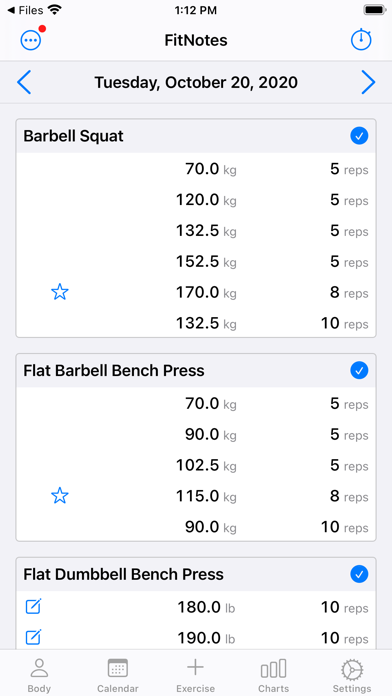
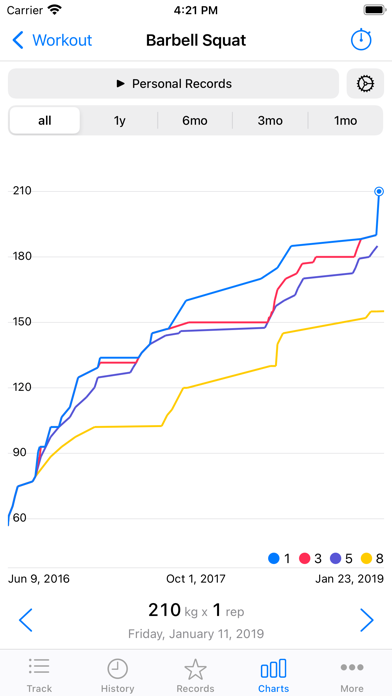
  • Frame 3 shows a progress chart with multi-colored lines β€” this is a strong conversion asset (users want to see that the app tracks progress visually) but the chart has no headline or benefit callout, so the value is implicit rather than explicit.
  • Frame 1 (the thumbnail visible in search results before a user taps through) shows a raw workout log UI β€” date header 'Tuesday, October 20, 2020,' exercise names, and weight/rep numbers β€” with no overlay headline. A user scanning Health & Fitness search results cannot determine what the app does or why it is better than alternatives in under 2 seconds.
  • The screenshot date visible in Frame 1 ('October 20, 2020') is four-plus years old, which subconsciously signals an unmaintained or legacy app to attentive users β€” even though the app is actively updated.
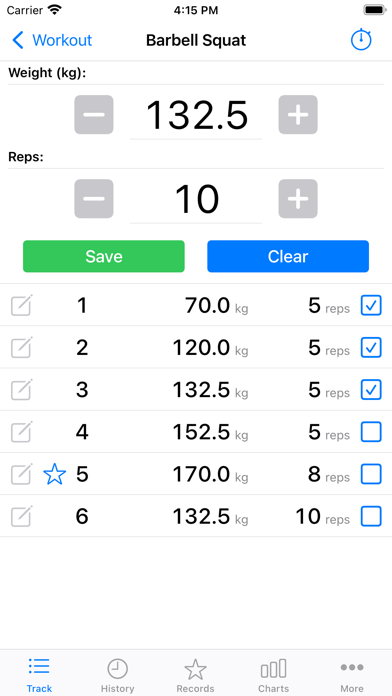
  • Frame 2 shows the set-entry screen (weight input with +/- buttons) β€” useful for demonstrating the logging flow, but again lacks an overlay headline to contextualize the feature for a user who has not yet decided to install.
  • The overall 10-screenshot set earns strong coverage marks, and iPad screenshots are present β€” those are genuine strengths. The primary gap is the absence of overlay copy on the first three frames.

Recommendations

  • Add a bold overlay headline to Frame 1 β€” see the Screenshot Copy section for the recommended text. The existing dashboard UI is a good background; it just needs a 3-4 word outcome headline and one line of subtext overlaid so it communicates value at thumbnail size.
  • Update the demo data in Frame 1 to a current date to eliminate the 'last updated 2020' perception problem.
  • Add overlay headlines to Frames 2 and 3 as well β€” the set-entry and chart screens are strong selling points that are currently silent. The recommended Frame 2 and Frame 3 copy below is designed for exactly these screens.
7/10

Ratings & Reviews

539 reviews Β· 4.56215 avg

Analysis

539 ratings at 4.6 stars lifetime is a solid foundation β€” above the 4.0 trust threshold and above the 3.5 floor where Apple suppresses search placement. The 50-review sample averages 3.7 stars, which is notably lower than the lifetime average and signals a recent uptick in negative feedback. The negative review pattern is concentrated around two issues: (1) the paywall surprise β€” users coming from the free Android version feel blindsided by the 12-workout cap on iOS, and (2) the payment confirmation flow being unclear (one reviewer couldn't tell if their lifetime purchase went through). These are not product problems β€” they are communication and UX problems that a better description and smoother purchase flow can fix. Addressing them in the description proactively will reduce future 1-star reviews from this cause.

Recommendations

  • Trigger the SKStoreReviewController rating prompt specifically after a user completes their 3rd logged workout β€” this is the moment when a user has demonstrated intent to use the app regularly and is most likely to rate positively. Do not prompt on first open.
  • Add a written response to the negative 'paywall surprise' reviews currently visible in the App Store. A developer response that explains the freemium model clearly and offers support contact will (a) show future readers that the developer is responsive and (b) occasionally convert the negative reviewer to update their rating.
  • The unclear purchase confirmation flow (mentioned in the 3-star payment review) should be patched in the next release β€” add an in-app confirmation alert after purchase so users know immediately that the unlock succeeded. This eliminates a review-trigger friction point.

Screenshot Copy5 frames

Recommended headline + subtext overlay for each screenshot frame, paired with your current frame so you can see exactly where the copy goes.

Frame 1Frame 1
Proposed copy
New headline

Log Every Lift

New subtext

Sets, reps, weight β€” tracked automatically as you go

Why this copy works

Communicates the core action (logging lifts) in three words readable at search-thumbnail size. 'Every lift' signals completeness and breadth of coverage, addressing a key concern for lifters switching apps. The subtext confirms the primary workflow so a user knows exactly what they are installing before tapping Get.

Frame 2Frame 2
Proposed copy
New headline

PRs Tracked for You

New subtext

Every personal record saved automatically β€” no manual entry

Why this copy works

Answers the 'what do I get from logging' question. Personal Records are the emotional payoff of a gym tracker β€” naming them explicitly converts intent into action. 'Automatically' handles the objection that manual tracking is too much work.

Frame 3Frame 3
Proposed copy
New headline

Watch Yourself Get Stronger

New subtext

Color-coded progress charts across all time ranges

Why this copy works

The progress chart screen is a strong visual asset that proves the app delivers on its core promise. This headline names the emotional outcome the chart represents β€” not 'view your data' but 'watch yourself get stronger.' Pairs directly with the chart screenshot behind it.

Frame 4Frame 4
Proposed copy
New headline

Built for Your Barbell

New subtext

Plate calculator, 1RM, training max percentages included

Why this copy works

Surfaces the powerlifting and barbell-specific tools that differentiate FitNotes 2 from generic fitness trackers. 'Built for your barbell' speaks directly to the strength-training user segment and names three specific tools that have no equivalent in step-count or cardio apps.

Frame 5Frame 5
Proposed copy
New headline

No Account. No Lock-In.

New subtext

iCloud backup, CSV export, Apple Watch included free

Why this copy works

Handles the trust and privacy objection at the point where users are deciding whether to install. 'No account' and 'no lock-in' are direct responses to the negative review themes around the paywall and data ownership. Naming Apple Watch and CSV export signals feature completeness to power users.

90-Day Action Plan

Week 1

5 tasks
  • Apply the new title (28/30 chars), subtitle (28/30 chars), and 100-char keyword field (99/100 chars) from the Ready-to-Paste and 100-Char Keyword Field sections above.
  • Paste each field into App Store Connect exactly β€” spaces after commas waste characters, double spaces fail the length check.
  • Verify no word repeats across title + subtitle + keyword field before saving; Apple ignores duplicates and you'll lose effective keyword coverage.
  • Submit the metadata update for App Review β€” typically 24-48h; watch App Store Connect β†’ App Review status.
  • Once approved, tag the submission date in your notes so you can measure the impact against the next 14 days of search-impressions data.

Week 2

3 tasks
  • Hand the five Frame headlines and subtext from the Screenshot Copy section to a designer. The existing UI screenshots (the workout log, the set entry screen, and the progress chart) are strong backgrounds β€” the primary task is overlaying bold headlines, not reshooting the UI. Request mockups at 1290x2796px for iPhone 15 Pro Max.
  • Update the demo date visible in Frame 1 from 'Tuesday, October 20, 2020' to a current date. This is a single-line data change in the simulator or a Photoshop edit β€” it eliminates the 'abandoned app' perception signal from the thumbnail.
  • Upload the revised screenshot set once designed. iPad screenshots are already present β€” confirm the five new headline overlays are applied to iPad frames as well, since iPad screenshots are sized separately in App Store Connect.

Week 3

2 tasks
  • Open App Store Connect β†’ Analytics β†’ Acquisition β†’ Search Terms. Confirm that 'planner,' 'journal,' and 'timer' are appearing as impression sources β€” these were not in the subtitle before, so any impressions from those terms confirm the subtitle rewrite is indexed.
  • Check ranking for 'performance' and 'metrics' in the App Store search bar directly (or via iTunes search). These are low-difficulty (21) tokens newly added to the keyword field β€” an app at 539 reviews should begin appearing in top-10 results within 1-2 weeks of indexing.

Ongoing

4 tasks
  • Trigger the SKStoreReviewController rating prompt specifically after a user completes and saves their 3rd workout session. This is the moment when the user has demonstrated a habit loop and is most emotionally engaged with the app β€” conversion to a 5-star rating is highest at this point, not on first open.
  • Monitor weekly search rankings for 'popular,' 'history,' and 'progress' β€” the three highest-opportunity tokens currently in the keyword field (opportunity scores 27, 21, 21). These are the leading indicators of whether the keyword field strategy is working.
  • Refresh the keyword field each January (New Year fitness surge) and each September (back-to-routine season). Both are high-intent windows for gym tracker searches β€” add seasonal modifier tokens ('new year,' 'routine,' 'challenge') temporarily during those windows if character budget allows.
  • Respond to every negative review that mentions the paywall or payment confirmation issue. A developer response costs nothing and signals responsiveness to future users reading those reviews before installing.

Expected Impact

The subtitle rewrite alone moves three high-popularity keywords (planner pop 67, journal pop 67, timer pop 63) from zero indexing to high-weight subtitle indexing β€” these should begin generating impressions within 1-2 weeks of Apple review approval. Replacing the high-difficulty 'fitness' (difficulty 83) and 'health' (difficulty 79) tokens in the keyword field with 'performance' (difficulty 21) and 'metrics' (difficulty 21) gives FitNotes 2 two genuinely winnable keyword positions where top-10 competition is sparse β€” expect first-page appearances for those terms within 4-6 weeks at 539 reviews. The description restructuring (prominent freemium explanation, benefit-framed bullets, removal of changelog content) should reduce the rate of 1-star 'surprise paywall' reviews, which will protect the recent-rating average that Apple weights heavily in ranking. Combined, these changes target a lift from the current 66/100 metadata score toward the 83/100 potential β€” with the largest single gains coming from subtitle keyword expansion and the keyword field quality swap.