Gym Log+

Gym Log+

Workout. Log. Improve.

Minds Aspire, LLCΒ·Health & Fitness
β˜…4.6 / 5Β·606 ratings
View on App Store

ASO Rewrite Report Β· πŸ‡ΊπŸ‡Έ United States

75
Current
+9 pts
84
Potential

Gym Log+ has a strong foundation β€” 4.6 stars, 606 reviews, 10 screenshots on both iPhone and iPad β€” but is leaving meaningful search real estate on the table. The subtitle wastes one of its 30 characters duplicating 'log' from the title, and the description's 3,916-character wall of bullet points lacks a closing CTA and conversion-focused structure. The biggest lever is redirecting the keyword field toward the highest-opportunity mid-difficulty terms (history, progress, planner, logging) and expanding the title into its remaining 22 unused characters to capture a high-intent compound keyword.

Listing Rewrites

Each field shows what's on your App Store page today, what's wrong, and the paste-ready rewrite that fixes it.

9/10

Title

Section score

Current

Gym Log+

8 / 30 chars

Solution

Gym Log+ - Workout Tracker

26 / 30 chars

Expands from 8 to 26 characters, adding 'workout' and 'tracker' at maximum title weight. 'Workout tracker' is a compound keyword (pop 62, diff 74) that generates additional compound rankings. The brand 'Gym Log+' stays anchored at the front for existing user recognition and App Store brand search.

7/10

Subtitle

Section score

Current

Workout. Log. Improve.

22 / 30 chars

Solution

Progress, Plan & Body Logger

28 / 30 chars

Drops 'Log' (duplicate of title token, ignored by Apple). Targets 'progress' (pop 52), 'plan' (pop 42), 'body' (pop 53), and 'logger' β€” all distinct from the new title tokens. The combination also generates compound rankings for 'body progress', 'workout plan', and 'progress logger' without those full phrases being present.

4/10

Description

Section score

Strengths

  • The description is 3,916 characters β€” nearly at the 4,000-character ceiling β€” but the density is working against readability rather than for it. Twelve separate bullet sections compete for attention with no visual hierarchy beyond the section headers.

Solution

Stop guessing. Start progressing. Every set, every rep, every PR β€” logged in seconds so you can see exactly how far you've come and push harder next session. Gyms are full of people lifting the same weights they lifted six months ago. Gym Log+ fixes that: it puts your last workout side-by-side with today's so you always know when to add weight, when you've hit a personal record, and what to do next. FAST & EFFORTLESS LOGGING β€’ One big Log button β€” tap it, done. No menu-diving, no account required β€’ Swipe between exercises while a session is in progress β€’ Rest timer autostarts and notifies you of your next set β€” even when you're checking texts β€’ Autofill carries your last workout's sets into today's log automatically β€’ Change any date or set after the fact β€” switch from another app without losing history TRACK EVERY DIMENSION OF YOUR PROGRESS β€’ Side-by-side workout comparison β€” today vs. any past session β€’ Visual graphs for max, min, average reps and weight over time β€’ Body tracking: weight, body fat %, BMI, pulse, blood pressure β€’ Body measurement log for waist, bicep, and every other body part β€’ Photo log: before-and-after pictures with date stamps β€’ 1-rep max calculator with percentage breakdowns β€’ Calories burned calculated per workout β€’ Cardio logging for warm-ups and conditioning BUILT FOR YOUR SETUP β€’ 400+ exercises across every muscle group β€” or add your own β€’ 25 built-in workout plans plus 3 starter routines; fully customizable β€’ Supersets, drop sets, and giant sets supported β€’ Imperial (lb) and metric (kg) β€” switch any time β€’ Multiple user profiles on one device (great for trainers and families) β€’ iPhone and iPad with iCloud backup and sync β€’ Apple Watch companion app: log sets, view summaries, add rest time from your wrist β€’ Workouts sync to Apple Health and count toward Activity rings β€’ Export and import workout data via email 4.6 stars from 600+ lifters β€” many of them using Gym Log+ for five, eight, even ten years straight. Download free and log your first workout in under 60 seconds.

1876 chars

Restructured the pre-fold opening to lead with the core transformation (seeing progress, pushing harder) rather than the app name. Consolidated 12 bullet sections into 4 tighter groups, cutting feature-only bullets that had no paired benefit. Reduced character count from 3,916 to ~1,876 β€” well under the ceiling and significantly more scannable. Added a trust-anchored closing CTA using the app's genuine long-tenure social proof from reviews. Removed the vague 'top workout tracker' superlative claim that violates App Store guidelines.
5/10

100-Char Keyword Field

Section score

Solution

health,fitness,planner,weight,loss,history,recorder,tracking,cross,training,look,routine,strength

97 / 100 chars

Rule-compliant keyword field with validated tokens (97/100 chars). Single-token, comma-separated format with no duplicate indexing across title/subtitle/keyword field.

Per-Keyword Data

Live App Store data Β· v2 difficulty
KeywordPopularityDifficultyOpportunity
health68/10079/10014/100
fitness68/10083/10012/100
planner67/10072/10019/100
weight46/10081/1009/100
loss floor5/10076/100β€”
history54/10061/10021/100
recorder49/10076/10012/100
tracking45/10081/1009/100
cross42/10078/1009/100
training41/10073/10011/100
look34/10058/10014/100
routine9/10067/1003/100
strength9/10072/1003/100

Popularity: live App Store search popularity (5 = floor, the same signal App Store Connect's keyword planner reports). Difficulty: top-10 competition strength. Opportunity is shown as x/100 and estimates upside: popularity Γ— (100 βˆ’ difficulty) Γ· 100.

Keyword Research84 of 84 keywords

84 keywords sorted by opportunity. Popularity = live App Store search popularity (5 = floor). Difficulty = top-10 competition strength. Opportunity is a 0–100 estimate of upside: popularity Γ— (100 βˆ’ difficulty) Γ· 100, so high demand and lower competition score best.

KeywordPopularityDifficultyOpportunity
history54/10061/10021/100
progress52/10059/10021/100
body53/10070/10016/100
top48/10068/10015/100
look34/10058/10014/100
routine planner33/10065/10012/100
device23/10054/10011/100
logging16/10048/10010/100
muscles21/10057/1009/100
training tracker19/10067/1006/100
firm9/10055/1004/100
develop8/10056/1004/100
routine9/10067/1003/100
gym tracking9/10070/1003/100
progress tracker8/10057/1003/100
workout log8/10065/1003/100
gym log6/10065/1002/100
health68/10079/1007/100
fitness68/10083/1006/100
planner67/10072/10019/100
workout tracker62/10074/10016/100
weight loss tracker61/10075/10015/100
weight loss56/10083/1005/100
iphone55/10085/1004/100
tracker52/10081/1005/100
ipad49/10071/10014/100
gym workout49/10075/10012/100
recorder49/10076/1006/100
weight46/10081/1004/100
tracking45/10081/1004/100
plan42/10071/10012/100
cross42/10078/1005/100
training41/10073/10011/100
strength training30/10076/1004/100
lose19/10074/1005/100
health fitness14/10078/1002/100
strength9/10072/1003/100
exercise9/10077/1001/100
workout plan9/10080/1001/100
muscle8/10071/1002/100
building6/10078/1001/100
toned floor5/10015/100β€”
logger floor5/10015/100β€”
cross device floor5/10021/100β€”
log improve floor5/10052/100β€”
exercise logger floor5/10053/100β€”
gym workout recorder floor5/10054/100β€”
improve health floor5/10054/100β€”
building tracker floor5/10056/100β€”
device fitness floor5/10056/100β€”
improve workout floor5/10057/100β€”
years floor5/10057/100β€”
larger floor5/10057/100β€”
improvement floor5/10057/100β€”
fitness improvement app floor5/10059/100β€”
loss tracker floor5/10059/100β€”
fitness improvement floor5/10060/100β€”
workout log improve floor5/10060/100β€”
muscle building tracker floor5/10062/100β€”
workout history floor5/10064/100β€”
strength training log floor5/10065/100β€”
customizable workout app floor5/10065/100β€”
customizable workout floor5/10065/100β€”
exercise routine planner floor5/10066/100β€”
strength training tracker floor5/10067/100β€”
fitness progress floor5/10067/100β€”
customizable floor5/10067/100β€”
training log floor5/10068/100β€”
cross device fitness floor5/10068/100β€”
workout logging floor5/10070/100β€”
log workout floor5/10070/100β€”
muscle building floor5/10070/100β€”
fitness log app floor5/10072/100β€”
fitness log floor5/10072/100β€”
gym tracking app floor5/10073/100β€”
fitness progress tracker floor5/10073/100β€”
workout recorder floor5/10073/100β€”
workout plan tracker floor5/10075/100β€”
fitness app iphone ipad floor5/10075/100β€”
loss floor5/10076/100β€”
exercise routine floor5/10077/100β€”
plan tracker floor5/10078/100β€”
iphone ipad floor5/10078/100β€”
fitness iphone floor5/10079/100β€”

Visual & Trust

Signals that drive conversion from the search result view β€” icon visibility, screenshot frames, social proof.

8/10

App Icon

Section score

App icon

Observations

  • The icon uses a cyan-to-blue gradient background with a white barbell-squat silhouette β€” a classic, unambiguous signal for a gym/strength-training app. At App Store search thumbnail size (~60x60), the silhouette reads cleanly: the wide barbell, broad shoulders, and squat stance are all distinguishable. Color contrast is excellent β€” white on gradient blue has no legibility problem at any size.
  • The one weakness is category differentiation: several competing workout-logging apps use similar blue palettes with weight-lifting silhouettes. The icon is competent and functional but not strongly memorable compared to apps that use a distinctive letterform or bold brand color.

Recommendations

  • The icon is doing its job well at an 8/10. Hold it through the next metadata update cycle β€” it signals the correct category immediately and has no thumbnail-legibility issues. If you revisit it post-launch of the rewrite, the only marginal improvement would be adding a subtle brand element (a stylized 'G+' or a thin neon accent line) to differentiate from the sea of blue-silhouette competitors, but this is not urgent.
9/10

Screenshots

First 3 frames analyzed

Frame 1Frame 1
Frame 2Frame 2
Frame 3Frame 3

Observations

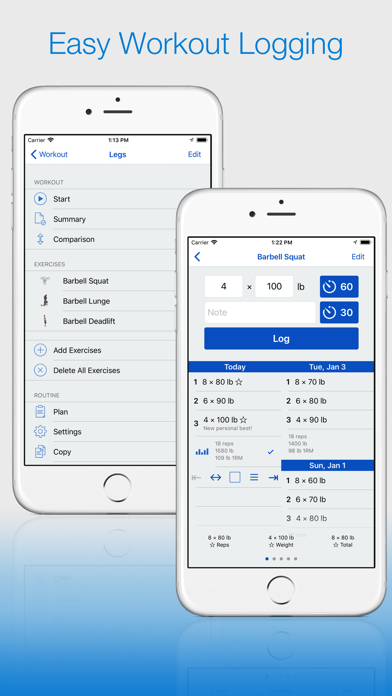
  • Frame 1 shows two overlapping iPhone mockups with the headline 'Easy Workout Logging' in blue text on a white background. At App Store search thumbnail size, the headline is legible and communicates the core function clearly. However, 'Easy Workout Logging' is a feature descriptor rather than an outcome statement β€” it tells users what the app does, not what changes for them.
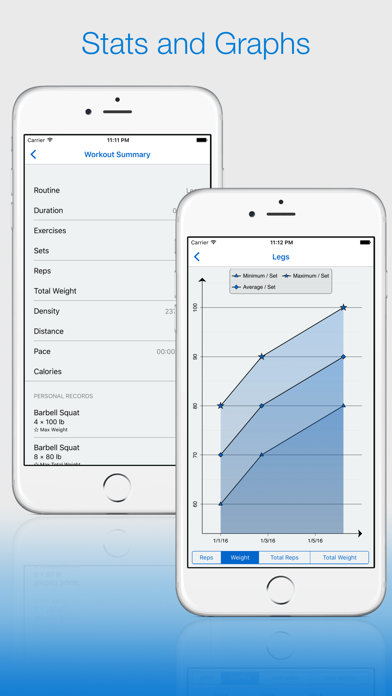
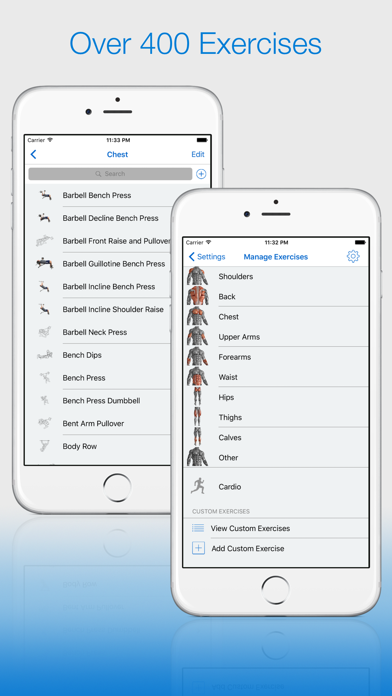
  • Frame 2 ('Stats and Graphs') and Frame 3 ('Over 400 Exercises') follow a consistent visual language β€” blue headline, dual-device mockup, gradient background β€” which creates a professional, coherent sequence. The consistency is a strength.
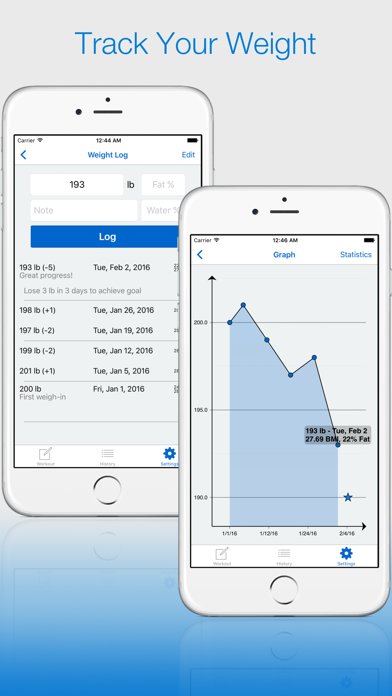
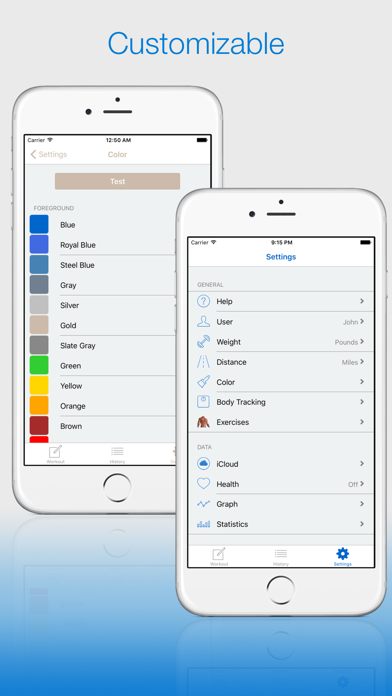
  • The mockups show iPhone 6-era devices with visible home buttons and older iOS UI chrome. While the app UI itself may be current, the device frames visually date the screenshots and may reduce conversion trust for users accustomed to modern edge-to-edge iPhone 15 Pro screenshots.

Recommendations

  • Update Frame 1 headline from the functional 'Easy Workout Logging' to an outcome-first statement such as 'Every Rep. Every PR. Logged.' β€” this communicates transformation (progress, personal records) rather than just the mechanism, which tests better for conversion at thumbnail size.
  • Re-render all mockups using iPhone 15 Pro frame assets (edge-to-edge, Dynamic Island). The visual age of the current device frames is the most actionable quality improvement available for this screenshot set given the otherwise strong structure.
  • Consider making Frame 5 a social-proof frame β€” '10+ Years Trusted by Lifters' or '4.6 Stars Β· 600+ Reviews' β€” since the app's decade-long track record is a genuine differentiator that competes directly against newer, better-funded apps.
7/10

Ratings & Reviews

606 reviews Β· 4.59241 avg

Analysis

A 4.6-star average across 606 ratings is a strong trust signal β€” it clears the critical 4.0-star threshold that Apple's algorithm rewards, and the recency signal is active (606 reviews on current version). However, the sampled reviews surface two recurring crash/data-loss complaints: workouts being deleted and exercises disappearing after purchase. These issues, if unresolved, risk driving the recent rating average below 4.0 as more users encounter them β€” which would erode a ranking signal that is currently working in the app's favor. One sampled review explicitly mentions the 3-workout freemium limit causing frustration, which is a conversion risk more than a rating risk.

Recommendations

  • Prioritize fixing the workout-deletion and exercise-disappearing bugs surfaced in recent reviews before the next keyword field update β€” a rating drop from 4.6 to below 4.2 would offset any metadata gains from this rewrite.
  • Trigger the SKStoreReviewController rating prompt immediately after a user logs their 5th workout set in a single session β€” this is a clear success moment when satisfaction is highest and the user has demonstrated intent to continue.
  • Respond publicly to the top 3 negative reviews that mention data loss β€” Apple shows developer responses to future users, and a response like 'We reproduced this in v[X] and it is fixed in the update submitted [date]' converts a 1-star signal into a trust signal for users reading reviews before installing.

Screenshot Copy5 frames

Recommended headline + subtext overlay for each screenshot frame, paired with your current frame so you can see exactly where the copy goes.

Frame 1Frame 1
Proposed copy
New headline

Every Rep. Logged.

New subtext

See today vs. last time β€” always know when to add weight

Why this copy works

Leads with the outcome a lifter actually wants (their progress captured) rather than the mechanism. 'Every Rep. Logged.' is readable at search-thumbnail size in under 1 second and implies completeness and reliability β€” directly addressing the core anxiety of a lifter choosing a logging app. The subtext explains the side-by-side comparison feature, which is Gym Log+'s strongest functional differentiator.

Frame 2Frame 2
Proposed copy
New headline

Stats That Show Growth

New subtext

Graphs, PRs, and 1RM calculator in one place

Why this copy works

Answers how Frame 1's outcome (visible progress) actually happens β€” through the stats and graph engine. 'PRs' is gym-native language that self-selects the serious lifter audience. This frame transitions from 'it logs' to 'it shows you what your data means', which is the next question a convert asks.

Frame 3Frame 3
Proposed copy
New headline

400+ Exercises Ready

New subtext

Or build your own β€” fully customizable routines

Why this copy works

Surfaces the depth of the exercise library as a trust signal at the point where users are deciding whether the app covers their specific training style. '400+' is a specific, credible number. 'Or build your own' handles the objection from users with custom programs from a trainer.

Frame 4Frame 4
Proposed copy
New headline

iPhone, iPad & Watch

New subtext

iCloud sync keeps all your data in step

Why this copy works

Expands the perceived value of the app by naming multi-device coverage β€” a real differentiator versus single-platform competitors. Users who train with their Watch on their wrist and review progress on iPad are a high-intent segment. This frame also surfaces the iCloud reliability signal, which addresses the sync complaint visible in recent reviews.

Frame 5Frame 5
Proposed copy
New headline

4.6 Stars. 10+ Years.

New subtext

Trusted by lifters since day one β€” free to start

Why this copy works

Handles the pricing and trust question at the frame where users who have swiped this far are closest to the install decision. The decade-long track record is a genuine, rare differentiator in a category full of VC-funded newcomers. 'Free to start' sets honest expectations about the freemium model and reduces post-install 1-star reviews from users surprised by the paywall.

90-Day Action Plan

Week 1

5 tasks
  • Apply the new title (26/30 chars), subtitle (28/30 chars), and 100-char keyword field (97/100 chars) from the Ready-to-Paste and 100-Char Keyword Field sections above.
  • Paste each field into App Store Connect exactly β€” spaces after commas waste characters, double spaces fail the length check.
  • Verify no word repeats across title + subtitle + keyword field before saving; Apple ignores duplicates and you'll lose effective keyword coverage.
  • Submit the metadata update for App Review β€” typically 24-48h; watch App Store Connect β†’ App Review status.
  • Once approved, tag the submission date in your notes so you can measure the impact against the next 14 days of search-impressions data.

Week 2

3 tasks
  • Hand the Frame 1-5 headline and subtext copy from the Screenshot Copy section to your designer along with current iPhone 15 Pro frame assets. Re-render all screenshots using modern edge-to-edge device frames β€” the current iPhone 6-era mockups are the most visible quality signal to update.
  • For Frame 1, apply the 'Every Rep. Logged.' headline over the existing side-by-side comparison UI β€” this is the highest-conversion change in the screenshot set and can be done by overlaying text on the current mockup without rebuilding the scene.
  • Upload refreshed screenshot set via App Store Connect once rendered. iPad screenshots can use the same content scaled to 2048x2732.

Week 3

2 tasks
  • Check App Store Connect > Analytics > Search Terms. Confirm impressions are appearing for 'workout tracker', 'progress', 'history', and 'planner'. If a keyword shows zero impressions after 7 days post-approval, Apple may not be indexing that token β€” investigate whether it conflicts with a title/subtitle duplicate.
  • Review the top 3 negative reviews mentioning workout deletion and exercise disappearing bugs. Post a public developer response acknowledging the issue and naming the version in which it was fixed (or your target fix date). This converts a visible trust problem into a visible accountability signal for new users reading reviews before installing.

Ongoing

3 tasks
  • Trigger the SKStoreReviewController rating prompt immediately after a user successfully logs their 5th set in a single workout session β€” this is the clearest success moment in the app flow, when the user has committed to the session and seen the side-by-side comparison update in real time.
  • Monitor weekly rankings for 'workout tracker', 'history', and 'planner' β€” these are the three highest-opportunity targets from the Keyword Research table. If ranking improves to top 20 for any of them within 60 days, consider running a small App Store search campaign on that keyword to accelerate velocity.
  • Refresh the keyword field seasonally: in January (New Year resolution season), swap lower-volume tokens for 'resolution', 'new year', or 'transformation' if those terms show elevated ASA popularity. Revert in February. App Store Connect keyword field changes take 24-48h and do not require a binary update.

Expected Impact

The most impactful change is title expansion: adding 'workout tracker' (pop 62) at title weight where it currently has no presence. Shifting away from the subtitle's 'Log' duplicate and replacing it with 'progress' (pop 52, opp 21) and 'plan' (pop 42) should generate new compound impressions for 'body progress', 'workout plan', and 'training plan' within 4-6 weeks of Apple re-indexing the metadata. The keyword field swap β€” removing 'fitness' and 'health' (diff 79-83, effectively unwinnable) and replacing with 'history' (opp 21), 'logging' (diff 48, lowest competition in the dataset), and 'planner' (pop 67) β€” targets terms where a 606-review app can realistically reach the top 20. Combined, these changes shift the indexed keyword portfolio from 4 effective tokens toward 12-15, with the highest-volume new target ('workout tracker', pop 62) now at title weight rather than absent entirely.