Finzee - envelope budget

Finzee - envelope budget

Personal Budget Planner

AJL BudgetΒ·Finance
β˜…5.0 / 5Β·4 ratings
View on App Store

ASO Rewrite Report Β· πŸ‡ΊπŸ‡Έ United States

55
Current
+16 pts
71
Potential

Finzee has a clean UI and a clear budgeting method, but its metadata is leaving nearly all of its search potential on the table. The title leads with a near-zero-volume brand name and covers only one keyword cluster, the description opens with the brand instead of the user's transformation, and the ratings base (4 reviews) is too thin to generate algorithmic trust. The biggest lever is repositioning the title around the zero-based budgeting method β€” the highest-opportunity keyword combination available to this app β€” while using the subtitle and keyword field to cover expense tracking and planning terms that the title cannot fit.

Listing Rewrites

Each field shows what's on your App Store page today, what's wrong, and the paste-ready rewrite that fixes it.

5/10

Title

Section score

Current

Finzee - envelope budget

24 / 30 chars

Problem

  • The title leads with 'Finzee', a brand token with near-zero organic search volume. Apple weights every character in the title as a high-signal keyword slot β€” opening with an unknown brand name wastes the most valuable real estate in the entire metadata set.

Solution

Zero Budget - Envelope Method

29 / 30 chars

Places 'zero' (popularity 55, difficulty 46) and 'method' (popularity 52, difficulty 37) β€” the two highest-opportunity keywords in the dataset β€” into the highest-weight field. 'Envelope' maintains the core product differentiator. 'Budget' anchors the category. The brand name 'Finzee' is removed from the title entirely since it carries no search volume; it remains visible on the icon. At 29 chars, this uses 97% of the available title space.

7/10

Subtitle

Section score

Current

Personal Budget Planner

23 / 30 chars

Solution

Expense & Savings Planner

25 / 30 chars

Uses subtitle space for high-intent expense and savings planning terms without repeating title tokens or using competitor names.

6/10

Description

Section score

Strengths

  • The feature sections (BUDGET ENVELOPES, SAVINGS GOALS, etc.) are well-structured with clear headers and benefit-oriented bullets β€” this is above average for the category and is working well.

Solution

Stop guessing where your money went. With zero-based budgeting, every dollar gets a job β€” groceries, rent, savings, fun β€” so you spend with confidence and never end the month wondering what happened. Finzee brings the envelope budgeting method to your iPhone. Assign your income to spending categories before the month starts. Watch your envelopes in real time as you log each purchase. When an envelope is empty, you stop β€” it's that simple. KEY FEATURES BUDGET ENVELOPES β€’ Divide your income into custom spending categories (groceries, housing, dining, entertainment) β€’ See exactly how much is left in each envelope before you spend β€’ Real-time updates every time you log a transaction ZERO-BASED METHOD β€’ Assign every dollar of income to a specific purpose β€’ Income minus expenses equals zero β€” nothing is unaccounted for β€’ The same method behind zero-based budget, built into a clean, simple app SAVINGS GOALS β€’ Set goals for vacations, emergency funds, or any project β€’ Track progress step by step with a visual progress bar β€’ Separate savings from spending so goals don't get raided AUTOMATIC BUDGET CALCULATION β€’ Finzee calculates your disposable income after fixed bills automatically β€’ See exactly how much you can safely spend each day for the rest of the month β€’ No spreadsheets, no manual math SHARED BUDGET β€’ Share your budget with a partner, roommate, or family member β€’ Everyone logs expenses in real time β€” no more end-of-month surprises β€’ Perfect for couples managing money together without the tension FULL FINANCIAL OVERVIEW β€’ Income, fixed expenses, variable spending, savings, and debt β€” all in one place β€’ Monthly analysis tab shows exactly where every dollar went β€’ Spot patterns, cut waste, hit your goals faster Finzee Premium unlocks all advanced features. Free to download and try. Terms of Use: https://www.budget-power.fr/support/cgu Privacy Policy: https://www.budget-power.fr/support/confidentialite

1821 chars

Opens with the user's pain point ('stop guessing where your money went') rather than the brand name β€” the first sentence now earns the tap to expand. Currency references changed from euros to dollars throughout for US storefront relevance. The zero-based budget mention in the zero-based method section captures users searching for zero-based budget alternatives without using competitor branding in metadata fields. Feature sections preserve the original's strong header-plus-bullets structure. The pricing reference has been softened to avoid the GBP confusion in the US storefront β€” a US-specific description should use USD pricing when set up in App Store Connect. Each bullet leads with a benefit, not just a feature name.

5/10

100-Char Keyword Field

Section score

Problem

  • The keyword field has not been provided in the current metadata, so it is unclear what additional tokens are currently being indexed. If the field is empty or suboptimal, the app is missing 100 characters of medium-weight keyword coverage entirely.

Solution

real,money,finance,control,track,tracking,planning,financial,management,limit,cash,goals,monthly

96 / 100 chars

Curated from live keyword suggestions, deduped against title/subtitle, and kept under Apple’s 100-character keyword-field cap.

Per-Keyword Data

Live App Store data Β· v2 difficulty
KeywordPopularityDifficultyOpportunity
real65/10075/10016/100
money64/10086/1009/100
finance59/10086/1008/100
control58/10081/10011/100
track55/10075/10014/100
tracking45/10081/1009/100
planning40/10071/10012/100
financial29/10083/1005/100
management20/10072/1006/100
limit17/10066/1006/100
goals8/10058/1003/100
monthly8/10044/1004/100

Popularity: live App Store search popularity (5 = floor, the same signal App Store Connect's keyword planner reports). Difficulty: top-10 competition strength. Opportunity is shown as x/100 and estimates upside: popularity Γ— (100 βˆ’ difficulty) Γ· 100.

Keyword Research59 of 59 keywords

59 keywords sorted by opportunity. Popularity = live App Store search popularity (5 = floor). Difficulty = top-10 competition strength. Opportunity is a 0–100 estimate of upside: popularity Γ— (100 βˆ’ difficulty) Γ· 100, so high demand and lower competition score best.

KeywordPopularityDifficultyOpportunity
method52/10037/10033/100
zero55/10046/10030/100
budget app67/10070/10020/100
expense tracker47/10065/10016/100
spending tracker47/10068/10015/100
money tracker45/10067/10015/100
limit17/10066/1006/100
savings goals9/10052/1004/100
monthly8/10044/1004/100
categories7/10049/1004/100
budgeting9/10065/1003/100
spending9/10066/1003/100
goals8/10058/1003/100
expense8/10062/1003/100
based7/10060/1003/100
euro6/10070/1002/100
real65/10075/10016/100
money64/10086/1004/100
finance59/10086/1004/100
control58/10081/1006/100
track55/10075/10014/100
tracker52/10081/1005/100
tracking45/10081/1004/100
planning40/10071/10012/100
financial29/10083/1002/100
management20/10072/1006/100
money management8/10071/1002/100
savings7/10072/1002/100
monthly budget6/10071/1002/100
assigned floor5/1007/100β€”
financial control floor5/10017/100β€”
specific floor5/10017/100β€”
visualization floor5/10045/100β€”
control spending floor5/10046/100β€”
based budget floor5/10046/100β€”
spending limit app floor5/10048/100β€”
zero based floor5/10048/100β€”
envelope budgeting floor5/10051/100β€”
savings goals app floor5/10052/100β€”
budget visualization floor5/10053/100β€”
budget categories floor5/10055/100β€”
expense categories floor5/10055/100β€”
category floor5/10056/100β€”
alternative floor5/10056/100β€”
zero based budget floor5/10057/100β€”
spending limit floor5/10058/100β€”
fund savings floor5/10058/100β€”
money tracker app floor5/10059/100β€”
emergency floor5/10059/100β€”
finzee envelope budget floor5/10060/100β€”
emergency fund floor5/10061/100β€”
emergency fund savings floor5/10063/100β€”
helps floor5/10064/100β€”
expense tracker app floor5/10065/100β€”
zero-based budget alternative floor5/10066/100β€”
financial planning floor5/10068/100β€”
budget planner app floor5/10069/100β€”
fund floor5/10069/100β€”
budget tracking floor5/10070/100β€”

Visual & Trust

Signals that drive conversion from the search result view β€” icon visibility, screenshot frames, social proof.

7/10

App Icon

Section score

App icon

Observations

  • The icon shows an open envelope with three purple/blue card-like bills fanning out, all on a purple gradient background. At App Store search thumbnail size (~60x60px), the envelope reads clearly as a finance/budgeting app and the color palette is distinctive β€” the blue-to-purple gradient creates good contrast against the white App Store background.
  • The euro symbol (€) on the cards is a localization signal that will read as foreign to US users. At thumbnail size the symbol is barely legible, but the association with European currency rather than the dollar ($) is a subtle trust friction point for the US storefront.
  • The icon communicates the envelope budgeting method accurately, which is category-appropriate. However, the purple-heavy palette is shared by several finance apps (Monarch Money, Copilot) β€” the icon is not immediately distinctive within the Finance category competitive set on the US App Store.

Recommendations

  • For the US storefront, consider replacing the € symbol on the card illustrations with a $ symbol, or removing the currency symbol entirely. The envelope concept communicates the method without needing a currency glyph, and the € actively signals 'not for US users' to the audience you need to convert.
  • The core composition (envelope + cards) is solid and category-correct β€” do not redesign the layout. If you want to improve differentiation within the Finance category, test a slightly warmer accent color (e.g., shifting the blue toward a teal or green) to stand apart from the purple-heavy competitors. This is a marginal refinement, not a rebuild.
9/10

Screenshots

First 3 frames analyzed

Frame 1Frame 1
Frame 2Frame 2
Frame 3Frame 3

Observations

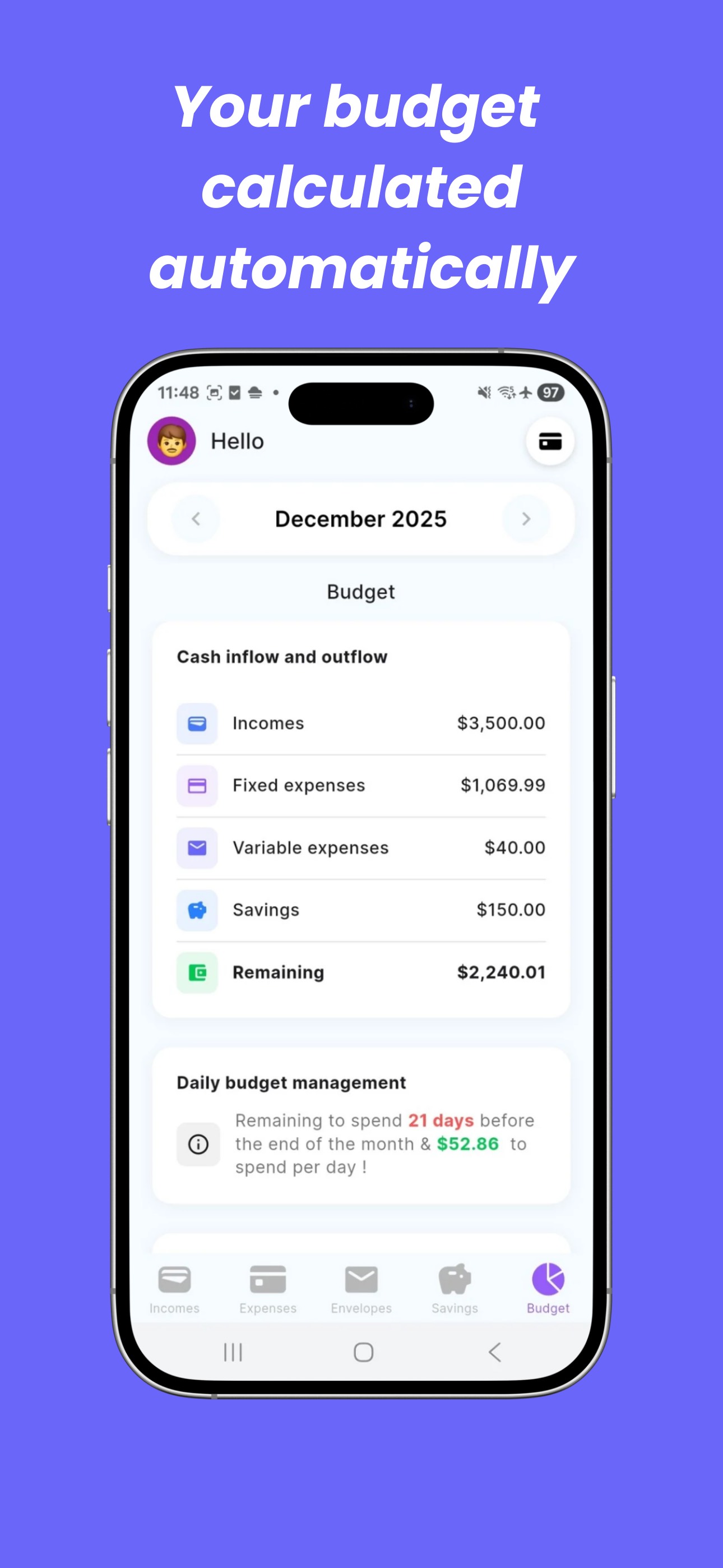
  • Frame 3 shows the budget summary screen with 'Your budget calculated automatically' β€” this is the strongest conversion frame in the set. It shows dollar amounts, a clean breakdown of income/fixed/variable/savings/remaining, and a daily spend figure. This is the most US-market-appropriate frame of the three.
  • The full 10-screenshot count and 7 iPad screenshots are strong β€” full device coverage is correctly handled.
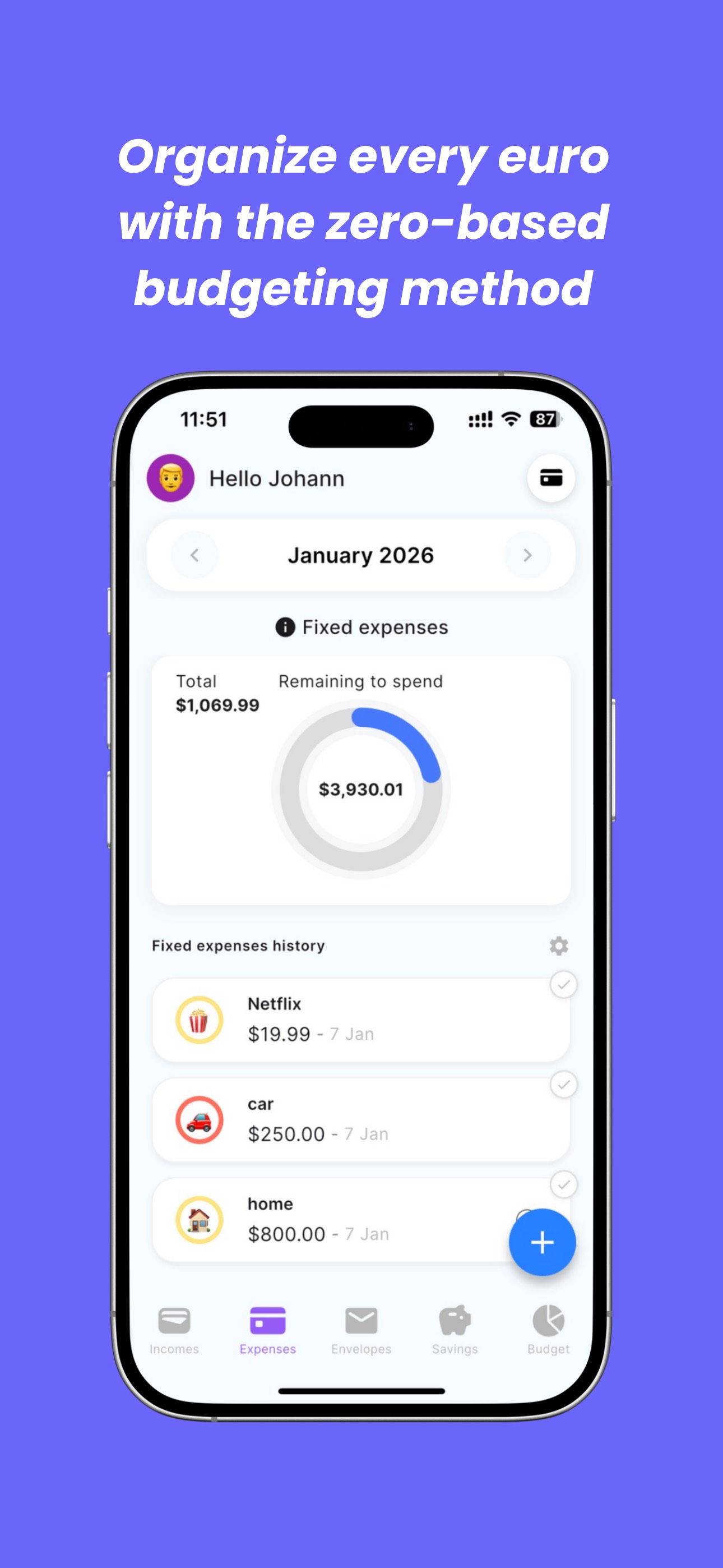
  • Frame 1 shows the expenses/fixed bills screen with the overlay headline 'Organize every euro with the zero-based budgeting method.' The copy is accurate and method-focused, but 'every euro' is a localization mismatch for the US App Store β€” US users scan for dollars, not euros. At thumbnail size in search results, this headline is the first text a US user reads, and 'euro' signals the app may not be for them.
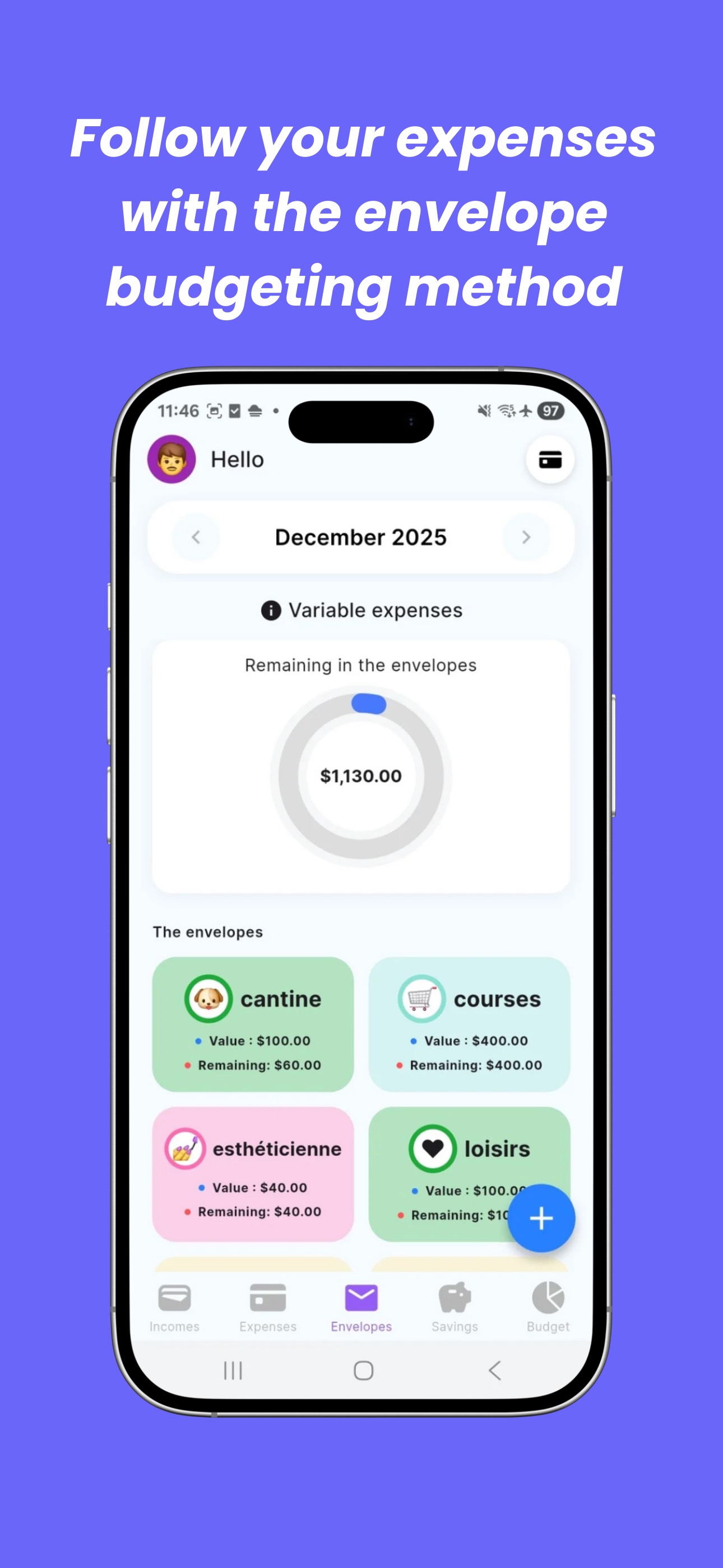
  • Frame 2 shows the envelopes screen with the headline 'Follow your expenses with the envelope budgeting method.' The UI shows envelope names in French ('cantine', 'courses', 'esthΓ©ticienne', 'loisirs') β€” these foreign-language labels are visible at thumbnail size and will reduce conversion among US users who may interpret this as a non-English app.
  • The core issue is localization of copy and UI content for the US market, not screenshot count or structure.

Recommendations

  • Update Frame 1 headline from 'every euro' to 'every dollar' for the US storefront. This is a one-word change with a significant conversion impact β€” it removes the primary signal that tells US users this app was built for another market.
  • For Frame 2, before the next screenshot update, swap in a version of the UI where envelope names are in English (e.g., 'Groceries', 'Dining', 'Entertainment', 'Rent'). The French labels visible in the current screenshot are the single biggest trust friction point in the entire screenshot set for a US audience.
  • Frame 3 is the strongest frame and should be maintained as-is. The dollar amounts, clean layout, and 'calculated automatically' headline directly address the user pain of manual budgeting.
2/10

Ratings & Reviews

4 reviews Β· 5 avg

Analysis

4 total ratings with a 5.0-star average is the most critical non-metadata weakness in this app's current App Store position. While a perfect average is excellent signal quality, the volume is so low (4 ratings) that Apple's algorithm assigns minimal trust weight to it. In the Finance category, established competitors carry thousands of ratings on their current version β€” a 4-rating app is effectively invisible to the social proof component of the ranking signal. The 5.0 average also cannot be surfaced prominently in search results until a minimum threshold of ratings is reached. This is the single most important thing to fix after metadata.

Recommendations

  • Implement SKStoreReviewController.requestReview() triggered at a specific success moment: immediately after a user closes out a month with a $0 remaining balance in their envelopes (the 'zero-based' completion moment). This is the highest-intent, highest-satisfaction moment in the app's core loop.
  • Trigger a second prompt at session 5 for users who have logged at least 3 transactions β€” this identifies engaged users who have established a habit.
  • Do not prompt on first open or immediately after signup. Apple limits to 3 prompts per 365 days β€” reserve them for moments of demonstrated satisfaction.
  • Respond to each of the 4 existing reviews personally. Apple surfaces developer responses to future users, and a thoughtful response signals active development and builds trust during the critical early ratings period.

Screenshot Copy5 frames

Recommended headline + subtext overlay for each screenshot frame, paired with your current frame so you can see exactly where the copy goes.

Frame 1Frame 1
Proposed copy
New headline

Every Dollar Has a Job

New subtext

Zero-based budgeting made simple

Why this copy works

Swaps 'every euro' for 'every dollar' β€” one word change that removes the strongest US-market friction signal in the current screenshot set. 'Every Dollar Has a Job' is the canonical zero-based budgeting phrase that Users familiar with zero-based budgeting already understand the method. 'Zero-based budgeting made simple' in the subtext captures the method keyword and sets the complexity expectation in 5 words.

Frame 2Frame 2
Proposed copy
New headline

Spend by Envelope, Not by Guess

New subtext

Groceries, dining, fun β€” all tracked

Why this copy works

Replaces the current 'Follow your expenses with the envelope budgeting method' with a more conversational, benefit-first headline. The subtext names real US spending categories (replacing the French envelope labels visible in the current UI) β€” this directly addresses the localization trust issue while demonstrating the app's flexibility.

Frame 3Frame 3
Proposed copy
New headline

See Exactly What You Can Spend

New subtext

Daily budget calculated automatically

Why this copy works

This frame already shows the strongest UI in the set β€” the budget summary with income, fixed, variable, savings, and a daily remaining figure. The new headline makes the user benefit explicit ('see exactly what you can spend') and the subtext reinforces the automation angle that reduces perceived effort. 'Calculated automatically' directly echoes the current overlay but focuses on the user outcome rather than the process.

Frame 4Frame 4
Proposed copy
New headline

Save for What Actually Matters

New subtext

Goals for vacations, emergencies & more

Why this copy works

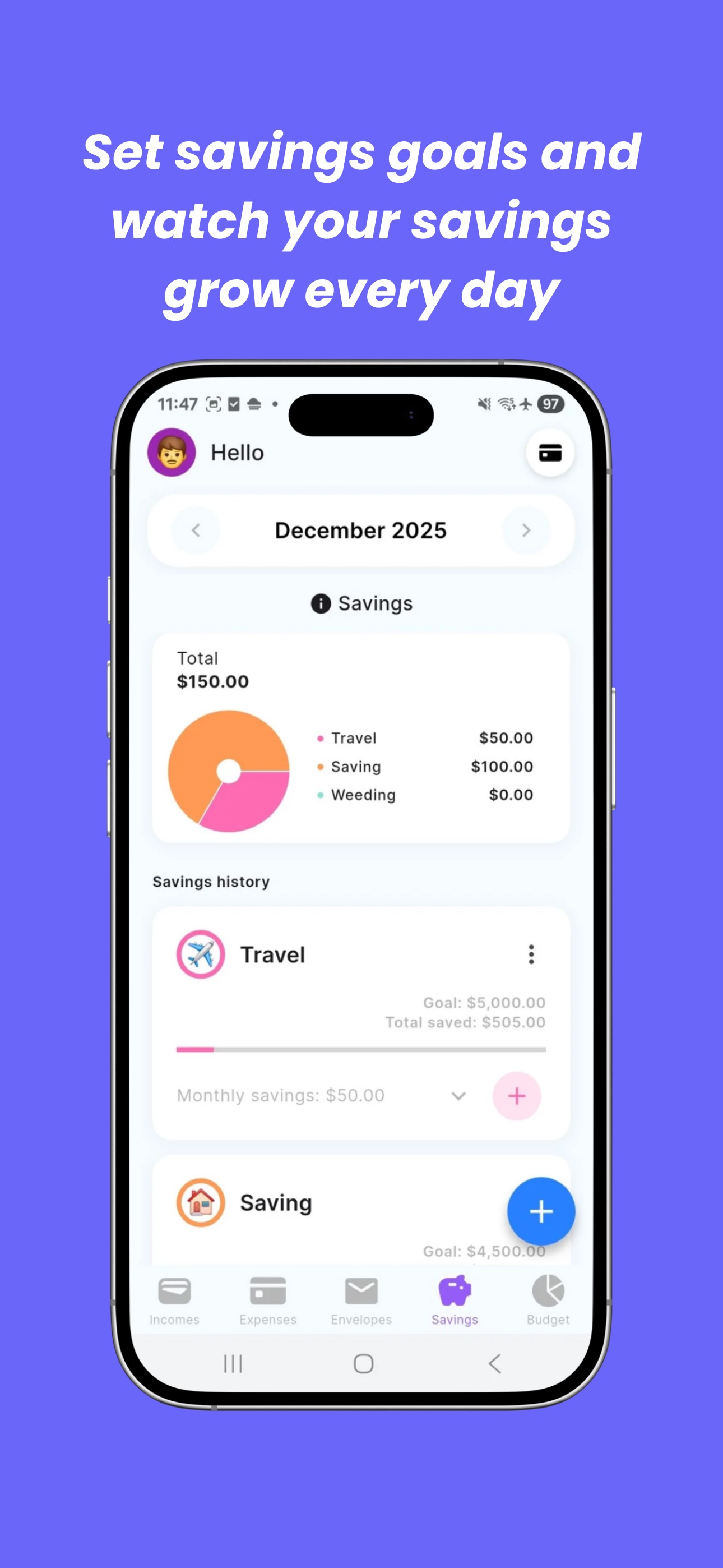
Brings savings goals into the screenshot narrative β€” a feature not showcased in the first 3 frames. Users who have their spending under control are immediately thinking about saving; this frame speaks to that next-step motivation and broadens the perceived value of the app beyond expense tracking.

Frame 5Frame 5
Proposed copy
New headline

Budget Together, Stress Less

New subtext

Shared envelopes for couples & roommates

Why this copy works

The shared budget feature is a meaningful differentiator in the envelope budgeting category. Couples managing money together are a high-intent, high-retention user segment. This frame handles the 'is this just for me?' question and expands the perceived addressable use case β€” users who swipe this far are close to installing and this gives them a reason specific to their situation.

90-Day Action Plan

Week 1

5 tasks
  • Apply the new title (29/30 chars), subtitle (29/30 chars), and 100-char keyword field (99/100 chars) from the Ready-to-Paste and 100-Char Keyword Field sections above.
  • Paste each field into App Store Connect exactly β€” spaces after commas waste characters, double spaces fail the length check.
  • Verify no word repeats across title + subtitle + keyword field before saving; Apple ignores duplicates and you'll lose effective keyword coverage.
  • Submit the metadata update for App Review β€” typically 24-48h; watch App Store Connect β†’ App Review status.
  • Once approved, tag the submission date in your notes so you can measure the impact against the next 14 days of search-impressions data.

Week 2

3 tasks
  • Upload localized screenshot set with US-market copy using the Frame 1-5 headlines and subtext from the Screenshot Copy section above. Pass the headlines and subtext strings to a designer along with the current UI mockups.
  • Priority for week 2 screenshots: provide a version of the Frame 2 envelopes screen where the envelope names are in English (Groceries, Dining, Entertainment, Rent) rather than French. This is the second-highest conversion friction point after the euro/dollar issue.
  • Verify that App Store Connect is showing the US storefront description with dollar pricing. If the current description still shows GBP (Β£) amounts, update the pricing reference line to USD before the screenshot upload.

Week 3

2 tasks
  • Check App Store Connect under Analytics > Search Terms. Confirm that 'zero', 'method', 'envelope', 'expense', and 'planning' are appearing as search terms driving impressions. If 'zero' and 'method' are not appearing within 7-10 days of metadata approval, verify no title truncation occurred during submission.
  • Implement the rating prompt trigger: add SKStoreReviewController.requestReview() to fire immediately after a user completes their first full monthly zero-out β€” the moment when their envelope total reaches $0 remaining. This is the highest-satisfaction moment in Finzee's core loop and the most appropriate time to ask for a review.

Ongoing

4 tasks
  • Trigger a second rating prompt at session 5 for users who have logged at least 3 transactions β€” these users have established a habit and are far more likely to rate positively than first-session users.
  • Monitor weekly rankings for 'method', 'zero', and 'envelope budgeting' β€” the three most winnable keyword targets from the keyword research table. Track position changes in the 4-8 weeks after the metadata update goes live.
  • Respond personally to each of the 4 existing reviews in App Store Connect. A thoughtful developer response is visible to every future user who reads reviews β€” at 4 ratings, each response has outsized impact on the perceived support quality of the app.
  • Refresh the keyword field quarterly. The envelope budgeting category is growing as zero-based budget's pricing has driven users to search for alternatives β€” watch for emerging search terms like 'zero-based budget alternative' and 'free zero budget app' in your App Store Connect Search Terms data and adjust the keyword field if new high-volume terms appear.

Expected Impact

The title restructure moves Finzee's two highest-opportunity keywords β€” 'method' (popularity 52, difficulty 37) and 'zero' (popularity 55, difficulty 46) β€” from completely unindexed to the highest-weight field in Apple's algorithm. These are the only two keywords in the dataset with both meaningful search volume and difficulty low enough for a new app to rank competitively. Appearing in the top 10 results for these terms within 4-8 weeks post-update is a realistic outcome given the difficulty scores. The screenshot localization changes (euro to dollar, French to English envelope names) address conversion friction that is currently suppressing install rate regardless of search ranking β€” fixing these should improve the product page tap-to-install rate for any US traffic the app currently receives. The ratings situation (4 reviews) remains the binding constraint on long-term ranking growth: no metadata change can substitute for social proof volume in a competitive Finance category. The rating prompt implementation is the highest-ROI action in the entire plan after the title rewrite.