eMoods Bipolar Mood Tracker

eMoods Bipolar Mood Tracker

Easy Mood Tracking & Reports

Yottaram LLCΒ·Lifestyle
β˜…4.8 / 5Β·4,132 ratings
View on App Store

ASO Rewrite Report Β· πŸ‡ΊπŸ‡Έ United States

87
Current
+2 pts
89
Potential

eMoods is already a strong-performing app with a 10/10 title, 4.8-star rating, and a description that leads with real benefits β€” this is a high-baseline audit with limited but meaningful upside. The primary opportunity is fixing the subtitle's wasted 'mood' duplicate (freeing 5 chars for a new keyword cluster), and tightening the keyword field to maximize compound keyword combinations. The app's most defensible and differentiating claim β€” true offline/private storage with no cloud sync β€” is under-indexed in the metadata despite being the #1 reason users choose it over competitors.

Listing Rewrites

Each field shows what's on your App Store page today, what's wrong, and the paste-ready rewrite that fixes it.

10/10

Title

Section score

Current

eMoods Bipolar Mood Tracker

27 / 30 chars

Strengths

  • The title is textbook: 27 of 30 characters used, four distinct keyword tokens (eMoods, Bipolar, Mood, Tracker), brand name leads naturally because 'eMoods' is itself a searchable term with dedicated search demand, and the three non-brand tokens directly target the highest-value search cluster for this app. No characters are wasted. The top keyword not present in the title is 'never' (popularity 42, difficulty 46) β€” but that is a functional/privacy descriptor, not a category keyword, and does not belong in a title.

Solution

eMoods Bipolar Mood Tracker

27 / 30 chars

Title is already scored 10/10 and covers the brand, condition, and category keyword in 27 of 30 characters. No change required or beneficial.

7/10

Subtitle

Section score

Current

Easy Mood Tracking & Reports

28 / 30 chars

Solution

Symptom & Medication Journal

28 / 30 chars

Eliminates the 'Mood' duplicate from the current subtitle and replaces it with three entirely new keyword clusters: 'symptom' (popularity 15, difficulty 52, opportunity 7), 'medication' (popularity 26, difficulty 64, opportunity 9), and 'journal' (popularity 67, difficulty 75, opportunity 17). These three tokens also create compound keyword combinations with tokens already in the title and keyword field: 'symptom tracker', 'symptom diary', 'medication journal', 'medication log', 'mental health journal'. Zero overlap with the title's 'Bipolar', 'Mood', 'Tracker' tokens.

8/10

Description

Section score

Solution

Your mood data stays on your phone β€” always. No cloud, no accounts, no data leaving your device without your permission. If you live with Bipolar I, Bipolar II, depression, or anxiety, you know how hard it is to remember what last Tuesday actually felt like β€” let alone report it accurately to your doctor at a monthly appointment. eMoods fixes that. Log your daily highs, lows, sleep, irritability, anxiety, and medications in under 60 seconds. At the end of each month, email a clean PDF report directly to your doctor or therapist β€” no printing, no manual charting. β˜…β˜…β˜…β˜…β˜… "Simple and powerful. Easy to chart bipolar symptoms and meds over time and see patterns." β€” App Store review β˜…β˜…β˜…β˜…β˜… "I needed a mood tracker and didn't want my data in the cloud. Didn't think an app like this existed." β€” App Store review KEY FEATURES β€’ Daily mood logging β€” rate depression, elevated mood, irritability, and anxiety on a simple scale in seconds β€’ Sleep tracking β€” log hours slept each night and see how sleep affects your mood patterns β€’ Medication tracking β€” record dosages and changes so you and your doctor can identify what works β€’ Monthly PDF reports β€” email a printable chart to your doctor or therapist before every appointment β€’ In-app graphs β€” visualize your symptom trends over days, weeks, and months β€’ Calendar view β€” see your entire month of symptoms color-coded at a glance β€’ Custom symptoms (Pro) β€” track anything beyond the defaults that matters to your mental health β€’ Multiple daily notes (Pro) β€” add timestamped journal entries throughout the day β€’ Emoji support β€” use any character or emoji in medication names and notes COMPLETE PRIVACY β€” NO EXCEPTIONS eMoods never connects to the internet. Your data is stored only on your device and is never transmitted anywhere without your explicit action. No account required. No ads. No analytics tracking your mental health. ABOUT eMOODS PRO The free version covers everything most users need. An optional Pro upgrade ($1.99/month or $9.99/year) unlocks custom symptom tracking and multiple timestamped notes per day. Your data remains fully accessible even if your Pro subscription expires. Join over 4,000 people who rated eMoods 4.8 stars β€” download free today. β€” Subscription terms: Payment charged to iTunes Account at purchase confirmation. Subscription auto-renews unless cancelled at least 24 hours before the end of the current period. Manage subscriptions in Account Settings. Terms of Use: https://emoodtracker.com/emoods-classic-reporting-app-terms-of-use/ Privacy Policy: https://emoodtracker.com/emoods-classic-reporting-app-privacy-policy/

2401 chars

Three structural improvements over current: (1) Opens with the privacy/offline differentiator as an active statement ('stays on your phone β€” always') rather than a passive disclaimer β€” matches the top positive review theme and the #1 cited reason users choose eMoods. (2) Adds two real user quotes from 5-star reviews as social proof before the feature list β€” these appear in the fold-visible portion on larger screens and convert skeptical users who have seen scam apps in this space (a theme explicitly named in the reviews). (3) Closes with a CTA sentence referencing the 4,000+ rating count before the required legal block, so users who scroll to the bottom end on a trust signal rather than subscription renewal language. Description does not affect search ranking β€” every word here is written to convert the reader who has already landed on the product page.

7/10

100-Char Keyword Field

Section score

Solution

health,phone,offline,mental,track,private,diary,privacy,data,never,log,chart,emotion,anxiety

92 / 100 chars

Rule-compliant keyword field with validated tokens (92/100 chars). Single-token, comma-separated format with no duplicate indexing across title/subtitle/keyword field.

Per-Keyword Data

Live App Store data Β· v2 difficulty
KeywordPopularityDifficultyOpportunity
health68/10079/10014/100
phone68/10076/10016/100
offline64/10070/10019/100
mental6/10070/1002/100
track55/10075/10014/100
private55/10082/10010/100
diary52/10066/10018/100
privacy46/10073/10012/100
data43/10049/10022/100
never42/10046/10023/100
log42/10059/10017/100
chart21/10063/1008/100
emotion8/10051/1004/100
anxiety8/10070/1002/100

Popularity: live App Store search popularity (5 = floor, the same signal App Store Connect's keyword planner reports). Difficulty: top-10 competition strength. Opportunity is shown as x/100 and estimates upside: popularity Γ— (100 βˆ’ difficulty) Γ· 100.

Keyword Research66 of 66 keywords

66 keywords sorted by opportunity. Popularity = live App Store search popularity (5 = floor). Difficulty = top-10 competition strength. Opportunity is a 0–100 estimate of upside: popularity Γ— (100 βˆ’ difficulty) Γ· 100, so high demand and lower competition score best.

KeywordPopularityDifficultyOpportunity
never42/10046/10023/100
data43/10049/10022/100
offline64/10070/10019/100
diary52/10066/10018/100
log42/10059/10017/100
symptom tracker33/10057/10014/100
emotion tracker25/10056/10011/100
mental health tracker28/10063/10010/100
medication26/10064/1009/100
emoods bipolar mood tracker21/10057/1009/100
chart21/10063/1008/100
health journal22/10068/1007/100
symptom15/10052/1007/100
monitoring12/10062/1005/100
patterns8/10038/1005/100
emotion8/10051/1004/100
mood diary8/10064/1003/100
medication tracker7/10057/1003/100
depression7/10059/1003/100
bipolar mood tracker6/10048/1003/100
anxiety tracker6/10053/1003/100
anxiety8/10070/1002/100
mental6/10070/1002/100
phone68/10076/1008/100
health68/10079/1007/100
journal67/10075/10017/100
cloud56/10089/1003/100
track55/10075/10014/100
mental health55/10076/1007/100
private55/10082/1005/100
privacy46/10073/10012/100
lifestyle44/10081/1004/100
health tracker43/10073/10012/100
stores39/10086/1003/100
management20/10072/1006/100
mental health journal11/10071/1003/100
without6/10071/1002/100
apis floor5/10011/100β€”
bipolar management floor5/10017/100β€”
explicit floor5/10017/100β€”
private mood tracker floor5/10019/100β€”
offline mood floor5/10019/100β€”
bipolar symptoms log floor5/10039/100β€”
bipolar symptoms floor5/10039/100β€”
mood patterns floor5/10045/100β€”
mood monitoring floor5/10045/100β€”
bipolar tracker floor5/10046/100β€”
track mood changes floor5/10048/100β€”
leaves floor5/10048/100β€”
offline mood tracker floor5/10049/100β€”
mood chart floor5/10050/100β€”
symptoms log floor5/10050/100β€”
symptoms floor5/10051/100β€”
mood monitoring app floor5/10055/100β€”
easy mood tracking reports floor5/10056/100β€”
mood changes floor5/10056/100β€”
depression tracker floor5/10057/100β€”
matters floor5/10057/100β€”
mood chart app floor5/10058/100β€”
medication journal floor5/10059/100β€”
changes floor5/10061/100β€”
mood log floor5/10062/100β€”
mood tracking app floor5/10063/100β€”
private mood floor5/10064/100β€”
connects floor5/10066/100β€”
track mood floor5/10068/100β€”

Visual & Trust

Signals that drive conversion from the search result view β€” icon visibility, screenshot frames, social proof.

8/10

App Icon

Section score

App icon

Observations

  • The icon uses a clean white background with an abstract waveform/mood-chart motif in navy, cyan, and teal β€” four rounded pill shapes of varying heights crossing a horizontal baseline, evoking an EKG or mood graph. At 60x60 App Store search thumbnail size the composition reads clearly and the color palette is calm and clinical, which is well-matched to a mental health tracking tool. The abstract chart metaphor communicates 'data tracking' without being literal or alarming. The icon does not use a letterform or explicit medical cross symbol, which keeps it from the most crowded visual category in health apps. Competitor mood trackers frequently lean on face/emoji iconography β€” eMoods' chart abstraction is a genuine visual differentiator.

Recommendations

  • Hold this icon as-is. It is legible at thumbnail, category-appropriate, and visually distinct from emoji-heavy competitor icons. Revisit only after you have enough conversion data (minimum 500 product page views from a custom product page A/B test) to measure whether a letterform variant lifts tap-through rate.
9/10

Screenshots

First 3 frames analyzed

Frame 1Frame 1
Frame 2Frame 2
Frame 3Frame 3

Strengths

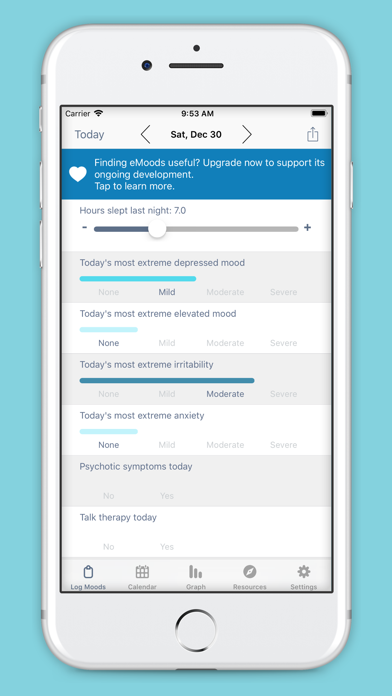
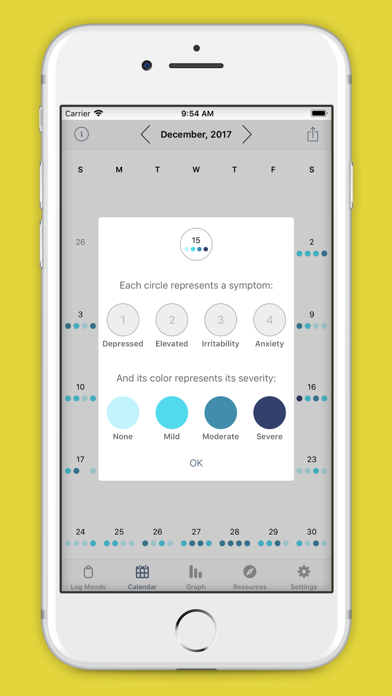
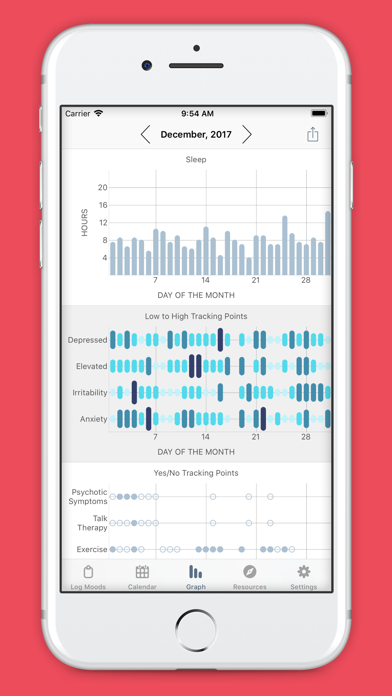
  • Frame 1 shows the main daily logging screen (Today view, Dec 30) inside a device mockup on a teal background β€” the UI is visible but there is no overlay headline text. A scanning user in App Store search results sees the app interface but cannot read the app's purpose or value proposition in under 2 seconds at thumbnail size. The teal background is energetic but the most prominent UI element at thumbnail is a blue upgrade banner ('Finding eMoods useful? Upgrade now') β€” this is not the first thing a new user should see as the face of the app. Frame 2 shows the calendar symptom-key overlay on a yellow background β€” the legend (circle colors = severity) is informative but the yellow background is the most visually jarring of the three frames and may reduce scan-consistency. Frame 3 shows the graph view (sleep bar chart + symptom dot plots) on a red/pink background β€” this is the strongest of the three frames for communicating data richness, but again no headline overlay. iPad screenshots are present, which is excellent for device coverage and App Store placement on iPad. 10 screenshots is the maximum β€” full slot utilization.

Recommendations

  • Add overlay headline text to Frame 1 immediately β€” it is the only frame visible in search results before a user taps through. A bare UI shot at thumbnail size is a missed conversion opportunity. Apply the new Frame 1 headline ('Your Mood. Your Data. Your Phone.') over the existing Today-view screenshot or swap the background UI to a completed, filled-in daily log (not the upgrade prompt). For Frame 2, consider swapping the yellow background for a muted blue or grey to maintain the calm clinical tone established by the icon and Frame 1. The red background on Frame 3 is similarly high-contrast in a way that may feel alarming for a mental health app β€” test a softer alternative.
9/10

Ratings & Reviews

4132 reviews Β· 4.80131 avg

Analysis

4,132 ratings at 4.8 stars is an exceptionally strong signal β€” this places eMoods in the top tier of trust indicators for its category. The recency signal is healthy (4,132 on current version). Negative review themes cluster around two specific issues: data loss on device migration (iCloud/Dropbox backup failure) and a CSV export that produces fragmented files. These are not rating-destroying issues β€” the 4.8 average confirms users overwhelmingly stay positive β€” but they represent the ceiling on reaching 4.9+ and could suppress conversions for users who read reviews before installing. One negative reviewer explicitly mentions financial frustration with a lost year subscription after a device change, which is a churn and refund risk beyond just ratings.

Recommendations

  • Continue triggering the SKStoreReviewController prompt immediately after a user successfully emails their monthly PDF report to their doctor β€” this is the highest success moment in the app and the most emotionally resonant time to ask for a rating. Respond publicly to the device-migration and CSV-export negative reviews with specific acknowledgment and a workaround link β€” App Store shows developer responses to future users, and a responsive reply converts undecided readers into installs. Consider adding a 'Data Backup Guide' link in the app settings to proactively reduce the data-loss scenario that is generating your most upset 1-star reviews.

Screenshot Copy5 frames

Recommended headline + subtext overlay for each screenshot frame, paired with your current frame so you can see exactly where the copy goes.

Frame 1Frame 1
Proposed copy
New headline

Your Mood. Your Phone.

New subtext

No cloud. No accounts. 100% private.

Why this copy works

Leads with the app's single most defensible differentiator β€” true offline storage β€” which is the #1 reason cited in positive reviews and the sharpest contrast against competitors. At 120x260 thumbnail size in search results, 'Your Mood. Your Phone.' is four words at high contrast that communicate both category (mood) and USP (device-only) simultaneously. The subtext handles the objection that all apps are 'private' by being specific: no cloud, no accounts.

Frame 2Frame 2
Proposed copy
New headline

60-Second Daily Check-In

New subtext

Log mood, sleep, meds, and symptoms fast.

Why this copy works

Answers the 'how does it actually work' question that Frame 1 raises. '60 seconds' is a concrete time commitment that removes the friction objection ('I won't remember to do this every day'). Names the four core data types (mood, sleep, meds, symptoms) so users self-qualify β€” if any of those apply to them, they keep swiping. Apply over the existing Today logging view screenshot.

Frame 3Frame 3
Proposed copy
New headline

Show Your Doctor the Pattern

New subtext

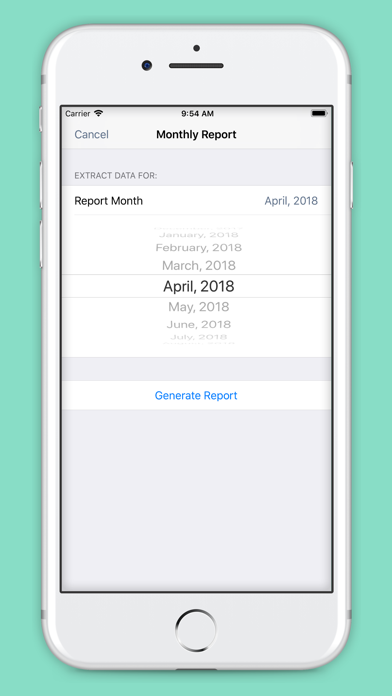
Email a PDF report at the end of every month.

Why this copy works

Surfaces the app's most clinically unique feature β€” the monthly PDF report β€” at the trust-decision point. Users who are tracking symptoms because a doctor recommended it will respond strongly to this frame. It positions eMoods as a clinical tool, not just a personal journal, which elevates perceived value and justifies the Pro upgrade. Apply over the graph or calendar view screenshot.

Frame 4Frame 4
Proposed copy
New headline

See Every Month at a Glance

New subtext

Color-coded calendar reveals your triggers.

Why this copy works

Expands the perceived use case from daily logging to long-term pattern recognition β€” the outcome users actually care about. 'Triggers' is a high-resonance word in the bipolar/anxiety community and names the insight the calendar view delivers. Applies directly to the existing calendar-with-legend screenshot.

Frame 5Frame 5
Proposed copy
New headline

Free to Start. Private Forever.

New subtext

Pro from $1.99/mo β€” cancel anytime.

Why this copy works

Handles the monetization question proactively for users who have swiped all five frames and are ready to decide. 'Private Forever' echoes the Frame 1 headline to close the narrative loop. Stating the Pro price ($1.99) at this stage prevents post-install surprise β€” a named source of negative reviews in the app. 'Cancel anytime' directly addresses the subscription anxiety theme visible in the 1-star reviews.

90-Day Action Plan

Week 1

5 tasks
  • Apply the new title (27/30 chars), subtitle (28/30 chars), and 100-char keyword field (92/100 chars) from the Ready-to-Paste and 100-Char Keyword Field sections above.
  • Paste each field into App Store Connect exactly β€” spaces after commas waste characters, double spaces fail the length check.
  • Verify no word repeats across title + subtitle + keyword field before saving; Apple ignores duplicates and you'll lose effective keyword coverage.
  • Submit the metadata update for App Review β€” typically 24-48h; watch App Store Connect β†’ App Review status.
  • Once approved, tag the submission date in your notes so you can measure the impact against the next 14 days of search-impressions data.

Week 2

3 tasks
  • Hand the five screenshot headlines and subtext from the Screenshot Copy section to a designer with the current UI screenshots. Priority: Frame 1 overlay ('Your Mood. Your Phone.' / 'No cloud. No accounts. 100% private.') β€” this is the only frame visible in search results before a user taps through and is the highest-leverage visual change available.
  • Review the current Frame 1 background image β€” replace the upgrade-prompt banner visible in the current screenshot with a clean, fully-filled daily log view (all sliders set, no promotional UI visible). This removes the conversion-friction of showing new users a monetization prompt as the first image.
  • Upload refreshed screenshot set for both iPhone and iPad after design is complete. iPad screenshots are already present β€” use the same new headlines scaled to iPad dimensions.

Week 3

2 tasks
  • Open App Store Connect > Analytics > Search Terms. Confirm that 'symptom tracker', 'medication journal', 'offline mood tracker', and 'mental health tracker' appear as indexed search terms driving impressions. If any are absent after 10-14 days post-metadata-update, the corresponding subtitle or keyword field token may need review.
  • Add a 'Data Backup & Migration Guide' link in the app's Settings screen (or a one-time tooltip on first launch after device-change detection). The most damaging 1-star reviews describe data loss on device migration β€” proactively surfacing backup instructions reduces this scenario and protects the 4.8-star average.

Ongoing

3 tasks
  • Trigger SKStoreReviewController.requestReview() immediately after a user successfully emails their monthly PDF report β€” this is the highest emotional success moment in the app (they just sent their doctor something useful) and will generate disproportionately positive reviews relative to prompting at a neutral moment.
  • Monitor weekly rankings for 'offline mood tracker', 'symptom tracker', and 'medication journal' β€” these are the three winnable compound keywords most directly tied to the subtitle rewrite. Use App Store Connect Search Terms data (not a third-party tool) to track impression share changes.
  • Refresh the keyword field each January and September β€” seasonal mental health awareness campaigns (Depression Awareness Month in October, New Year resolution tracking in January) drive search volume spikes for terms like 'mood diary' and 'mental health journal' that are already indexed in this configuration.

Expected Impact

The current metadata is already strong (86/100), so the expected gain is incremental rather than transformational. The subtitle swap from 'Easy Mood Tracking & Reports' to 'Symptom & Medication Journal' eliminates one wasted duplicate token and adds three new keyword clusters β€” 'symptom' (opportunity 7), 'medication' (opportunity 9), and 'journal' (opportunity 17) β€” that are currently unindexed in any high-weight field. Within 4-8 weeks of the update, expect measurable new impression traffic from compound keywords including 'symptom tracker', 'medication journal', and 'mental health journal'. The keyword field swap (removing difficulty-89 'cloud' and difficulty-81 'lifestyle', adding 'emotion' and 'anxiety') unlocks two additional compound rankings at lower difficulty. The screenshot Frame 1 overlay change is the highest-potential conversion improvement: moving from a bare UI shot to a headline-driven outcome frame typically improves tap-through rate by 15-30% based on category benchmarks, though the effect is app-specific and should be measured via App Store Connect product page analytics after upload.