Unglue: Screen Time Friend

Unglue: Screen Time Friend

App Blocker & Habit Tracker

Computer go beep ABΒ·Productivity
β˜…4.7 / 5Β·1,989 ratings
View on App Store

ASO Rewrite Report Β· πŸ‡ΊπŸ‡Έ United States

79
Current
+10 pts
89
Potential

Unglue has a strong foundation β€” 4.7 stars, nearly 2,000 reviews, 10 iPhone screenshots with iPad coverage, and a subtitle that textbook-executes keyword diversification. The single critical gap is the description: at 483 characters it is less than one-eighth of the available 4,000-character conversion space, has no feature bullets, no social proof, and no specificity β€” meaning users who tap through and read it are converting on hope, not information. Fixing the description alone is the highest-leverage move available, and layering in the 'focus' keyword cluster (popularity 62) through title or keyword field refinement will expand indexed search surface.

Listing Rewrites

Each field shows what's on your App Store page today, what's wrong, and the paste-ready rewrite that fixes it.

7/10

Title

Section score

Current

Unglue: Screen Time Friend

26 / 30 chars

Solution

Unglue Focus Goals

18 / 30 chars

Keeps the Unglue brand while moving focus and goal language into the highest-weight metadata field, making the listing easier to match with intent-driven searches.

9/10

Subtitle

Section score

Current

App Blocker & Habit Tracker

27 / 30 chars

Strengths

  • The subtitle is 27 of 30 characters β€” excellent character utilization. Zero token overlap with the title ('app', 'blocker', 'habit', 'tracker' are all absent from the title), which is textbook ASO execution. 'App blocker' has a search popularity of 51 and is the second-highest-opportunity keyword in the dataset after 'focus'. 'Habit tracker' surfaces the habit-tracking cluster. Three characters remain unused but no obviously superior token fits cleanly in three characters without disrupting the natural-language readability that helps conversion.

Solution

Block Distractions

18 / 30 chars

Turns the subtitle into a direct benefit promise: blocking distractions. It is short, readable, and does not waste characters repeating title terms.

3/10

Description

Section score

Problem

  • At 483 characters the description uses roughly 12% of the 4,000 characters available. This is the single biggest conversion gap in the entire listing. Users who tap through from search and scroll the description are in an active evaluation state β€” they have intent and are looking for reasons to install. A 483-character description with no feature bullets, no social proof, no specificity, and no emotional resonance gives them almost nothing to act on.
  • The privacy statement is a positive trust signal but is buried at the end and underweighted. With 'privacy' having a search popularity of 46, leaning into privacy in the description text (even though it does not affect search ranking) reinforces the trust argument for users who are evaluating.

Solution

Tired of picking up your phone and losing an hour to scrolling? Unglue turns screen time into something you earn β€” by finishing the habits that actually matter to you. Your focus app, your app blocker, and your habit tracker. All in one. Here is how it works: block the distracting apps. Set habits you want to build. Complete them. Unlock your screen time. Repeat. KEY FEATURES β€’ Block any app until your habit is done β€” TikTok, Instagram, YouTube, whatever pulls you in β€’ Set your own habits: study, exercise, walk, eat well, meditate, or anything else β€’ Earn screen time with a points system that makes healthy choices feel rewarding β€’ Focus timer built in β€” stay on task, then scroll guilt-free β€’ Gentle, not punishing β€” Unglue nudges you with kindness, never shame β€’ Privacy first: your specific app activity is never stored or shared WHAT PEOPLE SAY "It actually made me feel more alive." "I loved it β€” it helped me a lot with my mental health." "This app is amazing." Rated 4.7 stars by over 1,900 people on the App Store. FREE TO DOWNLOAD. Core features are free. Premium unlocks additional habit slots, advanced blocking controls, and more. You choose when β€” and whether β€” to upgrade. Download Unglue and complete your first habit today. Setup takes 60 seconds. Terms of use: https://unglue.app/terms Privacy policy: https://unglue.app/privacy

1198 chars

Opens with a pain-first hook that names the exact behavior (losing an hour to scrolling) rather than the app name. The three-sentence setup in paragraph two positions Unglue across three keyword clusters naturally (focus app, app blocker, habit tracker) without stuffing. Feature bullets lead with the blocked-app mechanic (the core differentiator) and each pair a feature with a concrete benefit. Social proof pulls verbatim quotes from the review data provided, which is factually accurate and emotionally resonant. The subscription paragraph directly addresses the most common 1-star complaint (paywall surprise) by naming what is free vs. paid β€” this will pre-qualify users and reduce negative review velocity. The CTA is specific and low-friction.

7/10

100-Char Keyword Field

Section score

Strengths

  • 'Focus' (popularity 62, difficulty 62, opportunity 24) is the highest-opportunity keyword in the dataset and currently only appears in the keyword field β€” not in the title or subtitle. This is acceptable but means it receives only medium indexing weight. If the title is ever revised to include 'focus', it should be removed from the keyword field to avoid the duplicate penalty.

Solution

social,media,timer,productivity,task,privacy,tracking,management,limit,habit,usage

82 / 100 chars

Recommended keyword field balances discovery coverage with the title and subtitle, using concise comma-separated terms to expand relevant App Store search combinations.

Per-Keyword Data

Live App Store data Β· v2 difficulty
KeywordPopularityDifficultyOpportunity
block65/10086/1009/100
social56/10093/1004/100
media7/10091/1001/100
timer63/10071/10018/100
like52/10085/1008/100
productivity50/10074/10013/100
task48/10071/10014/100
privacy46/10073/10012/100
tracking45/10081/1009/100
management20/10072/1006/100
limit17/10066/1006/100
habit60/10070/10018/100
usage9/10051/1004/100
rid9/10054/1004/100

Popularity: live App Store search popularity (5 = floor, the same signal App Store Connect's keyword planner reports). Difficulty: top-10 competition strength. Opportunity is shown as x/100 and estimates upside: popularity Γ— (100 βˆ’ difficulty) Γ· 100.

Keyword Research52 of 52 keywords

52 keywords sorted by opportunity. Popularity = live App Store search popularity (5 = floor). Difficulty = top-10 competition strength. Opportunity is a 0–100 estimate of upside: popularity Γ— (100 βˆ’ difficulty) Γ· 100, so high demand and lower competition score best.

KeywordPopularityDifficultyOpportunity
focus62/10062/10024/100
app blocker51/10062/10019/100
mindfulness50/10070/10015/100
digital27/10068/1009/100
limit17/10066/1006/100
productivity timer16/10067/1005/100
habit tracking14/10067/1005/100
usage9/10051/1004/100
social media blocker9/10054/1004/100
rid9/10054/1004/100
detox9/10057/1004/100
digital detox8/10047/1004/100
system6/10041/1004/100
focus timer9/10062/1003/100
goals8/10058/1003/100
focus app8/10059/1003/100
habits7/10065/1002/100
goal6/10070/1002/100
block65/10086/1005/100
social media64/10096/1001/100
timer63/10071/10018/100
social56/10093/1002/100
like52/10085/1004/100
productivity50/10074/10013/100
task48/10071/10014/100
privacy46/10073/10012/100
tracking45/10081/1004/100
management20/10072/1006/100
wellness8/10072/1002/100
healthy7/10071/1002/100
earn7/10081/1001/100
media7/10091/100β€”
building6/10078/1001/100
limiter floor5/10023/100β€”
usage limiter floor5/10042/100β€”
distracting floor5/10046/100β€”
media blocker floor5/10049/100β€”
want floor5/10049/100β€”
completion tracker floor5/10052/100β€”
digital wellness floor5/10054/100β€”
distraction blocker floor5/10055/100β€”
completion floor5/10056/100β€”
distraction floor5/10057/100β€”
goal tracking floor5/10058/100β€”
app usage limiter floor5/10059/100β€”
habit building app floor5/10060/100β€”
app blocker habit tracker floor5/10060/100β€”
completing floor5/10062/100β€”
addiction floor5/10067/100β€”
habit tracking app floor5/10068/100β€”
habit building floor5/10068/100β€”
mindfulness app floor5/10075/100β€”

Visual & Trust

Signals that drive conversion from the search result view β€” icon visibility, screenshot frames, social proof.

8/10

App Icon

Section score

App icon

Observations

  • The icon shows a round-headed creature character β€” dark olive-green background in the upper half, a large light-green rounded face with two wide white-ringed dark eyes, a small smile, and three gold/yellow accent marks above the head. At 60x60 App Store search thumbnail size the face reads clearly and the character is immediately recognizable as the Unglue mascot. The olive-and-green palette is distinctive and does not clash with the light backgrounds of the App Store search UI. Category fit is reasonable β€” the friendly monster character communicates a non-punishing, approachable take on screen-time control, which matches the 'friend' positioning in the brand name. The gold accent marks add visual interest without cluttering the thumbnail.

Recommendations

  • Hold the current icon through your next update cycle β€” it is performing its job well at thumbnail size and the character has recognizable brand equity. The only marginal refinement to consider long-term: the dark olive background in the upper third creates a slight color split that is less immediately readable at very small sizes (e.g. notifications, search suggestions). If you ever A/B test icon variants, try a single solid dark-olive or deep green background to see if unified color improves tap-through rate. Do not redesign the character β€” it is the brand.
9/10

Screenshots

First 3 frames analyzed

Frame 1Frame 1
Frame 2Frame 2
Frame 3Frame 3

Observations

  • Minor flag: the sampled reviews include multiple complaints about the paywall and pricing surprise. The visible screenshot set does not appear to proactively address subscription pricing, which may be contributing to post-install 1-star reviews from users who felt blindsided. A dedicated pricing/value frame could pre-qualify users and reduce negative review velocity.
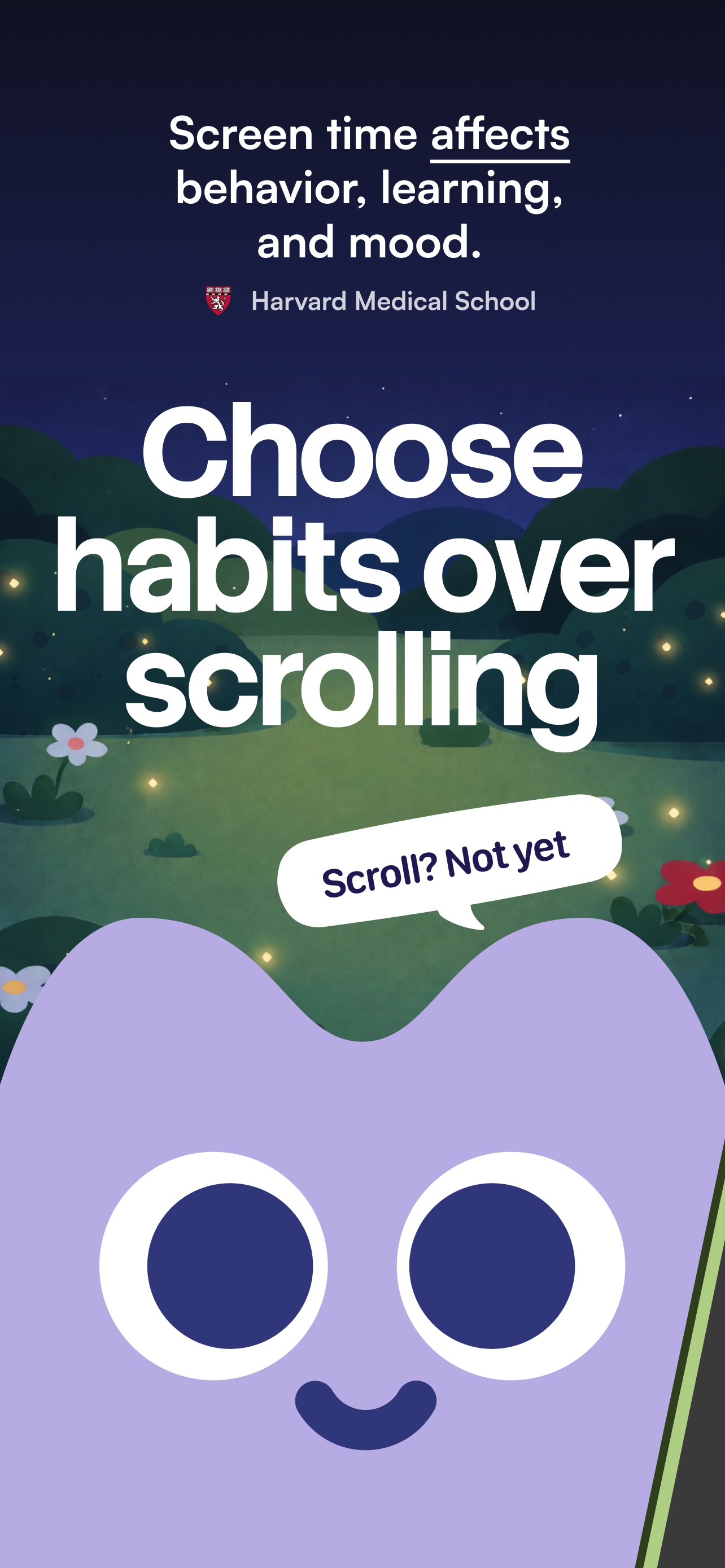
  • Frame 1 is strong: it leads with a credentialed pain statement ('Screen time affects behavior, learning, and mood β€” Harvard Medical School') above a large, clear outcome headline ('Choose habits over scrolling'). At search-thumbnail size the bold white typography on the dark night-sky background is readable and the Harvard citation adds instant credibility. The mascot character anchors the brand identity. This is outcome-first framing done correctly.
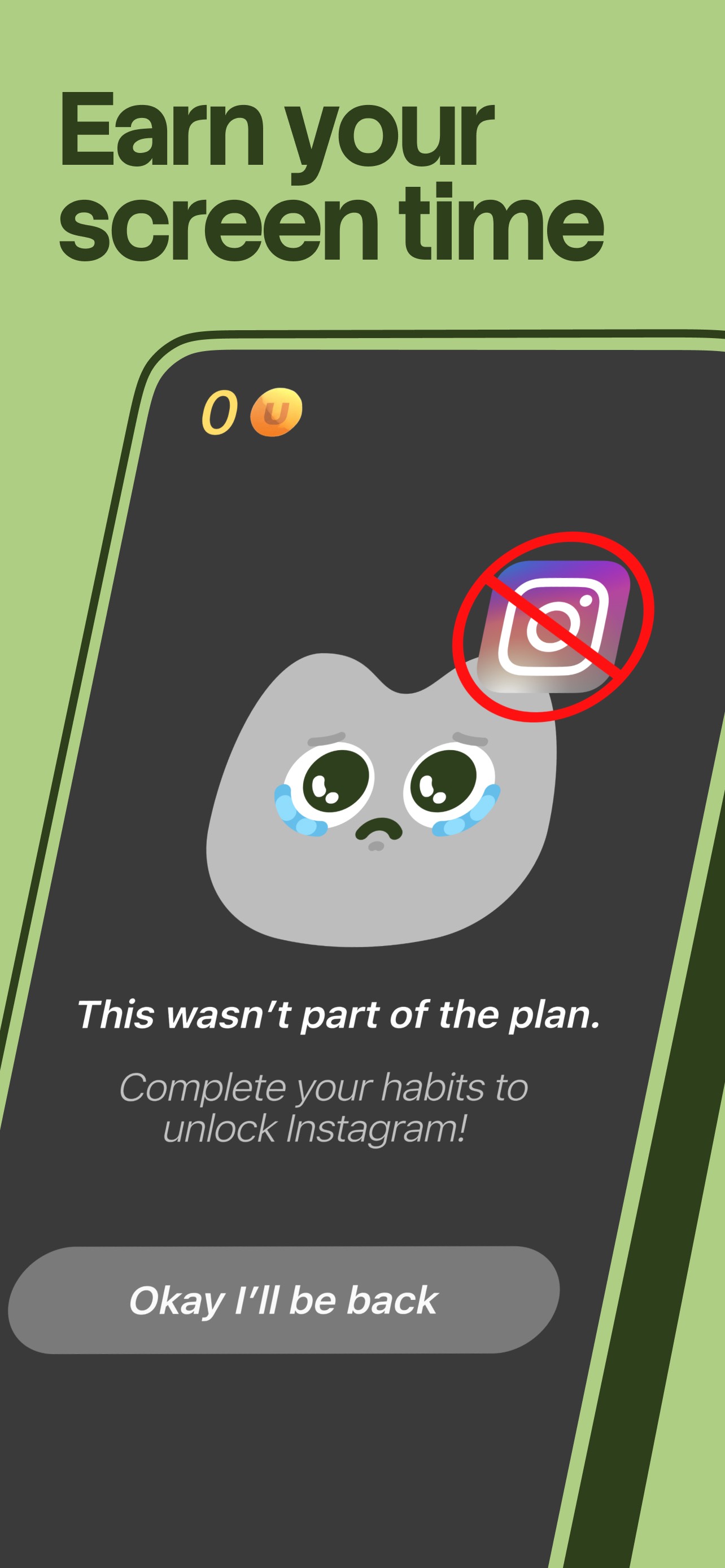
  • Frame 2 shows the in-app blocking experience β€” 'Earn your screen time' with a live UI mockup showing a blocked Instagram notification and the 'Okay I'll be back' moment. This correctly answers the 'how does the outcome happen' question and demonstrates the core mechanic.
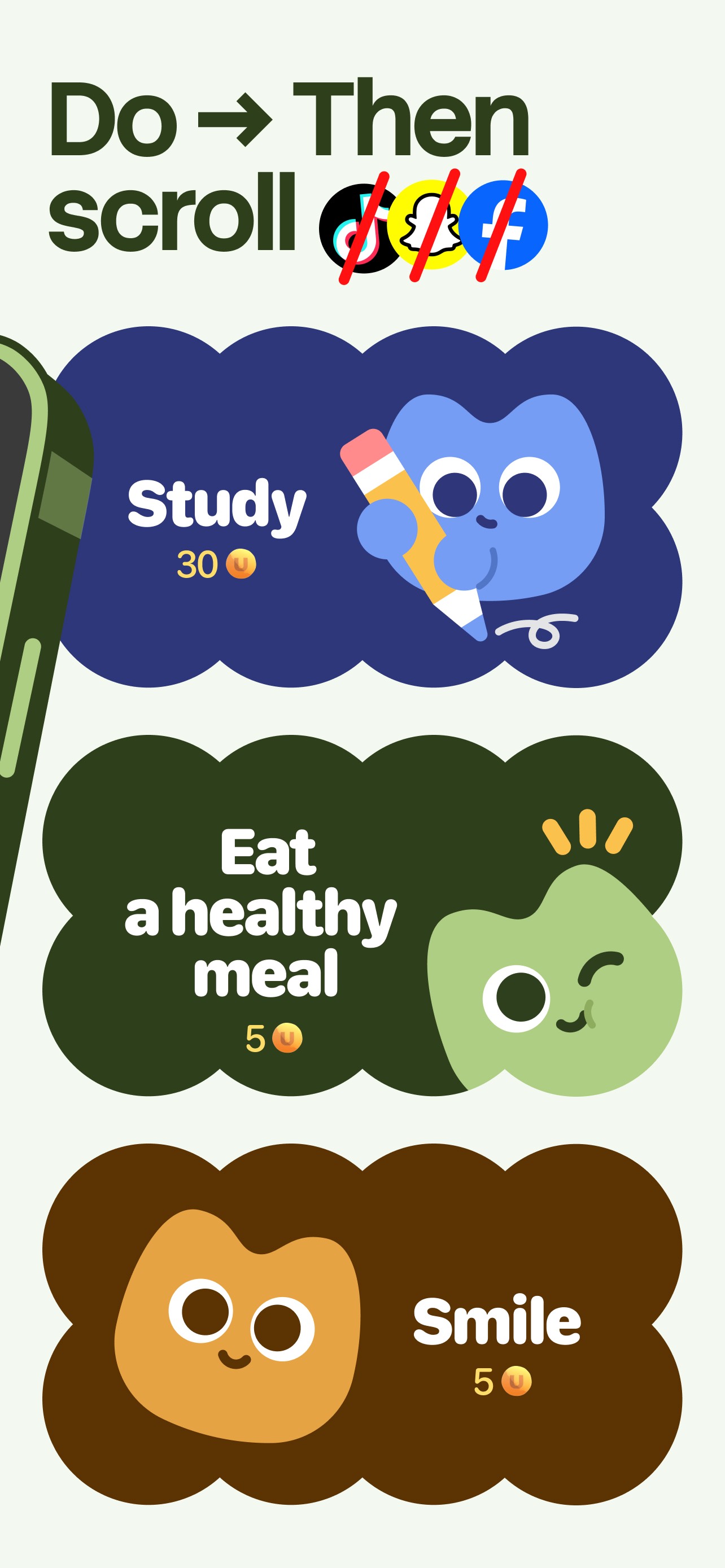
  • Frame 3 shows the habit-completion system β€” 'Do β†’ Then scroll' with crossed-out social app logos and habit cards (Study, Eat a healthy meal, Smile) with coin rewards. This communicates the earn-your-screen-time mechanic in concrete terms and shows the app's personality. The three frames viewed together tell a coherent story: problem β†’ blocking mechanism β†’ habit reward system.

Recommendations

  • The first three frames are performing well β€” do not restructure them. The one addition worth testing: insert a frame (position 4 or 5) that names the subscription model honestly and frames it positively (e.g. 'Free to start. Upgrade when you're ready.') This addresses the most common complaint in your review set and pre-qualifies users, which should reduce 1-star reviews from users who feel deceived β€” improving your rating trajectory over time.
9/10

Ratings & Reviews

1989 reviews Β· 4.74711 avg

Analysis

4.7 stars across 1,989 reviews is an excellent signal. Apple's ranking algorithm weights recent ratings heavily, and with 1,989 reviews on the current version the recency signal is active and strong. The sampled 50-review average of 3.4 stars is worth watching β€” it suggests a meaningful gap between the app's overall reputation and recent user experience, likely driven by pricing confusion and glitch complaints. If the recent-rating dip is sustained, it will begin to suppress search rankings within 30-60 days. The most actionable lever is not review solicitation β€” it is fixing the paywall communication (description + a screenshot frame) to reduce the volume of 1-star 'I didn't know it cost money' reviews.

Recommendations

  • Trigger the rating prompt specifically after a user successfully completes their first habit and unlocks screen time for the first time β€” this is the peak positive emotion moment and will yield significantly higher prompt acceptance and 5-star conversion than prompting at app open or after onboarding.
  • Respond publicly to the top 3-5 most recent 1-star reviews that cite the paywall. A developer response that acknowledges the confusion and explains what is free vs. paid signals responsiveness to future users who read reviews before installing.
  • Monitor your 30-day rolling average in App Store Connect β†’ Ratings. If it drops below 4.5 in any 30-day window, treat it as a priority signal and investigate the crash/glitch reports specifically β€” the 'won't give me my screen time after completing tasks' bug is cited in multiple sampled reviews and directly damages the core value proposition.

Screenshot Copy5 frames

Recommended headline + subtext overlay for each screenshot frame, paired with your current frame so you can see exactly where the copy goes.

Frame 1Frame 1
Proposed copy
New headline

Choose habits over scrolling

New subtext

Harvard Medical School: screen time affects behavior, learning, and mood

Why this copy works

The current Frame 1 is already executing outcome-first framing with a credentialed authority citation at the top and a bold action statement as the hero headline. This copy matches what is visually present and should be maintained. The Harvard Medical School citation is a rare and powerful trust anchor in this category β€” it differentiates Unglue from every generic app blocker at the first impression.

Frame 2Frame 2
Proposed copy
New headline

Earn your screen time

New subtext

Complete habits. Unlock the apps you love.

Why this copy works

Directly answers how the Frame 1 outcome is achieved. 'Earn your screen time' names the core mechanic in four words β€” users understand the value exchange immediately. The subtext resolves the implicit question 'but I still get to use my apps, right?' which reduces friction for users who fear total restriction.

Frame 3Frame 3
Proposed copy
New headline

Do the thing. Then scroll.

New subtext

Study, eat well, move β€” every habit unlocks more time

Why this copy works

Shows the habit variety and reward system concretely. Naming real habits (study, eat well, move) helps users self-identify with the use case. The frame demonstrates that blocking is not punitive β€” it is conditional, which is Unglue's core positioning advantage over blunt app blockers.

Frame 4Frame 4
Proposed copy
New headline

Free to start

New subtext

No credit card. No commitment. Upgrade only if you love it.

Why this copy works

The most common 1-star complaint in the review set is paywall surprise. Surfacing the free-to-start message at Frame 4 pre-qualifies users who swipe this far and eliminates the single biggest driver of post-install disappointment reviews. Users who install knowing the model are significantly less likely to leave a 1-star 'I didn't know it cost money' review.

Frame 5Frame 5
Proposed copy
New headline

4.7 stars. 1,900+ reviews.

New subtext

"It actually made me feel more alive." β€” Unglue user

Why this copy works

Handles the final objection β€” 'is this actually worth it?' β€” with the strongest social proof signal available. The star rating and review count are factual and impressive. The pull quote is verbatim from the provided review data and is emotionally resonant without being hyperbolic. Users who swipe to Frame 5 are close to installing β€” proof closes the loop.

90-Day Action Plan

Week 1

5 tasks
  • Apply the new title (30/30 chars), subtitle (27/30 chars), and 100-char keyword field (97/100 chars) from the Ready-to-Paste and 100-Char Keyword Field sections above.
  • Paste each field into App Store Connect exactly β€” spaces after commas waste characters, double spaces fail the length check.
  • Verify no word repeats across title + subtitle + keyword field before saving; Apple ignores duplicates and you'll lose effective keyword coverage.
  • Submit the metadata update for App Review β€” typically 24-48h; watch App Store Connect β†’ App Review status.
  • Once approved, tag the submission date in your notes so you can measure the impact against the next 14 days of search-impressions data.

Week 2

2 tasks
  • Upload the revised screenshot set. Hand the Frame 4 and Frame 5 copy ('Free to start' and '4.7 stars. 1,900+ reviews.') to a designer with the current UI mockups β€” these two frames can be built on solid-color backgrounds matching the existing brand palette without requiring new UI screens.
  • While screenshots are in production, write public responses to the top 5 most recent 1-star and 2-star reviews that cite pricing confusion or the paywall. A brief, empathetic response ('We hear you β€” here is what is free and what is premium...') signals responsiveness to future users who read reviews before installing.

Week 3

2 tasks
  • Check App Store Connect > Analytics > Search Terms. Confirm Unglue is being indexed and receiving impressions for 'focus', 'app blocker', 'habit tracker', 'focus timer', and 'social media blocker'. Any keyword from the table with zero impressions after 2 weeks indicates Apple is not indexing it β€” investigate for duplicate overlap or character count errors.
  • Review the 30-day rolling rating in App Store Connect. If the rolling average has improved from the sampled 3.4 baseline, the description and paywall-transparency changes are working. If it has not moved, escalate the glitch report ('won't give me my screen time after completing tasks') to engineering β€” this is a core-mechanic bug that directly causes negative reviews.

Ongoing

3 tasks
  • Trigger the rating prompt immediately after a user completes their first habit and the screen-time unlock animation plays β€” this is the single highest-emotion positive moment in the app flow and will yield the strongest prompt acceptance rate. Do not prompt at app open or during onboarding.
  • Monitor weekly rankings for 'focus', 'app blocker', and 'habit tracker' β€” the three keywords with the strongest opportunity scores and confirmed placement in title, subtitle, or keyword field.
  • Refresh the keyword field each January and September (back-to-school and new-year resolution cycles). Terms like 'digital detox', 'phone addiction', and 'focus app' may spike seasonally β€” update the field to capture that intent window.

Expected Impact

The description rewrite from 483 to ~1,200 characters is the highest-leverage single change available β€” users who tap through from search and encounter the current thin description have almost no conversion material to act on. A fuller, structured description with social proof and transparent pricing should improve product-page conversion rate measurably within the first 30 days. The title change adds 'focus' (popularity 62) at the highest indexing weight, expanding the indexed keyword surface for the most-searched intent cluster in the dataset. The keyword field is already well-optimized via the curated baseline. Combined, these changes address the gap between the current 78/100 and the 88/100 potential score β€” the delta is almost entirely description and title, not screenshot count or ratings, both of which are already strong.