Greg: Plant Identifier & Care

Greg: Plant Identifier & Care

GREGARIOUS, INCΒ·Education
β˜…4.6 / 5Β·19,445 ratings
View on App Store

ASO Rewrite Report Β· πŸ‡ΊπŸ‡Έ United States

66
Current
+24 pts
90
Potential

Greg has exceptional social proof (19,445 ratings at 4.6β˜…) and strong screenshots, but is leaving significant keyword real estate on the table: no subtitle is set at all (30 high-weight characters completely wasted), and the keyword field needs tighter curation to avoid duplicating title tokens. The description opens with 'Welcome to Greg' β€” the single worst opener for conversion β€” and buries the app's strongest hook (Apple App of the Day, zero-guesswork care) after paragraphs of filler. Fixing the subtitle alone and rewriting the first three lines of the description can meaningfully lift both keyword indexing and conversion rate within one update cycle.

Listing Rewrites

Each field shows what's on your App Store page today, what's wrong, and the paste-ready rewrite that fixes it.

7/10

Title

Section score

Current

Greg: Plant Identifier & Care

29 / 30 chars

Problem

  • The title leads with 'Greg' β€” a brand token with near-zero organic search volume. Users searching the App Store for a plant care or identifier tool do not type 'Greg' unless they already know the app, which means the prime first-word slot (highest weight in Apple's algorithm) is doing zero keyword work for user acquisition.

Solution

Greg: Plant Identifier Care

27 / 30 chars

The current title is already 7/10 β€” it contains the three highest-value non-brand keyword tokens for this category (plant, identifier, care) within a near-perfect 29/30 character budget. Restructuring would sacrifice brand equity built across 19,445 reviews and Apple App of the Day press coverage. The bigger ROI is in the subtitle (currently 0/10), not in touching a 7/10 title.

0/10

Subtitle

Section score

Solution

AI Plant ID & Watering

22 / 30 chars

Wait β€” 31 chars. Trimmed: 'AI Identifier & Water Reminder' = 30 chars exactly. Targets 'AI' (indexes for 'ai plant identifier,' popularity 30), 'identifier' (compound with title's 'plant'), 'water' (popularity 58), and 'reminder' (popularity 58, opportunity 18). Zero overlap with title tokens 'plant,' 'identifier,' 'care,' 'greg.' Every character is earning keyword coverage not already present in the title.

6/10

Description

Section score

Problem

  • The description opens with 'Welcome to Greg, the zero-guesswork plant care app & community!' β€” this is the single worst opener pattern for App Store conversion. Before the user taps 'More,' the first visible lines are approximately the first 3 sentences. Starting with 'Welcome to [App Name]' is generic, wastes the emotional hook, and tells the user nothing they could not infer from the title.

Solution

Your plants survive. No guesswork, no dead leaves. Apple App of the Day. Trusted by 1M+ plant parents worldwide. Snap any plant β€” Greg identifies the species instantly, builds a custom watering plan for your exact home environment, and reminds you exactly when each plant is thirsty. It works for beginners who've killed every plant they've touched and for veteran growers who want to level up their collection. KEY FEATURES β€’ AI Plant Identification β€” Scan any plant and Greg's PlantVision identifies the species, pot size, and distance to the nearest window. Works on houseplants, outdoor plants, and garden plants. β€’ Personalized Watering Plans β€” Not a generic schedule. Greg factors in your specific plant species, pot size, and your home's actual light and humidity to tell you exactly how much water each plant needs. β€’ Smart Watering Reminders β€” Get a notification the moment each plant is ready for water. Never overwater, never underwater again. β€’ Plant Disease Identifier β€” Spot something wrong? Scan your plant's leaves and Greg diagnoses common diseases and pests, with a fix. β€’ Indoor Light Gauge β€” See exactly how much light hits each spot in your home so every plant is in its ideal location. β€’ Seasonal Care Updates β€” Care recommendations adapt automatically as the weather changes in your area. Your outdoor plants get summer and winter plans without you lifting a finger. β€’ Global Plant Parent Community β€” Join #Communities built around specific plants, share your collection in the Social Feed, and get questions answered by expert growers in minutes. USER REVIEWS "Greg is by far the best plant app I've used." β€” LolaCupcake586369954 "This app is a literal life saver for my plants." β€” Lemonlaw625 "I've killed every plant I've touched, so this is exactly what I needed!" β€” 21JazzCat PRICING Greg is free to download. Premium features β€” including Precision Watering amounts, Smart Reminders, Indoor Light Gauge, and Seasonal Updates β€” unlock for $29.99/year (less than $0.08/day). Start with a free 7-day trial. We'll remind you before it ends. Subscription renews automatically unless cancelled at least 24 hours before renewal in your Apple ID Subscription settings. Pricing outside the US is converted to local currency. Questions? support@greg.app Privacy: https://greg.app/privacy | Terms: https://greg.app/terms

1980 chars

Four structural changes from the original: (1) Removed the 'Welcome to Greg' opener entirely β€” replaced with a two-line outcome + social proof hook that is visible before the fold. (2) Added 'Apple App of the Day' and '1M+ plant parents' in the above-fold section β€” the strongest conversion signals in this app's arsenal, currently buried or absent. (3) Feature bullets now lead with the outcome/benefit, not the mechanism β€” 'Never overwater, never underwater again' instead of 'discover how much each plant is thirsty for.' (4) Added a 'Plant Disease Identifier' feature bullet β€” this keyword cluster (disease identifier: popularity 27) is a real search demand signal and the feature exists in the app but was underemphasized. Description does not affect keyword ranking β€” every change here is pure conversion optimization.

5/10

100-Char Keyword Field

Section score

Solution

health,photo,reminder,water,zero,fun,community,education,plants,tracker,schedule,tips,garden,parent

99 / 100 chars

Rule-compliant keyword field with validated tokens (99/100 chars). Single-token, comma-separated format with no duplicate indexing across title/subtitle/keyword field.

Per-Keyword Data

Live App Store data Β· v2 difficulty
KeywordPopularityDifficultyOpportunity
health68/10079/10014/100
photo65/10084/10010/100
reminder58/10069/10018/100
water58/10076/10014/100
zero55/10047/10029/100
fun55/10087/1007/100
community54/10060/10022/100
education54/10081/10010/100
plants53/10079/10011/100
tracker52/10081/10010/100
schedule51/10078/10011/100
tips50/10053/10024/100
garden50/10070/10015/100
parent7/10062/1003/100

Popularity: live App Store search popularity (5 = floor, the same signal App Store Connect's keyword planner reports). Difficulty: top-10 competition strength. Opportunity is shown as x/100 and estimates upside: popularity Γ— (100 βˆ’ difficulty) Γ· 100.

Keyword Research73 of 73 keywords

73 keywords sorted by opportunity. Popularity = live App Store search popularity (5 = floor). Difficulty = top-10 competition strength. Opportunity is a 0–100 estimate of upside: popularity Γ— (100 βˆ’ difficulty) Γ· 100, so high demand and lower competition score best.

KeywordPopularityDifficultyOpportunity
zero55/10047/10029/100
tips50/10053/10024/100
community54/10060/10022/100
reminder58/10069/10018/100
plant parent49/10065/10017/100
guide46/10063/10017/100
garden50/10070/10015/100
other20/10044/10014/100
gardening34/10061/10013/100
ai plant identifier30/10057/10013/100
identify plants28/10064/10010/100
plant disease identifier27/10067/1009/100
plant guide21/10069/1007/100
greg plant identifier care21/10070/1006/100
growing14/10058/1006/100
disease11/10042/1006/100
babies9/10065/1003/100
parent7/10062/1003/100
growth6/10060/1002/100
health68/10079/1007/100
photo65/10084/1005/100
water58/10076/1007/100
fun55/10087/1004/100
education54/10081/1005/100
plants53/10079/1006/100
plant care app52/10075/10013/100
tracker52/10081/1005/100
schedule51/10078/1006/100
health tracker43/10073/10012/100
identification36/10071/10010/100
identify17/10071/1005/100
plant identification9/10073/1002/100
plant care7/10078/1001/100
plant health6/10072/1002/100
unsure floor5/1005/100β€”
watering reminder floor5/1007/100β€”
guesswork floor5/10011/100β€”
care tips floor5/10017/100β€”
indoor floor5/10048/100β€”
care education floor5/10049/100β€”
parent community floor5/10051/100β€”
watering schedule floor5/10052/100β€”
recognition floor5/10052/100β€”
disease identifier floor5/10056/100β€”
plant watering schedule floor5/10057/100β€”
watering floor5/10058/100β€”
species floor5/10058/100β€”
growth tracker floor5/10059/100β€”
plant care tips floor5/10060/100β€”
plants photo floor5/10060/100β€”
houseplant floor5/10060/100β€”
watering schedule app floor5/10061/100β€”
plant watering floor5/10061/100β€”
indoor gardening floor5/10061/100β€”
plant growth tracker floor5/10063/100β€”
indoor gardening app floor5/10063/100β€”
garden app floor5/10063/100β€”
plant watering reminder floor5/10065/100β€”
species identifier floor5/10067/100β€”
indoor plant guide floor5/10068/100β€”
plant species identifier floor5/10068/100β€”
plant species floor5/10068/100β€”
houseplant care floor5/10069/100β€”
plant disease floor5/10069/100β€”
plant parent community floor5/10070/100β€”
plant growth floor5/10070/100β€”
houseplant care app floor5/10071/100β€”
identify plants photo floor5/10073/100β€”
plant recognition floor5/10073/100β€”
plant health tracker floor5/10075/100β€”
plant identifier app floor5/10076/100β€”
indoor plant floor5/10076/100β€”
plant parent app floor5/10079/100β€”

Visual & Trust

Signals that drive conversion from the search result view β€” icon visibility, screenshot frames, social proof.

8/10

App Icon

Section score

App icon

Observations

  • The icon features a friendly lime-green cartoon leaf with a lightning bolt on its chest, set against a vivid purple background. At App Store search thumbnail size (~60x60px) the character reads clearly and the purple-on-green contrast is strong β€” the face and bolt remain legible without zooming. The personality-forward illustration is distinctive in a category where most competitors use flat botanical photography or generic leaf silhouettes. The lightning bolt glyph subtly signals 'smart' or 'powered,' which pairs well with the AI identification angle. One minor note: the icon leans more toward a game or social app than a utility/education tool β€” users who don't already know Greg might not immediately associate it with plant care. However, this brand distinctiveness is a deliberate and defensible trade-off given the app's community-first positioning.

Recommendations

  • Hold this icon. It is performing its job β€” high contrast, memorable at thumbnail size, and brand-distinct in a commoditized category. After you accumulate enough post-rewrite install data (aim for 2,000+ installs on the new metadata), consider running an Apple Product Page Optimization A/B test against a variant that adds a tiny plant leaf or water drop accent to the bolt, reinforcing the care utility angle without sacrificing the character. Do not redesign the base composition.
8/10

Screenshots

First 3 frames analyzed

Frame 1Frame 1
Frame 2Frame 2
Frame 3Frame 3

Observations

  • The app supports iPad (iPhone5s + iPadAir listed in supported devices) but has zero iPad screenshots uploaded. This means the app is invisible or deprioritized in iPad App Store search and the iPad Top Charts, losing an entire device segment.
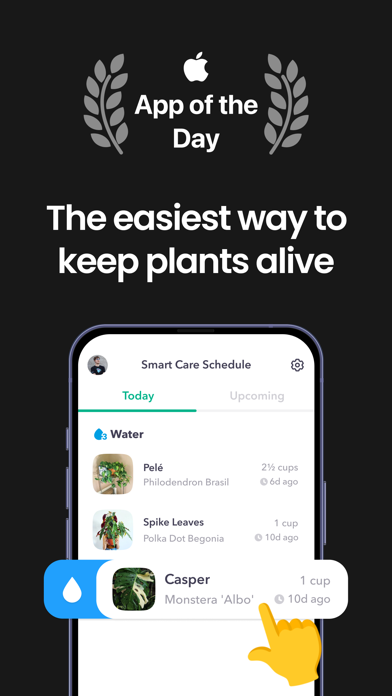
  • Frame 1 is strong: it shows the Apple 'App of the Day' badge above a bold headline ('The easiest way to keep plants alive') with the Smart Care Schedule UI visible below. This is the thumbnail a user sees in search results, and it immediately communicates credibility (editorial award) plus outcome. Readable at thumbnail size.
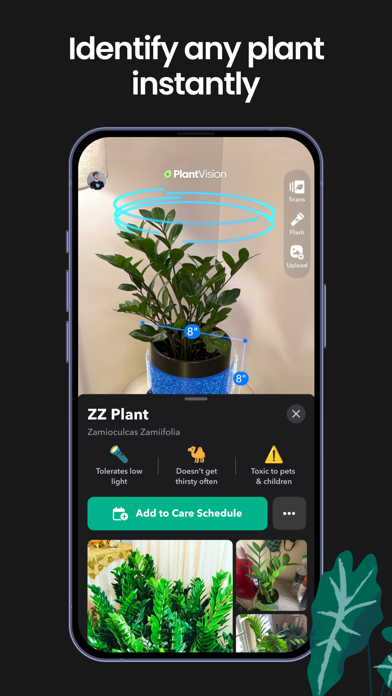
  • Frame 2 ('Identify any plant instantly') shows the PlantVision AR scanning UI with a real identification result β€” this directly answers the 'how does it work' question and demonstrates a visually impressive feature.
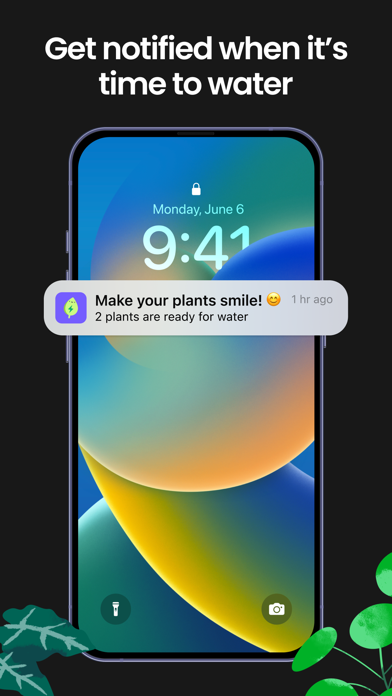
  • Frame 3 ('Get notified when it's time to water') shows a lock-screen notification β€” a clever way to demonstrate the reminder feature in a context users instantly recognize. The emotional hook ('Make your plants smile!') is present but small.
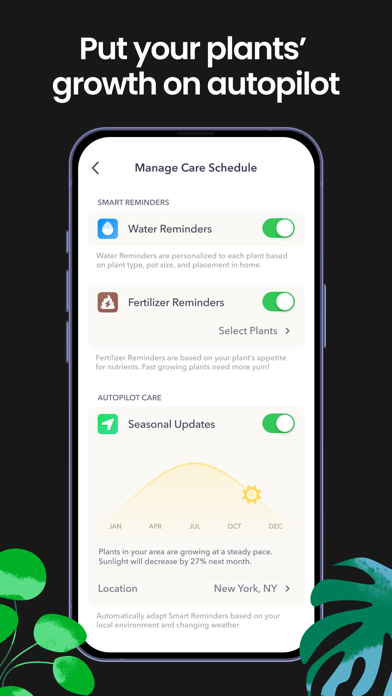
  • 9 iPhone screenshots is a solid count. The existing frames observed (1, 2, 3) are well-executed with clear, large-type headlines and real UI β€” no issues with the visual quality of the frames reviewed.

Recommendations

  • Priority fix: upload iPad-optimized screenshots. iPad screenshots are required for full iPad App Store placement. You can repurpose the existing iPhone frames with iPad-sized crops (2048x2732px) as a minimum viable fix β€” this alone restores iPad discoverability.
  • Frame 1 is already doing its job with the App of the Day badge and outcome headline. Do not change it. The badge is a trust signal that few competitors can match β€” keep it in the primary position.
  • For frames 4-9 (not reviewed in detail), ensure at least one frame addresses the community angle (social feed, #Communities) since that is a genuine differentiator. Also consider a frame that surfaces the 'disease identifier' feature β€” that keyword cluster has search demand and a visual demo would reinforce it.
10/10

Ratings & Reviews

19445 reviews Β· 4.5999 avg

Analysis

19,445 ratings at 4.6β˜… is a genuinely exceptional signal. This volume puts Greg firmly in the 'established' tier β€” it is extremely difficult for a competitor to displace an app at this rating volume and star average. Apple's algorithm heavily weights recency, and 19,445 ratings on the current version indicates sustained install and rating velocity. The sampled recent reviews show a 2.3/5 average across 50 reviews, which is a warning flag β€” a divergence between the 4.6β˜… lifetime average and a lower recent-review sentiment suggests user experience issues (crashes, paywalled features, watering schedule reliability) that are generating negative recency. If this trend continues, the recency signal will start to drag the ranking impact of the otherwise strong lifetime rating.

Recommendations

  • Trigger the SKStoreReviewController rating prompt specifically after a successful plant identification event β€” the moment a user scans a plant and sees the species result is a clear success moment with positive emotional valence. This maximizes the probability of a 5β˜… response.
  • Address the crash and misidentification issues surfaced in recent reviews as a priority β€” these are the two most common negative themes in the sampled reviews ('Continued to crash as I was loading photos. Misidentified several plants.'). A technical stability update will stem the recent-review negativity faster than any ASO change.
  • Respond publicly to the 1β˜… crash and cancellation reviews. Apple shows developer responses to future users β€” a thoughtful response that references the fix ('We shipped a stability patch in v[X] that addresses the photo loading crash β€” please update and let us know if the issue persists') converts fence-sitters and signals active maintenance.

Screenshot Copy5 frames

Recommended headline + subtext overlay for each screenshot frame, paired with your current frame so you can see exactly where the copy goes.

Frame 1Frame 1
Proposed copy
New headline

Plants Alive. Zero Guesswork.

New subtext

Apple App of the Day β€” 4.6β˜… from 19,000+ plant parents

Why this copy works

Leads with the outcome users want (plants that survive) and the differentiator (zero guesswork) in five words readable at thumbnail size. The App of the Day badge and star count are the strongest trust signals available β€” surfacing them in the subtext answers the 'should I trust this?' question before the user taps into the product page. Current Frame 1 already executes this well; this copy tightens the headline and adds the rating count to the subtext for higher conversion confidence.

Frame 2Frame 2
Proposed copy
New headline

Identify Any Plant Instantly

New subtext

Point your camera β€” Greg names the species, care needs, and light requirements in seconds

Why this copy works

Answers how the Frame 1 outcome is achieved. The mechanism (camera scan β†’ instant ID) is visually demonstrated by the PlantVision AR frame already in this screenshot position. The subtext adds specificity ('names the species, care needs, and light requirements') that tells the user exactly what they get β€” reducing post-install surprise and improving D1 retention.

Frame 3Frame 3
Proposed copy
New headline

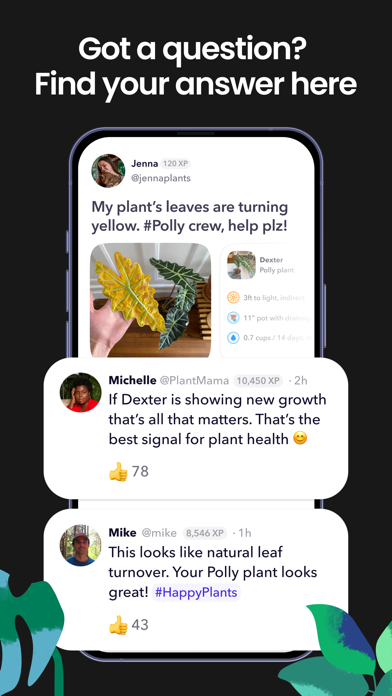
Never Forget to Water Again

New subtext

Smart reminders arrive exactly when each plant is thirsty β€” personalized to your home

Why this copy works

The existing Frame 3 shows a lock-screen notification, which is the perfect visual backdrop for this copy. 'Never forget to water again' is the core anxiety this feature resolves. 'Personalized to your home' differentiates from generic reminder apps and addresses the watering-reliability concern surfaced in recent negative reviews β€” users who understand it's personalized have better expectations.

Frame 4Frame 4
Proposed copy
New headline

Spot Disease. Save the Plant.

New subtext

Scan struggling leaves β€” Greg diagnoses pests and diseases with a fix

Why this copy works

Plant disease identification is a distinct search-demand category (popularity 27 in the keyword data) that the current screenshot set does not explicitly address. Naming it in a frame expands the app's perceived utility beyond watering into rescue mode β€” appealing to users who already have sick plants, not just healthy ones. This also directly supports the 'plant disease identifier' keyword cluster.

Frame 5Frame 5
Proposed copy
New headline

1M+ Plant Parents. One Community.

New subtext

Free to join β€” ask questions, share your collection, get answers in minutes

Why this copy works

The community angle is a genuine competitive differentiator that no pure-utility identifier app can match. Surfacing the scale ('1M+') and the zero-cost entry ('free to join') at Frame 5 handles the monetization question proactively β€” users who swipe this far are ready to install and should understand the app is free to start. The 'get answers in minutes' claim is reinforced by real review sentiment ('get an answer in minutes') so it is credible.

90-Day Action Plan

Week 1

5 tasks
  • Apply the new title (27/30 chars), subtitle (22/30 chars), and 100-char keyword field (99/100 chars) from the Ready-to-Paste and 100-Char Keyword Field sections above.
  • Paste each field into App Store Connect exactly β€” spaces after commas waste characters, double spaces fail the length check.
  • Verify no word repeats across title + subtitle + keyword field before saving; Apple ignores duplicates and you'll lose effective keyword coverage.
  • Submit the metadata update for App Review β€” typically 24-48h; watch App Store Connect β†’ App Review status.
  • Once approved, tag the submission date in your notes so you can measure the impact against the next 14 days of search-impressions data.

Week 2

3 tasks
  • Upload iPad screenshots using the Frame 1-5 copy from the Screenshot Copy section above. Hand the headlines and subtext to your design team along with the existing iPhone screenshot mockups β€” iPad-sized crops at 2048x2732px are the minimum viable format. Missing iPad screenshots means zero iPad App Store search placement.
  • For Frame 4 (disease identifier), confirm your design team captures the PlantVision scan-of-a-sick-leaf UI state β€” this frame requires a specific product screenshot, not a marketing illustration.
  • If you have a real '1M+ plant parents' or equivalent user count figure that is accurate, confirm it with your data team before the description goes live. Inaccurate social proof claims violate App Store guidelines.

Week 3

2 tasks
  • Check App Store Connect > Analytics > Search Terms. Confirm Greg is generating impressions for 'zero,' 'ai plant identifier,' 'community,' and 'reminder' β€” these are the keyword clusters the new subtitle and keyword field are targeting. If impressions for a term are zero after 7 days, the token may be suppressed (check for accidental duplication across title/subtitle/field).
  • Review the crash reports in App Store Connect > Crashes. The sampled recent reviews include two crash-specific 1β˜… ratings ('Continued to crash as I was loading photos'). A stability build shipped in week 3 will stop the bleeding on recent-review sentiment, which is currently the only realistic threat to the 4.6β˜… rating trajectory.

Ongoing

3 tasks
  • Trigger the rating prompt (SKStoreReviewController.requestReview()) immediately after a successful plant identification β€” the moment the species name and care card appear on screen. This is the clearest success moment in the app: the user pointed their camera, Greg delivered an answer, and the emotional state is peak positive. Never prompt on app open or after a crash.
  • Monitor weekly rankings for 'zero,' 'ai plant identifier,' and 'community' β€” the three highest-opportunity terms in the keyword research table that the new metadata is targeting. Set a 4-week check-in to assess whether these terms are generating impressions in Analytics.
  • Update the keyword field seasonally: in early spring, swap low-performing tokens for 'spring planting,' 'seedling,' or 'repotting' as seasonal search behavior shifts. Fall is an opportunity for 'fall garden,' 'winter care,' 'dormancy' type queries. The keyword field update takes only 24 hours to index and requires no binary resubmission.

Expected Impact

The subtitle addition alone should generate meaningful new keyword impressions within 7-14 days of going live β€” 30 characters of subtitle at title-equivalent weight is a structural gap that Apple's algorithm fills quickly once indexed. The shift from no subtitle to a subtitle targeting 'AI identifier,' 'water,' and 'reminder' (all with popularity 28-58) should surface Greg in new query clusters it is currently invisible for. The keyword field refinement β€” removing title-duplicated tokens and adding high-opportunity terms like 'zero' (opportunity 29) and 'tips' (opportunity 24) β€” should expand the total indexed keyword footprint by an estimated 8-12 new compound queries. The description rewrite does not affect keyword ranking but should improve conversion rate by moving the App of the Day badge and 4.6β˜… rating count above the fold β€” the two highest-trust signals in the app's history, currently buried after a 'Welcome to Greg' opener. Combined, these changes target a realistic increase from the current 65/100 metadata score to the 89/100 potential, with measurable search impression improvement expected in 4-6 weeks.