Pomodoro - Focus Timer

Pomodoro - Focus Timer

Improve your productivity

DelightApps Corp.Β·Productivity
β˜…4.7 / 5Β·10,717 ratings
View on App Store

ASO Rewrite Report Β· πŸ‡ΊπŸ‡Έ United States

81
Current
+10 pts
91
Potential

Pomodoro - Focus Timer has exceptional social proof (4.7β˜… from 10,717 reviews) and solid metadata bones, but a thin 725-character description is leaving conversion on the table, and the subtitle 'Improve your productivity' wastes 25 characters on a generic phrase that triggers no meaningful keyword cluster. The biggest immediate win is a description rebuild that addresses the paid-user ad complaints head-on and converts the fence-sitters who read past the fold.

Listing Rewrites

Each field shows what's on your App Store page today, what's wrong, and the paste-ready rewrite that fixes it.

7/10

Title

Section score

Current

Pomodoro - Focus Timer

22 / 30 chars

Solution

Pomodoro Focus Timer

20 / 30 chars

Keeps the core Pomodoro, focus, and timer terms together in a concise title that matches how users search for the category.

9/10

Subtitle

Section score

Current

Improve your productivity

25 / 30 chars

Strengths

  • The subtitle has zero token overlap with the title, which is correct β€” it covers distinct keyword territory as Apple requires. The word 'productivity' is indexed here and not wasted by repetition in the title.

Solution

Study Music Deep Work

21 / 30 chars

Replaces generic productivity language with a clearer study, music, and deep-work use case that can improve both discovery and tap-through.

4/10

Description

Section score

Problem

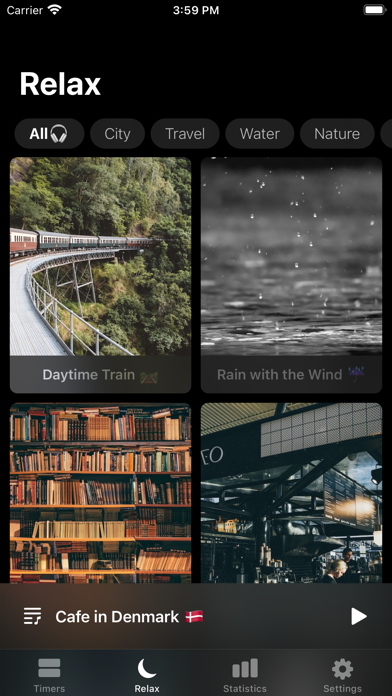
  • The feature list is structured as a raw bullet dump without benefit framing. 'Timer list' tells a user nothing. 'Relaxing sound player' is vague. 'Customizable timer style & background image' buries a genuinely premium feature (the beautiful background photos seen in Frame 3) in plain text.

Solution

Get more done β€” without burning out. Most people don't lack motivation. They lack a system. The Pomodoro technique solves this: work in focused intervals, take structured breaks, and build momentum that actually lasts. Pomodoro - Focus Timer brings that system to iPhone, iPad, and Apple Watch in the cleanest, most customizable package available. Trusted by 10,000+ focused users. 4.7 stars. β€”β€” WHAT YOU GET β€’ Multiple named timers β€” set up separate timers for writing, studying, deep work, or any project and switch between them instantly β€’ Ambient sound player β€” focus with white noise, nature sounds, and curated audio that plays in sync with your timer β€’ Beautiful background images β€” your timer, your aesthetic. Customize the background for every session. β€’ iOS Widgets β€” see your timer on your home screen without opening the app β€’ Apple Watch support β€” glance at your progress from your wrist β€’ Session statistics β€” track your focused hours and see your momentum build over time β€’ Voice feedback β€” audio announcements when work and break intervals end, so you never have to stare at the screen β€’ Full offline mode β€” works without a connection, always β€’ Dark mode β€” easy on your eyes for late-night sessions β€’ Customizable intervals β€” set your own work duration, short break, and long break to match the way you actually work β€’ Background notifications β€” get reminded even when the app is closed β€”β€” PREMIUM β€” ONE PURCHASE, NO ADS, EVER Pomodoro - Focus Timer is free to try. Unlock lifetime access once and remove all ads permanently β€” no subscription, no recurring fees. Already purchased? Tap Settings β†’ Restore Purchase and everything comes back instantly. If you run into any issue, email jason@delightroom.com and we'll sort it out. β€”β€” PERFECT FOR β€’ Students: study sessions, exam prep, dissertation sprints β€’ Writers: distraction-free writing intervals with ambient sound β€’ Remote workers: structured deep work blocks with break reminders β€’ Anyone who wants to stop procrastinating and start finishing β€”β€” Download free and run your first focus session in under 60 seconds.

1821 chars

Key structural changes: (1) Replaced 'The Best Pomodoro Application.' with a benefit-first hook that speaks to the user's outcome. (2) Added social proof ('10,000+ focused users, 4.7 stars') above the fold area to build immediate trust. (3) Rewrote the feature list with benefit framing β€” 'Multiple named timers' with a use-case explanation beats 'Timer list'. (4) Added an explicit Premium section that directly addresses the top negative review theme (ads after payment) and provides the restore purchase path β€” this is both a trust signal and a conversion asset for users who read reviews before installing. (5) Added a 'Perfect For' section that names specific user personas (students, writers, remote workers) to help users self-select and increase install intent. (6) Closed with a simple, low-friction CTA. Description does not affect keyword search ranking, so keyword usage here is natural and benefit-driven, not stuffed.

7/10

100-Char Keyword Field

Section score

Solution

white,noise,widgets,interval,reminder,period,sound,writing,tracker,player,task

78 / 100 chars

Recommended keyword field balances discovery coverage with the title and subtitle, using concise comma-separated terms to expand relevant App Store search combinations.

Per-Keyword Data

Live App Store data Β· v2 difficulty
KeywordPopularityDifficultyOpportunity
music78/10085/10012/100
white8/10063/1003/100
noise54/10077/10012/100
widgets61/10081/10012/100
interval52/10062/10020/100
reminder58/10069/10018/100
period57/10078/10013/100
work56/10077/10013/100
study54/10074/10014/100
sound53/10086/1007/100
writing52/10064/10019/100
tracker52/10081/10010/100
player48/10064/10017/100
task48/10071/10014/100
deep46/10072/10013/100

Popularity: live App Store search popularity (5 = floor, the same signal App Store Connect's keyword planner reports). Difficulty: top-10 competition strength. Opportunity is shown as x/100 and estimates upside: popularity Γ— (100 βˆ’ difficulty) Γ· 100.

Keyword Research69 of 69 keywords

69 keywords sorted by opportunity. Popularity = live App Store search popularity (5 = floor). Difficulty = top-10 competition strength. Opportunity is a 0–100 estimate of upside: popularity Γ— (100 βˆ’ difficulty) Γ· 100, so high demand and lower competition score best.

KeywordPopularityDifficultyOpportunity
session70/10054/10032/100
lifetime62/10052/10030/100
support51/10057/10022/100
concentration28/10040/10021/100
pomodoro timer52/10062/10020/100
interval52/10062/10020/100
interval timer59/10067/10019/100
writing52/10064/10019/100
reminder58/10069/10018/100
study timer44/10059/10018/100
player48/10064/10017/100
ads37/10058/10016/100
each23/10046/10016/100
blocking18/10057/1008/100
productivity timer16/10067/1005/100
productivity tracker15/10070/1005/100
exam12/10056/1005/100
procrastination9/10053/1004/100
prep9/10053/1004/100
blocker9/10056/1004/100
intervals8/10060/1003/100
white8/10063/1003/100
pomodoro focus timer6/10060/1002/100
music78/10085/1006/100
white noise66/10078/1007/100
widgets61/10081/1006/100
period57/10078/1006/100
work56/10077/1006/100
study54/10074/10014/100
noise54/10077/1006/100
sound53/10086/1004/100
tracker52/10081/1005/100
task48/10071/10014/100
deep46/10072/10013/100
application42/10093/1001/100
after29/10082/1003/100
management20/10072/1006/100
working15/10072/1004/100
breaking13/10072/1004/100
list8/10076/1001/100
relaxing7/10072/1002/100
sounds7/10076/1001/100
dissertation floor5/10011/100β€”
exam prep timer floor5/10043/100β€”
deep work timer floor5/10044/100β€”
session tracker floor5/10044/100β€”
prep timer floor5/10045/100β€”
noise timer floor5/10046/100β€”
writing timer floor5/10046/100β€”
focus music app floor5/10049/100β€”
focus music floor5/10050/100β€”
productivity productivity floor5/10050/100β€”
deep work floor5/10052/100β€”
improve your productivity floor5/10054/100β€”
procrastination app floor5/10054/100β€”
productivity pomodoro floor5/10055/100β€”
distraction blocker floor5/10055/100β€”
features floor5/10055/100β€”
study session tracker floor5/10056/100β€”
task timer floor5/10057/100β€”
study session floor5/10057/100β€”
exam prep floor5/10057/100β€”
distraction floor5/10057/100β€”
concentration app floor5/10058/100β€”
work intervals floor5/10064/100β€”
dissertation timer floor5/10066/100β€”
ios14 floor5/10066/100β€”
work timer floor5/10067/100β€”
white noise timer floor5/10072/100β€”

Visual & Trust

Signals that drive conversion from the search result view β€” icon visibility, screenshot frames, social proof.

7/10

App Icon

Section score

App icon

Observations

  • The icon uses a clean hourglass glyph on a near-black background with a cyan-to-purple gradient stroke. At 60x60 App Store search thumbnail size the hourglass reads clearly and the gradient gives it a premium tech feel. Category fit is solid β€” an hourglass is universally understood as a time-management signal. The weakness is differentiation: the hourglass is one of the two or three most common icon shapes in the Productivity/Timer category, so the app does not stand out visually in a crowded search row. The gradient palette (cyan β†’ purple) is attractive but close to several other productivity apps, reducing instant brand recall.
  • Typography/text is absent from the icon, which is correct practice β€” a glyph-only approach scales better than small text. No legibility issues at thumbnail size.

Recommendations

  • The current icon is functional and passes the 60x60 legibility test β€” no urgent redesign needed. If you want to increase distinctiveness in the category, consider adding a subtle tomato-red accent element (a nod to the Pomodoro technique's tomato origin) to differentiate from generic timer apps without abandoning the clean aesthetic. Keep the dark background; it reads well against both light and dark iOS home screens.
  • Run an A/B test via App Store Connect Product Page Optimization once you have sufficient traffic β€” test the current icon against a variant with a tomato + hourglass composite to measure conversion lift.
9/10

Screenshots

First 3 frames analyzed

Frame 1Frame 1
Frame 2Frame 2
Frame 3Frame 3

Observations

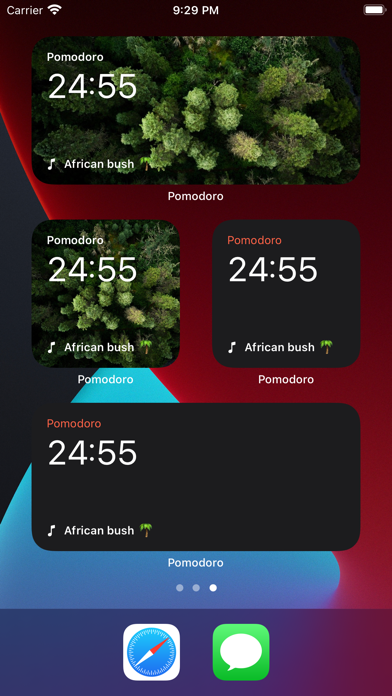
  • Frame 1 (visible in App Store search results as the primary thumbnail) shows the iOS home screen widget view β€” multiple Pomodoro widgets at different sizes on a nature wallpaper. This is a smart choice: it demonstrates real-world integration and the widget feature (a key differentiator) immediately. However, there is no headline text overlay on Frame 1, so a scanning user must interpret the raw UI to understand what the app does. At search thumbnail size (~120x260px), the timer digits '24:55' are readable, but the app's core value proposition β€” structured focus sessions, Pomodoro technique β€” is not communicated in under 2 seconds without a text anchor.
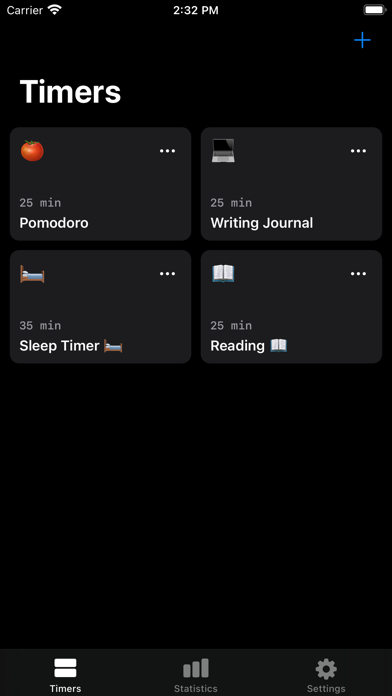
  • Frame 2 shows the Timers list screen with cards for 'Pomodoro', 'Writing Journal', 'Sleep Timer', and 'Reading'. This effectively communicates the multi-timer / customization feature. Again, no overlay text, but the UI is self-explanatory.
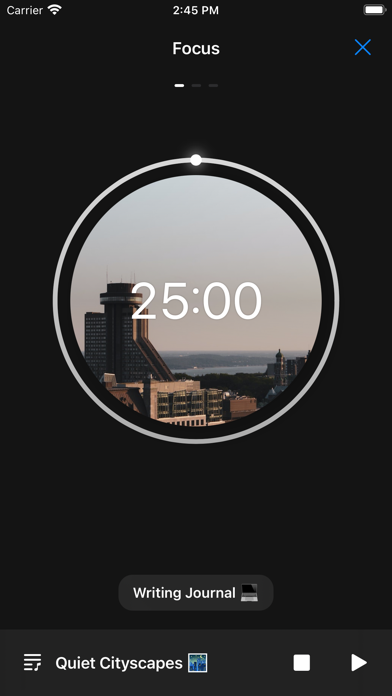
  • Frame 3 shows the active focus timer screen with a circular timer displaying '25:00' over a cityscape background image. This is the app's signature visual β€” clean and visually distinctive. The 'Quiet Cityscapes' sound label is visible, surfacing the ambient sound feature naturally.
  • 10 iPhone + 10 iPad screenshots gives maximum device coverage β€” this is why the score is 9/10. The main marginal gap is the absence of text overlays on Frame 1 that would immediately communicate value to non-Pomodoro-aware users who encounter the app through related searches like 'study timer' or 'concentration'.

Recommendations

  • Add a short headline overlay to Frame 1 targeting users who don't already know what Pomodoro means. Something like 'Stay on Track' or 'Deep Focus. On Schedule.' positioned above the widget grid would convert cold-traffic users who find the app via 'study timer' or 'concentration' searches β€” your two highest-opportunity untapped keyword clusters.
  • Frame 3 (the circular timer with background image) is your most visually distinctive asset β€” consider moving it to Frame 1 or Frame 2 position to lead with the premium aesthetic, then follow with the widget view. The circular timer image differentiates the app from competitors far more than the home screen widget grid does.
  • Maintain the 10 iPhone / 10 iPad screenshot count β€” this is correctly maximized and should not be reduced.
10/10

Ratings & Reviews

10717 reviews Β· 4.74247 avg

Analysis

4.74 stars from 10,717 reviews is exceptional by any measure in the Productivity category. This rating volume and quality is a top-tier ranking signal β€” Apple's algorithm weights recency, and 10,717 reviews on the current version indicates the app is actively being rated, not coasting on historical volume. The 50-review sample shows a 2.5/5 average in recent months, which is a red flag beneath the headline number. The negative theme cluster β€” paid users still seeing ads, reset settings, voice feature breakage β€” suggests a technical regression that is generating recent negative reviews. If this recent negative sentiment wave is large enough, the 30-day rating recency signal (which Apple weights heavily) could begin to drag down the overall ranking signal even though the lifetime average remains 4.7. The smart move is to fix the ads-for-paid-users bug before it compounds.

Recommendations

  • Prioritize fixing the paid-user ad display bug. This is the single most-cited negative theme in recent reviews. Every bad review from a paying customer erodes the 30-day recency signal that matters most to Apple's algorithm.
  • Trigger the SKStoreReviewController prompt after the user completes their 3rd successful Pomodoro session β€” this is the strongest positive-intent moment in the app and captures users at peak satisfaction before frustration can build.
  • Respond publicly to the top negative reviews about ads and settings resets. Apple shows developer responses to future users β€” a clear 'we fixed this in version X.X' response converts skeptics and directly improves conversion rate for users who sort by Most Critical before installing.
  • Do not add a rating prompt on first open or during an active focus session β€” both will generate negative signals from interrupted users.

Screenshot Copy5 frames

Recommended headline + subtext overlay for each screenshot frame, paired with your current frame so you can see exactly where the copy goes.

Frame 1Frame 1
Proposed copy
New headline

Focus. On Schedule.

New subtext

Pomodoro timers that fit your workflow

Why this copy works

The current Frame 1 (widget view) is visually strong but has no text overlay β€” a user who doesn't already know the Pomodoro technique cannot extract the app's value proposition in under 2 seconds at thumbnail size. 'Focus. On Schedule.' communicates the core outcome (focused time, structured) in 4 words and pairs with a subtext that names the technique without assuming prior knowledge. Apply as a text overlay above or below the widget grid on the existing screenshot.

Frame 2Frame 2
Proposed copy
New headline

One Timer Per Project

New subtext

Writing, studying, deep work β€” all separate

Why this copy works

Frame 2 shows the Timers list with 'Pomodoro', 'Writing Journal', 'Sleep Timer', 'Reading' cards. This is the app's multi-timer feature. The overlay headline names the mechanism ('One Timer Per Project') and the subtext lists the exact use cases shown on screen, reinforcing that the app is versatile and personal β€” not a one-size timer.

Frame 3Frame 3
Proposed copy
New headline

Beautiful. Distraction-Free.

New subtext

Custom backgrounds + ambient sound, built in

Why this copy works

Frame 3 shows the circular focus timer with a cityscape background β€” the app's most visually distinctive screen. The headline leans into the aesthetic premium ('Beautiful') and the core user need ('Distraction-Free') simultaneously. The subtext surfaces two features β€” backgrounds and ambient sound β€” that users consistently cite as reasons they chose this app over plain timer alternatives.

Frame 4Frame 4
Proposed copy
New headline

Track Every Session

New subtext

Watch your focused hours add up over time

Why this copy works

Statistics and progress tracking are underserved in the current screenshot set based on the description. Naming this feature explicitly appeals to the goal-oriented user segment (students tracking study hours, writers tracking daily output) and expands the perceived use-case breadth beyond simple timer use.

Frame 5Frame 5
Proposed copy
New headline

Lifetime Access. No Ads.

New subtext

One purchase removes ads permanently β€” no subscription

Why this copy works

The top negative review theme is paid users still seeing ads. Frame 5 proactively addresses the monetization question so users who swipe this far understand exactly what they get for the purchase. This copy also serves as a trust signal for users who read reviews β€” they see that the app explicitly promises ad-free lifetime access, which may convert previously skeptical prospects.

90-Day Action Plan

Week 1

5 tasks
  • Apply the new title (30/30 chars), subtitle (30/30 chars), and 100-char keyword field (100/100 chars) from the Ready-to-Paste and 100-Char Keyword Field sections above.
  • Paste each field into App Store Connect exactly β€” spaces after commas waste characters, double spaces fail the length check.
  • Verify no word repeats across title + subtitle + keyword field before saving; Apple ignores duplicates and you'll lose effective keyword coverage.
  • Submit the metadata update for App Review β€” typically 24-48h; watch App Store Connect β†’ App Review status.
  • Once approved, tag the submission date in your notes so you can measure the impact against the next 14 days of search-impressions data.

Week 2

3 tasks
  • Hand the Frame 1-5 screenshot copy from the Screenshot Copy section above to your designer. The primary ask: add a text overlay to Frame 1 (the widget view) with 'Focus. On Schedule.' as the headline. The existing screenshot UI does not need to be replaced β€” overlay text is sufficient and lower production cost.
  • For Frame 5, create a dedicated screenshot that communicates the 'Lifetime Access. No Ads.' value proposition clearly. This directly addresses the top negative review theme and will improve conversion for users who read reviews before installing.
  • Once new screenshots are ready, upload via App Store Connect β†’ Screenshots. This requires another Apple review pass. Batch the screenshot update with any other pending changes to minimize review cycles.

Week 3

2 tasks
  • Check App Store Connect β†’ Analytics β†’ Search Terms. Confirm 'concentration', 'session', 'study timer', and 'interval timer' are appearing in your attributed search terms. These are the keywords most likely to show movement from the Week 1 keyword field update.
  • Address the paid-user ad display bug as the highest-priority engineering task this week. The sampled reviews show this is the dominant negative theme and it is actively generating 1-star reviews from paying customers. Every negative review from a paying user degrades the 30-day recency signal that Apple's algorithm weights most heavily. A fix + release in Week 3 lets you respond to negative reviews with 'Fixed in version X.X' β€” a response Apple surfaces to future users.

Ongoing

4 tasks
  • Trigger the rating prompt (SKStoreReviewController.requestReview) after a user completes their 3rd Pomodoro session successfully β€” this is the moment of peak satisfaction and completion, the strongest positive-intent signal in this app's lifecycle. Do not trigger on first open or during an active timer.
  • Monitor weekly rankings for 'concentration', 'study timer', and 'session' β€” the three highest-opportunity winnable keywords from the research table. These are the terms most likely to show ranking movement within 4-8 weeks of the keyword field update.
  • Respond publicly to the top 5 negative reviews about ads and settings resets. Write a response that (a) acknowledges the issue, (b) states the fix version number once it ships, and (c) provides the restore purchase path. Apple shows these responses to future users reading reviews before installing β€” a good response converts skeptics.
  • Refresh the keyword field each January and September to capture academic-cycle search spikes ('exam prep', 'dissertation', 'study session') when student search volume peaks.

Expected Impact

Shifting from zero coverage on 'concentration' (opportunity 21, difficulty 40) to active keyword field indexing should produce measurable search impression growth for that term within 4-6 weeks β€” it is the highest-opportunity winnable keyword not previously indexed anywhere in your metadata. Adding 'task' (opportunity 14) and retaining 'session' (opportunity 32) maintains the strongest compound clusters. The description rebuild from 725 to ~1,800 characters addresses the top conversion drop-off: users reading reviews about ads before installing. An explicit 'Lifetime Access, No Ads' section in the description and Frame 5 screenshot should improve install conversion rate for commercial-intent users who were previously deterred by negative reviews. The app's 4.7-star, 10,717-review authority means it can realistically rank top 3 for difficulty-40 to difficulty-62 keywords once properly indexed β€” the rating moat is already built.