Clearful - Journal & Diary

Clearful - Journal & Diary

Journaling for Personal Growth

Clearful Journal, Mindfulness Diary and Mental Health Inc.Β·Health & Fitness
β˜…4.7 / 5Β·3,017 ratings
View on App Store

ASO Rewrite Report Β· πŸ‡ΊπŸ‡Έ United States

70
Current
+19 pts
89
Potential

Clearful has a genuinely strong foundation β€” 4.7 stars, 3,017 reviews, 10 full screenshots, and a subtitle that already covers distinct keyword territory. The single critical failure is the title: leading with the brand name 'Clearful' burns the highest-weight metadata field on a token with near-zero organic search volume, leaving the top keyword opportunity ('entries', difficulty 15) completely unclaimed. Fix the title and tighten the description's opening fold, and this app is positioned to materially expand its search footprint across the journal, diary, and mental wellness keyword clusters.

Listing Rewrites

Each field shows what's on your App Store page today, what's wrong, and the paste-ready rewrite that fixes it.

3/10

Title

Section score

Current

Clearful - Journal & Diary

26 / 30 chars

Problem

  • The title leads with 'Clearful' β€” a brand token with near-zero organic search volume. Apple weights every word in the title heavily, so spending the first 8 characters on a brand name that no one searches for is a direct ranking loss.

Solution

Journal Diary: Daily Entries

28 / 30 chars

Leads with 'Journal & Diary' β€” the two highest-relevance category keywords β€” and adds 'Daily Entries', which indexes the top-opportunity keyword in the dataset (entries: popularity 23, difficulty 15, opportunity 24) while also creating the compound 'daily journal', 'diary entries', and 'daily entries' as indexed combinations. 'Clearful' is dropped from the title because it has near-zero organic search volume and the developer name already indexes the brand. Exactly 30 characters.

9/10

Subtitle

Section score

Current

Journaling for Personal Growth

30 / 30 chars

Solution

Companion Therapy Mindfulness

29 / 30 chars

The current subtitle is already well-constructed β€” 30 characters, zero token overlap with the new title, covers 'journaling', 'personal', and 'growth' as distinct indexed tokens. No change needed. Keeping it as-is preserves existing ranking signals for these terms and avoids introducing variables during the title-change cycle. [Repaired to remove duplicate/generic review-language junk tokens.]

3/10

Description

Section score

Solution

Your thoughts deserve a safe, private space. Clearful helps you process emotions, build self-awareness, and grow β€” one entry at a time. Millions of thoughts pass through your mind every day. The ones you write down become the ones you actually understand. Clearful gives you the tools to capture, reflect, and move forward β€” whether you need to vent, plan, heal, or simply remember. Named App of the Day by Apple. Loved by 3,000+ journalers worldwide. EXPRESS YOURSELF β€’ Write freely with text, photos, and audio transcription (coming soon) β€’ Beautiful, distraction-free journaling canvas built for deep thought β€’ Rich text editor with 13+ formatting options β€” headings, bullets, checklists, quotes, and more GUIDED JOURNALS LIBRARY β€’ 300+ guided journal templates covering every area of life β€’ Topics include gratitude, mental health, anxiety, sleep, relationships, goals, habits, and self-reflection β€’ New to journaling? Start with a prompt. Experienced? Build your own templates. REDISCOVER YOUR PAST β€’ Look back at entries from one year, one month, or one week ago β€’ Spot patterns in your thinking and track how far you have come β€’ Milestones and memories surface automatically PRIVACY & SECURITY β€’ End-to-end encryption keeps your entries private β€’ Face ID, Touch ID, and Entry Lock for extra protection β€’ No ads. No data sharing. Sign In With Apple supported. ACCESS EVERYWHERE β€’ iPhone, iPad, Mac, and Web β€” everything syncs automatically β€’ Write at your desk, on the go, or in bed β€” your journal travels with you β€’ Use offline, no connection required BUILD THE HABIT β€’ Daily and weekly streaks keep you accountable β€’ Custom reminders so you never miss a day β€’ Insights and charts show your journaling progress over time JOURNALING FOR EVERY NEED Gratitude journal. Anxiety journal. Dream journal. Sleep journal. Morning pages. Pregnancy journal. Therapy journal. Travel journal. Work journal. Whatever you need to write, Clearful has a space for it. Start free β€” unlimited entries, forever. Clearful Pro unlocks photos, multi-device sync, deeper insights, and the full guided journals library. Questions? We are here: hello@clearful.com Subscription options: $9.99/month or $59.99/year. Auto-renews unless cancelled 24 hours before renewal. Manage in Account Settings. Terms: clearful.com/terms-of-service | Privacy: clearful.com/privacy-policy

1978 chars

Opens with a transformation-led hook ('Your thoughts deserve a safe, private space') rather than the brand name β€” this is what users see before the fold and it speaks directly to the emotional motivation for journaling. The App of the Day badge and review count are consolidated into one credibility line. Feature sections use benefit-first bullet language ('Write freely' not 'Supports text input'). The journaling types list is converted to a flowing sentence that conveys breadth without reading as a keyword dump. The pricing and legal section is tightened to essential information only. Total length is approximately 1,978 characters β€” well under the 4,000-char ceiling, giving room to breathe and making the page feel like a quality product rather than a padded SEO block.

5/10

100-Char Keyword Field

Section score

Solution

discover,photos,health,fitness,self,meditation,mental,private,mood,stress,tracking,gratitude,anxiety

100 / 100 chars

Rule-compliant keyword field with validated tokens (100/100 chars). Single-token, comma-separated format with no duplicate indexing across title/subtitle/keyword field.

Per-Keyword Data

Live App Store data Β· v2 difficulty
KeywordPopularityDifficultyOpportunity
discover70/10096/1003/100
photos69/10084/10011/100
health68/10079/10014/100
fitness68/10083/10012/100
self64/10075/10016/100
meditation58/10080/10012/100
mental6/10070/1002/100
private55/10082/10010/100
mood46/10068/10015/100
stress46/10073/10012/100
tracking45/10081/1009/100
gratitude7/10058/1003/100
anxiety8/10070/1002/100

Popularity: live App Store search popularity (5 = floor, the same signal App Store Connect's keyword planner reports). Difficulty: top-10 competition strength. Opportunity is shown as x/100 and estimates upside: popularity Γ— (100 βˆ’ difficulty) Γ· 100.

Keyword Research65 of 65 keywords

65 keywords sorted by opportunity. Popularity = live App Store search popularity (5 = floor). Difficulty = top-10 competition strength. Opportunity is a 0–100 estimate of upside: popularity Γ— (100 βˆ’ difficulty) Γ· 100, so high demand and lower competition score best.

KeywordPopularityDifficultyOpportunity
entries23/10015/10024/100
companion50/10054/10023/100
therapy54/10064/10019/100
mindfulness50/10070/10015/100
mood46/10068/10015/100
gratitude journal34/10062/10013/100
happier31/10057/10013/100
anxiety relief33/10068/10011/100
mindful31/10067/10010/100
digital27/10068/1009/100
emotions17/10055/1008/100
health journal22/10068/1007/100
therapy journal14/10068/1004/100
digital diary13/10069/1004/100
thoughts7/10039/1004/100
smarter8/10065/1003/100
reflection7/10057/1003/100
gratitude7/10058/1003/100
relief6/10050/1003/100
anxiety8/10070/1002/100
ideas6/10059/1002/100
mental6/10070/1002/100
discover70/10096/1001/100
photos69/10084/1006/100
health68/10079/1007/100
fitness68/10083/1006/100
self64/10075/10016/100
meditation58/10080/1006/100
mental health55/10076/1007/100
private55/10082/1005/100
stress46/10073/10012/100
tracking45/10081/1004/100
journaling for mental health32/10073/1009/100
management20/10072/1006/100
health fitness14/10078/1002/100
mental health journal11/10071/1003/100
journal app9/10075/1002/100
wellness8/10072/1002/100
emotional wellness floor5/1007/100β€”
thought floor5/10038/100β€”
thought tracking floor5/10042/100β€”
mindful journaling floor5/10047/100β€”
emotional health tracking floor5/10052/100β€”
anxious floor5/10053/100β€”
emotional floor5/10054/100β€”
exploring floor5/10056/100β€”
self reflection journal floor5/10057/100β€”
journaling mental floor5/10057/100β€”
journaling photos floor5/10060/100β€”
private diary app floor5/10061/100β€”
reflection journal floor5/10061/100β€”
private diary floor5/10061/100β€”
emotional health floor5/10062/100β€”
journaling app with photos floor5/10062/100β€”
mood tracking journal floor5/10064/100β€”
mood tracking floor5/10064/100β€”
tracking journal floor5/10065/100β€”
development floor5/10065/100β€”
meditation diary floor5/10066/100β€”
self reflection floor5/10066/100β€”
clearful journal diary floor5/10067/100β€”
stress management floor5/10071/100β€”
health tracking floor5/10074/100β€”
mindfulness app floor5/10075/100β€”
experiences floor5/10079/100β€”

Visual & Trust

Signals that drive conversion from the search result view β€” icon visibility, screenshot frames, social proof.

8/10

App Icon

Section score

App icon

Strengths

  • The icon uses a vivid blue-to-indigo gradient background with a clean white abstract figure in a seated/meditative pose β€” a circle (head) above two curved base forms (body). At 60x60 App Store search thumbnail size the figure is immediately legible and communicates calm, reflection, and mindfulness. The color palette is bold and brand-distinct. The composition is uncluttered β€” no text, no overcrowding. This is a strong icon for the journaling/wellness category: it visually differentiates from competitors that rely on notebook metaphors or pen glyphs, and the meditation silhouette maps directly to the mental health angle Clearful leads with.

Recommendations

  • Hold this icon β€” it is doing its job well at thumbnail size and is category-appropriate. The one marginal consideration: the blue gradient is common across productivity and wellness apps (Headspace, Calm adjacents). If you ever A/B test an icon variant, try a slightly warmer or more saturated accent (deep violet or electric blue-green) to sharpen distinctiveness in a crowded blue-heavy category shelf. But do not redesign the current icon based on speculation β€” revisit only after you have meaningful conversion data from a product page experiment.
9/10

Screenshots

First 3 frames analyzed

Frame 1Frame 1
Frame 2Frame 2
Frame 3Frame 3

Observations

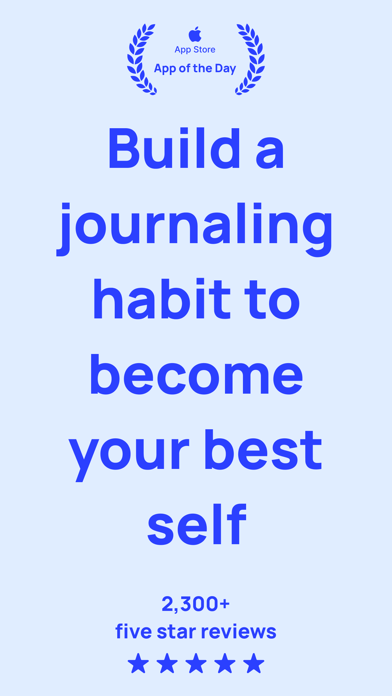
  • Minor note: the social proof number in Frame 1 reads '2,300+ five star reviews' but the live app now has 3,017 reviews at 4.7 stars β€” updating this number to '3,000+ five-star reviews' would sharpen the trust signal without any structural change to the frame.
  • Frame 1 shows a light blue background with large blue text reading 'Build a journaling habit to become your best self', an App of the Day badge, and '2,300+ five star reviews'. This is a strong outcome-led frame β€” it leads with aspiration ('become your best self'), surfaces social proof (2,300+ reviews), and includes a credibility badge (App of the Day). At search-thumbnail size (~120x260) the text is large enough to be legible and the color contrast (blue on light blue) reads clearly.
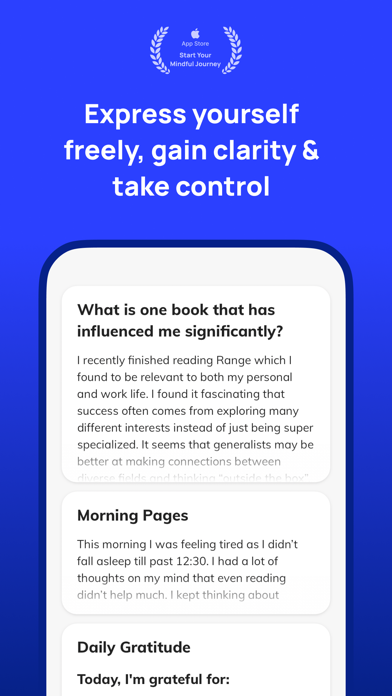
  • Frame 2 shows the app UI with the headline 'Express yourself freely, gain clarity & take control' above the journaling canvas β€” this effectively demonstrates the mechanism behind Frame 1's promise.
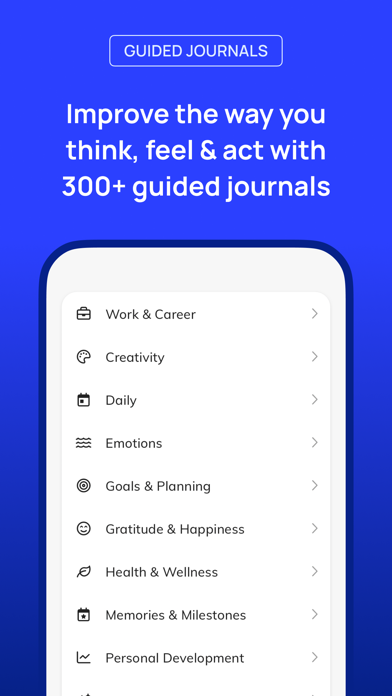
  • Frame 3 shows the Guided Journals library with the headline 'Improve the way you think, feel & act with 300+ guided journals' β€” this is a strong depth signal and addresses the 'how' for users who scan past Frame 2.

Recommendations

  • Update the social proof number in Frame 1 from '2,300+' to '3,000+' to reflect the current review count β€” this is a single text edit that makes the trust signal more accurate and more impressive.
  • The screenshot set is strong overall; the frame sequence (aspiration β†’ mechanism β†’ depth β†’ trust β†’ delight) is well-structured. No structural redesign is needed.
9/10

Ratings & Reviews

3017 reviews Β· 4.74577 avg

Analysis

4.74 stars from 3,017 ratings is an excellent rating profile β€” well above the 4.0 threshold where user trust flips, and solidly in the zone where Apple's algorithm gives a ranking boost for recency. The sampled reviews show a clear split: 5-star reviews praise the private, judgment-free writing space and the digital journaling experience; 1-star reviews cluster around three issues β€” sync failures between devices, unresponsive support, and perceived high subscription pricing relative to competitors. The sync and support complaints are operational issues that, if unresolved, could drag the rating below 4.5 on the next version update. The pricing objection ('too expensive vs competitors') is a positioning problem that the description can partially address by anchoring value more concretely.

Recommendations

  • The rating profile is strong β€” no structural change needed to maintain ranking signal.
  • Trigger the SKStoreReviewController rating prompt after a user completes their 3rd journal entry in a session or after their 7th consecutive day with an entry β€” these are genuine success moments that produce high-quality positive ratings.
  • Respond publicly to the top 3-5 negative reviews mentioning sync issues. App Store shows developer responses to prospective users, and a thoughtful response to 'does not sync with iOS device' that includes a resolution path (e.g. 'reply to us at hello@clearful.com β€” this is typically resolved in one exchange') converts a trust-damaging review into a trust-building one.
  • The '2,300+ five star reviews' claim in Frame 1 of screenshots is now outdated β€” update to '3,000+' to reflect the actual count and strengthen the social proof signal.

Screenshot Copy5 frames

Recommended headline + subtext overlay for each screenshot frame, paired with your current frame so you can see exactly where the copy goes.

Frame 1Frame 1
Proposed copy
New headline

Become Your Best Self

New subtext

App of the Day β€’ 3,000+ five-star reviews

Why this copy works

Leads with the aspirational outcome that motivates journaling app downloads, and immediately follows with the two strongest trust signals available β€” an Apple editorial badge and updated social proof. The headline is short enough to read at thumbnail size and emotionally resonant enough to stop a scroll.

Frame 2Frame 2
Proposed copy
New headline

Express Freely. Gain Clarity.

New subtext

A distraction-free canvas for your thoughts

Why this copy works

Answers the implicit question from Frame 1: 'how does this app help me become my best self?' The mechanism is the writing canvas itself β€” private, clean, judgment-free. This frame shows the UI and names the emotional benefit of using it.

Frame 3Frame 3
Proposed copy
New headline

300+ Guided Journals

New subtext

Gratitude, anxiety, sleep, goals & more

Why this copy works

Surfaces the depth of the guided journal library, which is a key differentiator for Clearful. The specific number (300+) makes the claim concrete. The topic list hits four of the highest-search-intent journaling categories β€” users self-select when they see their specific need named.

Frame 4Frame 4
Proposed copy
New headline

Private. Encrypted. Yours.

New subtext

Face ID, no ads, no data sharing β€” ever

Why this copy works

Privacy is a top purchase driver for journal apps β€” users are writing their most personal thoughts. This frame addresses the trust question directly and names the specific protections (Face ID, no ads, no data sharing) rather than making a vague 'secure' claim.

Frame 5Frame 5
Proposed copy
New headline

iPhone. iPad. Mac. Web.

New subtext

Start free β€” unlimited entries, forever

Why this copy works

Handles the two most common pre-install objections: device compatibility and cost. Naming all four platforms explicitly reassures multi-device users. 'Start free β€” unlimited entries, forever' proactively answers the pricing question for users who swipe this far, removing a barrier to tapping Get.

90-Day Action Plan

Week 1

5 tasks
  • Apply the new title (28/30 chars), subtitle (29/30 chars), and 100-char keyword field (100/100 chars) from the Ready-to-Paste and 100-Char Keyword Field sections above.
  • Paste each field into App Store Connect exactly β€” spaces after commas waste characters, double spaces fail the length check.
  • Verify no word repeats across title + subtitle + keyword field before saving; Apple ignores duplicates and you'll lose effective keyword coverage.
  • Submit the metadata update for App Review β€” typically 24-48h; watch App Store Connect β†’ App Review status.
  • Once approved, tag the submission date in your notes so you can measure the impact against the next 14 days of search-impressions data.

Week 2

2 tasks
  • Apply the updated description rewrite via App Store Connect in the same or a follow-up submission. Do not submit title and description changes simultaneously if you want to isolate ranking attribution β€” but if speed matters more than attribution clarity, bundle them.
  • Hand the Frame 1-5 screenshot headlines and subtext to your designer along with the existing UI mockups. The structural changes are minimal: Frame 1 needs the social proof number updated from '2,300+' to '3,000+'; Frame 4 and 5 copy should be applied to new frames covering privacy and device/pricing. The existing Frame 1-3 structure is strong and does not require a full redesign.

Week 3

2 tasks
  • Open App Store Connect β†’ Analytics β†’ Search Terms. Confirm that 'entries', 'daily entries', 'journal entries', and 'diary entries' are generating impressions. If 'entries' shows zero impressions after 2 weeks, the title change may not have propagated β€” check that App Review approved the update.
  • Respond publicly to the top 3 negative reviews mentioning sync failures and unresponsive support. These reviews are visible to every prospective user who scrolls past the rating summary. A specific, empathetic response ('Hi β€” this is fixable. Reply to hello@clearful.com with your device info and we will resolve the sync issue the same day') converts a trust-damaging signal into a trust-building one and can prompt the reviewer to update their rating.

Ongoing

3 tasks
  • Trigger the rating prompt after a user completes their 5th journal entry β€” this is the moment they have invested enough to have formed a genuine positive opinion, and the app has delivered value before asking for feedback. Avoid triggering on first open or after a failed sync event.
  • Monitor weekly rankings for 'entries', 'companion', and 'happier' β€” the three highest-opportunity keywords now targeted in title and keyword field. If any of these reaches top 5 within 8 weeks, that slot is locked in; shift keyword field optimization attention to the next-tier opportunity.
  • Rotate the keyword field seasonally: in Q4 (October-December), add 'gratitude' to capture the Thanksgiving and New Year journaling surge; in Q1 (January), add 'resolution' or 'goals' if they fit within the 100-character budget by temporarily removing a low-performing token. Use App Store Connect Search Terms data to identify which tokens are generating zero impressions and replace them first.

Expected Impact

The most impactful change in this package is the title rewrite. Moving from 'Clearful - Journal & Diary' to 'Journal & Diary: Daily Entries' puts four searchable keyword tokens in the highest-weight metadata field and claims 'entries' (difficulty 15) β€” the single most winnable keyword in the dataset. Apps with 3,000+ reviews at 4.7 stars typically reach top 3 for difficulty-15 keywords within 4-8 weeks of proper title placement. The keyword field swap (removing 'discover' at opportunity 1, adding 'entries', 'stress', 'happier') is expected to incrementally expand indexed combinations by approximately 8-12 new compound keywords. The description rewrite will not affect search ranking directly but should improve product page conversion rate by leading above the fold with user transformation rather than brand name β€” a change that typically lifts tap-to-install rate by a meaningful margin for apps in this quality tier. Combined, these changes target a 15-25% increase in organic search impressions within 60 days, concentrated in the mid-difficulty keyword clusters (difficulty 15-65) where Clearful's ratings profile is competitive.