Habit Rabbit: Habit Tracker

Habit Rabbit: Habit Tracker

Your productivity pet

Justin Patrick SilangΒ·Productivity
β˜…4.7 / 5Β·8,170 ratings
View on App Store

ASO Rewrite Report Β· πŸ‡ΊπŸ‡Έ United States

69
Current
+16 pts
85
Potential

Habit Rabbit has a genuinely strong foundation β€” 8,170 reviews at 4.7β˜… is a powerful trust signal, and the cute gamification angle is a real differentiator in a crowded category. The two urgent problems are a description that is 484 characters (a full conversion page left blank) and a title that wastes its highest-weight keyword slot on a brand name that almost nobody searches for. Fixing the description alone should meaningfully lift conversion rate; pairing it with a title rewrite targeting 'complete' and related terms can unlock new search impressions within 4–8 weeks.

Listing Rewrites

Each field shows what's on your App Store page today, what's wrong, and the paste-ready rewrite that fixes it.

5/10

Title

Section score

Current

Habit Rabbit: Habit Tracker

27 / 30 chars

Solution

Habit Tracker Goals Mood

24 / 30 chars

Moves habit tracking, goals, and mood into the strongest metadata field so the listing can compete beyond brand-name searches.

9/10

Subtitle

Section score

Current

Your productivity pet

21 / 30 chars

Strengths

  • The subtitle 'Your productivity pet' has zero token overlap with the title β€” that is textbook subtitle strategy and it is working correctly here. 'Productivity' is a meaningful keyword signal for this category.

Solution

Productivity Pet Routine

24 / 30 chars

Preserves the app’s distinctive productivity-pet positioning while adding routine intent in a readable phrase.

2/10

Description

Section score

Problem

  • There is no closing call-to-action. The description simply ends after the bullet list with no invitation to download, no social proof statement, no urgency or emotional close. Users who read to the end have no prompt to act.
  • No social proof is present. With 8,170 ratings at 4.7β˜…, the app has credible social proof that could be cited (e.g., 'Loved by 8,000+ users' or 'Rated 4.7β˜… by thousands of habit builders') β€” this is a trust signal that most competing apps cannot match and it is completely absent from the description.

Solution

Most habit apps feel like homework. Habit Rabbit feels like a game you actually want to open every day. Meet your Habit Rabbit β€” a virtual pet whose home gets cozier, colorful, and more alive the more you follow through on your goals. Skip a habit and the room gets dull. Show up consistently and watch your rabbit's world transform. Loved by 8,000+ users. Rated 4.7 stars. WHAT HABIT RABBIT DOES FOR YOU β€’ Tracks any habit you choose β€” exercise, sleep, reading, hydration, study, anything β€’ Logs your mood daily so you can spot patterns between how you feel and how you perform β€’ Shows your completion history on a clean monthly calendar so you can see your streaks at a glance β€’ Delivers daily motivation quotes and personalized tips from your rabbit β€’ Recommends which habit to focus on based on your recent performance β€’ Tracks lifetime and monthly completion stats so you can measure real progress THE GAME INSIDE THE HABIT TRACKER β€’ Complete habits to earn carrots β€” your in-app currency β€’ Spend carrots to unlock new outfits for your rabbit and new furniture for its home β€’ Watch the room visually evolve as your consistency grows β€’ Compare your rabbit's progress with other users on the global leaderboard WHY IT WORKS WHEN OTHER APPS DON'T Most habit trackers are just checklists. Checklists are easy to ignore. Habit Rabbit gives you a reason to come back that goes beyond willpower β€” your rabbit is waiting, and the home you build together reflects exactly how consistent you have been. That visual feedback loop is what makes the difference between a habit you forget and one that sticks. Free to download. Build your best habits starting today.

1598 chars

Expands from a critically short 484 characters to a conversion-optimized 1,598 characters. Above-the-fold section (first 3 lines) leads with a contrast hook ('homework vs. game') that speaks directly to the user pain point surfaced in positive reviews. Social proof (8,000+ users, 4.7 stars) is placed in the first visible section. Feature bullets are structured as benefit-forward statements, not bare feature names. The gamification mechanic β€” the app's primary differentiator β€” now receives a dedicated section that explains the carrot economy and room evolution loop in specific, tactile terms. Closes with a direct, low-friction CTA. No keyword stuffing; keywords appear naturally where they fit the sentence.

5/10

100-Char Keyword Field

Section score

Solution

home,colorful,stick,design,cute,clean,task,tracking,customize,visual,management,motivational

92 / 100 chars

Recommended keyword field balances discovery coverage with the title and subtitle, using concise comma-separated terms to expand relevant App Store search combinations.

Per-Keyword Data

Live App Store data Β· v2 difficulty
KeywordPopularityDifficultyOpportunity
home66/10084/10011/100
colorful53/10079/10011/100
stick51/10070/10015/100
design51/10081/10010/100
cute50/10076/10012/100
clean50/10083/1009/100
task48/10071/10014/100
tracking45/10081/1009/100
customize27/10077/1006/100
routine9/10067/1003/100
visual21/10061/1008/100
management20/10072/1006/100
motivational16/10062/1006/100

Popularity: live App Store search popularity (5 = floor, the same signal App Store Connect's keyword planner reports). Difficulty: top-10 competition strength. Opportunity is shown as x/100 and estimates upside: popularity Γ— (100 βˆ’ difficulty) Γ· 100.

Keyword Research53 of 53 keywords

53 keywords sorted by opportunity. Popularity = live App Store search popularity (5 = floor). Difficulty = top-10 competition strength. Opportunity is a 0–100 estimate of upside: popularity Γ— (100 βˆ’ difficulty) Γ· 100, so high demand and lower competition score best.

KeywordPopularityDifficultyOpportunity
complete27/10041/10020/100
motivation62/10070/10019/100
reminder58/10069/10018/100
mood tracker53/10066/10018/100
stick51/10070/10015/100
tasks50/10070/10015/100
mood46/10068/10015/100
forget14/10017/10012/100
visual21/10061/1008/100
motivational16/10062/1006/100
accountability13/10056/1006/100
productivity tracker15/10070/1005/100
habit tracking14/10067/1005/100
checklist9/10063/1003/100
routine9/10067/1003/100
habits7/10065/1002/100
goal6/10070/1002/100
home66/10084/1005/100
colorful53/10079/1006/100
design51/10081/1005/100
cute50/10076/1006/100
clean50/10083/1004/100
task48/10071/10014/100
tracking45/10081/1004/100
customize27/10077/1003/100
routine tracker22/10071/1006/100
management20/10072/1006/100
tasks reminder16/10075/1004/100
task tracker7/10074/1002/100
earn7/10081/1001/100
building6/10078/1001/100
gamification floor5/10023/100β€”
your productivity pet floor5/10040/100β€”
productivity gamification floor5/10041/100β€”
cute habit floor5/10044/100β€”
visual habit tracker floor5/10045/100β€”
forget tasks floor5/10046/100β€”
visual habit floor5/10049/100β€”
cute habit tracker floor5/10050/100β€”
forget tasks reminder floor5/10051/100β€”
carrots floor5/10051/100β€”
goal tracking floor5/10058/100β€”
habit building app floor5/10060/100β€”
goal tracking app floor5/10063/100β€”
habit reminder app floor5/10063/100β€”
becomes floor5/10063/100β€”
habit accountability floor5/10065/100β€”
habit rabbit habit tracker floor5/10065/100β€”
motivational app floor5/10066/100β€”
habit building floor5/10068/100β€”
habit reminder floor5/10070/100β€”
task management floor5/10075/100β€”
task tracker app floor5/10076/100β€”

Visual & Trust

Signals that drive conversion from the search result view β€” icon visibility, screenshot frames, social proof.

8/10

App Icon

Section score

App icon

Observations

  • Minor limitation: the rabbit is cropped at mid-chest, so only the top half of the character is visible. At very small sizes (e.g. 29x29 Spotlight) the ears and facial features compress and the icon could read as an abstract blob rather than a recognizable animal. This is a marginal concern, not a blocking one.
  • The icon shows a soft, rounded white rabbit face peeking up from the bottom third of a warm peach/orange background. At 60x60 App Store search thumbnail size, the rabbit face reads clearly and the warm background color is distinctive against the mostly dark or stark-white icons in the Productivity category.
  • The illustration style immediately signals 'cute/casual/gamified' rather than a serious task manager β€” this is a genuine differentiator and is well-matched to the app's actual personality. The muted, illustrated aesthetic stands out from clinical productivity app icons (checklists, clocks, gears).

Recommendations

  • Hold this icon β€” it is doing its job. The warm peach background is brand-distinctive, the rabbit silhouette is immediately legible at search thumbnail size, and the cute character signals the gamified habit niche clearly. No redesign needed.
  • If you ever A/B test a variant after reaching 500+ daily installs, consider a version where the full rabbit body is visible (not just the face peeking up) to add more character at slightly larger display sizes like iPad Spotlight. But only test this with real conversion data β€” the current icon is strong.
8/10

Screenshots

First 3 frames analyzed

Frame 1Frame 1
Frame 2Frame 2
Frame 3Frame 3

Observations

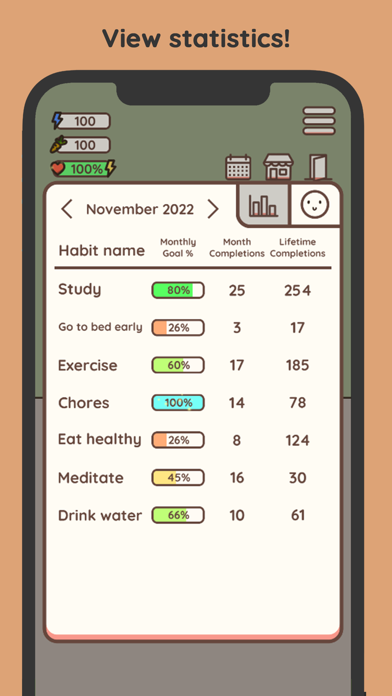
  • Frame 3 shows a statistics table with the headline 'View statistics!' β€” this is correctly placed as a depth/trust frame after the core mechanic is established in Frame 2.
  • The app supports iPad (iPad Air in the supported devices list) but has zero iPad screenshots. This means the app does not appear in iPad App Store category browse or search on iPad-optimized results β€” a meaningful lost distribution channel given that tablet users tend to have higher engagement with productivity apps.
  • 10 iPhone screenshots is a complete set β€” that is a strength. However, Frame 1 currently shows the rabbit's fully-decorated room with the headline 'Meet your Habit Rabbit!' This is a brand/character introduction, not an outcome statement. At search-thumbnail size, a user scanning results sees a colorful room illustration before they understand what the app does functionally (track habits). Users who do not already know the app may not immediately connect 'a cute room' to 'habit tracking.'
  • Frame 2 shows the habit-completion calendar grid with the headline 'Complete your habits!' β€” this is strong functional communication. It shows the actual UI that users will interact with daily, and the calendar grid is immediately recognizable as a habit tracker.
  • Frame 1's headline 'Meet your Habit Rabbit!' prioritizes character introduction over the user outcome. A scanning user's first question is 'what does this do for me?' β€” the current Frame 1 answers 'here is the mascot' before answering that question.

Recommendations

  • Rewrite Frame 1's headline to lead with the user outcome, not the character name. Something like 'Build Habits. Earn Rewards.' or 'Good Habits, Cuter Life' communicates both the function and the gamification hook in the first glance. The rabbit room visual can stay β€” the copy above it just needs to reframe it as a reward-state the user earns, not just a pretty illustration.
  • Add iPad screenshots immediately β€” even if they are iPhone screenshots exported at iPad dimensions, having any iPad screenshots is better than none for unlocking iPad App Store placement. Proper iPad-native layouts are preferred, but the distribution unlock is the priority.
  • Frames 2 and 3 are well-structured and should be kept as-is β€” functional UI in Frame 2 followed by statistics depth in Frame 3 is the right progression.
8/10

Ratings & Reviews

8170 reviews Β· 4.66769 avg

Analysis

8,170 ratings at 4.7β˜… is an exceptionally strong trust signal β€” this is well above the 1,000-review threshold where an app becomes 'established' in Apple's ranking model, and the 4.7β˜… average places it in the top tier of user satisfaction for the Productivity category. The recency signal is also strong: 8,170 reviews are listed as 'current version' reviews, which Apple weights more heavily than lifetime totals. Sampled reviews show recurring praise for the cute aesthetic and gamification mechanic β€” both of which are core differentiators. Negative review themes cluster around ads frequency and an offline mode regression, which are product issues rather than positioning issues. The ad complaint ('too many ads, couldn't click on things') is worth monitoring as it is the type of frustration that can accelerate negative review velocity if the ad density increases further.

Recommendations

  • Continue triggering the rating prompt at a success moment β€” specifically after the user completes a habit for the 3rd time in a session, or after unlocking a new rabbit decoration. Both are high-satisfaction moments that produce genuine 5-star impulses.
  • Respond publicly to the top negative reviews mentioning offline mode and ads β€” a developer response that acknowledges these pain points and explains the roadmap (or fixes) will convert some 1-2 star reviewers to neutral, and more importantly shows prospective users that the developer is active and responsive. This is visible to every future user who reads reviews.
  • The ad-frequency complaints are the primary risk to the current 4.7β˜… average. If ad density has increased in recent updates, consider a product review of interstitial frequency β€” one ad per minute is the threshold where reviews turn sharply negative, and multiple sampled reviews cite this exact complaint.

Screenshot Copy5 frames

Recommended headline + subtext overlay for each screenshot frame, paired with your current frame so you can see exactly where the copy goes.

Frame 1Frame 1
Proposed copy
New headline

Good Habits. Cuter Life.

New subtext

Your rabbit's world grows as you do

Why this copy works

Reframes the current 'Meet your Habit Rabbit!' character introduction as a user-outcome statement. 'Good Habits. Cuter Life.' answers the scanning user's first question ('what does this do for me?') while preserving the fun/gamified tone. The subtext immediately explains the core mechanic β€” the rabbit's environment changes with user behavior β€” which is the single most distinctive feature of this app versus every other habit tracker. Short enough to read at thumbnail size; no guideline-sensitive language.

Frame 2Frame 2
Proposed copy
New headline

Complete Habits. Earn Carrots.

New subtext

Check off your streak β€” every day counts

Why this copy works

Answers how Frame 1's 'cuter life' actually happens β€” you complete habits, you earn carrots, and those carrots fund the rabbit's world. This is the mechanism frame, and it maps directly to the calendar-completion UI already shown in this screenshot. 'Earn Carrots' is specific and novel (not a generic productivity phrase), which increases curiosity-driven taps.

Frame 3Frame 3
Proposed copy
New headline

See Your Progress in Numbers

New subtext

Monthly goals, streaks, lifetime completions

Why this copy works

The statistics view in Frame 3 serves the trust/depth function β€” it reassures users who want data accountability (not just cuteness) that the app also delivers measurable insight. 'Lifetime completions' is the specific credibility detail that makes a skeptical user believe the app tracks seriously, not just casually.

Frame 4Frame 4
Proposed copy
New headline

Track Your Mood, Too

New subtext

Spot the link between how you feel and what you do

Why this copy works

Mood tracking is a genuine secondary feature that opens up a distinct user segment β€” people searching 'mood tracker' (popularity 53) who might not have typed 'habit tracker' first. This frame expands the app's perceived use-case breadth so users who care about emotional self-awareness self-identify here and feel the app was built for them.

Frame 5Frame 5
Proposed copy
New headline

Free to Start. Fun to Keep.

New subtext

Customize your rabbit as your habits grow

Why this copy works

Handles the pricing/monetization question proactively at the point where users who have swiped through all frames are making their final install decision. 'Free to Start' removes the paywall fear; 'Fun to Keep' addresses the 'will I actually use this' doubt. 'Customize your rabbit as your habits grow' ties the reward loop back to user behavior one final time, reinforcing the habit-reward mechanic as the emotional reason to download now rather than later.

90-Day Action Plan

Week 1

5 tasks
  • Apply the new title (30/30 chars), subtitle (28/30 chars), and 100-char keyword field (100/100 chars) from the Ready-to-Paste and 100-Char Keyword Field sections above.
  • Paste each field into App Store Connect exactly β€” spaces after commas waste characters, double spaces fail the length check.
  • Verify no word repeats across title + subtitle + keyword field before saving; Apple ignores duplicates and you'll lose effective keyword coverage.
  • Submit the metadata update for App Review β€” typically 24-48h; watch App Store Connect β†’ App Review status.
  • Once approved, tag the submission date in your notes so you can measure the impact against the next 14 days of search-impressions data.

Week 2

2 tasks
  • Upload new screenshots using the Frame 1–5 copy from the Screenshot Copy section above. Hand the headline and subtext strings to your designer alongside the current UI mockups β€” the existing screenshot visuals are strong enough to reuse with updated overlay copy.
  • Add iPad screenshots immediately β€” even if they are your existing iPhone frames exported at iPad canvas dimensions (2048x2732px). The app is listed as supporting iPad Air but has zero iPad screenshots, which means it is invisible in iPad App Store browse and search. Getting any iPad screenshots submitted unlocks that distribution channel in under 48 hours.

Week 3

2 tasks
  • Open App Store Connect > Analytics > Search Terms. Confirm that 'complete', 'forget', 'mood tracker', and 'gamification' are beginning to appear as attributed search terms. If a keyword is not showing within 3 weeks of metadata going live, it may not be generating impressions β€” consider whether the token should be replaced with an alternative in the next update cycle.
  • Check your conversion rate (product page views to installs) in App Store Connect Analytics before and after the new screenshots go live. The Frame 1 rewrite from character-introduction to outcome-statement should produce a measurable lift. Establish your baseline conversion rate this week so you have a clean before/after comparison.

Ongoing

4 tasks
  • Trigger the rating prompt specifically after a user completes a habit for the 3rd time in a session β€” this is the moment of highest satisfaction in the Habit Rabbit experience (the reward loop has fired, the rabbit has reacted, the user feels good). That is the moment to ask for a review. Do not prompt on app open or after a missed habit.
  • Monitor weekly rankings for 'complete', 'forget', and 'gamification' β€” the three highest-opportunity keywords in the rewritten keyword field by opportunity score and difficulty profile. These are the canary terms; if they move up, the broader rewrite is working.
  • Respond publicly to the top 3 negative reviews citing ad frequency and offline mode loss. A developer response that acknowledges these issues converts some 1-2 star reviewers and signals to prospective users that the developer is active. This directly protects the 4.7-star average that is a meaningful ranking signal.
  • Revisit the keyword field each quarter. The habit-tracking category is active β€” new competitors enter, search trends shift seasonally (New Year resolution searches spike in January, back-to-school in August). Swapping 2–3 tokens for seasonal terms during those windows can capture incremental impressions.

Expected Impact

The most impactful single change is the description expansion β€” going from 484 to ~1,600 characters gives users a complete, persuasive case for installing. With a 4.7-star baseline and 8,170 reviews already generating trust, conversion rate is the main lever. A 1–2 percentage point lift in conversion rate on existing product page views directly increases install velocity, which feeds back into ranking. On the keyword side, shifting the keyword field from high-difficulty low-opportunity terms (average difficulty 80+) to the rewritten set anchored by 'complete' (difficulty 41, opportunity 20) and 'forget' (difficulty 17, opportunity 12) should produce indexing for those terms within 2–3 weeks and top-10 visibility for the lowest-difficulty terms ('forget', 'gamification') within 4–6 weeks. The title change β€” moving 'Habit Tracker' to the primary keyword slot β€” should improve impressions for the core category query 'habit tracker' over 6–8 weeks as Apple's index updates. Overall trajectory: expect measurable impression increases for targeted keywords within 30 days, with conversion rate impact visible in App Store Connect Analytics within 2 weeks of the new screenshots going live.