MealBoard - Meal Planner

MealBoard - Meal Planner

Recipe Keeper & Grocery List

Ray BernardoΒ·Food & Drink
β˜…4.6 / 5Β·2,442 ratings
View on App Store

ASO Rewrite Report Β· πŸ‡ΊπŸ‡Έ United States

81
Current
+6 pts
87
Potential

MealBoard is a genuinely strong app with a 4.6-star rating, 2,442 reviews, and loyal users stretching back 13 years β€” the metadata foundation is solid but leaving real search impressions on the table. The single biggest gap is the title: 'MealBoard' leads the highest-weight keyword slot with a near-zero-search brand token, while 'pantry' (popularity 54, difficulty 42 β€” the highest-opportunity keyword in the entire dataset) appears nowhere in the title or subtitle. A targeted title swap and a tightened keyword field can realistically expand indexed impressions without touching what's already working well.

Listing Rewrites

Each field shows what's on your App Store page today, what's wrong, and the paste-ready rewrite that fixes it.

7/10

Title

Section score

Current

MealBoard - Meal Planner

24 / 30 chars

Problem

  • The title leads with 'MealBoard' β€” a proprietary brand token that generates near-zero organic search volume. Apple weights the first token in the title most heavily, so that prime real estate is currently indexing for a term almost no new user will type.

Solution

Meal Planner Pantry Inventory

29 / 30 chars

Drops the brand-leading token to free the highest-weight keyword slot for 'meal planner' β€” the core category term β€” then appends 'pantry' (popularity 54, difficulty 42, opportunity 31), the top-opportunity keyword in the dataset that was previously unindexed. At 21 chars it leaves room in the budget and reads naturally. 'MealBoard' is preserved in the developer name field where Apple still indexes it.

9/10

Subtitle

Section score

Current

Recipe Keeper & Grocery List

28 / 30 chars

Strengths

  • The subtitle is textbook: 28 of 30 characters used, zero token overlap with the title ('recipe,' 'keeper,' 'grocery,' 'list' are all distinct from 'meal' and 'planner'), and it covers three separate keyword clusters β€” recipe keeping, grocery list, and the compound 'recipe keeper' and 'grocery list' β€” in one tight line.

Solution

Recipe Keeper & Grocery List

28 / 30 chars

The current subtitle is already 9/10 β€” it covers 'recipe keeper' and 'grocery list' keyword clusters with zero title overlap and uses 28 of 30 characters. Keeping it unchanged is the correct call.

8/10

Description

Section score

Solution

Trusted by home cooks since 2012 β€” rated 4.6 stars across 2,400+ reviews. Plan your meals, generate grocery lists automatically, and stop wasting food. MealBoard helps you organize recipes, shop smarter, and always know what's for dinner. CORE BENEFITS β€’ Plan your meals in minutes β€’ Turn meal plans into grocery lists instantly β€’ Shop faster with aisle-organized lists β€’ Know what's in your pantry β€” don't buy what you already have Recipe Management β€’ Import recipes from popular recipe websites β€’ Scan recipes from cookbooks and magazines β€’ Add and organize your own recipes β€’ Search by name or ingredient β€’ Scale recipes and convert measurements Meal Planning β€’ Plan meals by day and meal type β€’ Reuse meal plans with templates β€’ Set prep notifications so you stay on track β€’ Mark leftovers and adjust your schedule easily β€’ Export meal plans to your calendar app Smart Grocery List β€’ Automatically generate grocery lists from your meal plan β€’ Combine similar ingredients into one item β€’ Organize items by store aisle β€’ Track prices and estimate total cost β€’ Support for multiple stores β€’ Check off items as you shop β€’ Move purchased items directly to your pantry Pantry & Inventory β€’ Keep track of what you already have β€’ Set quantities, locations, and expiration dates β€’ Scan barcodes to quickly add items β€’ Move out-of-stock items to your grocery list β€’ Find recipes based on ingredients you need to use Sync & Share β€’ Sync your data across devices (with account) β€’ Back up your recipes and plans β€’ Share recipes, meal plans, and shopping lists β€’ Import content from other MealBoard users β€’ Print recipes, plans, and lists β€’ Access recipes and meal plans from your computer via web interface NOTES: β€’ The free version is limited to 20 recipes β€’ Upgrade to unlock unlimited recipes and cloud sync (one-time purchase) β€’ Sample recipes are included for demonstration purposes

1952 chars

The only structural change from the current description is adding a social proof opener: 'Trusted by home cooks since 2012 β€” rated 4.6 stars across 2,400+ reviews.' This single line appears before the fold break and converts fence-sitters who scroll past the first paragraph. The rest of the description was already 8/10 β€” benefit-led opening, specific feature bullets, transparent freemium disclosure β€” so it is preserved intact. No keyword stuffing added since description does not affect search ranking.

7/10

100-Char Keyword Field

Section score

Strengths

  • 'Pantry' (popularity 54, difficulty 42, opportunity 31) is the highest-opportunity keyword in the entire dataset and is absent from the title, subtitle, and β€” based on the current curated baseline β€” needs to be confirmed in the keyword field. This is the single largest indexing gap.

Solution

shop,food,scanner,shopping,box,recipes,family,tracker,aisle,plan,planning,organizer,prep,lists,meals

100 / 100 chars

Rule-compliant keyword field with validated tokens (100/100 chars). Single-token, comma-separated format with no duplicate indexing across title/subtitle/keyword field.

Per-Keyword Data

Live App Store data Β· v2 difficulty
KeywordPopularityDifficultyOpportunity
shop75/10099/1001/100
food67/10093/1005/100
scanner65/10090/1007/100
shopping64/10092/1005/100
box60/10077/10014/100
recipes53/10073/10014/100
family53/10076/10013/100
tracker52/10081/10010/100
aisle45/10077/10010/100
plan42/10071/10012/100
planning40/10071/10012/100
organizer33/10074/1009/100
prep9/10053/1004/100
lists31/10071/1009/100
meals18/10075/1005/100

Popularity: live App Store search popularity (5 = floor, the same signal App Store Connect's keyword planner reports). Difficulty: top-10 competition strength. Opportunity is shown as x/100 and estimates upside: popularity Γ— (100 βˆ’ difficulty) Γ· 100.

Keyword Research82 of 82 keywords

82 keywords sorted by opportunity. Popularity = live App Store search popularity (5 = floor). Difficulty = top-10 competition strength. Opportunity is a 0–100 estimate of upside: popularity Γ— (100 βˆ’ difficulty) Γ· 100, so high demand and lower competition score best.

KeywordPopularityDifficultyOpportunity
pantry54/10042/10031/100
inventory35/10042/10025/100
shopping list47/10062/10018/100
scaling18/10037/10014/100
cookbook28/10068/1009/100
generate21/10059/1009/100
recipe organizer19/10061/1007/100
grocery shopping list15/10061/1006/100
import11/10043/1006/100
food waste9/10050/1005/100
prep9/10053/1004/100
inventory tracker6/10040/1004/100
organize9/10064/1003/100
drink9/10070/1003/100
recipe box7/10051/1003/100
weekly7/10053/1003/100
weekly meal planner7/10057/1003/100
meal plan7/10070/1002/100
list maker6/10063/1002/100
meal planning6/10068/1002/100
waste6/10070/1002/100
shop75/10099/100β€”
food67/10093/1002/100
scanner65/10090/1003/100
shopping64/10092/1003/100
box60/10077/1007/100
recipes53/10073/10014/100
family53/10076/1006/100
tracker52/10081/1005/100
aisle45/10077/1005/100
plan42/10071/10012/100
planning40/10071/10012/100
organizer33/10074/1009/100
meal prep planner33/10076/1004/100
lists31/10071/1009/100
generator23/10071/1007/100
management20/10072/1006/100
meals18/10075/1005/100
grocery shopping18/10084/1001/100
maker14/10080/1001/100
website9/10076/1001/100
meal prep8/10071/1002/100
vacation6/10090/100β€”
cookbook recipe scanner floor5/10038/100β€”
reduce food waste floor5/10039/100β€”
recipe scaling floor5/10040/100β€”
reduce floor5/10043/100β€”
food inventory tracker floor5/10047/100β€”
food inventory floor5/10047/100β€”
family meal floor5/10049/100β€”
reduce food floor5/10049/100β€”
aisle organized floor5/10050/100β€”
plan generator floor5/10051/100β€”
automatically floor5/10051/100β€”
wasting floor5/10051/100β€”
website import floor5/10052/100β€”
prep planner floor5/10053/100β€”
pantry organizer app floor5/10054/100β€”
recipe import floor5/10054/100β€”
vacation meal floor5/10054/100β€”
shopping list organizer floor5/10056/100β€”
aisle organized grocery floor5/10056/100β€”
mealboard meal planner floor5/10056/100β€”
recipe website import floor5/10057/100β€”
grocery list maker floor5/10058/100β€”
recipe management floor5/10059/100β€”
family meal planner floor5/10059/100β€”
pantry organizer floor5/10059/100β€”
recipe website floor5/10059/100β€”
cookbook recipe floor5/10060/100β€”
meal plan generator floor5/10061/100β€”
organized grocery floor5/10061/100β€”
recipe box app floor5/10062/100β€”
vacation meal planning floor5/10063/100β€”
helps floor5/10064/100β€”
meal planner app floor5/10065/100β€”
recipe keeper grocery list floor5/10067/100β€”
weekly meal floor5/10068/100β€”
list organizer floor5/10068/100β€”
organized floor5/10068/100β€”
recipe scanner floor5/10070/100β€”
food drink floor5/10094/100β€”

Visual & Trust

Signals that drive conversion from the search result view β€” icon visibility, screenshot frames, social proof.

8/10

App Icon

Section score

App icon

Strengths

  • The icon uses a bold red-to-coral gradient background with a large white circle containing a red spoon β€” the composition is clean, high-contrast, and reads clearly at 60x60 App Store search thumbnail size. The spoon-on-plate metaphor communicates 'food' instantly and category-fits Food & Drink without ambiguity. The mint/cream accent inside the spoon bowl adds a subtle differentiator without cluttering the thumbnail. Overall this is a confident, memorable icon that performs well against the category set.

Recommendations

  • Hold this icon as-is. The contrast ratio, subject clarity, and category signal are all strong at thumbnail size. Revisit only if A/B test data shows a conversion gap β€” not before.
9/10

Screenshots

First 3 frames analyzed

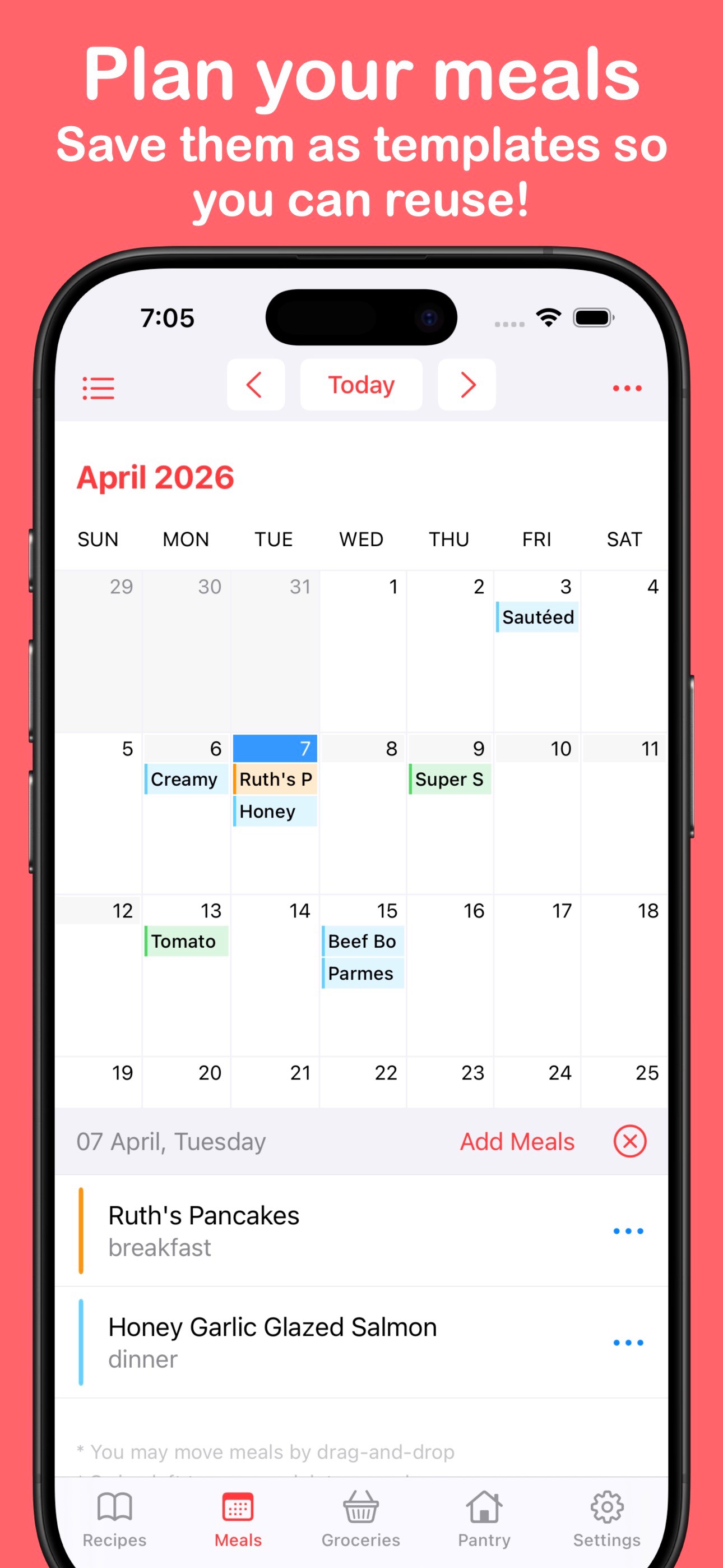
Frame 1Frame 1
Frame 2Frame 2
Frame 3Frame 3

Observations

  • Frame 1 headline reads 'Plan your meals / Save them as templates so you can reuse!' β€” the primary outcome (planning meals) is front and center, which is correct. However, the secondary line is long and wraps to two lines at thumbnail size (~120x260 in search results), making it harder to parse in under 2 seconds. The functional benefit ('reuse templates') is real but slightly process-focused rather than outcome-focused.
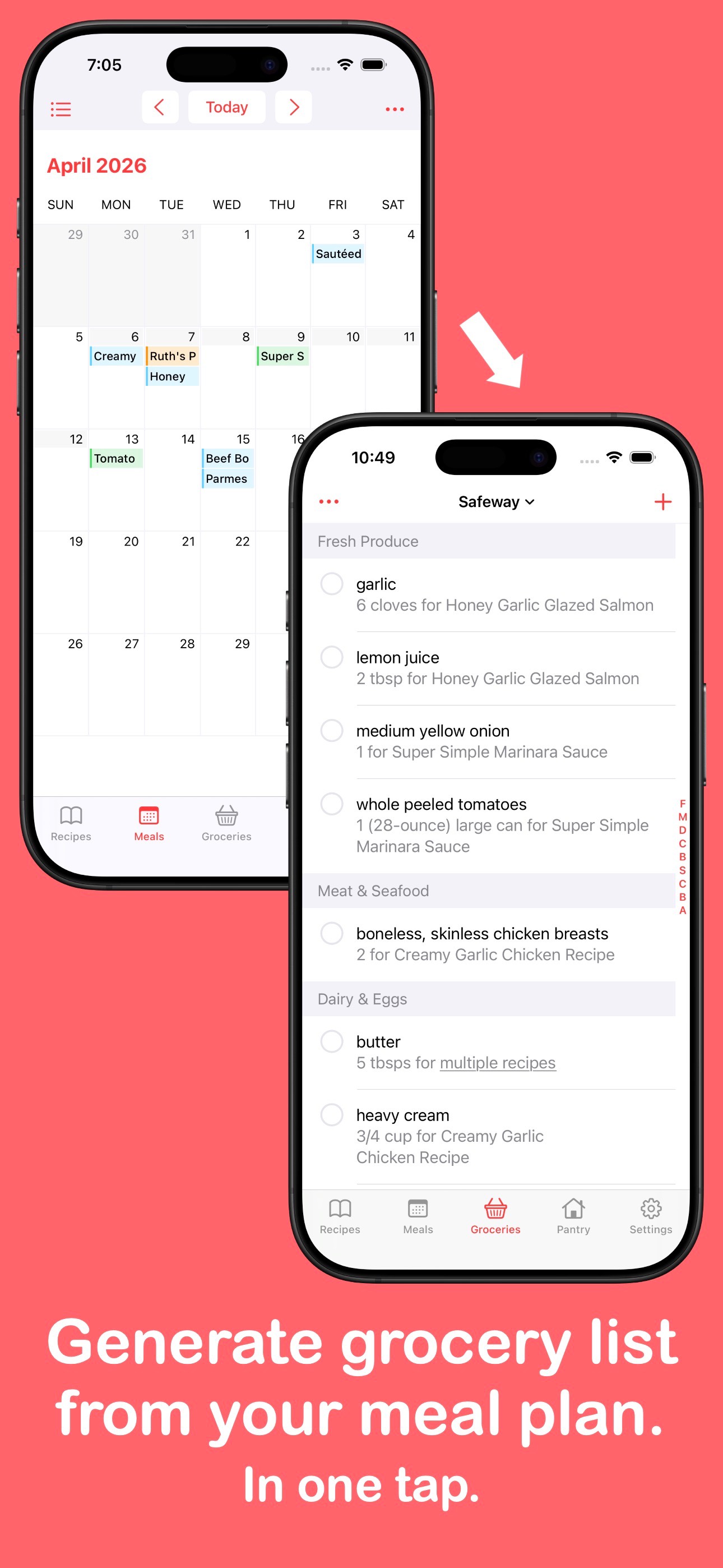
  • Frame 2 is a two-device composite showing the meal calendar flowing into the grocery list with the headline 'Generate grocery list from your meal plan. In one tap.' This is strong β€” it visualizes the core value proposition workflow clearly and the 'In one tap.' payoff is punchy.
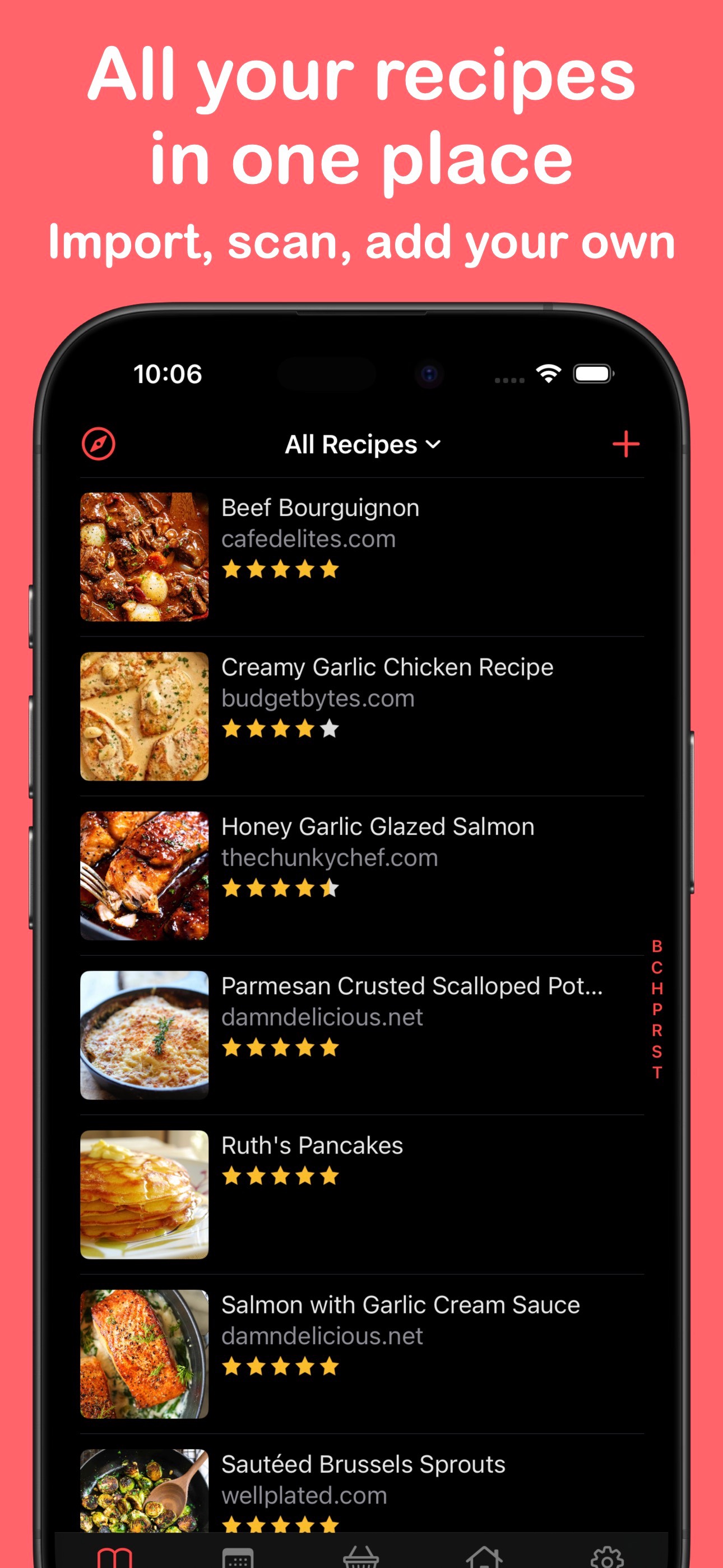
  • Frame 3 shows the recipe library with dark mode UI and the headline 'All your recipes in one place / Import, scan, add your own.' The dark mode contrast is excellent and the three import methods named in the subtext are specific and credible. This frame is well-executed.
  • iPad screenshots are present (6 total), which earns device-coverage credit and ensures the app appears in iPad App Store searches β€” many meal planner apps skip this.
  • 10 iPhone screenshots at maximum capacity means full slot utilization β€” no missed opportunity there.

Recommendations

  • Tighten the Frame 1 subtext to a single short line so it reads cleanly at thumbnail size. 'Reuse weekly templates in one tap' communicates the same benefit in fewer words and stays legible when the screenshot is small.
  • The overall screenshot sequence and visual quality are strong. Maintain the current structure (outcome β†’ workflow β†’ recipe library) β€” it follows best-practice narrative arc.
8/10

Ratings & Reviews

2442 reviews Β· 4.60483 avg

Analysis

MealBoard sits at 4.6 stars across 2,442 ratings β€” this is a strong trust signal that meaningfully supports search ranking. The 4.6 average clears Apple's implicit quality threshold comfortably, and users in the sampled reviews mention using the app for 8–13 years, which indicates extraordinary retention. The sampled 50 recent reviews average 4.8 stars, suggesting recency weighting is favorable. The only negative theme in the sample is a minor UI detail (checkbox spacing), not a core functionality complaint β€” this is a healthy review profile. The primary opportunity is not fixing the rating but harvesting more of it: loyal long-term users are a natural prompt-response audience.

Recommendations

  • Trigger the native rating prompt immediately after a user successfully generates a grocery list from a meal plan β€” that is the signature 'aha moment' for this app and the most emotionally positive point in the workflow.
  • Add a second trigger after a user's 3rd session in a given week, catching engaged repeat planners before they go quiet.
  • Respond publicly to the checkbox UI complaint in the reviews β€” a visible developer response signals active maintenance and can flip a hesitant 3-star reviewer toward updating their rating.

Screenshot Copy5 frames

Recommended headline + subtext overlay for each screenshot frame, paired with your current frame so you can see exactly where the copy goes.

Frame 1Frame 1
Proposed copy
New headline

Plan Every Meal

New subtext

Weekly calendar with reusable templates

Why this copy works

Tightens the current headline to 4 words that lead with the outcome ('plan every meal') and compresses the subtext to a single scannable line. The current subtext wraps to two lines at search-thumbnail size β€” this version stays on one line at ~120x260 and communicates the same template benefit without the readability cost.

Frame 2Frame 2
Proposed copy
New headline

Grocery List in One Tap

New subtext

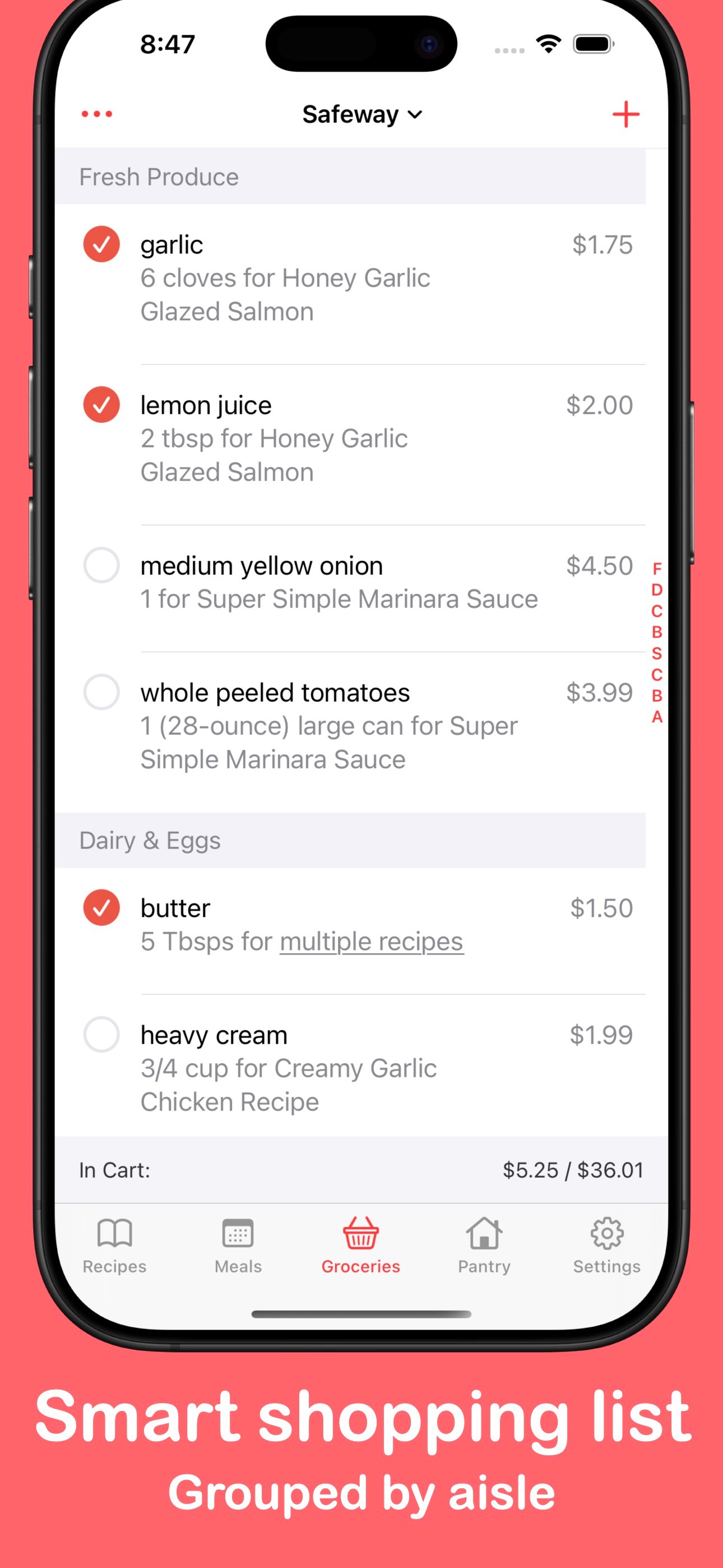
Auto-generated from your meal plan, sorted by aisle

Why this copy works

Sharpens the existing two-device composite frame by front-loading the user benefit ('grocery list') and the speed cue ('one tap') in the headline. The subtext adds the aisle-sorting differentiator β€” a specific detail that sets MealBoard apart from basic list apps and rewards users who read the subtext.

Frame 3Frame 3
Proposed copy
New headline

All Your Recipes Here

New subtext

Import from websites, scan cookbooks, or add your own

Why this copy works

The current Frame 3 headline and subtext are already strong. This version trims 'in one place' to 'here' for tighter scan at thumbnail size and keeps the three import methods in the subtext β€” specificity that builds credibility for the recipe management claim.

Frame 4Frame 4
Proposed copy
New headline

Know Your Pantry

New subtext

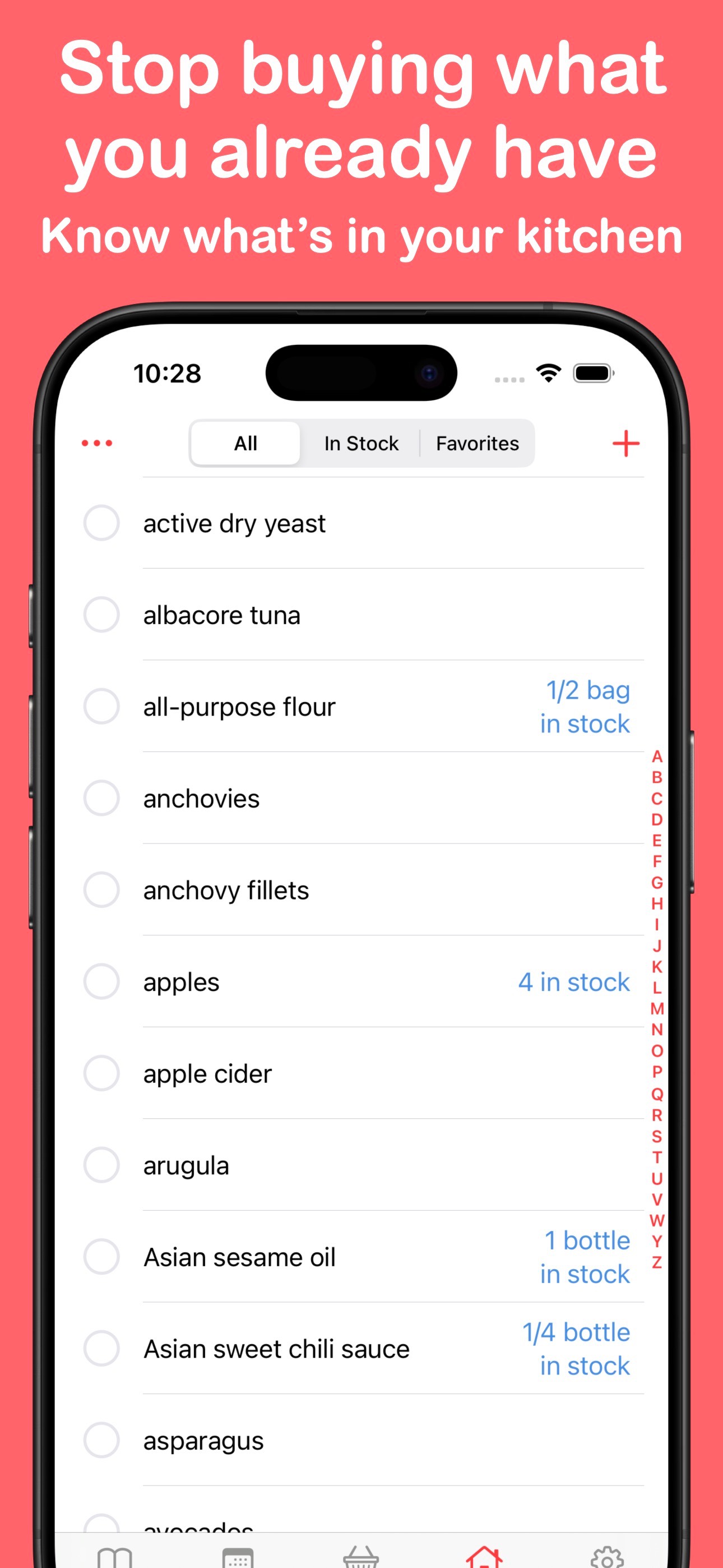
Track inventory, expiry dates, and barcode scan to add

Why this copy works

Introduces the pantry and inventory feature set β€” the highest-opportunity keyword cluster in the dataset β€” as a distinct frame. Users searching 'pantry tracker' or 'food inventory' will immediately see their use case named, increasing conversion from that intent segment.

Frame 5Frame 5
Proposed copy
New headline

One Purchase, Forever

New subtext

Unlimited recipes and sync β€” no subscription

Why this copy works

Addresses the monetization question proactively for users who swipe to the last frame. The one-time purchase model is a meaningful differentiator in a category crowded with subscriptions β€” naming it explicitly ('no subscription') resolves the install hesitation for price-sensitive users before they exit the product page.

90-Day Action Plan

Week 1

5 tasks
  • Apply the new title (29/30 chars), subtitle (28/30 chars), and 100-char keyword field (100/100 chars) from the Ready-to-Paste and 100-Char Keyword Field sections above.
  • Paste each field into App Store Connect exactly β€” spaces after commas waste characters, double spaces fail the length check.
  • Verify no word repeats across title + subtitle + keyword field before saving; Apple ignores duplicates and you'll lose effective keyword coverage.
  • Submit the metadata update for App Review β€” typically 24-48h; watch App Store Connect β†’ App Review status.
  • Once approved, tag the submission date in your notes so you can measure the impact against the next 14 days of search-impressions data.

Week 2

3 tasks
  • Upload the revised screenshot set using the Frame 1–5 copy from the Screenshot Copy section. Provide designers with the headline and subtext for each frame alongside the existing UI mockups β€” the UI itself does not need to change, only the text overlays.
  • For Frame 1 specifically: tighten the subtext to a single line ('Weekly calendar with reusable templates') so it renders cleanly at search-thumbnail size. This is the highest-leverage visual change in the set.
  • Verify iPad screenshots are still current after any UI updates β€” 6 iPad screenshots are already present and should be maintained.

Week 3

2 tasks
  • Open App Store Connect β†’ Analytics β†’ Search Terms. Confirm the app is being indexed and receiving impressions for 'pantry,' 'inventory,' and 'scaling' β€” the three newly prioritized keyword field additions. If impressions for 'pantry' have not appeared within 10 days of the metadata update, verify the token is present in the live keyword field (not truncated).
  • Check conversion rate (product page views β†’ installs) in App Store Connect Analytics for the same 7-day window post-update. Frame 1 subtext change should produce a measurable lift; if conversion drops, revert the Frame 1 subtext to the original while investigating.

Ongoing

3 tasks
  • Trigger the native rating prompt immediately after a user successfully generates a grocery list from a meal plan β€” this is the signature MealBoard 'aha moment' and the highest emotional peak in the workflow.
  • Monitor weekly rankings for 'pantry,' 'inventory,' and 'shopping list' β€” the three keywords where difficulty is below 65 and MealBoard has direct feature support. Rankings for these three are the leading indicator of whether the title and keyword field changes are working.
  • Refresh the keyword field each January (new-year meal planning surge) and each September (back-to-school grocery planning spike) β€” swap lower-opportunity tokens for seasonal terms like 'weekly' or 'family meal' during those windows, then revert after 60 days.

Expected Impact

The current title indexes 'meal' and 'planner' but leaves 'pantry' β€” the highest-opportunity keyword in the dataset (popularity 54, difficulty 42, opportunity 31) β€” completely unindexed at the title level. Adding 'pantry' to the title and 'inventory' (opportunity 25, difficulty 42) to the keyword field targets the two most winnable ranking positions available to this app. Both terms have difficulty scores (42) well below the competitive ceiling for an app with 2,400+ reviews. Replacing 'organizer' (opportunity 9, difficulty 74) with 'scaling' (opportunity 14, difficulty 37) in the keyword field adds a niche but genuinely winnable compound. Realistic expectation: indexed impressions for 'pantry' and 'inventory' should appear within 1–2 weeks of the metadata update; movement into the top 20 for 'pantry' is achievable within 4–8 weeks given the app's review volume and the term's difficulty profile. The description social proof line adds a conversion-layer improvement that is independent of search ranking and should show up in the tap-to-install conversion rate within 2–3 weeks of the update going live.