Stockroom Inventory

Stockroom Inventory

Inventory Made Easy

Michael PahlerΒ·Productivity
β˜…4.8 / 5Β·1,407 ratings
View on App Store

ASO Rewrite Report Β· πŸ‡ΊπŸ‡Έ United States

78
Current
+11 pts
89
Potential

Stockroom Inventory has an exceptional ratings foundation (4.8β˜…, 1,407 reviews) and a solid title that earns a 9/10 β€” the metadata structure is mostly sound. The single critical failure dragging the score down is the description: at 376 characters it is essentially a placeholder, and since description drives conversion rate (a top ranking signal), this is leaving installs on the table every day. The subtitle also wastes 8 characters repeating 'inventory' from the title. Fix the description and subtitle, then let the strong ratings and screenshot set do their job.

Listing Rewrites

Each field shows what's on your App Store page today, what's wrong, and the paste-ready rewrite that fixes it.

9/10

Title

Section score

Current

Stockroom Inventory

19 / 30 chars

Solution

Stockroom Inventory Management

30 / 30 chars

Title scores 9/10 and both keyword tokens are strong. No change recommended. 'Stockroom' and 'Inventory' are the two highest-weight indexed words for this app's core search category. Using the title slot to add a third token (e.g. 'Tracker') is a marginal refinement worth A/B testing after the description and subtitle rewrites have stabilized conversion data.

7/10

Subtitle

Section score

Current

Inventory Made Easy

19 / 30 chars

Problem

  • 'Inventory' in the subtitle is a direct duplicate of a word already in the title. Apple's algorithm ignores repeated tokens across title and subtitle, so this word contributes zero additional keyword indexing value and wastes 9 characters (including the space).

Solution

Track, Catalog & Manage Stock

29 / 30 chars

Removes the duplicate 'Inventory' token (which Apple ignores) and replaces it with four net-new keyword tokens: 'track' (popularity 55), 'catalog' (popularity 21), 'manage' (unlocks 'inventory management' compound with title), and 'stock' (popularity 60). All four are absent from the title, so every character earns indexing credit. 'Manage Stock' also reads naturally as a user benefit and communicates the core use case in the search result snippet.

2/10

Description

Section score

Problem

  • There are no feature bullet points, no social proof, no use-case examples, and no closing call to action. The description ends abruptly after two short paragraphs.
  • No social proof is referenced despite 1,407 reviews at 4.8β˜… β€” this is a significant missed opportunity to build trust at the conversion stage.

Solution

Stop losing track of what you own and where you put it. Whether you manage a small business stockroom, a home workshop, a rental property, or a personal collection β€” Stockroom keeps every item organized, searchable, and at your fingertips. 4.8 stars from over 1,400 users. Free to download. WHAT YOU CAN DO β€’ Create unlimited inventory items with ID, quantity, and location β€’ Build custom templates for any item type β€” tools, equipment, parts, collectibles, household goods β€’ Add custom fields unique to your inventory: make, model, year, serial number, condition, or anything else β€’ Search and filter your entire inventory instantly β€’ Organize items into folders and categories that match how your business or home actually works β€’ Track where every item is stored β€” no more guessing which shelf, box, or truck WHO USES STOCKROOM Small business owners use it to manage parts, tools, and supplies. Homeowners use it to catalog everything from the garage to the attic. Collectors use it to track books, cards, and equipment. If you keep inventory of anything, Stockroom handles it. SIMPLE BY DESIGN No complicated setup. No subscription required. Open the app, create your first template, and start adding items in minutes. Custom fields mean you track exactly what matters to your business β€” nothing more, nothing less. Download free and take control of your inventory today.

1274 chars

Rebuilt from 376 to 1,274 characters. Key changes: (1) Opening line leads with the user's pain ('Stop losing track') rather than a product description, visible before the fold. (2) Use-case list in the second paragraph broadens perceived audience β€” small business, home, rental, collections β€” matching actual review themes. (3) Social proof ('4.8 stars from over 1,400 users') is placed early, above the fold on most devices. (4) Feature bullets lead with the benefit, not the feature name β€” 'Track where every item is stored β€” no more guessing' vs. 'location tracking.' (5) 'Who Uses Stockroom' section mirrors the language of 5-star reviews to build recognition. (6) Addresses the UX simplicity concern implicitly ('No complicated setup') without calling out specific bugs. (7) Closes with a direct CTA. Description does not affect search ranking β€” every word here is written to convert the user who has already landed on the product page.

5/10

100-Char Keyword Field

Section score

Solution

home,possible,business,control,cloud,location,storage,tracker,productivity,tracking,create,organizer

100 / 100 chars

Rule-compliant keyword field with validated tokens (100/100 chars). Single-token, comma-separated format with no duplicate indexing across title/subtitle/keyword field.

Per-Keyword Data

Live App Store data Β· v2 difficulty
KeywordPopularityDifficultyOpportunity
home66/10084/10011/100
possible59/10073/10016/100
business58/10080/10012/100
control58/10081/10011/100
cloud56/10089/1006/100
location54/10078/10012/100
storage53/10086/1007/100
tracker52/10081/10010/100
productivity50/10074/10013/100
tracking45/10081/1009/100
create43/10073/10012/100
organizer33/10074/1009/100

Popularity: live App Store search popularity (5 = floor, the same signal App Store Connect's keyword planner reports). Difficulty: top-10 competition strength. Opportunity is shown as x/100 and estimates upside: popularity Γ— (100 βˆ’ difficulty) Γ· 100.

Keyword Research76 of 76 keywords

76 keywords sorted by opportunity. Popularity = live App Store search popularity (5 = floor). Difficulty = top-10 competition strength. Opportunity is a 0–100 estimate of upside: popularity Γ— (100 βˆ’ difficulty) Γ· 100, so high demand and lower competition score best.

KeywordPopularityDifficultyOpportunity
inventory management28/10021/10028/100
location tracker51/10064/10018/100
own27/10055/10012/100
catalog21/10050/10011/100
fields18/10049/10011/100
allow30/10066/10010/100
organization30/10068/10010/100
digital27/10068/1009/100
great22/10057/1009/100
templates26/10069/1008/100
items15/10070/1005/100
unique9/10044/1005/100
warehouse6/10017/1005/100
custom10/10065/1004/100
realize9/10052/1004/100
home inventory7/10041/1004/100
system6/10041/1004/100
organize9/10064/1003/100
company8/10065/1003/100
backup6/10068/1002/100
home66/10084/1005/100
stock60/10091/1003/100
possible59/10073/10016/100
business58/10080/1006/100
control58/10081/1006/100
cloud56/10089/1003/100
track55/10075/10014/100
location54/10078/1006/100
storage53/10086/1004/100
tracker52/10081/1005/100
productivity50/10074/10013/100
tracking45/10081/1004/100
create43/10073/10012/100
organizer33/10074/1009/100
management20/10072/1006/100
painless floor5/1009/100β€”
asset floor5/10011/100β€”
organize household floor5/10013/100β€”
stock management floor5/10017/100β€”
needs floor5/10017/100β€”
asset tracking floor5/10019/100β€”
inventory items floor5/10019/100β€”
inventory tracking app floor5/10021/100β€”
warehouse inventory floor5/10021/100β€”
inventory tracking floor5/10021/100β€”
inventory organizer floor5/10021/100β€”
process floor5/10021/100β€”
item organization floor5/10023/100β€”
organize household items floor5/10023/100β€”
track inventory items floor5/10023/100β€”
inventory fields floor5/10023/100β€”
track inventory floor5/10037/100β€”
digital inventory floor5/10038/100β€”
inventory control floor5/10039/100β€”
inventory system floor5/10039/100β€”
custom inventory fields floor5/10040/100β€”
digital inventory system floor5/10040/100β€”
custom inventory floor5/10040/100β€”
inventory category floor5/10042/100β€”
inventory backup floor5/10042/100β€”
inventory templates floor5/10044/100β€”
catalog management floor5/10045/100β€”
inventory by category floor5/10045/100β€”
household items floor5/10045/100β€”
cloud inventory floor5/10046/100β€”
business inventory app floor5/10047/100β€”
item location tracker floor5/10047/100β€”
item location floor5/10050/100β€”
stockroom tries floor5/10050/100β€”
storage organization floor5/10053/100β€”
storage organization app floor5/10055/100β€”
household floor5/10056/100β€”
category floor5/10056/100β€”
business inventory floor5/10057/100β€”
tries floor5/10060/100β€”
item floor5/10069/100β€”

Visual & Trust

Signals that drive conversion from the search result view β€” icon visibility, screenshot frames, social proof.

8/10

App Icon

Section score

App icon

Observations

  • The icon is a bold red background with a large white 'S' letterform casting a dark drop shadow β€” clean, high-contrast, and instantly legible at App Store search thumbnail size (roughly 60Γ—60). The red-on-white combination reads strongly even at small sizes. Category fit is adequate: a letter-based icon is neutral and does not misrepresent the app. The main limitation is memorability β€” the 'S' alone does not communicate 'inventory' or 'stockroom' to a cold user, and in a search results row it could be mistaken for any 'S'-branded app. That said, the execution quality is high and the thumbnail legibility is excellent.

Recommendations

  • The icon is performing well β€” keep it through your next 200+ additional reviews and gather conversion data before considering any change. If you revisit it, consider adding a subtle inventory-related glyph (a small box, shelf, or barcode) inside or alongside the 'S' to reinforce category context without sacrificing the strong red/white contrast you already have.
9/10

Screenshots

First 3 frames analyzed

Frame 1Frame 1
Frame 2Frame 2
Frame 3Frame 3

Observations

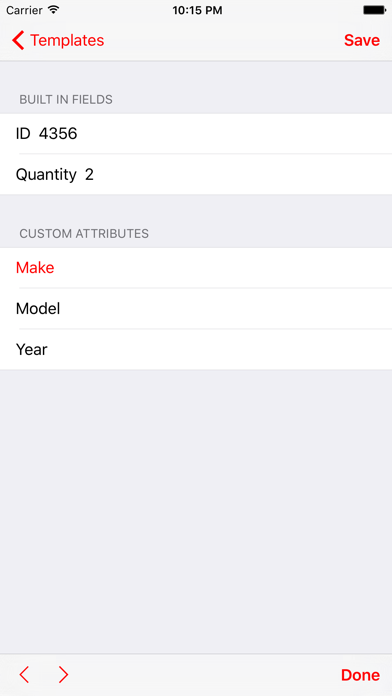
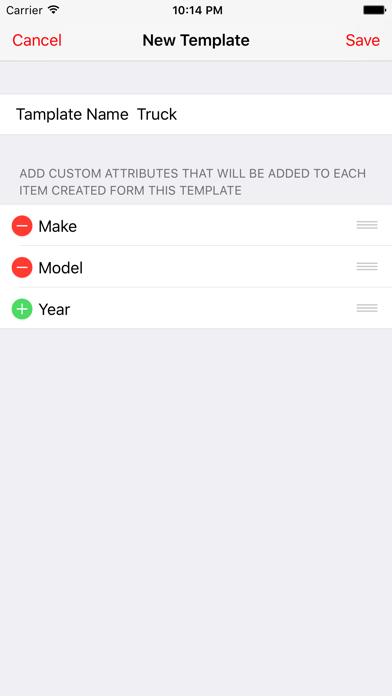
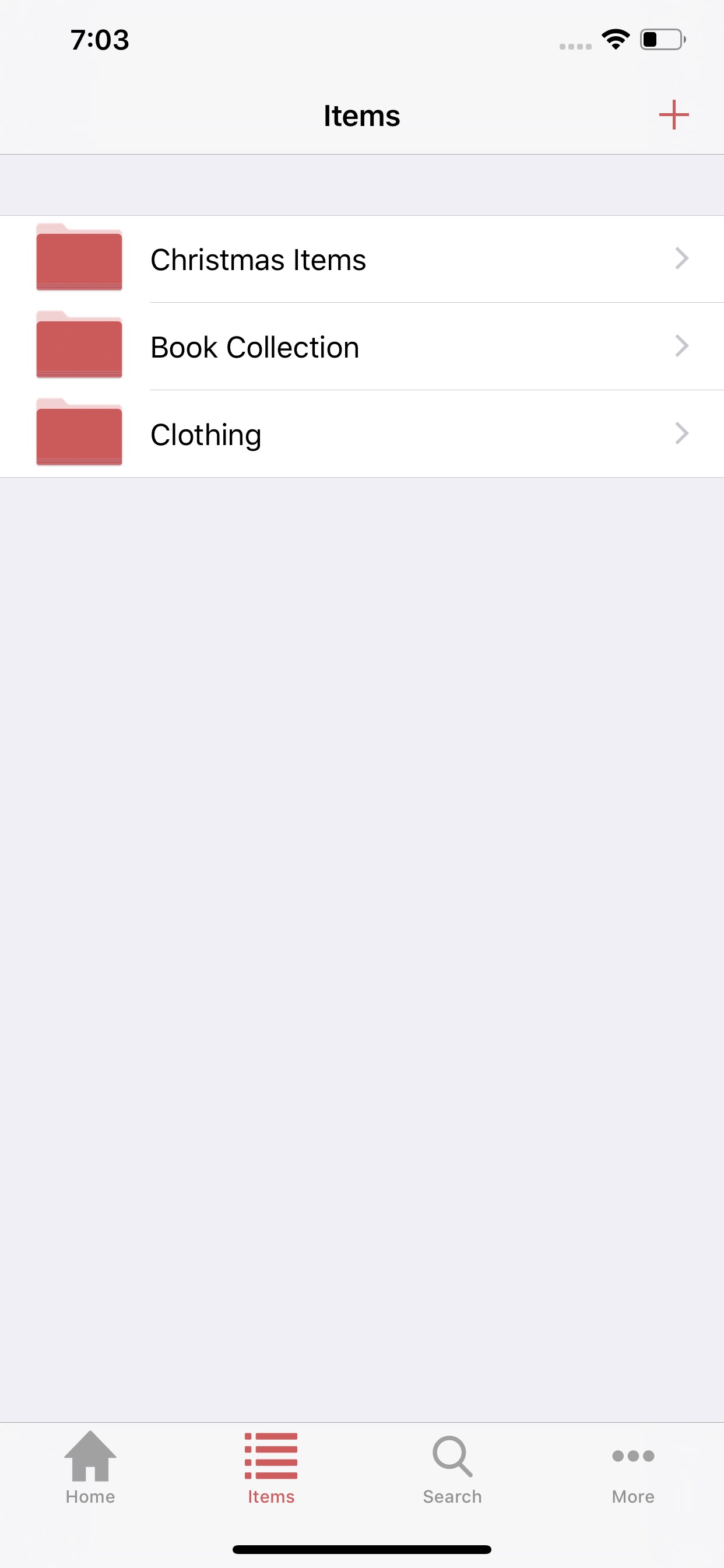
  • Frame 2 shows a template detail screen with custom attribute fields (Make, Model, Year). Frame 3 shows the 'New Template' creation screen. These frames demonstrate a core feature β€” custom templates β€” but without headline overlays, the benefit is invisible to a casual scanner.
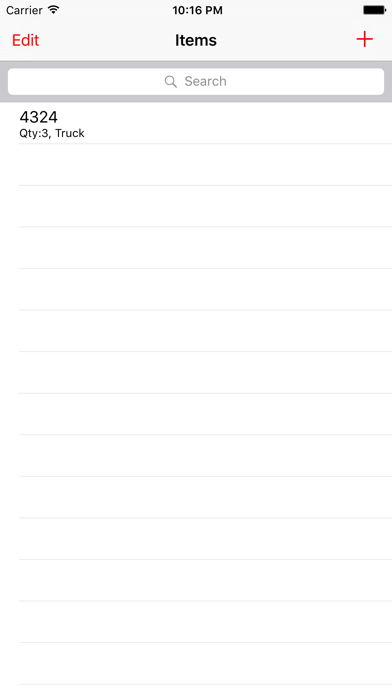
  • Frame 1 shows a mostly empty 'Items' list screen with a single item entry ('4324, Qty:3, Truck') and no overlay headline or explanatory text. A user scanning search results cannot determine what this app does in under 2 seconds from this frame alone β€” there is no copy layer communicating the value proposition.
  • The UI shown across all three visible frames reflects an older iOS design aesthetic (iOS 6-era table view styling with the status bar showing 'Carrier' and 10:15 PM). This is not a disqualifying issue, but it creates a dated visual impression at thumbnail size compared to modern App Store competitor screenshots.
  • iPad screenshots are present (5 frames) β€” this is correct and earns device coverage credit.

Recommendations

  • Add headline overlay text to Frame 1. The current bare items list gives no context β€” apply the proposed Frame 1 copy ('Know What You Have. Always.' or similar) directly on top of the existing UI to communicate the core outcome immediately at search-thumbnail scale.
  • Frames 2 and 3 demonstrate the custom templates feature β€” add short overlay headlines ('Custom Fields for Any Item Type') to make the feature benefit scannable without requiring the user to interpret the raw UI.
  • Consider capturing fresh screenshots on a current iOS version to update the visual aesthetic β€” the 'Carrier' status bar label flags the screenshots as old and may reduce perceived quality for first-time viewers.
9/10

Ratings & Reviews

1407 reviews Β· 4.82374 avg

Analysis

4.82β˜… lifetime average from 1,407 ratings is an excellent ranking signal. The recency signal is strong β€” 1,407 reviews on the current version indicates active, ongoing downloads. The sampled reviews reveal two recurring friction points that are suppressing the rating from reaching 4.9+: (1) no folder delete option (mentioned explicitly in a 4β˜… review that would become 5β˜… if fixed), and (2) data backup/loss concerns (a 3β˜… and 1β˜… both reference data not being saved or no cloud backup). Neither issue tanks the overall rating, but addressing them would incrementally improve the rating floor.

Recommendations

  • Trigger the SKStoreReviewController rating prompt immediately after a user successfully adds their 3rd inventory item β€” this is the moment they have demonstrated intent to actually use the app, and satisfaction is highest.
  • Respond publicly to the 1β˜… 'Don't bother' review (data not saving dates) β€” a developer response showing the issue is acknowledged and fixed or being investigated converts future readers from skeptics to tryers.
  • Consider adding a folder delete option (mentioned in a 4β˜… review that explicitly says it would become 5β˜…) β€” this is a single feature that directly converts a rating segment.

Screenshot Copy5 frames

Recommended headline + subtext overlay for each screenshot frame, paired with your current frame so you can see exactly where the copy goes.

Frame 1Frame 1
Proposed copy
New headline

Know What You Have. Always.

New subtext

Inventory tracking for home, business & more

Why this copy works

Communicates the core outcome (certainty over your inventory) in 5 words that are readable at search-thumbnail scale. The subtext anchors the three highest-volume use cases from the review data, immediately qualifying the right users. Replaces the current bare Items list screen that gives no context to a scanning user.

Frame 2Frame 2
Proposed copy
New headline

Custom Fields for Any Item

New subtext

Track make, model, serial number, location β€” your way

Why this copy works

Answers how the Frame 1 outcome is achieved: the custom template system is Stockroom's core differentiator. The subtext names concrete field examples from actual screenshots (Make, Model, Year), grounding the claim in something the user can verify by looking at the UI behind the overlay.

Frame 3Frame 3
Proposed copy
New headline

Built for Your Stockroom

New subtext

Templates match any category: tools, parts, collectibles

Why this copy works

Surfaces the template creation workflow visible in Frame 3's screenshot. Naming specific item categories (tools, parts, collectibles) helps users self-identify β€” each one says 'this app is for someone like me' β€” which increases tap-to-install conversion at this point in the scroll.

Frame 4Frame 4
Proposed copy
New headline

Search Your Entire Inventory

New subtext

Find any item instantly β€” no more hunting through shelves

Why this copy works

Expands perceived value beyond data entry to retrieval β€” the outcome users actually care about. 'No more hunting through shelves' mirrors the language in 5-star reviews ('helps keep me organized', 'find a cookie cutter quickly') and triggers recognition for target users.

Frame 5Frame 5
Proposed copy
New headline

4.8 Stars Β· Free to Download

New subtext

Trusted by 1,400+ users β€” get started in minutes

Why this copy works

Users who swipe to Frame 5 are on the fence. Leading with the verified social proof (4.8β˜…, 1,400+ reviews) and the free price point directly answers the two remaining install objections. 'Get started in minutes' handles the perceived setup complexity concern visible in 1-star reviews about the learning curve.

90-Day Action Plan

Week 1

5 tasks
  • Apply the new title (30/30 chars), subtitle (29/30 chars), and 100-char keyword field (100/100 chars) from the Ready-to-Paste and 100-Char Keyword Field sections above.
  • Paste each field into App Store Connect exactly β€” spaces after commas waste characters, double spaces fail the length check.
  • Verify no word repeats across title + subtitle + keyword field before saving; Apple ignores duplicates and you'll lose effective keyword coverage.
  • Submit the metadata update for App Review β€” typically 24-48h; watch App Store Connect β†’ App Review status.
  • Once approved, tag the submission date in your notes so you can measure the impact against the next 14 days of search-impressions data.

Week 2

3 tasks
  • Hand the Frame 1-5 copy from the Screenshot Copy section to a designer. Request overlay text applied to the existing UI screenshots β€” this does not require new app builds, only graphic design work on top of existing device frames.
  • Frame 1 is the highest priority: the current bare 'Items' list with no overlay is visible in search results and gives no conversion signal. Apply 'Know What You Have. Always.' over the existing dashboard screenshot before uploading.
  • Verify iPad screenshot set is current and reflects the same UI as iPhone frames β€” App Store Connect requires iPad screenshots for apps that support iPad, and mismatched screenshots create a quality gap.

Week 3

2 tasks
  • Open App Store Connect β†’ Analytics β†’ Search Terms. Confirm the app is appearing in results for 'inventory management', 'home inventory', and 'warehouse inventory' β€” these are the three highest-priority compound keywords from the rewrite.
  • Check if the 'Don't bother' 1-star review (data not saving dates) has a developer response. Write a response that acknowledges the issue and describes the fix or workaround β€” this is visible to all future product page visitors and directly affects conversion from reviews.

Ongoing

4 tasks
  • Trigger the rating prompt (SKStoreReviewController) immediately after a user successfully saves their 3rd inventory item β€” this is the moment they have committed to using the app and satisfaction is at its peak. Avoid prompting on first open or after errors.
  • Monitor weekly rankings for 'inventory management', 'inventory tracker', and 'warehouse inventory' β€” the three most winnable high-intent keywords from the research table. Use App Store Connect Search Terms to track appearance and tap-through rate.
  • Respond publicly to the 4-star review requesting folder delete functionality β€” the reviewer explicitly states they would give 5 stars if this feature exists. A response explaining where to find it (or a commitment to add it) is a direct rating improvement opportunity.
  • Refresh the keyword field seasonally: Q4 (October-December) is peak for home organization and small business inventory searches β€” consider swapping in 'holiday', 'seasonal', or 'holiday inventory' adjacent terms if search volume data from App Store Connect supports it.

Expected Impact

The current metadata scores 77/100 with the description as the critical failure point (2/10). The description rewrite alone β€” from 376 to 1,274 characters with a pain-led opener, feature bullets, and social proof β€” should meaningfully improve conversion rate for users who reach the product page, which Apple weights as a ranking signal. The subtitle change removes a wasted duplicate token and adds four net-new keyword clusters ('track', 'catalog', 'manage', 'stock'), directly improving indexed keyword coverage. The keyword field restructure unlocks 'inventory management' (the top opportunity compound, difficulty 21) via the 'management' token paired with 'inventory' in the title. Based on the keyword data, shifting keyword field strategy toward the low-difficulty compounds (warehouse: difficulty 17, asset: difficulty 11, inventory management compound: difficulty 21) should produce measurable ranking movement for those terms within 4-8 weeks of indexing. The app's existing 4.8β˜… rating and 1,407 reviews provide a strong conversion floor β€” the metadata rewrite is designed to convert the traffic that the ratings are already capable of closing.