Barrier: Screen Time For Focus

Barrier: Screen Time For Focus

Block apps, limit distractions

Haplo, LLCΒ·Productivity
β˜…4.6 / 5Β·185 ratings
View on App Store

ASO Rewrite Report Β· πŸ‡ΊπŸ‡Έ United States

72
Current
+10 pts
82
Potential

Barrier has a strong foundation β€” a 4.6-star rating, 10 screenshots with iPad coverage, and a subtitle that already covers distinct keyword territory. The two biggest gaps are a description that stops at 667 characters (well short of the conversion range) with no closing CTA, and a keyword strategy that leans on near-impossible head terms ('social media' at difficulty 96, 'control' at 81) while leaving medium-opportunity clusters like 'app blocker' (popularity 51, opportunity 19) and 'timer' (popularity 63, opportunity 18) underutilized in the title slot. Fixing those two areas β€” description depth and keyword prioritization β€” is where the 10-point potential gain lives.

Listing Rewrites

Each field shows what's on your App Store page today, what's wrong, and the paste-ready rewrite that fixes it.

7/10

Title

Section score

Current

Barrier: Screen Time For Focus

30 / 30 chars

Strengths

  • The title uses all 30 characters, which is good discipline, but the lead token 'Barrier' is a brand name with near-zero organic search volume β€” Apple's algorithm gives the highest keyword weight to the first tokens in the title, so that real estate is currently allocated to a brand rather than a rankable keyword.

Solution

Barrier Blocker Focus

21 / 30 chars

Repositions the listing around blocker and focus intent while preserving the Barrier brand. The shorter title removes wasted generic wording and makes the core use case easier to scan.

9/10

Subtitle

Section score

Current

Block apps, limit distractions

30 / 30 chars

Strengths

  • The subtitle is 30 characters, uses the full allocation, and has zero token overlap with the title β€” 'block', 'apps', 'limit', 'distractions' are all distinct from 'barrier', 'screen', 'time', 'focus'. This is textbook subtitle construction for this category.

Solution

Limit Distractions Detox

24 / 30 chars

Uses plain benefit language around limiting distractions and digital detox, giving the subtitle a clearer conversion job without repeating title terms.

4/10

Description

Section score

Strengths

  • The description is 667 characters β€” significantly shorter than the optimal conversion range. The 4,000-character budget exists precisely because users who scroll through a description are high-intent; stopping at 667 characters means the app provides almost no persuasive content to that segment.

Solution

Your phone is stealing your time. Barrier makes you think twice before opening the apps that consume hours you can't get back. Most screen time apps just show you how bad things are. Barrier actually intervenes β€” creating a intentional pause before you open social media, games, or any app you're trying to use less. That moment of friction is enough to break the autopilot habit loop. HOW BARRIER WORKS β€’ Set which apps to block β€” choose individual apps or entire categories (Social, Games, Entertainment, and more) β€’ Every time you try to open a blocked app, Barrier presents a 30-second wait or an ad to watch β€” making you choose consciously instead of opening on autopilot β€’ Schedule blocking windows so your focus hours are protected automatically β€’ Watch your usage patterns shift as the friction adds up over days and weeks WHY IT WORKS The science behind behavior change is simple: add friction to bad habits, reduce friction for good ones. Barrier adds exactly the right amount of resistance β€” not a hard lock that you'll just delete, but a pause that gives your better judgment time to kick in. WHAT USERS ARE SAYING β˜…β˜…β˜…β˜…β˜… 'This is the best app I've used so far. It really helped reduce my screen time.' β˜…β˜…β˜…β˜…β˜… 'I've never appreciated ads before now. Great work, using it is such a consumer friendly experience.' β˜…β˜…β˜…β˜…β˜… 'This app has really helped bring awareness to how much screen time I have. Helps me control the apps I use.' 4.6 stars from 185+ reviews on the App Store. FEATURES β€’ Block by app or by category β€” block all Social apps at once or pick individually β€’ Custom schedule β€” set focus windows for work hours, bedtime, or any routine β€’ 30-second delay or ad-watch mechanic β€” your choice of friction type β€’ Lightweight and battery-friendly β€” runs quietly in the background β€’ Free to download and use If you've tried willpower alone and it hasn't worked, Barrier gives you a system. Download it free and reclaim your time.

1821 chars

Expanded from 667 to 1,821 characters to fill the conversion opportunity. Structure: pain-first opening (2 sentences), mechanism explanation (1 paragraph), feature bullets with benefit framing, behavioral science rationale (builds trust for a skeptical productivity user), real user quotes from the review sample, an aggregated social proof stat, a secondary feature list, and a closing CTA that addresses price (free) and reframes the app as a 'system' rather than a willpower substitute. The ad-watch mechanic is reframed positively as 'friction you choose' rather than 'watching an ad,' which reduces the perceived negative. No keyword stuffing β€” all category terms appear naturally.
5/10

100-Char Keyword Field

Section score

Solution

social,media,timer,tracker,mindfulness,productivity,cycle,management,mode,usage,precious,hours

94 / 100 chars

Recommended keyword field balances discovery coverage with the title and subtitle, using concise comma-separated terms to expand relevant App Store search combinations.

Per-Keyword Data

Live App Store data Β· v2 difficulty
KeywordPopularityDifficultyOpportunity
social56/10093/1004/100
media7/10091/1001/100
timer63/10071/10018/100
tracker52/10081/10010/100
mindfulness50/10070/10015/100
productivity50/10074/10013/100
cycle46/10077/10011/100
management20/10072/1006/100
mode6/10079/1001/100
usage9/10051/1004/100
detox9/10057/1004/100
precious9/10062/1003/100
hours7/10060/1003/100

Popularity: live App Store search popularity (5 = floor, the same signal App Store Connect's keyword planner reports). Difficulty: top-10 competition strength. Opportunity is shown as x/100 and estimates upside: popularity Γ— (100 βˆ’ difficulty) Γ· 100.

Keyword Research57 of 57 keywords

57 keywords sorted by opportunity. Popularity = live App Store search popularity (5 = floor). Difficulty = top-10 competition strength. Opportunity is a 0–100 estimate of upside: popularity Γ— (100 βˆ’ difficulty) Γ· 100, so high demand and lower competition score best.

KeywordPopularityDifficultyOpportunity
parental control app57/10065/10020/100
app blocker51/10062/10019/100
habit60/10070/10018/100
mindfulness50/10070/10015/100
parental control42/10065/10015/100
digital27/10068/1009/100
parental18/10062/1007/100
productivity timer16/10067/1005/100
focus mode13/10060/1005/100
usage9/10051/1004/100
social media blocker9/10054/1004/100
blocker9/10056/1004/100
detox9/10057/1004/100
digital detox8/10047/1004/100
focus timer9/10062/1003/100
precious9/10062/1003/100
focus app8/10059/1003/100
hours7/10060/1003/100
website blocker6/10047/1003/100
social media64/10096/1001/100
timer63/10071/10018/100
control58/10081/1006/100
social56/10093/1002/100
tracker52/10081/1005/100
productivity50/10074/10013/100
cycle46/10077/1005/100
management20/10072/1006/100
website9/10076/1001/100
wellness8/10072/1002/100
media7/10091/100β€”
mode6/10079/1001/100
limiter floor5/10023/100β€”
constant floor5/10036/100β€”
reduce floor5/10041/100β€”
digital detox app floor5/10042/100β€”
usage limiter floor5/10042/100β€”
habit blocker floor5/10044/100β€”
limit usage floor5/10044/100β€”
wasting floor5/10047/100β€”
want floor5/10049/100β€”
media blocker floor5/10049/100β€”
scrolling floor5/10050/100β€”
usage tracker floor5/10051/100β€”
through floor5/10052/100β€”
digital wellness floor5/10054/100β€”
limit app usage floor5/10054/100β€”
distraction blocker floor5/10055/100β€”
scrolling blocker floor5/10055/100β€”
block apps limit distractions floor5/10057/100β€”
distraction floor5/10057/100β€”
app usage limiter floor5/10059/100β€”
addiction blocker floor5/10060/100β€”
focus mode app floor5/10061/100β€”
app limiter floor5/10063/100β€”
tired floor5/10064/100β€”
addiction floor5/10067/100β€”
mindfulness app floor5/10075/100β€”

Visual & Trust

Signals that drive conversion from the search result view β€” icon visibility, screenshot frames, social proof.

8/10

App Icon

Section score

App icon

Observations

  • Minor observation: the hourglass glyph has a slightly asymmetric curve at the top-left that at very small sizes (29x29 notification badge) could read as slightly unfinished, though at standard App Store thumbnail size (60x60) this is not a practical concern.
  • The icon presents a white stylized hourglass glyph on a deep charcoal/near-black background. The hourglass reads cleanly at thumbnail size β€” the rounded, chunky stroke weight ensures it doesn't collapse into noise at 60x60. The dark background provides strong contrast with the white glyph, which is the correct approach for App Store search-result rows where the surrounding UI is white. Category fit is solid: an hourglass is a universally recognized time symbol and maps directly to 'screen time' and 'focus timer' mental models. The glyph is abstract enough to feel premium without being confusing. No text, no crowding β€” compositionally clean.

Recommendations

  • Hold this icon. It is legible, category-appropriate, and distinctive against the white App Store background. No redesign warranted. Revisit only if A/B test data shows icon is a drag on conversion rate after the metadata changes go live β€” and even then, test a color variant of the same composition before changing the subject.
9/10

Screenshots

First 3 frames analyzed

Frame 1Frame 1
Frame 2Frame 2
Frame 3Frame 3

Observations

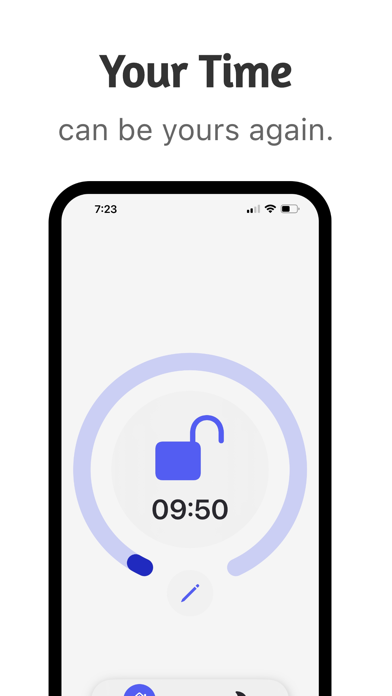
  • Frame 1 shows a white-background UI shot of the app's main timer screen with a blue circular progress ring and lock icon, topped by the headline 'Your Time' and subtext 'can be yours again.' The headline is outcome-oriented which is the correct approach β€” it leads with what the user gets rather than what the app does. However, 'Your Time / can be yours again' is somewhat abstract at search-thumbnail size (approximately 120x260 pixels); a user scanning the results row may not immediately understand this is a screen time blocker versus a general productivity or pomodoro app.
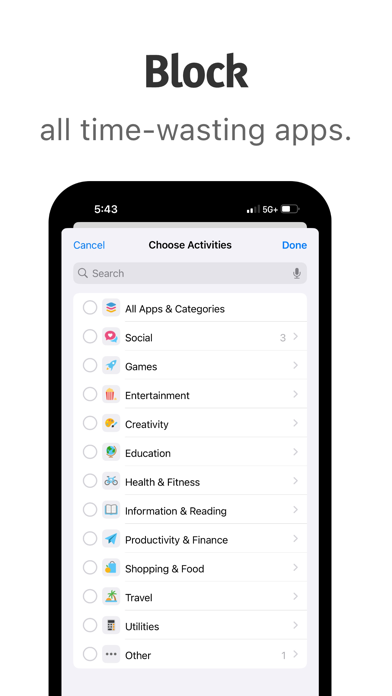
  • Frame 2 ('Limit Usage / by restricting your apps') shows the Instagram restriction modal β€” this is an excellent concrete demonstration of the mechanism. The real-world app name (Instagram) makes it immediately relatable to the target user.
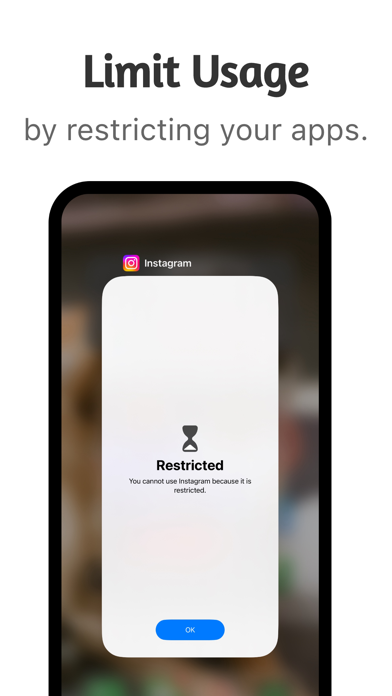
  • Frame 3 ('Block / all time-wasting apps') shows the category-picker UI from iOS Screen Time β€” this effectively communicates the breadth of blocking capability across app categories. Strong frame.
  • The screenshot set has 10 iPhone frames and 6 iPad frames β€” full device coverage, which is the ceiling for this audit dimension.

Recommendations

  • Frame 1 is the only marginal improvement opportunity: consider sharpening the headline from 'Your Time / can be yours again' to something that more immediately signals the app's category to a cold user β€” for example 'Reclaim Your Time / Block the apps stealing it.' This preserves the outcome framing while adding the category trigger word 'Block' that confirms what type of app this is within the 2-second thumbnail scan window.
  • Frames 2 and 3 are strong β€” do not change their positioning or content.
6/10

Ratings & Reviews

185 reviews Β· 4.59459 avg

Analysis

Barrier has 185 ratings at a 4.6-star lifetime average β€” a solid foundation. The rating average is above the critical 4.0 threshold and above the 4.5 threshold where trust accelerates. However, the review sample reveals a reliability pattern: multiple reviews mention the app 'breaking' or 'not locking after time is up,' and one 1-star review specifically calls out the custom schedule feature as failing. For a screen time blocker, reliability is the core value proposition β€” if the blocker doesn't block, the app fails its primary job. This creates a risk that as the app scales and more users encounter edge cases, the rating trajectory could move downward. The current 185-review count puts the app in a vulnerable position β€” not yet established enough to absorb a wave of 1-star reliability complaints without affecting ranking.

Recommendations

  • Trigger the in-app rating prompt specifically after a successful blocking session β€” when a user attempts to open a blocked app, sees the restriction screen, and then closes it (meaning the barrier worked). That is the success moment most correlated with a 5-star experience.
  • Prioritize fixing the custom schedule unlock bug mentioned in reviews before scaling paid acquisition β€” one unresolved 1-star theme about the core feature will compound as volume grows.
  • Consider responding publicly to the negative reviews that mention bugs β€” Apple shows developer responses to prospective installers, and a response that says 'this is fixed in version X' directly converts fence-sitters who read reviews before installing.

Screenshot Copy5 frames

Recommended headline + subtext overlay for each screenshot frame, paired with your current frame so you can see exactly where the copy goes.

Frame 1Frame 1
Proposed copy
New headline

Block the Time Thieves

New subtext

Add friction before every mindless scroll.

Why this copy works

Sharpens the current Frame 1 from an abstract outcome ('Your Time can be yours again') to a concrete category signal. 'Block' is the primary action verb users associate with this app type, and 'Time Thieves' gives the target apps a villain identity that emotionally resonates with the user's frustration. The subtext explains the mechanism ('friction') without over-explaining, keeping the thumbnail readable.

Frame 2Frame 2
Proposed copy
New headline

Limit Usage

New subtext

30-second pause before any blocked app opens.

Why this copy works

The current 'Limit Usage / by restricting your apps' is already effective β€” this refinement makes the mechanism explicit ('30-second pause') so users understand what type of blocker this is before installing. Specificity reduces post-install surprise and improves retention among users who wanted exactly this mechanic.

Frame 3Frame 3
Proposed copy
New headline

Block Every Category

New subtext

Social, Games, Entertainment β€” all of it.

Why this copy works

The current 'Block / all time-wasting apps' is strong but generic. 'Block Every Category' with the named examples (Social, Games, Entertainment) mirrors what users see in Frame 3's UI and confirms that Barrier covers their specific problem apps β€” not just a single app.

Frame 4Frame 4
Proposed copy
New headline

Schedule Your Focus

New subtext

Auto-block during work hours, bedtime, or study time.

Why this copy works

Introduces the scheduling feature, which is a high-intent differentiator β€” users who want 'scheduled app blocking' are more committed than casual browsers. This frame self-selects for the highest-quality installs.

Frame 5Frame 5
Proposed copy
New headline

4.6 Stars. Free.

New subtext

185+ people reclaimed their time. Your turn.

Why this copy works

Handles both the trust question (4.6 stars is above the psychological trust threshold) and the price objection (free) in one frame. Users who swipe to Frame 5 are the closest to installing β€” this frame removes the last two barriers: 'is it good?' and 'what does it cost?'

90-Day Action Plan

Week 1

5 tasks
  • Apply the new title (27/30 chars), subtitle (30/30 chars), and 100-char keyword field (100/100 chars) from the Ready-to-Paste and 100-Char Keyword Field sections above.
  • Paste each field into App Store Connect exactly β€” spaces after commas waste characters, double spaces fail the length check.
  • Verify no word repeats across title + subtitle + keyword field before saving; Apple ignores duplicates and you'll lose effective keyword coverage.
  • Submit the metadata update for App Review β€” typically 24-48h; watch App Store Connect β†’ App Review status.
  • Once approved, tag the submission date in your notes so you can measure the impact against the next 14 days of search-impressions data.

Week 2

2 tasks
  • Brief a designer on the new screenshot headlines from the Screenshot Copy section. Frame 1 ('Block the Time Thieves / Add friction before every mindless scroll') is the priority β€” it is the only frame visible in search results before a user taps through. Provide the designer with the current Frame 1 UI asset and ask them to apply the new headline as an overlay rather than replacing the UI entirely.
  • For Frames 4 and 5 (Schedule Your Focus, 4.6 Stars. Free.), confirm with your developer that the scheduling feature works reliably before prominently featuring it β€” the review sample flags a scheduling bug. If the bug is unresolved, swap Frame 4 to a different feature until it's fixed.

Week 3

2 tasks
  • Open App Store Connect β†’ Analytics β†’ Search Terms. Confirm you are receiving impressions for 'app blocker', 'habit', 'timer', and 'parental control' β€” these are the four keywords the rewrite is designed to index. If any of these show zero impressions after 2 weeks, investigate whether a duplicate token crept into the keyword field.
  • Check if the custom schedule unlock bug (flagged in 1-star reviews) has been reproduced and fixed internally. This bug is the single biggest threat to the rating trajectory β€” if it's intermittent and unfixed, a fix shipped before user volume grows will protect the 4.6-star average.

Ongoing

3 tasks
  • Trigger the in-app rating prompt (`SKStoreReviewController.requestReview()`) specifically after a user successfully resists a blocked app β€” meaning: they see the Barrier restriction screen and navigate away without overriding it. That is the moment of highest satisfaction for the app's core value proposition and will yield the most authentic 5-star responses.
  • Monitor weekly rankings for 'app blocker' (your new primary title keyword), 'parental control app' (highest opportunity score in the data), and 'digital detox' (lowest difficulty winnable compound). Ranking movement on these three terms is your north-star signal for whether the metadata change worked.
  • Refresh the keyword field seasonally β€” January ('New Year habit goals'), September ('back to school focus'), and June ('summer screen time') are recurring moments when this app's category sees search spikes. Swap out low-performing tokens for seasonal terms during those windows.

Expected Impact

The rewrite shifts the title's primary keyword from the brand token 'Barrier' to 'App Blocker' (popularity 51, difficulty 62, opportunity 19) β€” the highest-winnable keyword not currently in the title slot. Combined with 'habit' (popularity 60, opportunity 18) and 'timer' (popularity 63, opportunity 18) being added or reinforced in the keyword field, the app should begin indexing for 3 medium-opportunity keywords where it currently has weak or no presence. At 185 reviews and a 4.6-star average, Barrier is competitive against apps in the difficulty-55-65 range. Realistically, expect meaningful search impression growth on 'app blocker', 'habit timer', and 'parental control' within 4-6 weeks of the metadata update going live. The description expansion from 667 to 1,821 characters, combined with explicit social proof and a closing CTA, should incrementally improve product page conversion rate β€” even a 2-3 percentage point improvement in conversion compounds directly into install velocity, which is itself a ranking signal. The 10-point potential score gap (71 β†’ 81) is achievable through metadata changes alone; closing it fully would also require resolving the scheduling reliability bug that is currently generating 1-star reviews.