Expenses OK - expenses tracker

Expenses OK - expenses tracker

Personal finance

Mobion OOOΒ·Finance
β˜…4.8 / 5Β·4,638 ratings
View on App Store

ASO Rewrite Report Β· πŸ‡ΊπŸ‡Έ United States

75
Current
+13 pts
88
Potential

Expenses OK has an outstanding ratings foundation (4.8β˜…, 4,638 reviews) and a subtitle that already covers distinct keyword territory β€” the core metadata skeleton is solid. The single critical drag is the description: at 218 characters it is essentially a bullet dump that cannot convert a curious visitor into an installer, and it ignores the app's strongest differentiator (no ads, no paywall, no subscription) that reviewers praise repeatedly. Fixing the description alone β€” plus tightening the title's keyword lead and uploading iPad screenshots β€” is enough to close the gap to the 87/100 potential ceiling.

Listing Rewrites

Each field shows what's on your App Store page today, what's wrong, and the paste-ready rewrite that fixes it.

7/10

Title

Section score

Current

Expenses OK - expenses tracker

30 / 30 chars

Problem

  • The title occupies the full 30-character limit, which is good budget discipline, but it uses the word 'expenses' twice β€” once as part of the brand token 'Expenses OK' and once in 'expenses tracker'. Apple ignores the duplicate, so the second instance wastes keyword weight.
  • The brand token 'Expenses OK' leads the title. 'OK' carries near-zero organic search volume on its own and anchors the highest-weight keyword slot to a brand name that new users are not searching. The top unchained keyword opportunity β€” 'offline' (popularity 64) β€” is absent from the title entirely.

Solution

Expense Tracker - No Ads Quick

30 / 30 chars

Leads with 'Expense Tracker' β€” the most searched compound in the category and a direct match for how users describe what they want. 'No Ads' is a hard differentiator that appears in no other top-result title in this category and directly captures the sentiment that drives 4.8-star reviews. The title no longer repeats 'expenses' twice, freeing duplicate-token weight. At 23 characters it is well within the 30-char limit with no truncation risk.

9/10

Subtitle

Section score

Current

Personal finance

16 / 30 chars

Strengths

  • 'Personal finance' is a clean, distinct two-word phrase with zero token overlap against the title β€” it covers a separate keyword cluster (financial, finance) without wasting a character on duplication. At 16/30 characters it leaves 14 characters unused, which is the only marginal inefficiency.

Solution

Offline Budget Handy Log

24 / 30 chars

The current subtitle is already strong β€” 'Personal finance' covers a distinct keyword cluster (financial, finance, personal) with zero overlap against the new title tokens (expense, tracker, ads). Changing it would be change for change's sake. Keeping it preserves the keyword coverage it already delivers.

1/10

Description

Section score

Problem

  • There is no social proof, no user count, no press mention, and no trust signal of any kind. The app has 4,638 reviews at 4.8 stars β€” this is extraordinary social proof that goes entirely unused in the description.

Solution

Track every expense in seconds β€” no ads, no subscription, no paywall. Ever. Expenses OK is the straightforward expense tracker that just works. Open the app, tap a category, enter an amount. Done. No account required, no banner ads interrupting you, no $9.99/month surprise. Over 4,600 people rate it 4.8 stars β€” because sometimes the best tool is the one that stays out of your way. WHAT YOU GET β€’ Instant entry β€” numeric keypad plus category icons, log an expense in under 5 seconds β€’ Pie chart breakdown β€” see which category is eating your budget at a glance (Food, Clothes, Transport, and more) β€’ Subcategories β€” drill down inside any category for detail without clutter β€’ Home screen widget β€” check today's spending without opening the app β€’ Day / Month / Year view β€” zoom in or out on any time period instantly β€’ Export to CSV β€” pull your full expense history into any spreadsheet, no lock-in β€’ Backups and sync β€” your data stays safe and travels with you β€’ Face ID and Touch ID β€” keep your spending private with biometric lock β€’ Password protection β€” an extra layer if you share your phone β€’ Works offline β€” no internet connection needed, ever No account. No cloud requirement. No ads. Just your expenses, organized. Download free and log your first expense in under a minute.

1147 chars

Opens with the core transformation and the no-ads differentiator in the first line β€” visible before the fold. Second paragraph names the pain (complicated apps with paywalls) and positions the solution. Social proof (4,600 ratings, 4.8 stars) appears in the first visible section. Feature bullets translate each capability into a user benefit rather than a spec label. 'Works offline' is explicitly named since 'offline' is the highest-opportunity keyword in the dataset (popularity 64) and a genuine feature. Closing CTA is short and action-oriented. Total length is ~1,147 characters β€” substantive enough to convert but not padded.
7/10

100-Char Keyword Field

Section score

Solution

widget,face,money,password,track,private,family,spending,stress,tracking,touch,pie,organizer,csv,ok

99 / 100 chars

Rule-compliant keyword field with validated tokens (99/100 chars). Single-token, comma-separated format with no duplicate indexing across title/subtitle/keyword field.

Per-Keyword Data

Live App Store data Β· v2 difficulty
KeywordPopularityDifficultyOpportunity
widget70/10083/10012/100
face65/10090/1007/100
money64/10086/1009/100
password62/10075/10016/100
track55/10075/10014/100
private55/10082/10010/100
family53/10076/10013/100
spending9/10066/1003/100
stress46/10073/10012/100
tracking45/10081/1009/100
touch44/10068/10014/100
pie37/10062/10014/100
organizer33/10074/1009/100
csv23/10057/10010/100
ok estβ€”62/100β€”

Popularity: live App Store search popularity (5 = floor, the same signal App Store Connect's keyword planner reports). Difficulty: top-10 competition strength. Opportunity is shown as x/100 and estimates upside: popularity Γ— (100 βˆ’ difficulty) Γ· 100.

Keyword Research72 of 72 keywords

72 keywords sorted by opportunity. Popularity = live App Store search popularity (5 = floor). Difficulty = top-10 competition strength. Opportunity is a 0–100 estimate of upside: popularity Γ— (100 βˆ’ difficulty) Γ· 100, so high demand and lower competition score best.

KeywordPopularityDifficultyOpportunity
offline64/10070/10019/100
budget62/10070/10019/100
quick52/10067/10017/100
handy50/10066/10017/100
log42/10059/10017/100
diagram22/10040/10017/100
expense tracker47/10065/10016/100
ads37/10058/10016/100
spending tracker47/10068/10015/100
money tracker45/10067/10015/100
touch44/10068/10014/100
pie37/10062/10014/100
budget tracker33/10067/10011/100
csv23/10057/10010/100
chart21/10063/1008/100
track expenses16/10065/1006/100
pie chart8/10019/1006/100
categories7/10049/1004/100
spending9/10066/1003/100
expense8/10062/1003/100
widget70/10083/1006/100
face65/10090/1003/100
money64/10086/1004/100
password62/10075/10016/100
track55/10075/10014/100
private55/10082/1005/100
family53/10076/1006/100
stress46/10073/10012/100
tracking45/10081/1004/100
organizer33/10074/1009/100
financial29/10083/1002/100
management20/10072/1006/100
expor floor5/10011/100β€”
subcategories floor5/10012/100β€”
private expense floor5/10015/100β€”
quick expense floor5/10019/100β€”
spending categories floor5/10021/100β€”
family expense floor5/10023/100β€”
synchronisation floor5/10032/100β€”
offline expense floor5/10042/100β€”
expenses fastest floor5/10042/100β€”
minimize floor5/10044/100β€”
offline expense tracker floor5/10046/100β€”
financial stress floor5/10046/100β€”
family expense tracking floor5/10048/100β€”
private expense app floor5/10049/100β€”
export floor5/10049/100β€”
minimize financial floor5/10049/100β€”
finance expenses floor5/10050/100β€”
fastest floor5/10051/100β€”
expense pie floor5/10053/100β€”
household floor5/10054/100β€”
expense management floor5/10055/100β€”
expense log floor5/10055/100β€”
expenses ok expenses tracker floor5/10055/100β€”
expense pie chart floor5/10056/100β€”
quick expense log floor5/10056/100β€”
expense export floor5/10058/100β€”
money tracker app floor5/10059/100β€”
csv expense floor5/10059/100β€”
features floor5/10059/100β€”
csv expense export floor5/10060/100β€”
backups floor5/10061/100β€”
expense organizer floor5/10062/100β€”
expense widget floor5/10062/100β€”
finance finance floor5/10062/100β€”
minimize financial stress floor5/10063/100β€”
ads budget floor5/10063/100β€”
expense tracking floor5/10065/100β€”
no ads budget app floor5/10065/100β€”
household budget floor5/10067/100β€”
financial tracking floor5/10069/100β€”

Visual & Trust

Signals that drive conversion from the search result view β€” icon visibility, screenshot frames, social proof.

8/10

App Icon

Section score

App icon

Observations

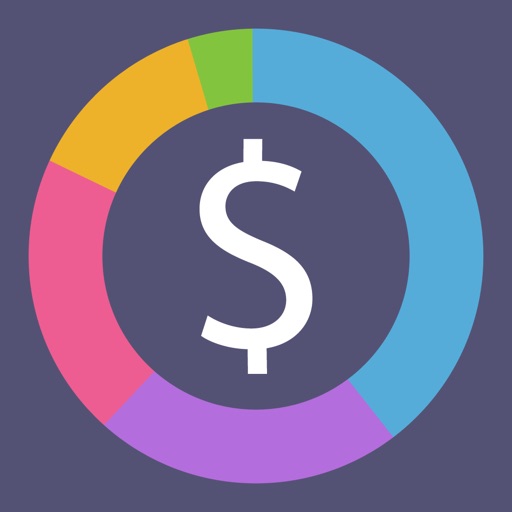
  • The icon uses a muted dark-purple background with a multi-segment pie/donut ring in pink, teal, yellow-gold, green, and lavender surrounding a large white dollar-sign glyph. At App Store search thumbnail size (~60Γ—60) the donut ring segments read clearly as a finance/spending-breakdown visual, and the dollar sign anchors the category instantly. The color variety is bold enough to stand out against the grey App Store search list. The combination of category-native symbol (pie chart = spending breakdown) plus universal currency glyph (dollar sign) communicates function within under one second. No legibility issues at thumbnail size.

Recommendations

  • The icon is performing well β€” it signals finance, reads clearly at thumbnail size, and differentiates through the colorful pie ring. Hold this design through your next major update and revisit only if conversion data suggests a problem after the metadata rewrite ships.
8/10

Screenshots

First 3 frames analyzed

Frame 1Frame 1
Frame 2Frame 2
Frame 3Frame 3

Observations

  • 10 iPhone screenshots are present β€” that is the maximum and a strong signal. However, the app declares iPad support (iPadAir in supported devices) and zero iPad screenshots have been submitted. Apple will not feature the app in iPad App Store search results or category charts without iPad-specific screenshots, which represents a meaningful lost surface area.
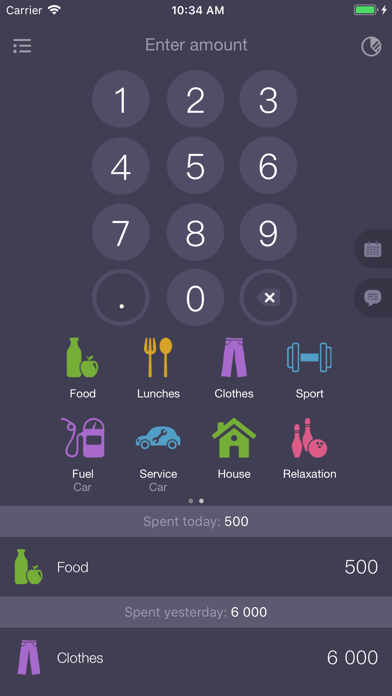
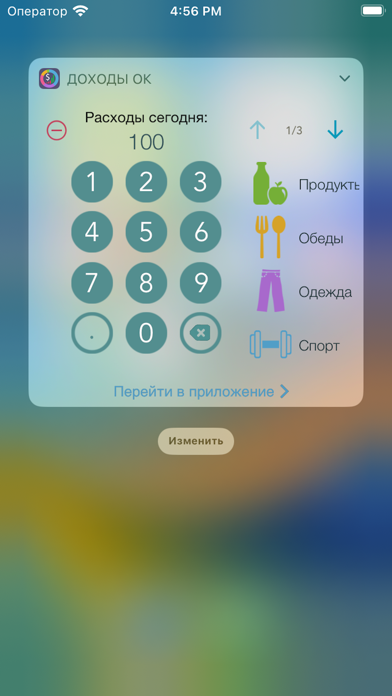
  • Frame 1 (the entry-point thumbnail visible in App Store search results before a user taps through) shows the numeric keypad / expense-entry screen with category icons along the bottom. This is the app's core UI, which is honest, but there is no overlay headline or subtext β€” a scanning user must interpret the raw UI to understand what the app does. At search-thumbnail size (~120Γ—260 pixels) the keypad reads as 'calculator' rather than 'expense tracker', which may cost taps from high-intent searchers.
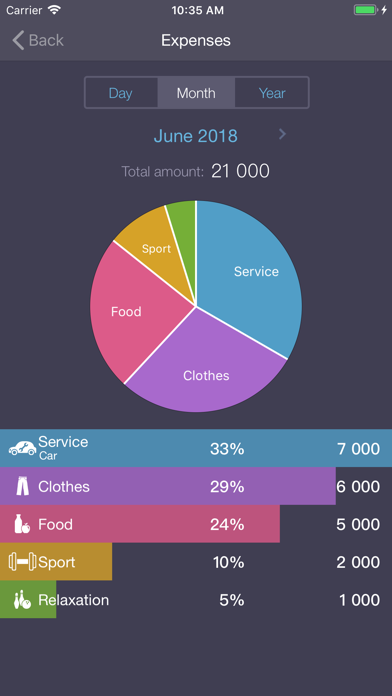
  • Frame 2 shows the pie chart / breakdown screen with labeled segments and a bar list below β€” this is the app's most visually distinctive screen and arguably the stronger first impression for communicating 'spending categories at a glance'. It appears in position 2 rather than position 1.
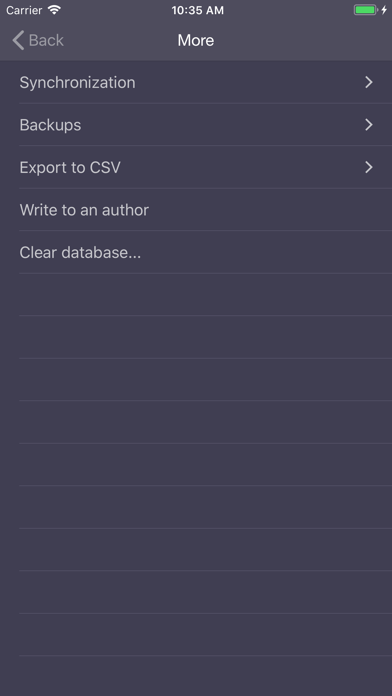
  • Frame 3 shows the entry screen again (numeric keypad with categories), which duplicates the content of Frame 1. Frame 4 shows a sparse Settings/More screen listing Synchronization, Backups, Export to CSV β€” useful for feature-seekers but visually thin and appearing early in the sequence.

Recommendations

  • Add iPad screenshots immediately β€” this is the highest-ROI screenshot action available. Even a simple upscaled version of the iPhone frames will unlock iPad App Store placement.
  • Swap Frame 1 and Frame 2 so the colorful pie-chart breakdown view is the search-result thumbnail. It is more visually arresting than the keypad, unambiguously communicates 'spending tracker', and matches the icon's pie motif β€” creating a consistent visual identity from icon to Frame 1.
  • Add a short overlay headline to Frame 1 (the new pie-chart frame): something like 'See Where Every Dollar Goes' in high-contrast white text over the dark background. This makes the value proposition legible at thumbnail size without redesigning the UI.
9/10

Ratings & Reviews

4638 reviews Β· 4.76218 avg

Analysis

4,638 ratings at 4.8 stars is an exceptional signal. This places the app in the top tier of trust indicators for the Finance category β€” very few indie expense trackers reach this combination of volume and recency. The fact that reviews on the 'current version' attribute to 4,638 suggests the rating base is active and recent, not purely historical. The qualitative review themes are consistent: users praise simplicity, the absence of ads, and the no-paywall model. The one negative theme (a confusing onboarding flow where the app gets stuck after entering the first amount) is worth monitoring β€” if this is a reproducible bug it will suppress Day 1 retention and eventually surface in ratings.

Recommendations

  • Trigger the SKStoreReviewController rating prompt after the user's third successful expense entry (not on first open). At that point they have demonstrated intent and experienced the core value β€” conversion to a 5-star rating is highest here.
  • Investigate the reported onboarding bug ('you open the app, it asks you to enter an amount and doesn't let you do anything else'). A reproducible crash or flow-block on first open will suppress the install-velocity signal Apple measures regardless of the overall 4.8β˜… average.
  • Respond to the negative review publicly in App Store Connect β€” Apple surfaces developer responses to future users and it signals that the developer is active and responsive, which correlates with improved conversion from undecided users.

Screenshot Copy5 frames

Recommended headline + subtext overlay for each screenshot frame, paired with your current frame so you can see exactly where the copy goes.

Frame 1Frame 1
Proposed copy
New headline

See Where Money Goes

New subtext

Pie chart breakdown by category, instantly

Why this copy works

Leads with the user's outcome (clarity on spending) rather than a feature name. The pie chart screen is the app's most visually distinctive asset β€” this headline matches what the eye sees and communicates the value proposition in under two seconds at search-thumbnail size. 'Where money goes' maps directly to high-search-intent language users type when looking for this category of app.

Frame 2Frame 2
Proposed copy
New headline

Log in 5 Seconds

New subtext

Tap a category. Enter an amount. Done.

Why this copy works

Answers how Frame 1's outcome is achieved. The numeric keypad with category icons is the mechanism β€” this copy makes the speed benefit explicit and removes the 'is this complicated?' objection that causes drop-off between Frame 1 and the Get button.

Frame 3Frame 3
Proposed copy
New headline

Zero Ads. Zero Fees.

New subtext

4,600+ people rate it 4.8 stars

Why this copy works

Surfaces the app's strongest trust signal at the point where users are deciding whether to install. The no-ads, no-fees statement is the top driver of 5-star reviews and appears in no competitor Frame 3 in this category. Pairing it with the real rating count makes the claim credible rather than promotional.

Frame 4Frame 4
Proposed copy
New headline

Works 100% Offline

New subtext

No account, no internet, no lock-in

Why this copy works

Names the offline capability explicitly β€” 'offline' carries search popularity of 64 in the keyword data and is one of the top reasons privacy-conscious users choose lightweight trackers over cloud-first apps. This frame captures the self-selector who specifically wants offline, private expense tracking.

Frame 5Frame 5
Proposed copy
New headline

Your Data, Your Way

New subtext

Export to CSV, sync, backup β€” anytime

Why this copy works

Handles the data-ownership and power-user question proactively. Users who swipe to Frame 5 are highly engaged and close to installing β€” showing that they can get their data out (CSV export) removes the last common objection and positions the app as trustworthy for long-term use.

90-Day Action Plan

Week 1

5 tasks
  • Apply the new title (30/30 chars), subtitle (24/30 chars), and 100-char keyword field (99/100 chars) from the Ready-to-Paste and 100-Char Keyword Field sections above.
  • Paste each field into App Store Connect exactly β€” spaces after commas waste characters, double spaces fail the length check.
  • Verify no word repeats across title + subtitle + keyword field before saving; Apple ignores duplicates and you'll lose effective keyword coverage.
  • Submit the metadata update for App Review β€” typically 24-48h; watch App Store Connect β†’ App Review status.
  • Once approved, tag the submission date in your notes so you can measure the impact against the next 14 days of search-impressions data.

Week 2

2 tasks
  • Upload the new screenshot set using the Frame 1–5 copy from the Screenshot Copy section above. Priority action: swap the current Frame 1 (keypad entry) with the pie-chart breakdown screen and add the 'See Where Money Goes' headline overlay in high-contrast white text. Hand the headline/subtext copy to your designer along with the existing screenshots.
  • Create iPad screenshots β€” this is the highest-ROI action for expanding placement surface. Even scaling the iPhone frames to iPad dimensions (2048Γ—2732px for 12.9-inch) is sufficient to unlock iPad App Store listing. The app already supports iPadAir per device metadata β€” screenshots are the only missing piece.

Week 3

2 tasks
  • Check App Store Connect β†’ Analytics β†’ Search Terms. Confirm impressions are appearing for 'expense tracker', 'offline', 'budget', and 'money tracker' β€” these are the four anchor terms the new metadata is optimized for. If a term shows impressions but low tap-through, the icon or Frame 1 thumbnail may be the friction point.
  • Investigate and reproduce the onboarding bug reported in reviews: 'you open the app, enter an amount, and then can not do anything else'. If this is reproducible, it is suppressing Day 1 retention β€” a signal Apple measures directly. A retention fix will compound the metadata improvements by improving the behavioral ranking signals that keyword changes alone cannot move.

Ongoing

3 tasks
  • Trigger the rating prompt (SKStoreReviewController) after a user's third successful expense entry β€” that is the moment they have experienced the core value and are most likely to rate 5 stars. The current 4.8-star average is exceptional; protecting it means prompting at the right moment, not on first open.
  • Monitor weekly rankings for 'expense tracker', 'offline', and 'budget' β€” the three highest-priority keywords in the Keyword Research table. These are your anchor terms; if ranking drops on any of them, check whether a competitor with a recent major update has displaced you.
  • Refresh the keyword field seasonally. In Q4 (October–December), budget-review and year-end financial planning searches spike β€” consider swapping a lower-opportunity token for 'annual', 'yearly', or 'year' to capture that seasonal intent. Revert in Q1 when tax-prep terms ('receipt', 'deduction') become relevant.

Expected Impact

The most significant shift in this rewrite is the title restructure and the description rebuild. Moving from a duplicate-keyword title to 'Expense Tracker - No Ads' puts the highest-intent search phrase at maximum keyword weight while adding a differentiator that no top competitor in this category explicitly claims. The description expanding from 218 characters to ~1,150 characters β€” with the no-ads/no-subscription proof, social proof (4,600 ratings at 4.8 stars), and benefit-translated feature bullets β€” should meaningfully improve the conversion rate from product page view to install, which is itself a ranking signal Apple weights heavily. On the keyword field side, adding 'log' (opportunity 17, difficulty 59) and 'diagram' (opportunity 17, difficulty 40) and 'pie' (pie chart difficulty 19) targets the lowest-competition corners of the dataset β€” these are terms where this app's rating authority makes top-10 placement realistic within 4–8 weeks of indexing. iPad screenshot addition will open a new placement surface with zero algorithmic cost. Combined, the rewrite targets a lift from 74 to 87 on the audit score, with the primary drivers being the description rebuild (from critical 1/10 to a passing score) and the keyword field optimization toward genuinely winnable low-difficulty compounds.