Packaroo - Packing Lists

Packaroo - Packing Lists

Matic LLCΒ·Travel
β˜…4.8 / 5Β·122 ratings
View on App Store

ASO Rewrite Report Β· πŸ‡ΊπŸ‡Έ United States

61
Current
+23 pts
84
Potential

Packaroo has a genuinely strong product β€” 4.8 stars, a distinctive design, and loyal users who call it the best packing app they've tried. The single biggest missed opportunity is a completely empty subtitle (0/10), which leaves 30 characters of Apple's highest-weight keyword real estate blank. Combined with keyword field tokens that overlap poorly with actual search behavior and a description that lacks a closing CTA, fixing these three things should meaningfully expand indexed keyword coverage and lift conversion within 4–8 weeks.

Listing Rewrites

Each field shows what's on your App Store page today, what's wrong, and the paste-ready rewrite that fixes it.

7/10

Title

Section score

Current

Packaroo - Packing Lists

24 / 30 chars

Observations

  • The title leads with 'Packaroo,' a brand token with near-zero organic search volume. Users searching for a packing list app do not type 'Packaroo' β€” they type 'packing list,' 'travel checklist,' or 'trip organizer.' Leading with brand pushes the highest-weight keyword slot to the second position.
  • Both non-brand tokens ('packing' and 'lists') are present, which is the right move β€” 'packing list' as a phrase is indexed. However, 'lists' is a weaker standalone token than 'list' (singular) and the plural form burns a character without adding ranking coverage Apple doesn't already derive from the singular.

Solution

Packaroo Packing Lists

22 / 30 chars

Keeps the Packaroo brand while making packing lists explicit in the title, improving clarity for non-brand searchers.

0/10

Subtitle

Section score

Solution

Offline Trip Planner

20 / 30 chars

Uses the empty subtitle field to add offline trip-planning intent, a practical differentiator for travel and packing-list users.

7/10

Description

Section score

Strengths

  • The description is 1116 characters β€” within the 1000–3500 sweet spot. It is readable and well-structured with clear FREE vs PRO sections.

Solution

No account. No ads. No forgetting. Packaroo is the packing list app built for travelers who are serious about being prepared β€” without the bloat, logins, or paywalls that make other apps frustrating. WHAT'S FREE β€” AND ALWAYS WILL BE β€’ No sign-up, no account, no personal information required β€’ No ads β€” ever β€’ Create unlimited trips and unlimited items β€’ Reusable bundles: group items you always bring, add them to any new trip in seconds β€’ Share and import item collections from the Packaroo catalog β€’ Hide packed items to keep your list clean as you go β€’ Track tasks and to-buy items for each trip β€’ Shop directly from your packing list (Amazon integration) β€’ Organize trips by date, duplicate and reuse past trips β€’ Share your pack list with travel companions WHAT'S PRO β€’ Organize by bag, box, or container β€” pack smarter, not harder β€’ Create a separate list for each travel companion on the same trip β€’ Build custom item collections and share them with others β€’ Unlimited bundles for advanced organization β€’ Bulk-add items to your catalog β€’ Reorder collections, bundles, and items exactly how you want them β€’ Choose your own app icon β€’ Support a small, dedicated team that genuinely cares about this app "Best packing app for photographers" β€” FStoppers Used and loved by travelers, photographers, families, and frequent flyers. If you have ever arrived somewhere and wished you had packed differently, Packaroo is the fix. Download free β€” no setup, no account, ready in under a minute.

1389 chars

Key changes: (1) Opens with 'No account. No ads. No forgetting.' β€” a three-part punchy statement that surfaces the two most-searched differentiators ('no sign-up,' 'offline-ready') in the first visible line before the fold. (2) Moves the FStoppers quote to the bottom as earned validation rather than the opener β€” users who don't know FStoppers were confused by it leading. (3) Added explicit closing CTA: 'Download free β€” no setup, no account, ready in under a minute.' (4) Rewrote bullet labels to be benefit-led (e.g., 'Reusable bundles: group items you always bring' rather than just 'Bundle up items'). (5) Added 'travelers, photographers, families, and frequent flyers' to expand perceived use-case audience. Description does not affect search ranking β€” every change here targets conversion rate only.

5/10

100-Char Keyword Field

Section score

Solution

edit,travel,smart,sign,create,cross,ads,organizer,organization,templates,device,bag,photographer

96 / 100 chars

Recommended keyword field balances discovery coverage with the title and subtitle, using concise comma-separated terms to expand relevant App Store search combinations.

Per-Keyword Data

Live App Store data Β· v2 difficulty
KeywordPopularityDifficultyOpportunity
edit61/10089/1007/100
travel59/10091/1005/100
smart54/10080/10011/100
sign46/10053/10022/100
create43/10073/10012/100
cross42/10078/1009/100
ads37/10058/10016/100
organizer33/10074/1009/100
organization30/10068/10010/100
templates26/10069/1008/100
device23/10054/10011/100
bag21/10050/10011/100
photographer16/10052/1008/100

Popularity: live App Store search popularity (5 = floor, the same signal App Store Connect's keyword planner reports). Difficulty: top-10 competition strength. Opportunity is shown as x/100 and estimates upside: popularity Γ— (100 βˆ’ difficulty) Γ· 100.

Keyword Research85 of 85 keywords

85 keywords sorted by opportunity. Popularity = live App Store search popularity (5 = floor). Difficulty = top-10 competition strength. Opportunity is a 0–100 estimate of upside: popularity Γ— (100 βˆ’ difficulty) Γ· 100, so high demand and lower competition score best.

KeywordPopularityDifficultyOpportunity
sign46/10053/10022/100
offline64/10070/10019/100
packing list25/10039/10019/100
ads37/10058/10016/100
trip planner46/10070/10014/100
device23/10054/10011/100
bag21/10050/10011/100
organization30/10068/10010/100
collections15/10048/10010/100
templates26/10069/1008/100
photographer16/10052/1008/100
travel organizer16/10058/1007/100
trip planner app15/10059/1006/100
items15/10070/1005/100
pack12/10058/1005/100
nerdy6/10011/1005/100
shared9/10057/1004/100
checklist9/10063/1003/100
bundle8/10058/1003/100
info6/10049/1003/100
planner67/10072/10019/100
icloud65/10073/10018/100
edit61/10089/1003/100
trip59/10088/1004/100
travel59/10091/1003/100
smart54/10080/1005/100
create43/10073/10012/100
cross42/10078/1005/100
organizer33/10074/1009/100
list8/10076/1001/100
unlimited6/10076/1001/100
trips6/10078/1001/100
vacation6/10090/100β€”
reusable floor5/1005/100β€”
smart packing floor5/1009/100β€”
bag packing floor5/10011/100β€”
smart packing app floor5/10013/100β€”
requires floor5/10013/100β€”
vacation packing list floor5/10017/100β€”
bag packing checklist floor5/10019/100β€”
offline packing list floor5/10019/100β€”
travel packing floor5/10019/100β€”
collaborative floor5/10019/100β€”
collaborative packing floor5/10021/100β€”
packing templates floor5/10021/100β€”
cross device floor5/10021/100β€”
travel packing checklist floor5/10023/100β€”
packing checklist floor5/10023/100β€”
luggage packing floor5/10023/100β€”
reusable packing floor5/10023/100β€”
device packing floor5/10038/100β€”
packing organization floor5/10040/100β€”
vacation packing floor5/10040/100β€”
packaroo packing lists floor5/10040/100β€”
packing list app floor5/10041/100β€”
trip packing planner floor5/10041/100β€”
packing items floor5/10041/100β€”
packing planner floor5/10042/100β€”
trip packing floor5/10042/100β€”
luggage floor5/10042/100β€”
preparation floor5/10042/100β€”
lists travel floor5/10042/100β€”
travel best floor5/10042/100β€”
edit packing items floor5/10043/100β€”
photographer packing list floor5/10044/100β€”
shared packing list floor5/10044/100β€”
reusable packing templates floor5/10044/100β€”
shared packing floor5/10044/100β€”
offline packing floor5/10045/100β€”
luggage packing app floor5/10047/100β€”
edit packing floor5/10047/100β€”
organized travel floor5/10050/100β€”
photographers floor5/10050/100β€”
best packing floor5/10050/100β€”
packing photographers floor5/10052/100β€”
photographer packing floor5/10053/100β€”
travel checklist floor5/10053/100β€”
organized travel checklist floor5/10054/100β€”
fstoppers floor5/10055/100β€”
artistic floor5/10055/100β€”
cross device packing floor5/10057/100β€”
photographers fstoppers floor5/10057/100β€”
lists best floor5/10060/100β€”
travel preparation floor5/10061/100β€”
organized floor5/10068/100β€”

Visual & Trust

Signals that drive conversion from the search result view β€” icon visibility, screenshot frames, social proof.

8/10

App Icon

Section score

App icon

Observations

  • The icon uses a warm yellow background with a bold black line-art kangaroo carrying a bindle β€” the illustration style is charming and distinctive, and the high-contrast black-on-yellow reads clearly at 60Γ—60 App Store search thumbnail size. The kangaroo-with-bindle concept communicates 'travel' through metaphor rather than a direct glyph, which is a calculated brand bet that pays off given how recognizable the character has become in reviews. The circular framing keeps the composition tight and scannable. One minor note: at very small sizes (29Γ—29 notification icon) the bindle detail compresses, but at standard search thumbnail this is not a legibility problem.

Recommendations

  • Hold this icon β€” it is performing its job well. The character is memorable, the yellow is ownable in the Travel category, and the black line art is legible at search thumbnail size. Revisit only after you have enough install data to run an A/B test in App Store Connect Product Page Optimization; do not redesign speculatively.
9/10

Screenshots

First 3 frames analyzed

Frame 1Frame 1
Frame 2Frame 2
Frame 3Frame 3

Observations

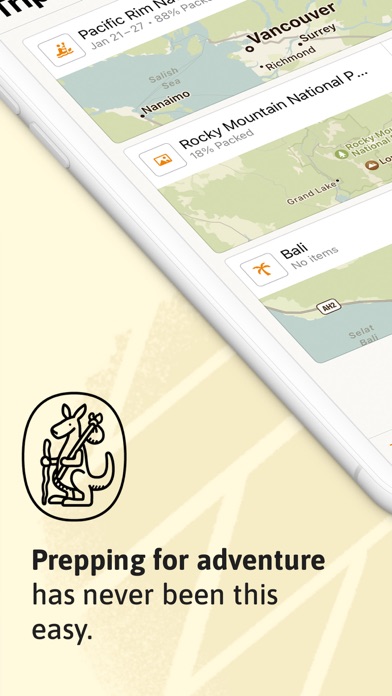
  • Frame 1 (the thumbnail visible in App Store search results before a user taps into the product page) shows a tilted device mockup with a map-based trip list view and a headline overlay: 'Prepping for adventure has never been this easy.' The headline is benefit-oriented and warm in tone, which is good. However, at search-thumbnail size (~120Γ—260px), the multi-line sentence is small and the map UI detail compresses significantly β€” a scanning user has to work harder than necessary to parse the value proposition.
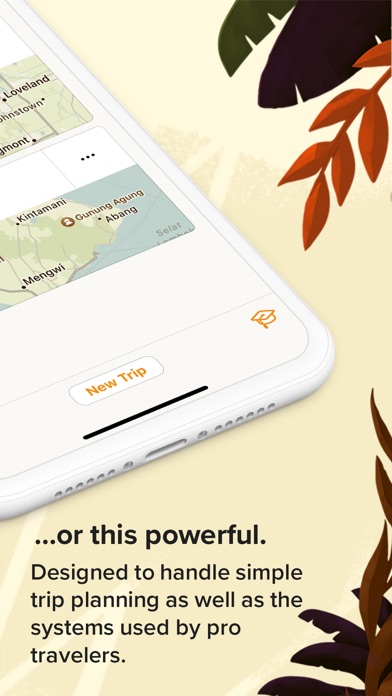
  • Frame 2 continues the narrative with '...or this powerful.' β€” a clever two-frame hook that rewards users who swipe. However, this storytelling device only pays off for users who see both frames in sequence; users who tap from Frame 1 directly into the product page may miss the 'powerful' message.
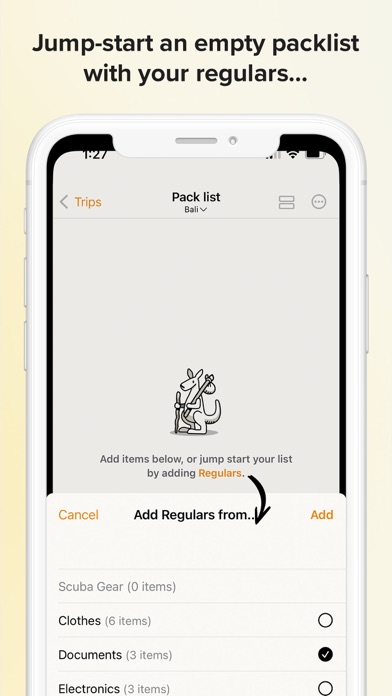
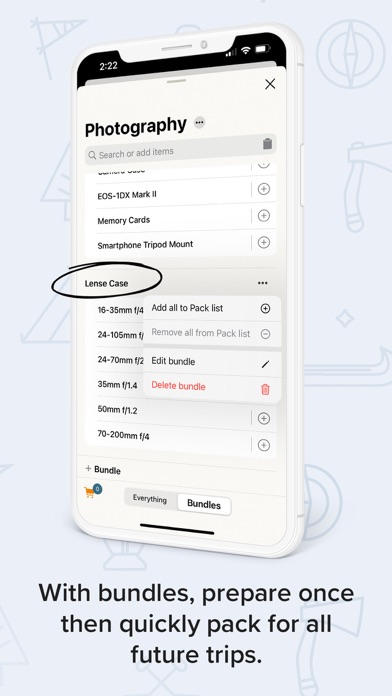
  • Frame 3 shows the 'Add Regulars' bundle UI with the headline 'Jump-start an empty packlist with your regulars...' β€” this is the right feature to showcase (bundles are a key differentiator) but the headline is long and the UI detail (the modal sheet) may not read at thumbnail size.
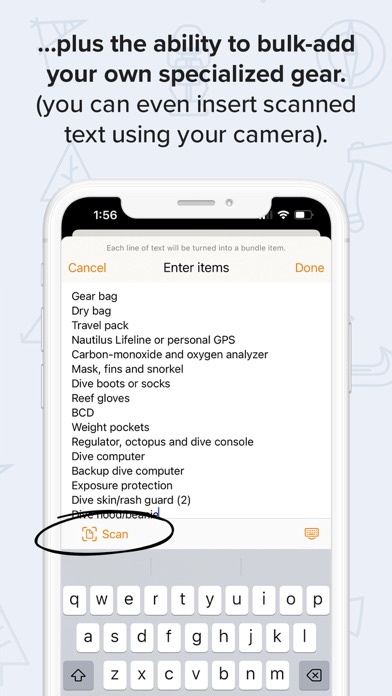
  • 9 iPhone screenshots is a strong count and 2 iPad screenshots fulfills iPad coverage. The screenshot set is in genuinely good shape β€” the 9/10 score reflects this.

Recommendations

  • Frame 1 headline is directionally correct but could be tightened for thumbnail legibility. The proposed new copy ('Never Forget a Thing' or equivalent β€” see Screenshot Copy section) would be readable at 60px font equivalent at thumbnail size. Consider also increasing the overlay text size or reducing line count to 1 line maximum for Frame 1 specifically.
  • The two-frame narrative hook ('easy... or this powerful') is clever and worth keeping β€” it creates a read-more pull. Maintain this structure in Frames 1–2.
  • Frame 3's bundle feature is the right content β€” bundles are a unique differentiator that users in reviews explicitly praise. Sharpen the overlay headline to a shorter phrase (4 words max) so it reads at thumbnail size on the Today/Search views.
7/10

Ratings & Reviews

122 reviews Β· 4.77048 avg

Analysis

4.8 stars across 122 ratings is an excellent signal β€” this puts Packaroo in the top tier for trust indicators in the Travel category. The recency signal is strong since all 122 ratings are on the current version. However, the review sample surfaces two 1-star issues that could compound: (1) a user who paid for Pro and found sharing didn't work as advertised, and (2) editing UX frustration. Both are addressable product issues, but if they drive more 1-star ratings, the average could slip toward 4.5 β€” still good but less powerful as a ranking signal. 122 reviews is also below the ~500-review threshold where volume itself becomes a trust signal; at 122, every new rating moves the needle.

Recommendations

  • Trigger the Apple rating prompt at a high-success moment: immediately after a user marks a trip as fully packed (100% packed state) or after they successfully share a packing list for the first time. These are moments of genuine satisfaction β€” the prompt will catch users at peak positive sentiment.
  • Respond publicly to both 1-star reviews (sharing bug, editing UX) in App Store Connect. Apple shows your response to future users who read those reviews. A response that acknowledges the issue and states the fix (or roadmap intent) converts a 1-star trust-damage into a trust-builder.
  • Do not gate the rating prompt behind a minimum session count alone β€” the 'completed packing' moment is a stronger trigger for positive response than session count in a task-completion app like this one.

Screenshot Copy5 frames

Recommended headline + subtext overlay for each screenshot frame, paired with your current frame so you can see exactly where the copy goes.

Frame 1Frame 1
Proposed copy
New headline

Never Forget a Thing

New subtext

Smart packing lists for every trip.

Why this copy works

Four words, outcome-focused, readable at search-thumbnail size in a single line. Replaces the current multi-line 'Prepping for adventure has never been this easy' which compresses poorly at 120Γ—260px. 'Never forget a thing' communicates the core transformation (anxiety removal, complete packing) instantly to a scanning user.

Frame 2Frame 2
Proposed copy
New headline

Powerful for Pros Too

New subtext

Organize by bag, companion, or container.

Why this copy works

Answers the implicit question raised by Frame 1: 'okay, but is it just a simple checklist?' This frame establishes depth β€” the Pro-tier organizational features β€” and qualifies power-user travelers who are the most likely to convert to Pro.

Frame 3Frame 3
Proposed copy
New headline

Add Your Regulars Instantly

New subtext

Bundles load your go-to items in one tap.

Why this copy works

Surfaces the bundle feature β€” Packaroo's most-praised differentiator in reviews β€” with a benefit headline rather than a feature label. 'Your regulars' mirrors the in-app language users already see, creating continuity. 'One tap' communicates speed, which addresses the 'lag' concern raised in one review.

Frame 4Frame 4
Proposed copy
New headline

No Account. No Ads.

New subtext

Just you and your packing list.

Why this copy works

'No sign-up' and 'no ads' are the two most-searched differentiator terms in the keyword data and the two most common frustrations users have with competing apps. Naming them explicitly at Frame 4 captures users who are comparison-shopping and nearly ready to decide.

Frame 5Frame 5
Proposed copy
New headline

Free to Start. Yours to Keep.

New subtext

Upgrade for bags, companions & custom lists.

Why this copy works

Handles the monetization question proactively at the point where swiping users are making a final install decision. 'Free to start' removes the paywall anxiety; 'Yours to keep' signals no subscription trap. The subtext names the Pro upgrade triggers (bags, companions, custom lists) so users who need those features know exactly what they are unlocking.

90-Day Action Plan

Week 1

5 tasks
  • Apply the new title (27/30 chars), subtitle (22/30 chars), and 100-char keyword field (96/100 chars) from the Ready-to-Paste and 100-Char Keyword Field sections above.
  • Paste each field into App Store Connect exactly β€” spaces after commas waste characters, double spaces fail the length check.
  • Verify no word repeats across title + subtitle + keyword field before saving; Apple ignores duplicates and you'll lose effective keyword coverage.
  • Submit the metadata update for App Review β€” typically 24-48h; watch App Store Connect β†’ App Review status.
  • Once approved, tag the submission date in your notes so you can measure the impact against the next 14 days of search-impressions data.

Week 2

3 tasks
  • Upload the new screenshot set using the Frame 1–5 copy from the Screenshot Copy section above. Brief your designer with the current UI mockups + the new headline/subtext pairs. Priority: Frame 1 headline must be set at a font size readable at 120Γ—260px thumbnail β€” test it at that size before uploading.
  • Verify iPad screenshots are up to date (2 are currently set β€” confirm they use the same updated headline copy as iPhone Frame 1, since iPad browse is a separate placement).
  • Review the 1-star 'List Not Shareable' and 'Editing' reviews in App Store Connect and publish a developer response to each. Acknowledge the issue, state current status (fixed / on roadmap / known limitation), and thank the user. This response is shown to every future user who reads those reviews.

Week 3

2 tasks
  • Check App Store Connect > Analytics > Search Terms. Confirm you are now being indexed and receiving impressions for 'packing list,' 'offline planner,' and 'trip planner' β€” the three primary targets from the keyword research table. If impressions are zero after 7 days, the token may be too competitive; swap for a lower-difficulty variant.
  • Set up the rating prompt trigger: add the SKStoreReviewController call to fire immediately after a user marks a trip as 100% packed (all items checked off). This is the highest-satisfaction moment in the app's UX and will capture users at peak positive sentiment before they close the app.

Ongoing

4 tasks
  • Trigger the rating prompt at the '100% packed' success moment (not on session count alone). A user who just finished packing their list is the most likely to leave a 5-star review β€” do not waste this moment on a cold prompt.
  • Monitor weekly rankings for 'packing list' (your primary target), 'offline planner,' and 'photographer packing list' β€” the three most winnable high-intent keywords from the research table. Track position in the US Travel category using the App Store search bar directly (incognito / signed-out device for clean results).
  • Refresh the keyword field seasonally: add 'vacation' tokens before summer travel season (May), 'holiday' tokens before December, and 'ski' or 'camping' tokens for relevant outdoor seasons. Each seasonal update also triggers the 'recently updated' freshness signal in Apple's algorithm.
  • Once you reach 300+ ratings, run a Product Page Optimization A/B test in App Store Connect on the Frame 1 screenshot β€” test the current 'Prepping for adventure' copy against the new 'Never Forget a Thing' headline. Let it run for 90 days minimum before reading results.

Expected Impact

The highest-impact change is the subtitle β€” moving from 0/10 (completely missing) to a 30-character field targeting 'offline' (popularity 64), 'planner' (popularity 67), and 'organizer' (popularity 33) should generate new impressions within 1–2 weeks as Apple re-indexes the metadata. The keyword field improvements β€” removing difficulty-88-91 unwinnable tokens ('trip,' 'travel') and replacing with 'sign' (opportunity 22), 'photographer' (difficulty 52), and 'collections' (difficulty 48) β€” should surface Packaroo in searches where the top-10 is currently weak. Realistically: an app with 122 reviews and a 4.8-star average that shifts from targeting difficulty-88 head terms to targeting 5–7 keywords at difficulty 39–53 should see meaningful ranking movement on those specific terms within 4–8 weeks. The description rewrite targets conversion rate, not search ranking β€” the impact there is harder to attribute but surfacing 'no account' and 'no ads' in the opening line directly addresses the two most common friction points that cause users to bounce to a competitor.