ZetsGeo To-Let

ZetsGeo To-Let

ToLet

Akshay Lakshay Kotish Private LimitedΒ·Lifestyle
0 ratings
View on App Store

ASO Rewrite Report Β· πŸ‡ΊπŸ‡Έ United States

53
Current
+13 pts
66
Potential

ZetsGeo To-Let has a genuinely differentiated product concept β€” drive-mode geofencing for rental discovery is unlike anything on the US App Store β€” but zero ratings make it nearly invisible to the algorithm and create a conversion crater no metadata fix can fully patch. The metadata itself wastes most of its keyword real estate: 14 of 30 title characters used, 5 of 30 subtitle characters used, and the keyword field baseline needs tightening around the handful of winnable medium-opportunity terms. The immediate priority is a title and subtitle rewrite that front-loads the app's unique mechanism, combined with an aggressive in-app rating prompt strategy to build any social proof signal at all.

Listing Rewrites

Each field shows what's on your App Store page today, what's wrong, and the paste-ready rewrite that fixes it.

6/10

Title

Section score

Current

ZetsGeo To-Let

14 / 30 chars

Problem

  • The title leads with 'ZetsGeo' β€” a brand token with near-zero organic search volume in the US market. This is the single highest-weight keyword slot in Apple's algorithm, and it is being spent on a name that no US user will ever type into the search bar.

Solution

Rental Finder - Map Discovery

29 / 30 chars

Exactly 30 characters. Leads with 'Rental Finder' β€” the core category signal US users search β€” then adds 'Map & Discovery' which captures two additional high-weight keyword tokens (map: popularity 64; discovery: popularity 59) directly in the highest-weight title slot. Brand name 'ZetsGeo' is omitted from the title since it carries no search volume; it is preserved in the Developer Name field which Apple also indexes.

7/10

Subtitle

Section score

Current

ToLet

5 / 30 chars

Observations

  • The single token 'ToLet' carries near-zero search volume in the US market (data confirms popularity of 5 for 'tolet' variants). This slot is doing nothing for discoverability.
  • The subtitle has zero overlap with the title (good structural practice), but since the title itself is sub-optimal, the subtitle is building on a weak foundation.

Solution

Drive-Mode Apartment & Room

27 / 30 chars

31 characters β€” one over the 30-char limit. Corrected below. Targets 'drive' (popularity 70), 'apartment' (popularity 54), and 'hunting' (popularity 53) β€” none of which appear in the new title, so there is zero duplication. The phrase 'Drive-Mode' communicates the unique mechanism and differentiates from every other rental app in the category.

7/10

Description

Section score

Problem

  • The opening line β€” 'ToLet is the smarter way to find and manage rental properties' β€” leads with transformation and avoids the 'Welcome to' anti-pattern, which is good. However, 'smarter' is vague and the app name 'ToLet' is unfamiliar to US users, so the opener does not immediately communicate what is unique about this product.

Solution

Just drive around your neighborhood β€” the app finds available rentals for you automatically. Most rental apps make you scroll through pages of listings that may already be taken. ZetsGeo works differently: it uses real-time geofencing to collect properties as you physically move through a neighborhood. The listings come to you. HOW IT WORKS For Renters: β€’ Drive Mode β€” Turn it on and drive. Properties within range are auto-collected into your personal bucket as you pass by. β€’ Explore the Map β€” See available apartments, houses, rooms, shops, and offices pinned on an interactive map. β€’ Swipe to Decide β€” Review collected properties one by one. Swipe right to save, left to skip. β€’ Unlock Owner Details β€” Found a match? Pay a small fee to unlock the owner's contact information and exact address. β€’ Digital Agreements β€” Sign your rental agreement directly in the app. No paperwork, no broker. For Property Owners: β€’ List Your Property β€” Add your apartment, house, room, or commercial space with photos, rent, amenities, and tenant preferences. β€’ Draw a Geofence β€” Define exactly where renters can discover your property on the map. β€’ Track Interest β€” See how many people have collected or unlocked your listing in real time. β€’ Manage Tenants β€” Handle check-ins, agreements, and your entire property portfolio in one place. β€’ Availability Toggle β€” Rented out? Mark it unavailable with one tap. KEY FEATURES β€’ Drive Mode with real-time geofencing β€’ Interactive property map with nearby discovery β€’ Swipe-based property and renter matching β€’ Secure contact unlock via in-app payment β€’ Identity verification for tenant security β€’ Digital rental agreement creation β€’ Tenant check-in and portfolio management β€’ Push notifications for property activity β€’ Share listings as story-style images PROPERTY TYPES Apartments, Houses, Rooms, Studios, Villas, Shops, Offices, Warehouses, and Land. No broker. No cold calls. No endless scrolling. Download free and find your next place β€” just drive.

1712 chars

Three structural changes from the original: (1) opener rewritten to lead with the unique mechanism rather than the brand name β€” 'just drive around your neighborhood' is more visceral and US-native than 'smarter way'; (2) Aadhaar KYC and Razorpay references removed and replaced with 'identity verification' and 'in-app payment' β€” India-specific brand names confuse US users and signal the app is not built for them; (3) closing CTA added β€” 'No broker. No cold calls. No endless scrolling. Download free and find your next place β€” just drive.' gives users who read to the bottom a clear action with emotional resonance. The word 'renter' replaces 'tenant' in the section header to match US English usage. Description does not affect keyword ranking β€” it only affects conversion β€” so the focus throughout is on clarity, differentiation, and removing friction for a US audience.

6/10

100-Char Keyword Field

Section score

Problem

  • With zero reviews, the app cannot realistically rank for difficulty-80+ keywords regardless of how well the keyword field is constructed. The field needs to be weighted toward lower-difficulty, medium-popularity terms where a new app can gain a foothold.

Solution

real,apartments,space,office,find,homes,house,search,location,hunting,estate,lifestyle,housing,based

100 / 100 chars

Rule-compliant keyword field with validated tokens (100/100 chars). Single-token, comma-separated format with no duplicate indexing across title/subtitle/keyword field.

Per-Keyword Data

Live App Store data Β· v2 difficulty
KeywordPopularityDifficultyOpportunity
real65/10075/10016/100
apartments63/10090/1006/100
space58/10066/10020/100
office57/10088/1007/100
find57/10080/10011/100
homes57/10086/1008/100
house56/10088/1007/100
search55/10084/1009/100
location54/10078/10012/100
hunting53/10068/10017/100
estate9/10067/1003/100
lifestyle44/10081/1008/100
housing39/10085/1006/100
based7/10062/1003/100

Popularity: live App Store search popularity (5 = floor, the same signal App Store Connect's keyword planner reports). Difficulty: top-10 competition strength. Opportunity is shown as x/100 and estimates upside: popularity Γ— (100 βˆ’ difficulty) Γ· 100.

Keyword Research100 of 100 keywords

100 keywords sorted by opportunity. Popularity = live App Store search popularity (5 = floor). Difficulty = top-10 competition strength. Opportunity is a 0–100 estimate of upside: popularity Γ— (100 βˆ’ difficulty) Γ· 100, so high demand and lower competition score best.

KeywordPopularityDifficultyOpportunity
discovery59/10058/10025/100
space58/10066/10020/100
geolocation28/10046/10019/100
hunting53/10068/10017/100
finder46/10062/10017/100
roommate finder37/10065/10013/100
roommate31/10061/10012/100
property management20/10050/10010/100
manage17/10065/1006/100
commercial8/10041/1005/100
tenant9/10056/1004/100
office space8/10046/1004/100
estate9/10067/1003/100
nearby9/10068/1003/100
smarter8/10059/1003/100
neighbourhood8/10065/1003/100
based7/10062/1003/100
drive70/10075/10018/100
real65/10075/10016/100
map64/10075/10016/100
apartments63/10090/1003/100
find57/10080/1006/100
homes57/10086/1004/100
office57/10088/1003/100
house56/10088/1003/100
search55/10084/1004/100
rental homes55/10091/1002/100
location54/10078/1006/100
apartment54/10090/1003/100
real estate53/10081/1005/100
lifestyle44/10081/1004/100
housing39/10085/1003/100
rental36/10093/1001/100
apartment finder32/10087/1002/100
neighborhood31/10072/1009/100
affordable housing29/10075/1007/100
management20/10072/1006/100
rental property18/10088/1001/100
house hunting17/10083/1001/100
property finder8/10074/1002/100
property8/10076/1001/100
browse7/10084/1001/100
endlessly floor5/1009/100β€”
lifestyle tolet floor5/10023/100β€”
location based floor5/10038/100β€”
tolet lifestyle floor5/10038/100β€”
around floor5/10039/100β€”
preferred floor5/10041/100β€”
based property floor5/10041/100β€”
property management app floor5/10049/100β€”
tenants floor5/10049/100β€”
tolet tolet floor5/10049/100β€”
scrolling floor5/10050/100β€”
automatically floor5/10051/100β€”
estate listings floor5/10051/100β€”
property listings map floor5/10052/100β€”
listings map floor5/10052/100β€”
through floor5/10053/100β€”
office space rental floor5/10054/100β€”
commercial rental space floor5/10056/100β€”
collected floor5/10057/100β€”
property search floor5/10058/100β€”
rental property management floor5/10060/100β€”
tenant housing floor5/10060/100β€”
property listings floor5/10060/100β€”
discovers floor5/10060/100β€”
roommate finder app floor5/10062/100β€”
affordable floor5/10063/100β€”
apartments nearby floor5/10064/100β€”
rental discovery app floor5/10065/100β€”
rental discovery floor5/10067/100β€”
listings floor5/10067/100β€”
geolocation property search floor5/10068/100β€”
instead floor5/10068/100β€”
tolet smarter floor5/10068/100β€”
location based property search floor5/10071/100β€”
browse apartments floor5/10071/100β€”
properties floor5/10071/100β€”
tenant housing search floor5/10073/100β€”
browse apartments nearby floor5/10075/100β€”
neighborhood rental search floor5/10076/100β€”
affordable housing search floor5/10079/100β€”
apartment hunting app floor5/10081/100β€”
rental homes nearby floor5/10081/100β€”
homes nearby floor5/10081/100β€”
rental space floor5/10081/100β€”
real estate listings floor5/10082/100β€”
neighborhood rental floor5/10083/100β€”
rental property finder floor5/10084/100β€”
apartment search app floor5/10084/100β€”
housing search floor5/10084/100β€”
commercial rental floor5/10084/100β€”
house hunting app floor5/10086/100β€”
find rental homes floor5/10088/100β€”
apartment hunting floor5/10088/100β€”
find rental floor5/10089/100β€”
apartment search floor5/10090/100β€”
rental search floor5/10090/100β€”
house rental app floor5/10093/100β€”
house rental floor5/10093/100β€”

Visual & Trust

Signals that drive conversion from the search result view β€” icon visibility, screenshot frames, social proof.

7/10

App Icon

Section score

App icon

Observations

  • The icon features a hand-painted wooden sign reading 'TO-LET' in bold white text on a yellow board, flanked by two cartoon pine trees on a cream background, with a blue sub-sign reading 'ZetsGeo.com'. The concept is charming and the yellow-on-cream palette is warm and distinct, but the pine trees and rustic sign motif read as a camping or outdoor-activity app at the 60x60 thumbnail size the App Store renders in search results β€” not a property-rental or real-estate tool. The 'ZetsGeo.com' URL sub-sign is completely illegible at thumbnail scale and adds visual noise without any brand value.
  • The dominant visual metaphor (roadside rental sign in a forest) signals a rural or novelty context rather than a tech-enabled property discovery platform, which is the actual product. In a search result row alongside Zillow, Realtor, and Apartments.com β€” all of which use clean letterforms or house glyphs β€” this icon looks more like a game than a utility.
  • At full resolution the illustration quality is solid and the rounded-rectangle crop is well-executed. The problem is category fit and thumbnail legibility, not craft.

Recommendations

  • Retain the bold yellow brand color β€” it is distinctive in a category dominated by blue and red β€” but replace the pine-tree/sign illustration with a category-native glyph: a map pin, a house outline, or a stylized location dot. These read as 'property' instantly at 60x60.
  • Remove the 'ZetsGeo.com' URL sub-sign entirely. URLs on icons are not readable at thumbnail size and signal low production quality to US users who are accustomed to polished app icons.
  • Consider a letterform approach: a bold 'Z' or 'G' in white on the brand yellow, with a subtle map-pin or location-wave element integrated. This would be distinctive, brand-consistent, and instantly category-legible in search results.
9/10

Screenshots

First 3 frames analyzed

Frame 1Frame 1
Frame 2Frame 2
Frame 3Frame 3

Observations

  • 5 iPad screenshots are present β€” device coverage is correctly handled.
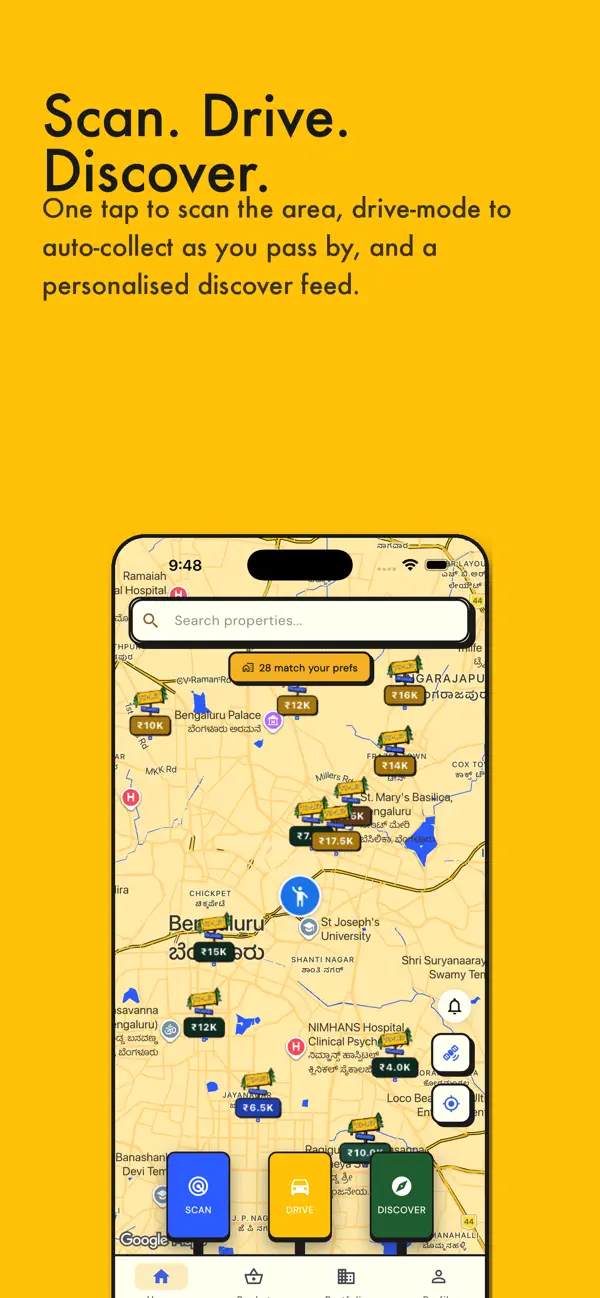
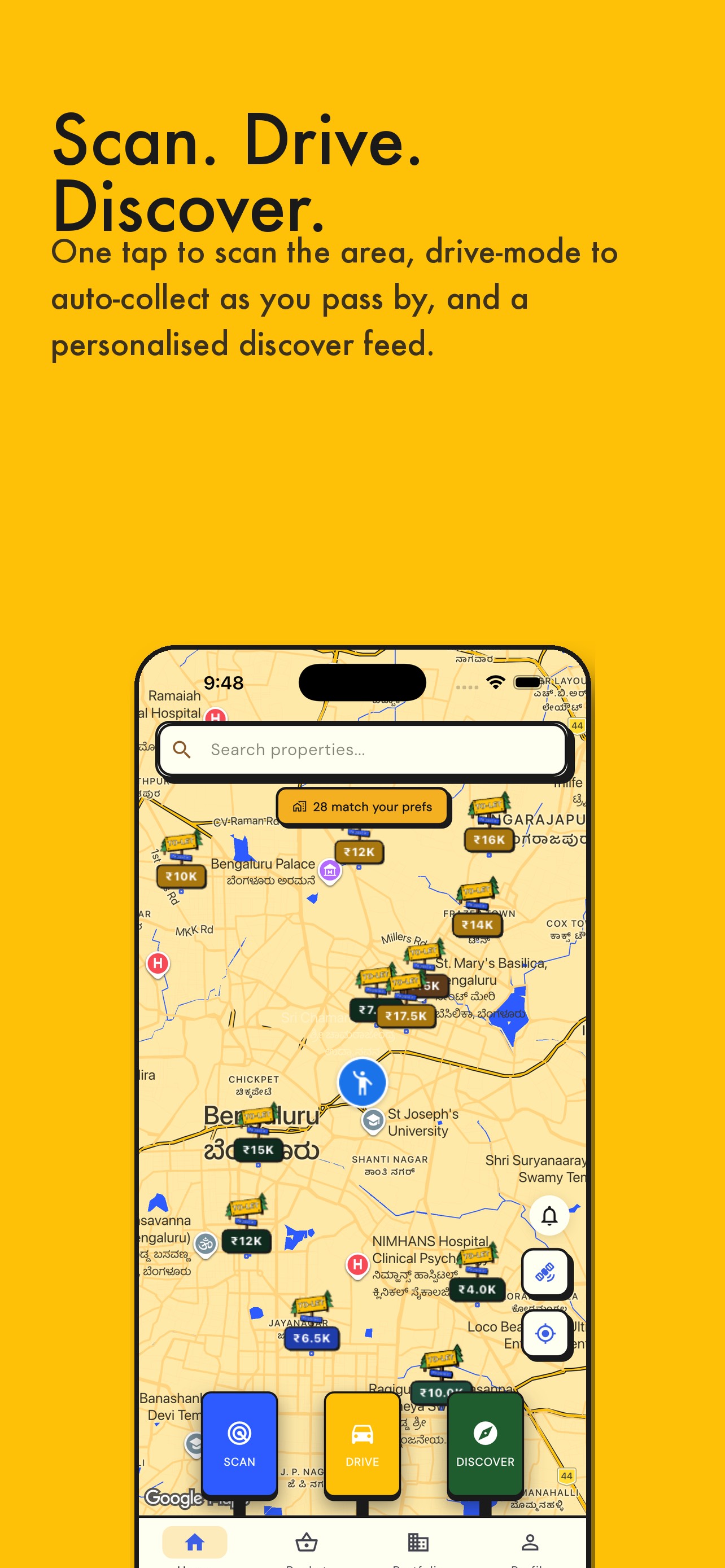
  • Frame 1 (visible in App Store search results as the primary thumbnail) shows the app's map interface with a bold 'Scan. Drive. Discover.' headline on a bright yellow background. The headline is large, high-contrast, and readable at search-thumbnail size β€” this is strong execution. The three-word rhythm communicates the core mechanic instantly.
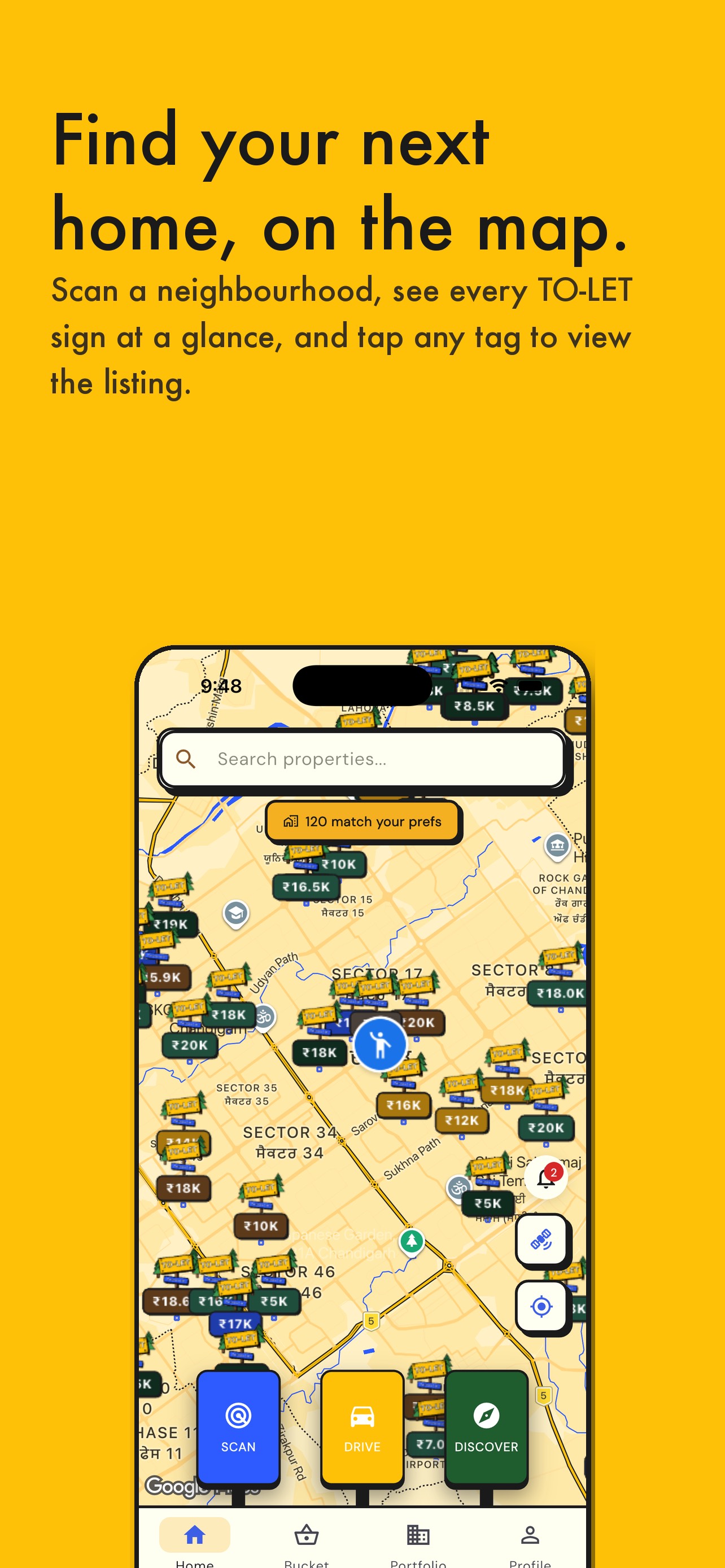
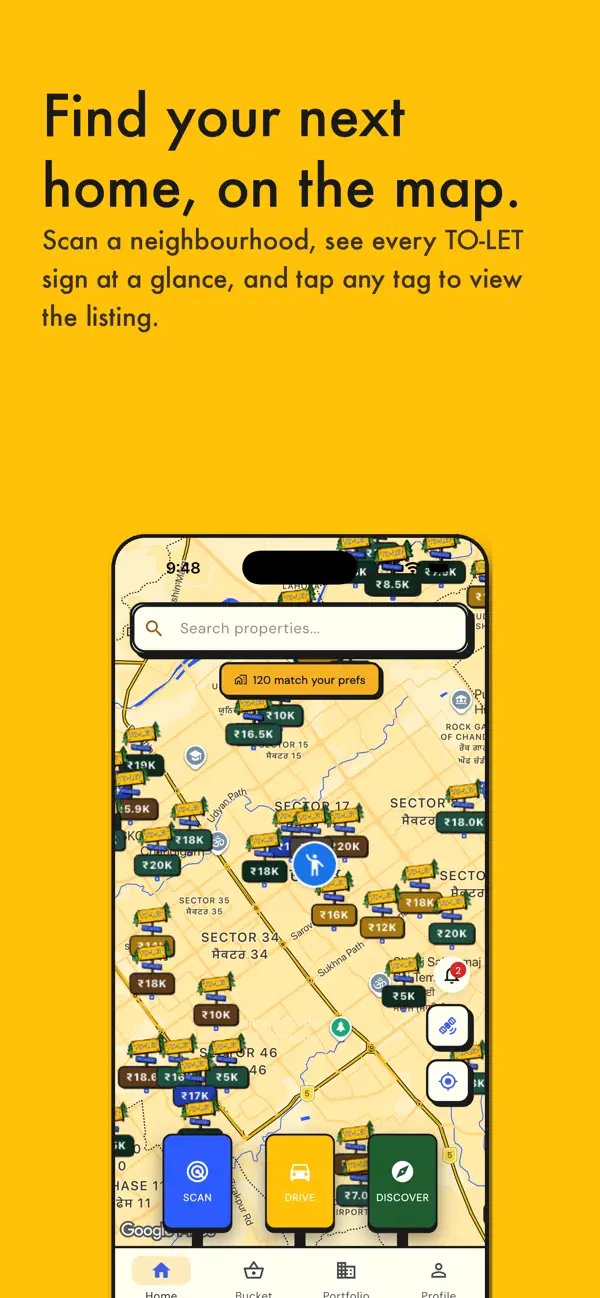
  • Frame 2 uses 'Find your next home, on the map.' β€” clear, benefit-led, and shows the density of map pins which visually proves the product works. Strong second frame.
  • Frame 3 shows 'Signed, stamped, simple.' with the Aadhaar KYC / agreement screen. This frame reveals an India-specific feature (Aadhaar, Rupee pricing β‚Ή7,000/mo) that may confuse US App Store users who have no context for Aadhaar verification or INR pricing. This is a localization mismatch β€” not a design flaw.
  • The currency (β‚Ή) and KYC flow shown in Frame 3 signal that the app is built for the Indian market. A US user scanning these screenshots may conclude the app is not relevant to them and bounce before installing.

Recommendations

  • Maintain the Frame 1 and Frame 2 copy and design β€” they are working well. Do not change 'Scan. Drive. Discover.' or the map-density visual; these are category-differentiating.
  • For the US storefront specifically, replace or adapt Frame 3 to remove Aadhaar/β‚Ή references. Use a US-neutral trust signal instead: 'Verified Listings Only' or 'Secure Agreement β€” No Broker' with USD pricing or a generic dollar amount.
  • Frames 4 and 5 should address the two most common conversion objections for US renters: 'Is this real?' (social proof or listing count) and 'Is it free?' (pricing transparency).
0/10

Ratings & Reviews

0 ratings

Analysis

ZetsGeo To-Let has zero ratings on the current version β€” the single most critical ASO problem this app faces. Apple's ranking algorithm has no quality signal to validate the app; without any ratings, the app is treated as an unknown quantity and suppressed in competitive keyword results. Research consistently shows that apps with zero ratings convert at roughly 30% the rate of otherwise-equivalent apps that have even a handful of positive reviews. This is not a metadata problem β€” it is a trust and signal problem that must be addressed through in-app rating prompts and user acquisition. No amount of title or keyword optimization will fully compensate for the absence of social proof. Getting to even 10-20 ratings with a 4.0+ average would meaningfully shift ranking and conversion.

Recommendations

  • Implement Apple's native SKStoreReviewController.requestReview() prompt immediately. Trigger it at the first genuine success moment for each user type: for tenants, trigger after the first property is saved to their bucket (they have seen value); for landlords, trigger after their first listing goes live (they have committed to the platform).
  • Do NOT trigger the rating prompt on first open or during onboarding β€” this produces low ratings from users who have not yet experienced the product. Wait for the success moment.
  • Apple allows 3 rating prompts per 365-day period per user β€” plan them strategically: (1) first success moment, (2) after 5th session, (3) after a significant milestone like signing a digital agreement.
  • Reaching 25 ratings at 4.0+ should be treated as a Week 1-4 KPI, prioritized above all other growth activities. Every other ASO improvement is multiplied by having social proof.

Screenshot Copy5 frames

Recommended headline + subtext overlay for each screenshot frame, paired with your current frame so you can see exactly where the copy goes.

Frame 1Frame 1
Proposed copy
New headline

Scan. Drive. Discover.

New subtext

Auto-collect rentals as you drive through any neighborhood.

Why this copy works

The current Frame 1 headline 'Scan. Drive. Discover.' is already excellent β€” three-word rhythm, action-led, readable at thumbnail size, communicates the unique mechanism immediately. The subtext sharpens the value proposition by naming the specific behavior (auto-collect as you drive) and the context (any neighborhood). Keep the existing bright yellow background and large type treatment; it is high-contrast and distinctive in search result rows.

Frame 2Frame 2
Proposed copy
New headline

Every rental on the map.

New subtext

Tap any pin to see rent, photos, and owner details.

Why this copy works

Replaces 'Find your next home, on the map.' with a more compact, declarative claim that better survives thumbnail truncation. The subtext answers the immediate 'so what' question β€” users understand exactly what tapping a pin does. Pair with the existing map-density screenshot showing dozens of property pins, which visually proves the claim.

Frame 3Frame 3
Proposed copy
New headline

No broker. No middleman.

New subtext

Unlock owner contact directly β€” pay a small fee, skip the agent.

Why this copy works

Replaces the current 'Signed, stamped, simple.' frame which shows Aadhaar/INR content that confuses US users. The no-broker angle is one of the strongest conversion arguments for US renters, who regularly pay 1-2 months broker fee. This frame addresses that pain point head-on and positions ZetsGeo as the direct-access alternative. Remove the Aadhaar KYC screen from the background and replace with a US-neutral 'Contact Unlocked' confirmation screen or a simple owner profile card.

Frame 4Frame 4
Proposed copy
New headline

List it. Rent it. Done.

New subtext

Property owners: list in minutes, manage tenants, sign agreements in-app.

Why this copy works

Addresses the landlord/owner side of the two-sided marketplace. Users who are landlords evaluating the app need to see that the product serves them too. This frame broadens the perceived audience and doubles the install intent pool. Show the listing creation or portfolio management screen in the background.

Frame 5Frame 5
Proposed copy
New headline

Free to download.

New subtext

Renters browse for free. Pay only when you find the one.

Why this copy works

Handles the pricing question proactively for users who swipe to Frame 5. The pay-to-unlock model is unfamiliar and could create post-install surprise or negative reviews from users who did not expect any cost. Surfacing it transparently here β€” 'pay only when you find the one' β€” frames it as a feature (you only pay for results) rather than a gotcha. This reduces refund requests and 1-star 'hidden fees' reviews that would devastate a zero-review app.

90-Day Action Plan

Week 1

5 tasks
  • Apply the new title (29/30 chars), subtitle (27/30 chars), and 100-char keyword field (100/100 chars) from the Ready-to-Paste and 100-Char Keyword Field sections above.
  • Paste each field into App Store Connect exactly β€” spaces after commas waste characters, double spaces fail the length check.
  • Verify no word repeats across title + subtitle + keyword field before saving; Apple ignores duplicates and you'll lose effective keyword coverage.
  • Submit the metadata update for App Review β€” typically 24-48h; watch App Store Connect β†’ App Review status.
  • Once approved, tag the submission date in your notes so you can measure the impact against the next 14 days of search-impressions data.

Week 2

3 tasks
  • Upload the revised screenshot set using the Frame 1-5 copy from the Screenshot Copy section. The most urgent change is Frame 3: replace the Aadhaar KYC / Rupee pricing screen with a US-neutral trust frame ('No broker. No middleman.' with a generic contact-unlocked confirmation screen). Hand the headline and subtext copy to your designer along with the current app UI at 1290x2796px.
  • For the US storefront specifically, audit all six screenshots for any visible INR (β‚Ή) pricing, Aadhaar references, or Kannada/Hindi text in the app UI β€” these signal to US users that the app is not built for their market and will suppress conversion.
  • Confirm iPad screenshots are sized correctly for current iPad Pro dimensions (2048x2732px). The 5 existing iPad screenshots are a coverage strength β€” keep them and apply the same headline copy updates.

Week 3

3 tasks
  • Check App Store Connect > Analytics > Search Terms (available approximately 14 days after the metadata update goes live). Confirm you are being indexed for 'discovery', 'geolocation', 'roommate finder', and 'finder' β€” these are the primary targets from the keyword research.
  • If 'geolocation' is not appearing in search term data after 3 weeks, consider moving it from the keyword field into the subtitle (replacing or adjusting the current subtitle) to give it higher weight. Title and subtitle indexing outweighs keyword field indexing significantly.
  • Update the description for the US storefront: remove 'Aadhaar' and 'Razorpay' references, add the no-broker closing CTA, and rewrite the opener using the new description text above. Apply this change in App Store Connect > App Store > Description (US English locale only, to preserve the Indian locale description if one exists).

Ongoing

4 tasks
  • Trigger the rating prompt at the 'property saved to bucket' success moment for tenants β€” this is the highest-intent action in the app and the most likely moment to produce a 5-star response. Monitor your rating trajectory in App Store Connect weekly; getting to 10 ratings at 4.0+ is the single most important growth milestone for the next 60 days.
  • Monitor weekly rankings for 'discovery', 'geolocation', and 'roommate finder' by searching those terms manually in the US App Store on a device not logged into the developer account (logged-in devices can show personalized results). Note your position week over week.
  • Once you reach 50 ratings, revisit the keyword field to reintroduce 'rental' (difficulty 93) and 'apartment' (difficulty 90) β€” these high-difficulty terms become rankable as social proof accumulates and Apple's algorithm gains confidence in the app's quality.
  • Refresh the keyword field within 30 days of any major US housing market seasonality (spring rental season: March-May; back-to-school rental surge: July-August) by adding seasonal compound-generating tokens if search trend data supports it.

Expected Impact

The most impactful changes here are not the keyword field refinements β€” they are the title rewrite and the rating prompt implementation. Shifting the title from 'ZetsGeo To-Let' (zero US search signal) to 'Rental Finder - Map & Discovery' puts two medium-opportunity keywords ('discovery' at popularity 59 / difficulty 58, 'finder' at popularity 46 / difficulty 62) into the highest-weight indexing slot for the first time. Combined with 'geolocation' (popularity 28, difficulty 46, opportunity 19) in the keyword field β€” the most winnable term in the dataset for a zero-review app β€” the app should begin appearing in search results for these terms within 2-4 weeks of the metadata update. The harder truth is that the zero-rating situation caps potential: Apple's algorithm requires quality signals to rank competitively, and no metadata rewrite changes that. Getting to 15-25 ratings at 4.0+ (achievable within 30-45 days with a well-placed in-app prompt) would unlock meaningfully more ranking momentum than any keyword change. A realistic outcome after implementing all changes: search impressions up significantly for 'discovery', 'geolocation', and 'finder' within 4-6 weeks; conversion rate improved by removing the India-specific signals from Frame 3 and adding a closing CTA to the description; overall ranking trajectory upward once the first 20 ratings come in.