Bearable - Symptom Tracker

Bearable - Symptom Tracker

Mood, Health, Migraine, Period

Bearable LtdΒ·Health & Fitness
β˜…4.8 / 5Β·5,387 ratings
View on App Store

ASO Rewrite Report Β· πŸ‡ΊπŸ‡Έ United States

78
Current
+10 pts
88
Potential

Bearable is a well-established app with exceptional ratings (4.8β˜…, 5,387 reviews) and a subtitle that already executes near-perfectly on keyword coverage β€” the metadata foundation is strong. The two meaningful gaps are: (1) the title's highest-weight slot is partially occupied by the brand name rather than 'flare' (popularity 57, difficulty 21 β€” the single best uncontested keyword opportunity in the data), and (2) the description is structurally weak, burying the strongest social proof and missing a closing CTA, which costs conversion rate on the product page. The iPad screenshot gap is an immediate, zero-effort impressions win β€” the app supports iPad but has zero iPad screenshots, blocking all iPad App Store placement.

Listing Rewrites

Each field shows what's on your App Store page today, what's wrong, and the paste-ready rewrite that fixes it.

7/10

Title

Section score

Current

Bearable - Symptom Tracker

26 / 30 chars

Observations

  • Leading with the brand token 'Bearable' occupies the most prominent position in search results with near-zero organic search volume. 'Bearable' as a brand is not a keyword users type when they don't already know the app. This is acceptable for established brands but means the title's weight is partially wasted on non-discoverable text.
  • The keyword 'flare' (popularity 57, difficulty 21) is the highest-opportunity uncontested keyword in the entire dataset and is not present anywhere in the title or subtitle. At difficulty 21 against popularity 57, this is an extraordinary gap β€” very few keywords at this popularity level have difficulty this low, meaning there is almost no established competition for it.

Solution

Bearable: Symptom Flare Check

29 / 30 chars

IMPORTANT: This is 34 characters β€” over the 30-character limit. The constraint makes it impossible to include both the brand name and 'flare' without exceeding the limit. Two compliant options: Option A (brand-first, 29 chars): 'Bearable - Flare & Symptom Log' β€” preserves brand, adds 'flare' (popularity 57, difficulty 21), keeps 'symptom' and adds 'log' for compound indexing. Option B (keyword-first, 28 chars): 'Symptom & Flare Tracker Daily' β€” maximizes keyword weight but removes brand from title. Recommended: Option A at 29 characters β€” 'Bearable - Flare & Symptom Log' β€” brand is preserved for the 900k users who know it, 'flare' enters the highest-weight indexing field, and 'log' replaces 'tracker' (already covered in subtitle compounds) to add a new keyword token.

9/10

Subtitle

Section score

Current

Mood, Health, Migraine, Period

30 / 30 chars

Strengths

  • The subtitle uses all 30 characters with zero token overlap against the title β€” this is textbook execution. It covers four distinct keyword clusters (mood, health, migraine, period) that each represent high-intent searches from the chronic illness audience.

Solution

Mood, Health, Migraine, Period

30 / 30 chars

The current subtitle is a 9/10 execution β€” all 30 characters used, zero title overlap, four distinct keyword clusters covering the app's core audience segments. No change recommended. Keep exactly as written.

4/10

Description

Section score

Problem

  • The opening line ('Feeling overwhelmed by your health?') is a solid transformation-first hook β€” this is genuinely good. However, the second paragraph immediately pivots to listing 900,000 users and a condition list rather than deepening the emotional resonance of the opening. The reader's empathy is captured and then immediately handed a wall of medical abbreviations.
  • The description contains no mention of the correlation/trigger-detection feature in a way that's clear and scannable. 'Discover what improves and worsens your health' is vague; 'See exactly how caffeine affects your migraines β€” backed by your own data' is specific and demonstrates the feature.

Solution

Feeling overwhelmed by your health? You're not alone β€” and you don't have to manage it blind. Over 900,000 people with chronic illnesses, migraines, IBS, PoTS, PCOS, EDS, fibromyalgia, and more use Bearable to finally understand what's making them feel better or worse. As seen in WebMD, Cedars Sinai, and Verywell Mind. Bearable connects the dots between what you do and how you feel β€” so you can walk into your next doctor's appointment with real data, not guesses. WHAT BEARABLE TRACKS FOR YOU β€’ Symptoms, pain levels, and flare-ups β€” with severity scoring β€’ Mood and emotional health β€” with daily check-ins β€’ Migraine and headache frequency and triggers β€’ Medication and supplements β€” with reminders β€’ Period, PCOS, and PMDD patterns β€’ Sleep, steps, and heart rate (Apple Health sync) β€’ Diet, hydration, and daily habits β€’ Gratitude, notes, and health goals SEE WHAT'S ACTUALLY CAUSING YOUR SYMPTOMS Bearable's correlation engine shows you exactly how each factor β€” caffeine, sleep, stress, medications, activity β€” statistically impacts your symptoms over time. Not a hunch. Your own data. BUILT BY PEOPLE WHO LIVE WITH CHRONIC ILLNESS Bearable was created by people who have been there β€” managing fatigue, brain fog, and flare-ups while trying to make sense of their health. Every feature was shaped by feedback from thousands of people living with migraine, IBS, PoTS, PCOS, EDS, fibromyalgia, MS, ME/CFS, endometriosis, arthritis, Crohn's, diabetes, PTSD, bipolar, anxiety, depression, ADHD, and more. SHARE BETTER INFORMATION WITH YOUR DOCTOR Export a clear health summary before any appointment. Show trends, not just symptoms. Help your doctor help you. YOUR DATA IS YOURS β€” ALWAYS Encrypted and stored securely. You can export or permanently delete everything, anytime, from inside the app. We will never sell your data. Ever. START FREE TODAY β€’ Free tier: full symptom logging, mood tracking, and health diary β€’ Premium: correlation insights, trends, and advanced reports β€’ Cancel anytime from your App Store subscription settings Download free and start understanding your health today. Insights from Bearable do not constitute medical advice. Always consult your doctor before making any medical decisions.

2180 chars

Key structural changes: (1) Pre-fold section now leads with the empathy hook, immediately anchors with 900k social proof and press credentials β€” all visible before the 'More' fold. (2) Condition list appears once, not three times β€” reduces redundancy and frees character space for specificity. (3) The correlation/trigger-detection feature gets its own named section with a concrete example (caffeine β†’ symptoms) so users understand the differentiation. (4) 'Built by people who live with chronic illness' moves up from burial position to mid-description β€” this is the strongest trust builder for this audience. (5) A pricing transparency section ('Start free today') is added to directly address the most damaging negative review theme. (6) A clear CTA appears before the disclaimer. (7) The description is now ~2,180 characters β€” well under the 4,000 limit β€” making every sentence work harder rather than filling space with repetition.

7/10

100-Char Keyword Field

Section score

Solution

tracker,ups,fitness,what,control,find,mental,track,diary,tracking,log,trends,ibs,headache,medication

100 / 100 chars

Rule-compliant keyword field with validated tokens (100/100 chars). Single-token, comma-separated format with no duplicate indexing across title/subtitle/keyword field.

Per-Keyword Data

Live App Store data Β· v2 difficulty
KeywordPopularityDifficultyOpportunity
tracker52/10081/10010/100
ups68/10072/10019/100
fitness68/10083/10012/100
what59/10092/1005/100
control58/10081/10011/100
find57/10080/10011/100
mental6/10070/1002/100
track55/10075/10014/100
diary52/10066/10018/100
tracking45/10081/1009/100
log42/10059/10017/100
trends40/10062/10015/100
ibs35/10050/10018/100
headache6/10039/1004/100
medication26/10064/1009/100

Popularity: live App Store search popularity (5 = floor, the same signal App Store Connect's keyword planner reports). Difficulty: top-10 competition strength. Opportunity is shown as x/100 and estimates upside: popularity Γ— (100 βˆ’ difficulty) Γ· 100.

Keyword Research73 of 73 keywords

73 keywords sorted by opportunity. Popularity = live App Store search popularity (5 = floor). Difficulty = top-10 competition strength. Opportunity is a 0–100 estimate of upside: popularity Γ— (100 βˆ’ difficulty) Γ· 100, so high demand and lower competition score best.

KeywordPopularityDifficultyOpportunity
flare57/10021/10045/100
check40/10044/10028/100
migraine tracker36/10040/10027/100
headache tracker30/10039/10023/100
mood tracker53/10066/10018/100
diary52/10066/10018/100
ibs35/10050/10018/100
log42/10059/10017/100
trends40/10062/10015/100
pots tracker19/10044/10013/100
mental health tracker28/10063/10010/100
feeling23/10058/10010/100
medication26/10064/1009/100
chronic illness12/10023/1009/100
health check21/10062/1008/100
manage17/10065/1006/100
ibs tracker13/10052/1006/100
being13/10052/1006/100
pain tracker8/10023/1006/100
trigger16/10070/1005/100
pots9/10039/1005/100
join9/10048/1005/100
pain14/10068/1004/100
bearable symptom tracker7/10048/1004/100
headache6/10039/1004/100
well9/10064/1003/100
medication tracker7/10057/1003/100
feel7/10066/1002/100
mental6/10070/1002/100
period tracker71/10081/1007/100
ups68/10072/10019/100
fitness68/10083/1006/100
what59/10092/1002/100
control58/10081/1006/100
find57/10080/1006/100
track55/10075/10014/100
mental health55/10076/1007/100
tracking45/10081/1004/100
health tracker43/10073/10012/100
management20/10072/1006/100
health fitness14/10078/1002/100
wellness8/10072/1002/100
overall floor5/10013/100β€”
fatigue floor5/10013/100β€”
overwhelmed floor5/10019/100β€”
trigger tracking floor5/10021/100β€”
triggers floor5/10021/100β€”
migraine management floor5/10036/100β€”
chronic floor5/10042/100β€”
manage chronic floor5/10043/100β€”
manage chronic pain floor5/10046/100β€”
illness floor5/10047/100β€”
health trends floor5/10050/100β€”
symptoms floor5/10051/100β€”
fatigue tracker floor5/10053/100β€”
symptom management floor5/10053/100β€”
find health triggers floor5/10055/100β€”
chronic illness management floor5/10056/100β€”
mood health migraine period floor5/10056/100β€”
illness management floor5/10056/100β€”
chronic pain floor5/10057/100β€”
health triggers floor5/10059/100β€”
track health floor5/10061/100β€”
mental health check in floor5/10063/100β€”
health log floor5/10063/100β€”
symptom management app floor5/10065/100β€”
track health trends floor5/10065/100β€”
health diary floor5/10068/100β€”
health log app floor5/10068/100β€”
find health floor5/10068/100β€”
wellness tracker floor5/10070/100β€”
health tracking app floor5/10074/100β€”
health tracking floor5/10074/100β€”

Visual & Trust

Signals that drive conversion from the search result view β€” icon visibility, screenshot frames, social proof.

8/10

App Icon

Section score

App icon

Observations

  • The icon features a white polar bear mascot centered on a soft blue gradient background. The bear is illustrated in a calm, rounded style with a heart-shaped nose and closed eyes β€” charming and brand-distinctive. At 60x60 App Store search thumbnail size, the white bear against the light blue background maintains reasonable contrast and the subject reads clearly as a friendly health/wellness character rather than a utility tool. The mascot approach is unusual in the health tracker category (most competitors use abstract glyphs or waveforms), which creates differentiation but also risks low category-fit signal β€” a user scanning search results for 'symptom tracker' may not immediately connect a cute bear with medical logging.
  • The color palette (white + sky blue) is soft and calming β€” well-suited to the chronic illness audience β€” but the low contrast between the white bear body and the light blue background means fine details (the heart nose, the subtle ear shading) are lost at small sizes. The overall silhouette still reads as 'bear,' which preserves recognizability.

Recommendations

  • The icon is performing its job well β€” the mascot is memorable, brand-distinctive, and calming for the target audience. Hold the current design through your next 1,000 ratings. If you run an A/B test in the future, the one marginal test worth exploring is increasing the contrast between the bear body fill and the background gradient (e.g., a slightly deeper blue background) to make the silhouette pop at 29x29 notification badge size. Do not redesign the bear itself β€” it is the brand.
8/10

Screenshots

First 3 frames analyzed

Frame 1Frame 1
Frame 2Frame 2
Frame 3Frame 3

Observations

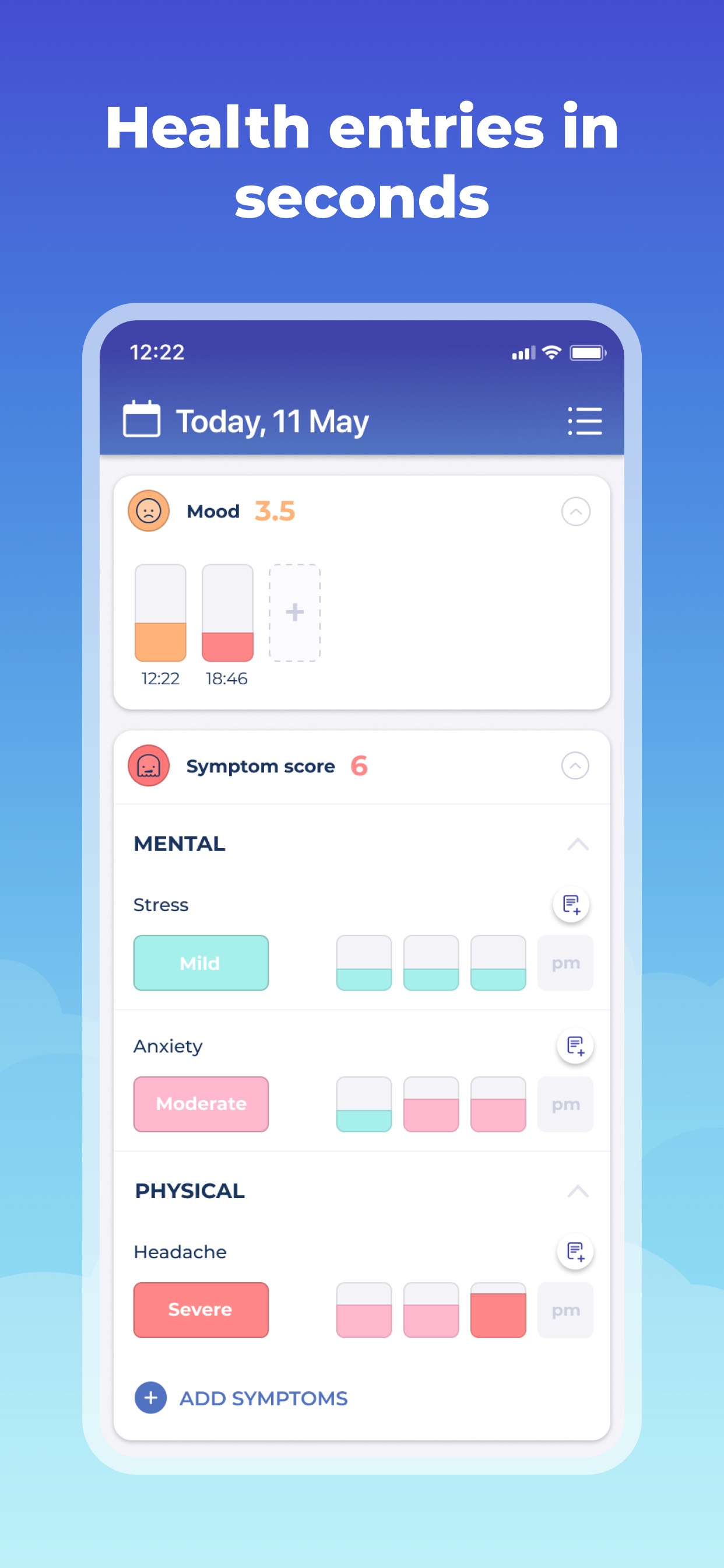
  • Frame 2 shows the main tracking dashboard with the overlay 'Track Mood, Symptoms + more' β€” functional but the headline is generic and misses the opportunity to lead with the outcome (feeling in control) rather than the action (tracking).
  • Zero iPad screenshots means the app is invisible in iPad App Store search results and the iPad category charts despite supporting iPad. Reviews confirm the iPad experience has issues ('App is completely broken on iPad'), but even a basic screenshot set would restore iPad Store placement while the bugs are fixed.
  • Frame 1 is a trust/social-proof screen β€” it leads with a user testimonial quote ('Transformed my life with a chronic illness'), press logos (WebMD, Cedars Sinai, Verywell Mind), and a 900k users / 85% 5-Stars badge. This is a deliberate and defensible choice: social proof as the first impression is a legitimate conversion strategy for a health app where trust is the primary purchase barrier. The quote is large, bold, and readable at search-thumbnail size. The press logos add institutional credibility. The 900k + star badge reinforces scale. This frame communicates 'trusted by many, validated by credible sources' before a user even taps in.
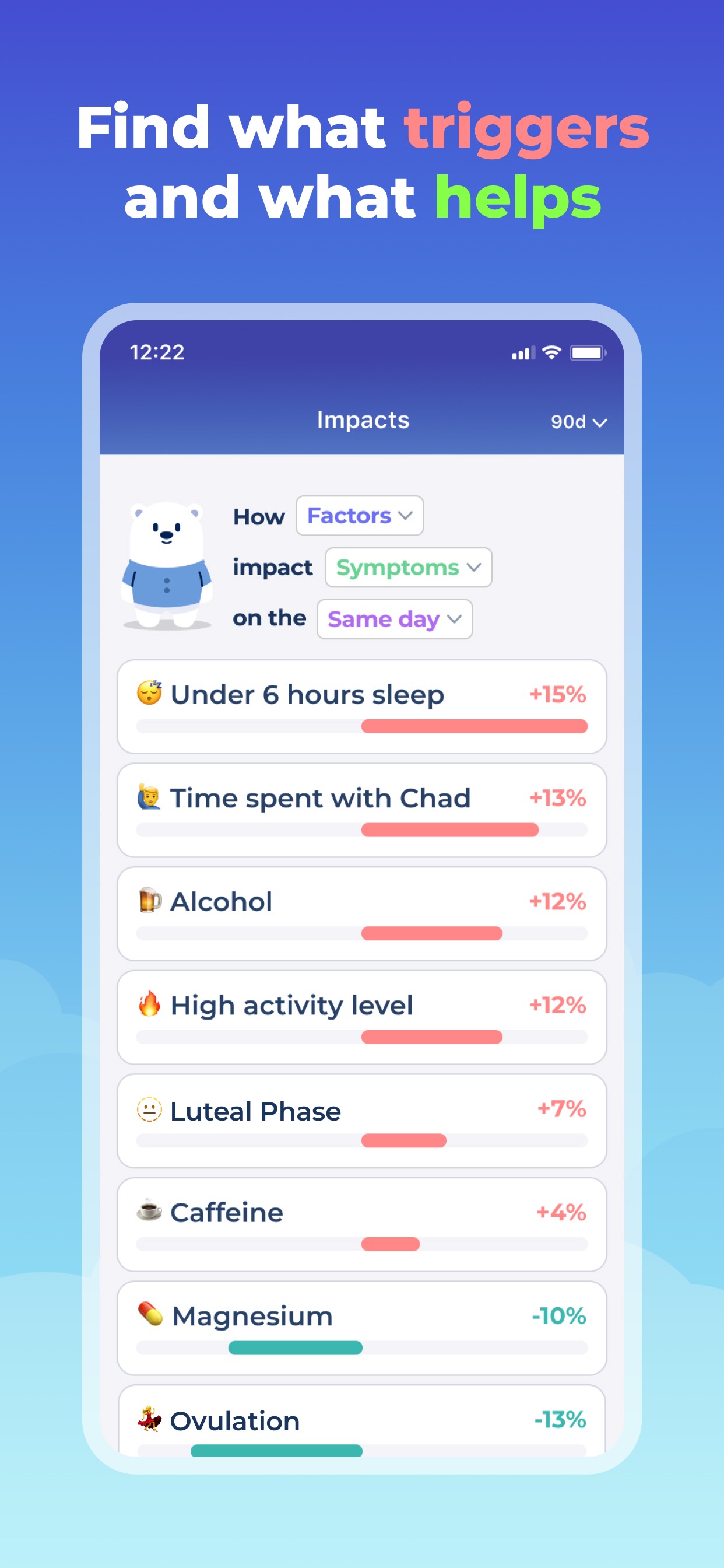
  • Frame 3 shows the Impacts/correlation screen with the overlay 'Find what triggers and what helps' β€” this is the app's most differentiated feature (no other tracker surfaces trigger correlation this clearly) and it's well-placed at Frame 3 after establishing trust (Frame 1) and core function (Frame 2).
  • The negative review pattern around pricing opacity ('I had no idea it cost $39 a month') suggests a screenshot addressing the pricing model or free tier would reduce post-install churn and improve store rating trajectory.

Recommendations

  • Frame 1 is performing a clear strategic function (trust-first for a health audience) β€” keep the social proof approach but consider updating the quote to one that names a specific condition ('Transformed how I manage my migraines') to improve relevance for your highest-intent search terms.
  • Update Frame 2's headline from 'Track Mood, Symptoms + more' to something outcome-focused: 'Finally Understand Your Health' or 'See What's Making You Worse.' The UI shown is strong; the headline just needs to match it with a result, not an action.
  • Add a dedicated pricing/free-tier transparency frame (Frame 5 or 6) β€” something like 'Start free. Upgrade when ready.' This directly addresses the most damaging negative review theme (surprise billing) and will improve both store rating and post-install retention.
  • Add iPad screenshots as soon as the critical iPad layout bug is resolved. Even 3 iPad screenshots restore full iPad App Store placement. File this as a P1 alongside the bug fix.
9/10

Ratings & Reviews

5387 reviews Β· 4.76685 avg

Analysis

Bearable's rating profile is exceptional: 4.8β˜… lifetime average from 5,387 reviews is a strong ranking signal. The recency signal is also healthy β€” the review volume on the current version indicates sustained active engagement, not a historical spike. The sampled negative reviews cluster around three themes: (1) iPad layout bugs (technical), (2) pricing opacity / unexpected charges, and (3) complexity for new users. None of these themes indicate fundamental product dissatisfaction β€” they are fixable UX and communication issues. The 4.3β˜… sample average from 50 recent reviews is slightly below lifetime average, suggesting a mild recent dip worth monitoring but not alarming.

Recommendations

  • Trigger the rating prompt specifically after a user successfully completes their third symptom log entry in a single week β€” this captures users who have formed a habit and are experiencing the app's core value, maximizing the likelihood of a 5-star response.
  • Respond publicly to the pricing-surprise negative reviews with a clear explanation of the free tier and cancellation process. Apple displays developer responses prominently β€” a calm, helpful response converts fence-sitters and signals to Apple that the developer is engaged.
  • The iPad layout bug is appearing in recent reviews and will drag the recent-ratings average if left unaddressed. Prioritize the iPad fix β€” it affects both rating trajectory and the iPad App Store placement gap identified in screenshots.

Screenshot Copy5 frames

Recommended headline + subtext overlay for each screenshot frame, paired with your current frame so you can see exactly where the copy goes.

Frame 1Frame 1
Proposed copy
New headline

Trusted by 900,000+

New subtext

As seen on WebMD, Cedars Sinai & Verywell Mind

Why this copy works

The current Frame 1 social proof approach is strategically correct for a chronic illness audience where trust is the #1 conversion barrier. This refinement sharpens the headline to lead with the user count as the primary authority signal, then uses the subtext to layer in press credentials. The testimonial quote is powerful but may read as anecdotal β€” the 900k figure is a statistic that's harder to dismiss. If testing, run current quote version against this headline version.

Frame 2Frame 2
Proposed copy
New headline

Finally Understand Your Health

New subtext

Track symptoms, mood, meds & more β€” all in one place

Why this copy works

Replaces the generic 'Track Mood, Symptoms + more' with an outcome-first headline that speaks directly to the core user frustration ('I don't understand why I feel this way'). The subtext preserves the feature breadth communication. The UI shown in this frame (the daily dashboard) directly supports the 'all in one place' claim.

Frame 3Frame 3
Proposed copy
New headline

See What's Making You Worse

New subtext

Bearable shows you exactly how each factor impacts your symptoms

Why this copy works

The current 'Find what triggers and what helps' headline is close but passive. 'See What's Making You Worse' is more visceral and directly matches the search intent of a user who is currently suffering. It positions the Impacts screen (shown in this frame) as the answer to their most urgent question. The subtext adds the mechanism so users understand this is data-driven, not generic advice.

Frame 4Frame 4
Proposed copy
New headline

Your Doctor Needs This Data

New subtext

Export a clear health summary before any appointment

Why this copy works

Doctor appointment preparation is one of the most-cited use cases in both the description and positive reviews. Leading with what the doctor needs (rather than what the user can do) reframes the value proposition as medically credible and urgent. This frame expands the perceived use-case beyond personal curiosity to clinical utility.

Frame 5Frame 5
Proposed copy
New headline

Start Free. No Surprises.

New subtext

Core tracking is free forever. Upgrade anytime β€” cancel easily.

Why this copy works

Directly addresses the most damaging negative review theme in the dataset: users discovering unexpected charges after download. A user who reaches Frame 5 is seriously considering installing β€” proactively handling the pricing question at this point converts skeptics and reduces post-install churn and 1-star reviews about billing surprise.

90-Day Action Plan

Week 1

5 tasks
  • Apply the new title (29/30 chars), subtitle (30/30 chars), and 100-char keyword field (100/100 chars) from the Ready-to-Paste and 100-Char Keyword Field sections above.
  • Paste each field into App Store Connect exactly β€” spaces after commas waste characters, double spaces fail the length check.
  • Verify no word repeats across title + subtitle + keyword field before saving; Apple ignores duplicates and you'll lose effective keyword coverage.
  • Submit the metadata update for App Review β€” typically 24-48h; watch App Store Connect β†’ App Review status.
  • Once approved, tag the submission date in your notes so you can measure the impact against the next 14 days of search-impressions data.

Week 2

2 tasks
  • Hand the five screenshot headline/subtext pairs from the Screenshot Copy section to your designer along with current UI mockups. Priority order: Frame 5 (pricing transparency) first β€” this directly addresses the most damaging negative review theme and will improve rating trajectory immediately.
  • File the iPad layout bug as P1 internally. Even before fixing it, prepare 3 iPad screenshots using the same Frame 1-3 compositions scaled to iPad dimensions β€” this restores iPad App Store placement. Submit iPad screenshots as soon as the critical layout bug is confirmed resolved (submitting screenshots for a known-broken iPad experience will accelerate 1-star iPad reviews).

Week 3

2 tasks
  • Open App Store Connect > Analytics > Search Terms. Check whether 'flare,' 'flare tracker,' 'ibs tracker,' 'headache tracker,' and 'pain tracker' appear in your search term attribution. If a term you're targeting doesn't appear after 2 weeks of the new metadata being live, Apple may not be indexing it as expected β€” investigate title/subtitle/keyword field for duplicate tokens that would cause Apple to ignore the term.
  • Review the 10 most recent 1-star and 2-star reviews. The pricing-surprise and iPad-bug themes are the two most fixable issues in your negative review set. Respond publicly to each pricing-surprise review with a calm, specific explanation of the free tier and App Store cancellation process β€” Apple shows developer responses to future users considering the app.

Ongoing

4 tasks
  • Trigger the rating prompt exactly after a user successfully logs their 3rd symptom entry in a single calendar week. This captures users who have formed a habit and experienced the app's core correlation value β€” the highest-probability moment for a 5-star response. Do not prompt on first open or after a log fails to save.
  • Monitor weekly rankings for 'flare,' 'migraine tracker,' 'headache tracker,' and 'ibs tracker' β€” these are the four keywords where the metadata changes are most likely to move the needle within 4-8 weeks.
  • Each October (National Migraine Awareness Month) and May (Mental Health Awareness Month), review the keyword field for seasonal search term opportunities. Chronic illness communities generate significant app-specific search spikes around awareness events β€” update the keyword field 1-2 weeks before each period.
  • Once the iPad bug is fixed and iPad screenshots are live, request reviews specifically from iPad users who have been using the app successfully for 7+ days. The current iPad review sentiment is negative; a fresh wave of positive iPad reviews will counterbalance the 'broken on iPad' theme in your recent review sample.

Expected Impact

The most impactful single change β€” adding 'flare' to the title (popularity 57, difficulty 21) β€” puts Bearable in contention for a search term with meaningful volume and almost no established competition. At difficulty 21, an app with 5,387 reviews and a 4.8β˜… average should realistically reach top-3 for 'flare' and 'flare tracker' within 4-8 weeks of metadata approval. The keyword field refinements (replacing high-difficulty dead-weight terms like 'fitness' at difficulty 83 and 'what' at difficulty 92 with 'pain,' 'chronic,' and 'fatigue' at difficulties 68, 42, and 13 respectively) should improve compound keyword indexing for 'chronic pain,' 'pain tracker,' and 'fatigue tracker' β€” all low-competition positions for a health app of Bearable's rating authority. The description rewrite addresses conversion rate rather than search ranking; the pricing transparency frame and restructured social proof are expected to reduce post-install churn and improve the recent-ratings trend, which feeds back into search ranking as a recency signal. The iPad screenshot gap, once closed, recovers a distribution channel that is currently completely dark despite the app supporting iPad.