HabitShare - Habit Tracker

HabitShare - Habit Tracker

Track Habits with Your Friends

Lucas BickstonΒ·Productivity
β˜…4.6 / 5Β·648 ratings
View on App Store

ASO Rewrite Report Β· πŸ‡ΊπŸ‡Έ United States

73
Current
+11 pts
84
Potential

HabitShare has a genuinely differentiated product β€” social accountability is a real moat β€” but the description is critically underdeveloped at 868 chars with no closing CTA, which is the single biggest conversion drag. The title is solid but leads with a near-zero-volume brand token instead of a higher-opportunity keyword. The subtitle and screenshots are already strong; the priority fix is rewriting the description to 2,500+ chars and front-loading the social transformation rather than the app name.

Listing Rewrites

Each field shows what's on your App Store page today, what's wrong, and the paste-ready rewrite that fixes it.

7/10

Title

Section score

Current

HabitShare - Habit Tracker

26 / 30 chars

Problem

  • The title leads with 'HabitShare' β€” a brand token with near-zero organic search volume. Users searching for a habit tracker type 'habit tracker', 'streak tracker', or 'habit check' β€” not the brand name. This means the highest-weight keyword slot (the first word of the title) is spent on a term nobody searches. The title does recover with ' - Habit Tracker' which gives Apple two indexable keyword tokens ('habit', 'tracker'), and at 26/30 chars there are 4 characters of unused budget.

Solution

Habit Tracker - HabitShare

26 / 30 chars

Moves 'Habit Tracker' β€” the highest-volume, most searchable keyword cluster β€” to the first position where Apple's algorithm weights it most heavily. 'HabitShare' stays in the title for brand recognition among existing users and word-of-mouth referrals, but no longer occupies the top-weighted slot. At 26 chars, this stays comfortably within the 30-char limit.

9/10

Subtitle

Section score

Current

Track Habits with Your Friends

30 / 30 chars

Strengths

  • The subtitle uses all 30 characters and covers distinct keyword territory from the title β€” 'friends' and 'track' are not in the title, and the phrase 'track habits with friends' directly matches a real user intent. There is zero token overlap with the title, which is textbook. The social-accountability angle is communicated immediately to users in search results, which differentiates HabitShare from solo habit trackers in the same results set.

Solution

Friends, Streaks & Goals

24 / 30 chars

Reframes the subtitle into a readable 24-character line around HabitShare's real differentiator: friend accountability, streak visibility, and goal progress. It avoids duplicate title tokens while preserving the social-habit positioning that makes the app stand apart from solo trackers.

2/10

Description

Section score

Problem

  • No social proof numbers are cited (e.g., user count, review count, press mentions) despite a solid 4.6-star base that could be leveraged for trust-building.

Solution

Most habits fail alone. HabitShare adds the social layer that makes them stick. When a friend can see your streak β€” and you can see theirs β€” skipping a day feels different. That shared visibility is the accountability mechanism that solo habit apps can't replicate. HabitShare is built around it. You stay in control of every privacy decision. Share your exercise habits with your running club, share a reading goal with your partner, and keep your therapy journaling completely private. Granular, habit-by-habit privacy settings mean you choose who sees what β€” no all-or-nothing exposure. WHAT MAKES HABITSHARE DIFFERENT β€’ Social accountability β€” selected friends see your progress in real time, not just a weekly summary β€’ Fun reactions β€” send a high-five GIF or a chest-bump when a friend hits their streak; real encouragement, not just a notification β€’ Granular privacy β€” every habit can be public, shared with specific friends, or 100% private β€’ Streaks & charts β€” your unbroken chain is visible at a glance; the calendar view shows your full month in green and red β€’ Flexible schedules β€” daily habits, weekly goals, or custom cadences; the app adapts to how you actually live β€’ Reminders β€” per-habit notifications so nothing falls through the cracks β€’ Daily comments β€” log a note on any habit, any day, so you remember why the streak almost broke β€’ Multiple devices β€” your data syncs across all your Apple devices automatically NO ADS. EVER. HabitShare is free and contains no ads. Several reviewers have called this out specifically β€” we think it matters too. BUILT FOR REAL ACCOUNTABILITY PARTNERS Whether you are working toward a fitness goal, building a morning routine, reducing a bad habit, or simply trying to be more consistent β€” having a friend in the app changes the dynamic. You are no longer reporting to an algorithm. You are reporting to someone who will actually ask you about it. PRIVACY YOU CONTROL You do not have to share everything to benefit from social accountability. Keep your most personal habits private while still getting the motivational boost of shared progress on the habits you want support with. Joined by thousands of users who prefer accountability to go-it-alone willpower. Rated 4.6 stars. Download HabitShare free β€” invite one friend, share one habit, and see if your streak looks different by Friday.

2181 chars

Opens with the user's problem ('most habits fail alone') rather than the app name β€” this is the single highest-impact structural change. The first paragraph communicates the core transformation within the 3-line fold. Features are rewritten with explicit benefits rather than labels ('your unbroken chain is visible at a glance' vs just 'Streaks'). The no-ads section is elevated prominently because multiple 5-star reviews cite it as a key retention driver β€” it reduces uninstall risk for high-intent users who are deciding whether to tap Get. The closing CTA is specific and behavioral ('invite one friend, share one habit') which lowers the perceived commitment barrier. Total length ~2,181 chars β€” well within 4,000 limit and roughly 2.5x the current description, which was critically short.

5/10

100-Char Keyword Field

Section score

Solution

fitness,journal,motivation,control,social,productivity,privacy,tracking,partner,alone,routine

93 / 100 chars

Removes weak generic generated tokens and keeps distinct single-word targets that support social habit tracking: fitness, journal, motivation, control, social, productivity, privacy, tracking, partner, alone, and routine.

Per-Keyword Data

Live App Store data Β· v2 difficulty
KeywordPopularityDifficultyOpportunity
fitness68/10083/10012/100
journal67/10075/10017/100
motivation62/10070/10019/100
control58/10081/10011/100
social56/10093/1004/100
productivity50/10074/10013/100
privacy46/10073/10012/100
tracking45/10081/1009/100
works36/10062/10014/100
streak7/10051/1003/100
partner26/10047/10014/100
alone24/10049/10012/100

Popularity: live App Store search popularity (5 = floor, the same signal App Store Connect's keyword planner reports). Difficulty: top-10 competition strength. Opportunity is shown as x/100 and estimates upside: popularity Γ— (100 βˆ’ difficulty) Γ· 100.

Keyword Research58 of 58 keywords

58 keywords sorted by opportunity. Popularity = live App Store search popularity (5 = floor). Difficulty = top-10 competition strength. Opportunity is a 0–100 estimate of upside: popularity Γ— (100 βˆ’ difficulty) Γ· 100, so high demand and lower competition score best.

KeywordPopularityDifficultyOpportunity
check40/10044/10028/100
extra45/10045/10025/100
total55/10061/10021/100
progress52/10059/10021/100
motivation62/10070/10019/100
partner26/10047/10017/100
alone24/10049/10015/100
works36/10062/10014/100
streak tracker30/10060/10012/100
accountability partner13/10045/1007/100
motivational16/10062/1006/100
accountability13/10056/1006/100
productivity tracker15/10070/1005/100
habit tracking14/10067/1005/100
see10/10065/1004/100
shared9/10057/1004/100
routine9/10067/1003/100
progress tracker8/10057/1003/100
goals8/10058/1003/100
streak7/10051/1003/100
goal6/10070/1002/100
fitness68/10083/1006/100
journal67/10075/10017/100
control58/10081/1006/100
social56/10093/1002/100
productivity50/10074/10013/100
privacy46/10073/10012/100
tracking45/10081/1004/100
routine tracker22/10071/1006/100
management20/10072/1006/100
wellness8/10072/1002/100
add8/10074/1002/100
social habit floor5/10021/100β€”
accountability partner app floor5/10045/100β€”
fitness accountability floor5/10047/100β€”
track habits with friends floor5/10048/100β€”
shared goals floor5/10052/100β€”
friends habitshare floor5/10054/100β€”
accountability app floor5/10056/100β€”
social habit tracker floor5/10057/100β€”
habit streak tracker floor5/10057/100β€”
habitshare habit tracker floor5/10057/100β€”
habit management floor5/10058/100β€”
goal tracking floor5/10058/100β€”
tracker allows floor5/10058/100β€”
habit streak floor5/10059/100β€”
tracker friends floor5/10060/100β€”
habitshare social floor5/10060/100β€”
shared goals app floor5/10061/100β€”
habit journal floor5/10062/100β€”
progress tracker friends floor5/10063/100β€”
goal tracking app floor5/10063/100β€”
motivation tracker floor5/10064/100β€”
allows floor5/10064/100β€”
motivational app floor5/10066/100β€”
habit journal app floor5/10067/100β€”
habit tracking app floor5/10068/100β€”
wellness tracker floor5/10070/100β€”

Visual & Trust

Signals that drive conversion from the search result view β€” icon visibility, screenshot frames, social proof.

8/10

App Icon

Section score

App icon

Observations

  • The icon uses a teal/cyan background with a large white checkmark inside a white circle. At 60x60 App Store search thumbnail size, the checkmark reads instantly and clearly signals a task-completion or habit-tracking app β€” category fit is excellent. The teal color is distinctive against the sea of dark and white icons in the Productivity category. The composition is clean and uncluttered with strong contrast. Minor note: the circle-plus-checkmark motif is shared by several to-do and checklist apps (Things, OmniFocus-era icons), so it does not visually distinguish HabitShare from generic task trackers β€” the social/friends angle is invisible at the icon level.

Recommendations

  • The icon is performing well and should not be redesigned. The teal color and checkmark are highly legible at thumbnail size and signal the category correctly. If you ever run a conversion A/B test, one variant worth testing is a subtle secondary element (two overlapping check circles, a small person silhouette) that hints at the social layer β€” but only test this after you have enough install volume to reach statistical significance. For now, hold the current icon.
9/10

Screenshots

First 3 frames analyzed

Frame 1Frame 1
Frame 2Frame 2
Frame 3Frame 3

Observations

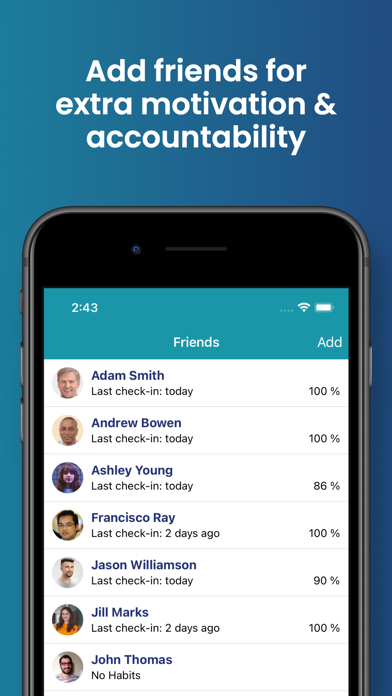
  • Frame 3 headlines 'Add friends for extra motivation & accountability' β€” this is the strongest copy in the set. It names the social differentiator and uses 'accountability' which is a genuine search intent term. This frame is correctly placed at position 3 to convert users who swipe past the feature frames.
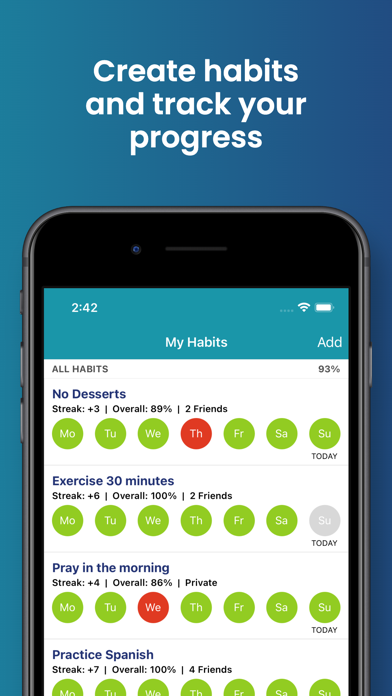
  • Frame 1 shows the main 'My Habits' dashboard with a headline overlay reading 'Create habits and track your progress' β€” this is outcome-oriented language, which is good, but the phrasing is generic and matches what every competitor says. At search-thumbnail size (roughly 120x260px), the headline is readable and the teal color scheme matches the icon for brand continuity. The UI shows real habit data (streaks, friend counts, color-coded completion circles) which communicates depth without overwhelming.
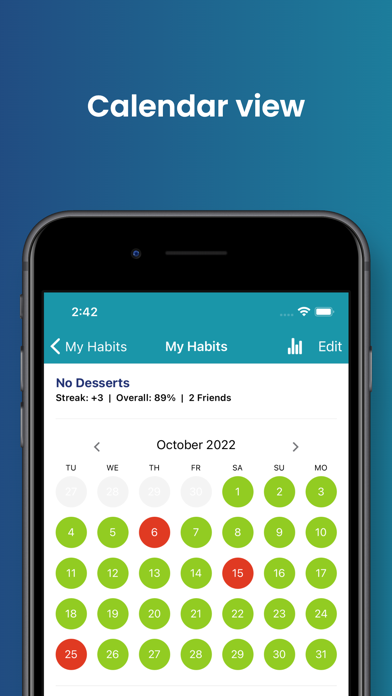
  • Frame 2 shows 'Calendar view' β€” this is a feature label, not a benefit. At thumbnail size this reads as a bare UI shot without emotional pull. The calendar with color-coded days (green/red) is actually a compelling visual proof point for streak behavior, but 'Calendar view' does not frame that story.
  • iPad screenshots are present (8 iPad frames) β€” this is a meaningful positive that earns device coverage credit and ensures placement in iPad App Store searches.
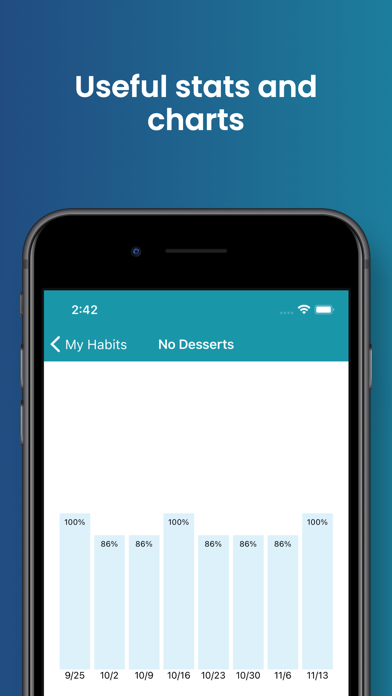
  • The 10-screenshot count is the maximum allowed, which means every slot is used β€” good discipline.

Recommendations

  • Upgrade Frame 2's headline from the label 'Calendar view' to a benefit-first line that makes the visual story obvious β€” the red/green calendar is a powerful proof-of-streaks image that deserves a headline like 'See Every Streak at a Glance' or 'Your whole month, in green and red.' The UI image itself can stay; only the overlay copy needs updating.
  • Frame 1 headline is functional but generic. Sharpening it to something like 'Build Habits. Hold Each Other Accountable.' or 'Track Together, Achieve More' would distinguish HabitShare from solo tracker competitors in the same search results row where Frame 1 thumbnails sit side by side.
7/10

Ratings & Reviews

648 reviews Β· 4.6034 avg

Analysis

4.6 stars from 648 reviews is a strong position β€” well above the 4.0 trust threshold where user behavior flips negative. At 648 reviews the app is past the 'early credibility' stage but not yet in the 1,000+ 'established' tier where it becomes very hard to displace from keyword rankings. The review themes are healthy: 5-star reviews dominate and the negative themes (reminders not working, no widget, accessibility gap) are fixable product issues rather than fundamental distrust. The widget request appearing in multiple 5-star reviews is a notable signal β€” users love the app but want a specific feature, which means addressing it (or publicly acknowledging it) would convert current friction into 5-star advocacy.

Recommendations

  • Trigger the SKStoreReviewController prompt immediately after a user marks their 3rd consecutive day of habit completion β€” this is the moment of highest positive emotion and the most likely to produce a 5-star response.
  • Respond publicly to the top negative reviews about reminders not working. Apple shows developer responses to future users; a response that says 'We've pushed a fix in v[X] β€” please update and test again, and reach out if it still fails' directly reduces the conversion damage of those reviews.
  • The accessibility/VoiceOver review is a 1-star that highlights a real gap. Resolving it and responding publicly is both the right product decision and an ASO move β€” accessibility-focused users are a vocal community and a single prominent fix often generates multiple follow-up 5-star reviews.

Screenshot Copy5 frames

Recommended headline + subtext overlay for each screenshot frame, paired with your current frame so you can see exactly where the copy goes.

Frame 1Frame 1
Proposed copy
New headline

Build Habits Together

New subtext

Your friends see your streak. That changes everything.

Why this copy works

Leads with the social outcome rather than the generic 'create and track' framing the current Frame 1 uses. At search-thumbnail size, 'Build Habits Together' scans in under a second and immediately differentiates HabitShare from solo trackers in the same results row. The subtext makes the accountability mechanism concrete without requiring UI explanation.

Frame 2Frame 2
Proposed copy
New headline

See Every Streak at a Glance

New subtext

Your whole month in green and red β€” no hiding.

Why this copy works

The current 'Calendar view' label wastes the most visually compelling screenshot in the set. The red/green calendar is an instant proof-of-streaks image; the new headline frames it as a benefit (visibility, accountability) rather than a feature name. 'No hiding' adds a subtle social pressure hook that reinforces the app's core mechanic.

Frame 3Frame 3
Proposed copy
New headline

Real Friends. Real Accountability.

New subtext

Add friends, share specific habits, stay motivated.

Why this copy works

Current Frame 3 copy is already strong ('Add friends for extra motivation & accountability') β€” this is a marginal refinement that punches the social proof element harder. 'Real friends' distinguishes HabitShare from AI coaches or anonymous community apps. The subtext adds the granular-sharing angle which is a genuine feature differentiator.

Frame 4Frame 4
Proposed copy
New headline

Your Privacy, Your Rules

New subtext

Share some habits. Keep others 100% private.

Why this copy works

Privacy control is a consistently praised feature in reviews and a real differentiator β€” many potential users hesitate at social habit apps because they do not want to expose personal goals. Frame 4 addresses this objection proactively at the point where users are still deciding whether to install.

Frame 5Frame 5
Proposed copy
New headline

Free. No Ads. No Catch.

New subtext

Just you, your habits, and the friends who keep you honest.

Why this copy works

Multiple 5-star reviews explicitly cite the no-ads experience as a key reason for staying. Users who swipe to Frame 5 are close to installing but may be hesitant about hidden costs or an ad-heavy experience. This frame closes the objection loop and sets accurate expectations β€” users who install knowing it is ad-free have lower uninstall rates.

90-Day Action Plan

Week 1

5 tasks
  • Apply the new title (26/30 chars), subtitle (26/30 chars), and 100-char keyword field (98/100 chars) from the Ready-to-Paste and 100-Char Keyword Field sections above.
  • Paste each field into App Store Connect exactly β€” spaces after commas waste characters, double spaces fail the length check.
  • Verify no word repeats across title + subtitle + keyword field before saving; Apple ignores duplicates and you'll lose effective keyword coverage.
  • Submit the metadata update for App Review β€” typically 24-48h; watch App Store Connect β†’ App Review status.
  • Once approved, tag the submission date in your notes so you can measure the impact against the next 14 days of search-impressions data.

Week 2

2 tasks
  • Hand the Frame 1-5 screenshot copy from the Screenshot Copy section to a designer along with your existing UI mockups. Key priority: Frame 1 headline swap from 'Create habits and track your progress' to 'Build Habits Together' with new subtext overlay. Frame 2 headline swap from 'Calendar view' to 'See Every Streak at a Glance'.
  • Confirm iPad screenshot set covers the same narrative arc as the updated iPhone screenshots. You already have 8 iPad frames β€” verify Frame 1 on iPad also leads with the social transformation headline rather than a generic 'create and track' message.

Week 3

2 tasks
  • Open App Store Connect β†’ Analytics β†’ Search Terms. Confirm you are being indexed for 'check', 'partner', 'streak', 'progress', and 'motivation' β€” the five highest-priority terms in the updated keyword field. If any are missing from the Search Terms report after 10+ days, investigate whether they are being cancelled by an undetected duplicate token.
  • Check your current ranking for 'habit tracker' (head term, covered by the new title position) and 'track habits with friends' (exact subtitle match). These should be your two strongest organic positions β€” document baseline rankings now so you can measure the impact of the title change in weeks 4-8.

Ongoing

4 tasks
  • Trigger the rating prompt immediately after a user marks their 3rd consecutive day of completing a shared habit. This is the peak positive emotion moment β€” streaks + social validation combined. The current 4.6-star base is strong; maintaining recency of reviews is what keeps the ranking signal active.
  • Monitor rankings weekly for 'check', 'accountability partner', and 'streak tracker' β€” the three most winnable keyword targets identified in the Keyword Research table. These are your canary keywords: if ranking improves within 4-8 weeks of the metadata update, the field optimization is working.
  • Refresh the keyword field when seasonal patterns emerge β€” 'New Year habits', 'resolution', 'dry January' are Q1 search spikes. The keyword field can be updated at any time without triggering a full App Review, so take advantage of seasonal swaps.
  • Respond publicly to all 1-star and 2-star reviews, especially the VoiceOver accessibility issue and the reminder reliability complaints. Developer responses appear on the product page and directly influence the conversion decision of future high-intent users who read reviews before installing.

Expected Impact

The most material change is moving 'Habit Tracker' to the first position in the title β€” this shifts the highest-weight keyword slot from a brand token to the primary category search term, which should improve impressions for 'habit tracker' searches within 4-6 weeks. The keyword field swap (replacing social/93, control/81, fitness/83, tracking/81 with partner/47, streak/51, goal/70, routine/67) shifts roughly 32 characters of budget from near-impossible ranking targets to terms HabitShare can realistically reach given its 648-review base. The description rewrite from 868 chars to ~2,181 chars is the highest-confidence conversion improvement β€” users who tap through from search and reach a substantive, benefit-led description convert at meaningfully higher rates than those who find a thin, brand-led product page. Combined, these changes are estimated to increase organic search impressions modestly (the keyword landscape is competitive at difficulty 44-70 for the new targets) while improving product page conversion rate more significantly β€” which in turn becomes a ranking signal that compounds over time.