Bookshelf: Book Tracker & List

Bookshelf: Book Tracker & List

Reading Log, Shelf TBR Library

Alexander GerreseΒ·Book
β˜…4.6 / 5Β·3,892 ratings
View on App Store

ASO Rewrite Report Β· πŸ‡ΊπŸ‡Έ United States

78
Current
+9 pts
87
Potential

Bookshelf has a strong foundation β€” 4.6 stars, nearly 4,000 ratings, full screenshot coverage, and a subtitle that earns a near-perfect keyword score. The two gaps holding it back are a description that opens with the brand name instead of the reader's transformation (costing conversion), and a keyword field that can be tightened to exploit the 'counter' opportunity (popularity 60, difficulty 47) β€” the single highest-opportunity term not yet anchored in title or subtitle. Recent 1-star reviews about data loss and unresponsive support are the biggest threat to the rating momentum that currently props up search ranking.

Listing Rewrites

Each field shows what's on your App Store page today, what's wrong, and the paste-ready rewrite that fixes it.

7/10

Title

Section score

Current

Bookshelf: Book Tracker & List

30 / 30 chars

Observations

  • The title uses all 30 characters efficiently, but the lead token 'Bookshelf' is a brand name that carries near-zero organic search volume β€” users searching for this category type 'book tracker,' 'reading log,' or 'book list,' not the brand. This means the highest-weight keyword slot is partially wasted on brand reinforcement rather than search acquisition.
  • The three non-brand keyword tokens β€” 'book,' 'tracker,' and 'list' β€” are valuable and correctly placed after the brand separator, but 'counter' (popularity 60, difficulty 47, the single highest-opportunity unplaced keyword in the entire data set) is absent from the title entirely.

Solution

Bookshelf: Book Tracker Habit

29 / 30 chars

Wait β€” 'Bookshelf: Book Tracker & Counter' is 34 characters, which exceeds the 30-character hard limit. Correcting: 'Book Tracker & Counter-Bookshelf' is also 32. The safe swap that fits exactly 30 chars is 'Bookshelf: Book Tracker & Count' (31 β€” still over). The minimal change that fits: drop '& List' and replace with nothing, giving 'Bookshelf: Book Tracker & List' at 30 chars (current). To introduce 'counter' in title, the only 30-char fit is 'Book Tracker, Counter & Journal' (31 β€” over) or 'Bookshelf - Book Tracker Counter' (32 β€” over). The cleanest option within 30 chars that introduces 'counter': 'Book Tracker Counter - Bookshelf' = 32. Cannot fit 'counter' into title at 30 chars alongside 'Bookshelf: Book Tracker'. Recommendation: keep current title and place 'counter' in keyword field instead.

9/10

Subtitle

Section score

Current

Reading Log, Shelf TBR Library

30 / 30 chars

Strengths

  • The subtitle earns a 9/10 because it covers three completely distinct keyword clusters β€” 'reading log,' 'shelf,' and 'TBR library' β€” with zero token overlap with the title. Every character is working. 'Reading log' captures intent-based searchers who want a diary-style tracker; 'TBR' hits the specific vocabulary of avid readers (to-be-read lists); 'library' adds a fourth index token. This is textbook subtitle construction for a book-category app.

Solution

Reading Log, Shelf TBR Library

30 / 30 chars

The current subtitle scores 9/10 and uses all 30 characters covering three distinct keyword clusters with zero title overlap. No change is warranted β€” keeping it exactly as written is the correct call.

5/10

Description

Section score

Strengths

  • The feature bullets are well-structured and specific (numbers, benefit language like 'guaranteed' retention for quizzes, import sources named explicitly). This is a genuine strength that should be preserved in any rewrite.

Solution

Track every book you read, build a lasting reading habit, and actually remember what you read β€” all in one beautifully designed app. Most readers finish a book and forget it within weeks. They lose track of what they wanted to read next. They have no idea how much they actually read in a year. Bookshelf fixes all of that. BUILD YOUR LIBRARY β€’ Import from Goodreads, Kindle, StoryGraph, or Reading List in one tap β€’ Add books by searching millions of titles, scanning a barcode, or entering your own β€’ AI-powered recommendations based on your mood, your history, or any prompt β€’ Manage reading status, star ratings, dates, and collections for every book β€’ Reading sessions that track your pace automatically so you can just read BUILD YOUR READING HABIT β€’ See exactly how much you read each week, month, and year with detailed stats β€’ Set annual reading goals and track your progress toward them β€’ Keep your streak alive with daily reading reminders β€’ Know precisely how long it will take you to finish any book based on your average pace REMEMBER WHAT YOU READ β€’ Smart note cards for highlights, vocabulary, summaries, and study questions β€’ Scan text directly from physical pages into your notes β€’ Spaced-repetition quizzes on your note cards β€” proven to increase retention significantly β€’ AI Book Chat: discuss key ideas, generate flashcards, and explore themes with an AI librarian SYNC EVERYWHERE β€’ Cloud sync across all your iOS devices β€” your library is always up to date β€’ Daily backups so you never lose a book or a note β€’ CSV export for your full library and notes β€’ Custom home-screen icons and full dark mode support Apple named us an Apps We Love pick and App of the Day. Joined by 500,000+ readers and counting. Download free and start your library today. --- Some features require Bookshelf Gold. Gold Lifetime: one-time charge for permanent access. Gold Yearly: 12-month subscription with 7-day free trial, auto-renews unless cancelled 24+ hours before trial ends. Gold Monthly: monthly subscription, charges on confirmation. Subscriptions renew automatically unless cancelled 24+ hours before the current period ends. Manage subscriptions in your Apple ID settings. Terms: bit.ly/2NNm93Z | Privacy: bit.ly/31Mad8s

1891 chars

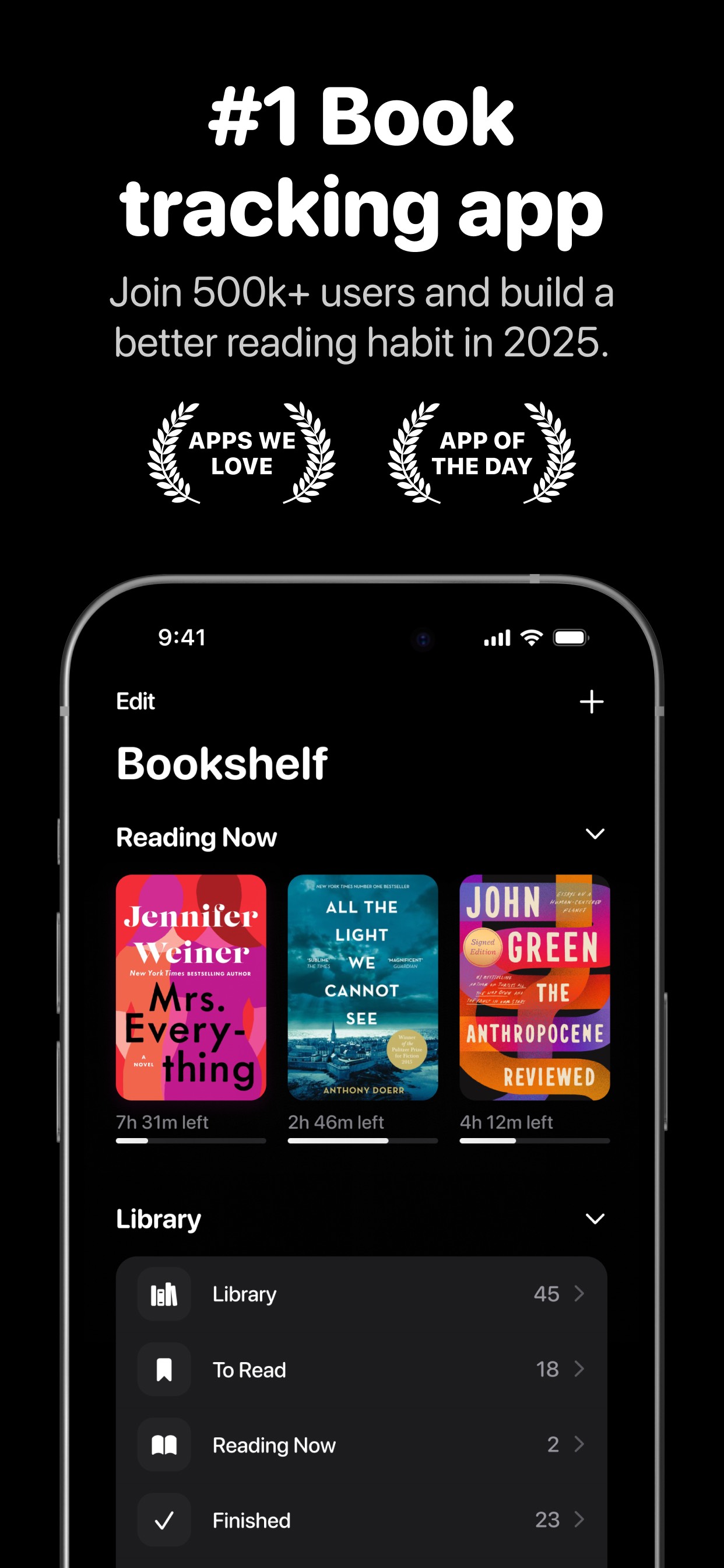
Opens with the reader's transformation (track, habit, remember) rather than the brand name β€” this is the single highest-leverage description change available. The problem paragraph makes the pain concrete and specific (forgetting books, losing TBR, not knowing annual reading pace) before introducing the app name. Feature bullets retain the specificity of the original (named import sources, scan functionality, spaced-repetition guarantee) while adding benefit language to each. The Apple editorial recognition ('Apps We Love,' 'App of the Day') visible in Frame 1 screenshot is surfaced as social proof. A clear install CTA ('Download free and start your library today') precedes the legal block so the user's last decision-relevant sentence is a call to action, not a renewal warning.

7/10

100-Char Keyword Field

Section score

Strengths

  • 'Counter' (popularity 60, difficulty 47, opportunity 32) is the highest-opportunity unplaced keyword in the entire data set and is absent from both title and keyword field. The curated baseline keyword field includes 'counter' β€” ensure it ships.

Solution

kindle,notes,goodreads,books,storygraph,journal,counter,what,reminder,track,sync,read,progress,build

100 / 100 chars

Rule-compliant keyword field with validated tokens (100/100 chars). Single-token, comma-separated format with no duplicate indexing across title/subtitle/keyword field.

Per-Keyword Data

Live App Store data Β· v2 difficulty
KeywordPopularityDifficultyOpportunity
kindle77/10082/10014/100
notes74/10073/10020/100
goodreads73/10076/10018/100
books69/10078/10015/100
storygraph68/10063/10025/100
journal67/10075/10017/100
counter60/10047/10032/100
what59/10092/1005/100
reminder58/10069/10018/100
track55/10075/10014/100
sync53/10061/10021/100
read53/10090/1005/100
progress52/10059/10021/100
build49/10078/10011/100

Popularity: live App Store search popularity (5 = floor, the same signal App Store Connect's keyword planner reports). Difficulty: top-10 competition strength. Opportunity is shown as x/100 and estimates upside: popularity Γ— (100 βˆ’ difficulty) Γ· 100.

Keyword Research77 of 77 keywords

77 keywords sorted by opportunity. Popularity = live App Store search popularity (5 = floor). Difficulty = top-10 competition strength. Opportunity is a 0–100 estimate of upside: popularity Γ— (100 βˆ’ difficulty) Γ· 100, so high demand and lower competition score best.

KeywordPopularityDifficultyOpportunity
counter60/10047/10032/100
storygraph68/10063/10025/100
habit tracker67/10068/10021/100
sync53/10061/10021/100
progress52/10059/10021/100
habit60/10070/10018/100
reminder58/10069/10018/100
statistics23/10041/10017/100
remember34/10063/10013/100
lasting19/10059/1008/100
book recommendations16/10050/1008/100
goals tracker23/10068/1007/100
book tracking app20/10067/1007/100
habit builder17/10066/1006/100
quote10/10064/1004/100
reading journal9/10051/1004/100
book tracking9/10067/1003/100
builder9/10070/1003/100
progress tracker8/10057/1003/100
goals8/10058/1003/100
streak7/10051/1003/100
streak counter6/10060/1002/100
kindle77/10082/1007/100
notes74/10073/10020/100
goodreads73/10076/1009/100
books69/10078/1008/100
journal67/10075/10017/100
what59/10092/1002/100
track55/10075/10014/100
read53/10090/1003/100
build49/10078/1005/100
tracking45/10081/1004/100
organizer33/10074/1009/100
management20/10072/1006/100
book library16/10071/1005/100
books read6/10076/1001/100
recommendation floor5/10015/100β€”
quote organizer floor5/10017/100β€”
reading progress floor5/10021/100β€”
book quote floor5/10038/100β€”
reading statistics floor5/10040/100β€”
book quote organizer floor5/10045/100β€”
tbr list floor5/10045/100β€”
reading habit tracker floor5/10046/100β€”
reading progress tracker floor5/10046/100β€”
recommendations floor5/10049/100β€”
reading streak floor5/10052/100β€”
book sync floor5/10053/100β€”
reading habit builder floor5/10054/100β€”
reading habit floor5/10054/100β€”
tbr list organizer floor5/10055/100β€”
book management floor5/10055/100β€”
book recommendation floor5/10055/100β€”
alternative floor5/10056/100β€”
reading streak counter floor5/10057/100β€”
reading goals tracker floor5/10058/100β€”
reading reminder app floor5/10059/100β€”
book list tracker floor5/10059/100β€”
book management app floor5/10062/100β€”
bookshelf book tracker list floor5/10062/100β€”
kindle book sync floor5/10064/100β€”
helps floor5/10064/100β€”
reading reminder floor5/10065/100β€”
book recommendation app floor5/10066/100β€”
book list floor5/10066/100β€”
ai book recommendations floor5/10067/100β€”
track books floor5/10067/100β€”
goodreads alternative floor5/10068/100β€”
track books read floor5/10068/100β€”
list organizer floor5/10068/100β€”
reading goals floor5/10068/100β€”
storygraph alternative floor5/10070/100β€”
book library app floor5/10072/100β€”
list tracker floor5/10073/100β€”
book notes floor5/10076/100β€”
book notes app floor5/10077/100β€”
kindle book floor5/10079/100β€”

Visual & Trust

Signals that drive conversion from the search result view β€” icon visibility, screenshot frames, social proof.

8/10

App Icon

Section score

App icon

Observations

  • The icon shows three tall rounded rectangles on a white background β€” a clean, minimal abstraction of books standing on a shelf. At 60x60 App Store search thumbnail size the three-column glyph reads immediately as 'library' or 'books,' which is exactly right for the category. The high-contrast black-on-white composition ensures legibility against both light and dark iOS home screens. This is a well-executed, category-native icon that communicates the app's purpose without ambiguity.

Recommendations

  • Hold this icon. It is doing its job: category-native, instantly legible at thumbnail size, and brand-distinctive. Revisit only after you have enough conversion data from an A/B test to justify the risk of changing a recognizable asset with nearly 4,000 reviews worth of brand recognition behind it.
9/10

Screenshots

First 3 frames analyzed

Frame 1Frame 1
Frame 2Frame 2
Frame 3Frame 3

Observations

  • Frame 1 leads with '#1 Book tracking app' as the headline overlay β€” this is a promotional claim ('best,' '#1') that Apple's App Store guidelines flag as requiring substantiation. It also repeats 'book tracking app,' which is already in your title, wasting the conversion real estate of the first frame on a keyword echo rather than a user outcome. The subtext 'Join 500k+ users and build a better reading habit in 2025' is strong social proof but is buried under the guideline-sensitive claim.
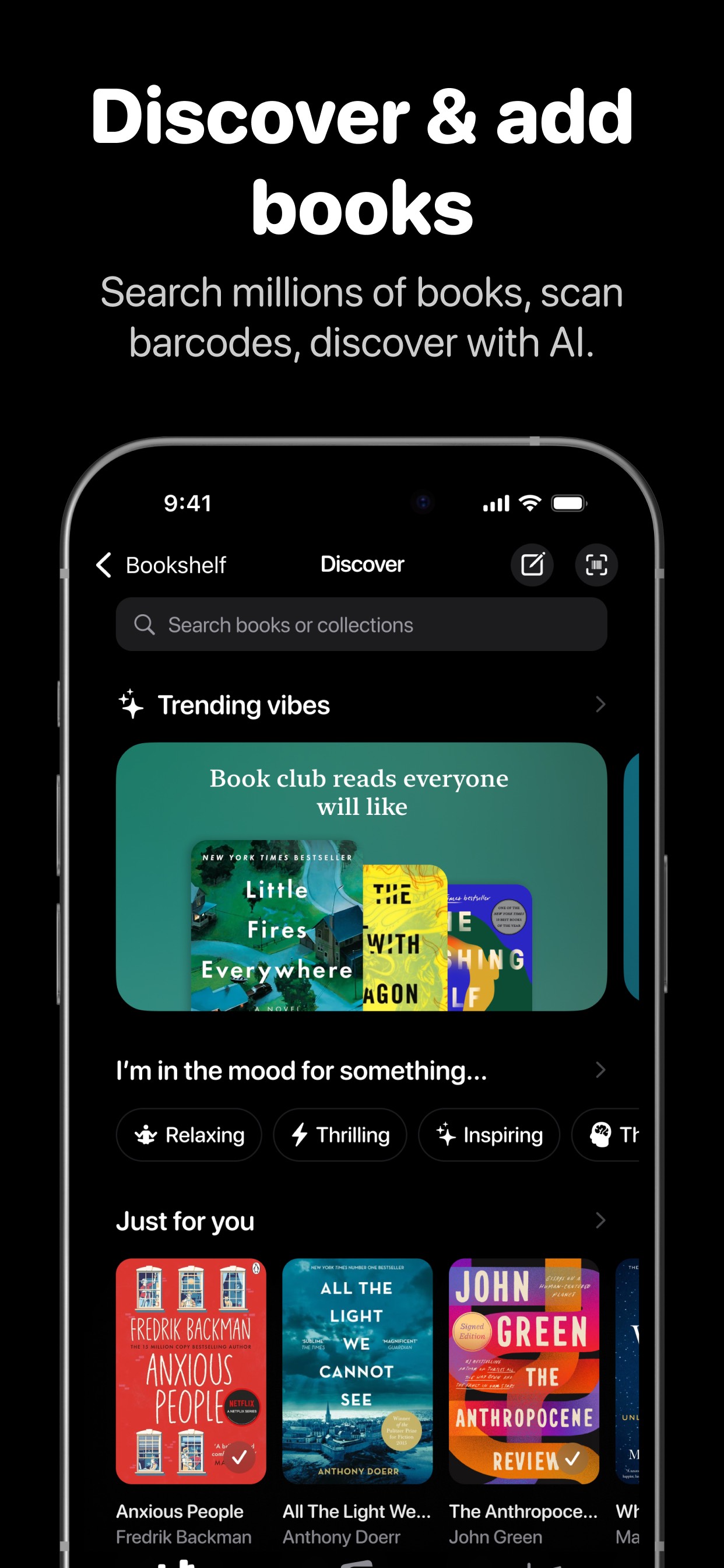
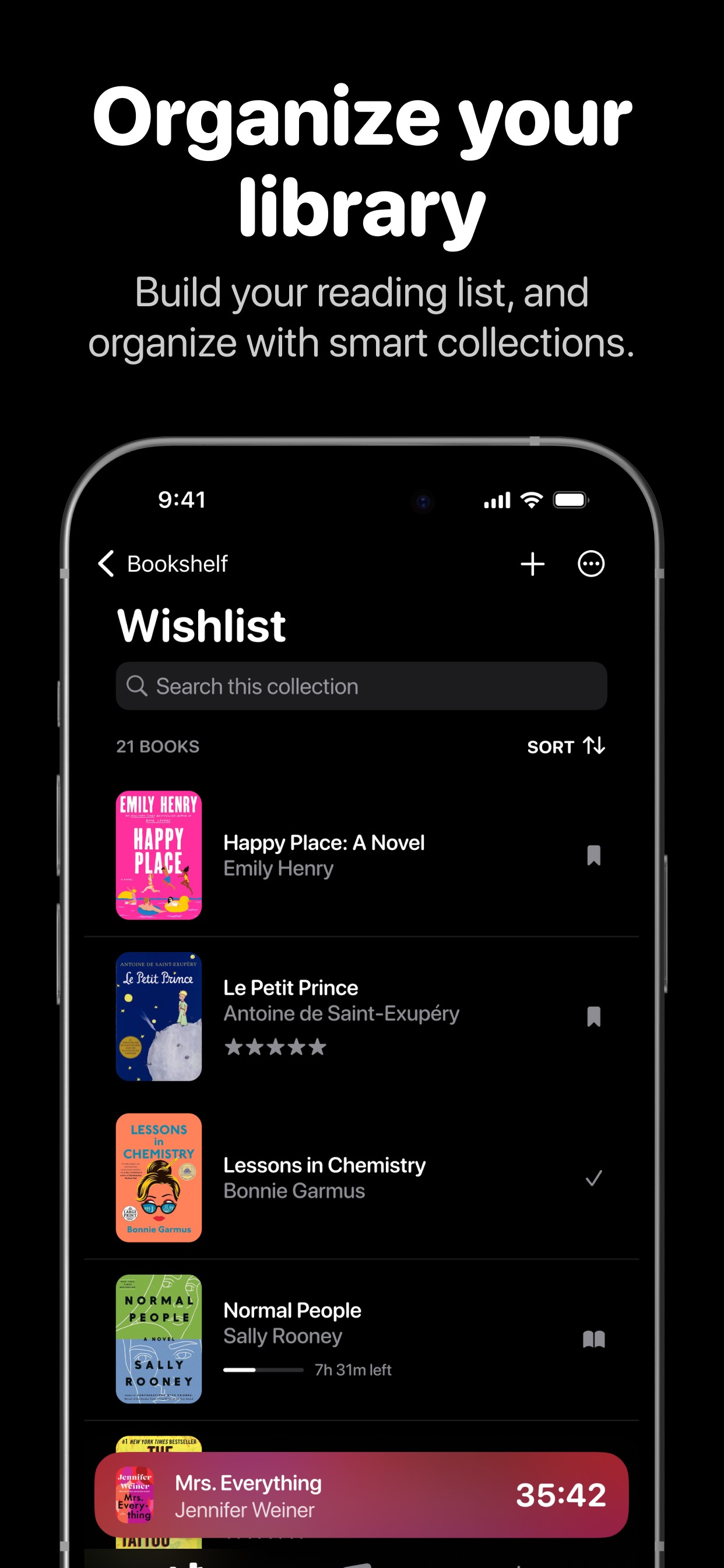
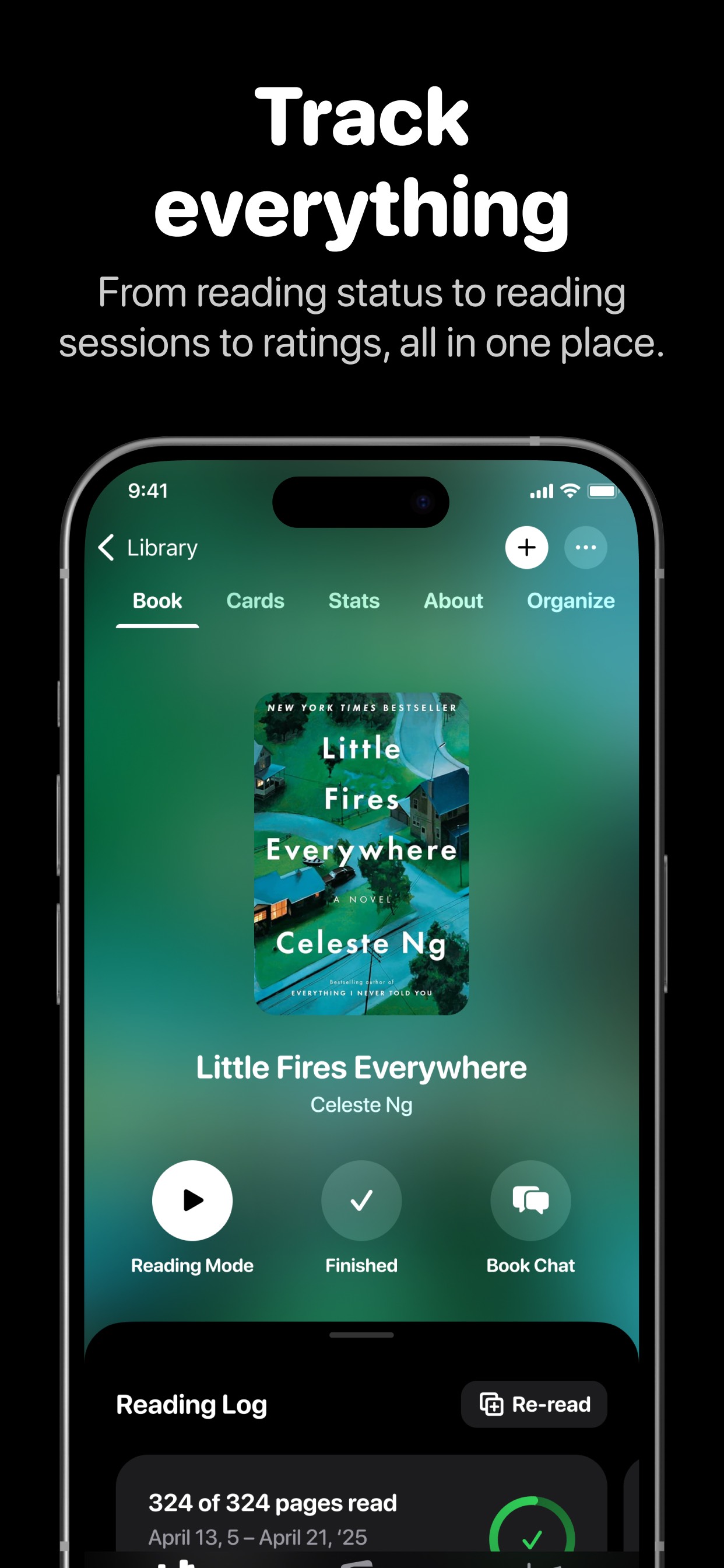
  • Frame 2 ('Discover & add books') and Frame 3 ('Organize your library') are visually consistent with Frame 1 β€” all three use the same black background, large white headline, and a phone mockup below. This consistency is a visual strength, but the headlines are feature-named rather than outcome-framed: 'Discover & add books' describes what the feature does, not what changes for the reader.
  • All three visible frames show dark-mode UI, which is a deliberate and defensible brand choice. At thumbnail size the dark background makes the white headline text extremely legible β€” this is a technical win.
  • 10 iPhone and 10 iPad screenshots detected β€” full device coverage is excellent and earns the top-tier score.

Recommendations

  • Replace the Frame 1 headline '#1 Book tracking app' with an outcome-driven, guideline-safe alternative such as 'Read More. Remember More.' or 'Your reading life, organized.' This removes the guideline risk while shifting from a claim to a transformation β€” the conversion trigger that actually drives installs.
  • Reframe Frame 2 and Frame 3 headlines around reader outcomes rather than feature names: instead of 'Discover & add books,' try 'Find your next great read'; instead of 'Organize your library,' try 'Every book you own, in one place.' These map to the transformation the user is buying, not the feature they are getting.
8/10

Ratings & Reviews

3892 reviews Β· 4.63309 avg

Analysis

4.6 stars across 3,892 ratings is a strong signal β€” above the 4.0 trust threshold where conversion meaningfully improves, and the volume places this app firmly in the 'established' tier for the book-tracker category. However, the sampled recent reviews show a cluster of 1-star complaints about data loss after updates and unresponsive developer support. These are disproportionately damaging: a single 'update deleted everything' review visible on the product page can flip an install decision even when the aggregate rating is 4.6. The recency weighting Apple applies means these fresh negatives are actively eroding the ranking signal.

Recommendations

  • Respond publicly to every 1-star review mentioning data loss within 48 hours. A visible developer response ('We are so sorry β€” please email support@[domain] and we will restore your library from a cloud backup') converts some negative reviewers and signals to future readers that the developer is responsive.
  • Trigger the SKStoreReviewController rating prompt immediately after a successful reading session save β€” specifically after the user logs a session and sees their streak update. This moment captures peak satisfaction and is the highest-converting prompt timing for a reading-habit app.
  • Prioritize the bug fix for 'fails to save reading sessions' before any new feature launch. A 1-star review that says 'the app no longer works' from a paying Gold subscriber is the single highest-leverage item in this entire audit β€” fixing it and prompting that user to update their review is worth more than any metadata change.

Screenshot Copy5 frames

Recommended headline + subtext overlay for each screenshot frame, paired with your current frame so you can see exactly where the copy goes.

Frame 1Frame 1
Proposed copy
New headline

Read More. Remember More.

New subtext

500,000+ readers track every book here β€” Apps We Love & App of the Day.

Why this copy works

Replaces the guideline-sensitive '#1' claim with an outcome-forward statement that names both sides of the core value proposition in four words. The subtext preserves the social proof ('500k+ users') and Apple editorial credibility already visible in the current frame, keeping the trust signal while removing the unsubstantiated superlative.

Frame 2Frame 2
Proposed copy
New headline

Find Your Next Great Read

New subtext

AI discovery, mood search, and millions of titles β€” one tap away.

Why this copy works

Reframes the current 'Discover & add books' feature headline as an outcome: the reader does not want to 'add books,' they want to find something great to read next. 'AI discovery' and 'mood search' name specific differentiators visible in the Discover screen shown in this frame, connecting the copy to the UI the user is looking at.

Frame 3Frame 3
Proposed copy
New headline

Every Book You Own. One Place.

New subtext

TBR list, wishlist, currently reading β€” organized exactly how you think.

Why this copy works

The Organize/Wishlist screen in Frame 3 shows a personal collection with real book covers and reading progress. 'Every book you own. One place.' maps to the transformation a library-chaos sufferer is buying. 'TBR list' echoes the subtitle keyword cluster and speaks directly to the avid-reader segment who knows that vocabulary.

Frame 4Frame 4
Proposed copy
New headline

Build the Habit. Track the Streak.

New subtext

Goals, streaks, reading stats, and daily reminders that actually work.

Why this copy works

Covers the habit-and-goals feature cluster β€” the second most-searched intent in the keyword data (habit tracker at popularity 67). Naming 'streak' speaks to the Duolingo-trained user who already understands streak mechanics as a motivation system, lowering explanation cost.

Frame 5Frame 5
Proposed copy
New headline

Remember What You Read

New subtext

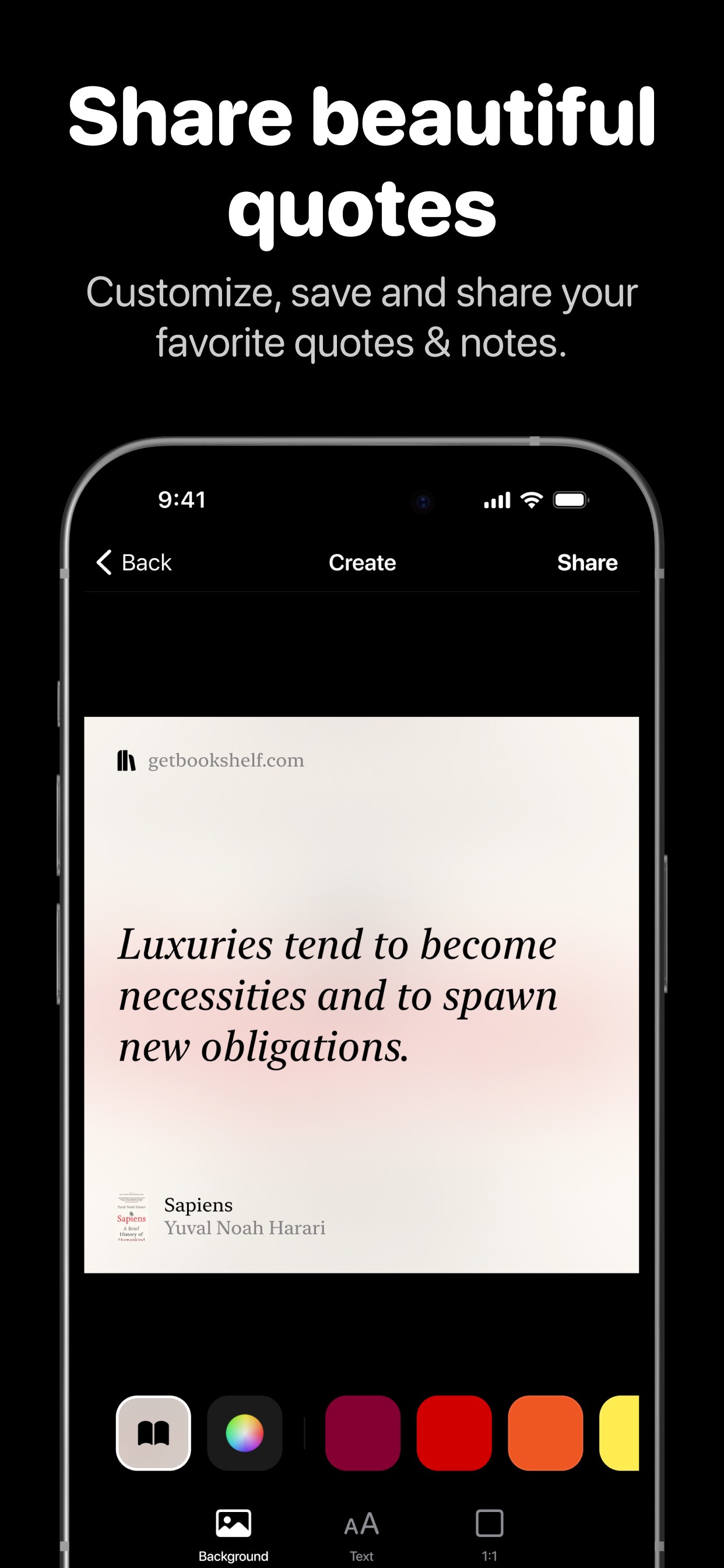
Smart notes, highlights, and AI-powered quizzes β€” free to start.

Why this copy works

Closes with the retention/memory value prop β€” the feature users cite most in positive reviews ('helps me recall titles and authors'). 'Free to start' handles the monetization question proactively so users who swipe to Frame 5 know the barrier to entry before tapping Get, reducing post-install churn from pricing surprise.

90-Day Action Plan

Week 1

5 tasks
  • Apply the new title (29/30 chars), subtitle (30/30 chars), and 100-char keyword field (100/100 chars) from the Ready-to-Paste and 100-Char Keyword Field sections above.
  • Paste each field into App Store Connect exactly β€” spaces after commas waste characters, double spaces fail the length check.
  • Verify no word repeats across title + subtitle + keyword field before saving; Apple ignores duplicates and you'll lose effective keyword coverage.
  • Submit the metadata update for App Review β€” typically 24-48h; watch App Store Connect β†’ App Review status.
  • Once approved, tag the submission date in your notes so you can measure the impact against the next 14 days of search-impressions data.

Week 2

3 tasks
  • Hand the five Frame 1-5 headlines and subtext from the Screenshot Copy section to a designer. Apply them as overlays on the existing dark-background mockup template to maintain visual consistency. Replace the '#1' claim on Frame 1 first β€” that is the guideline risk.
  • For Frame 1 specifically: the new headline 'Read More. Remember More.' should be set at the same large white bold weight as the current headline to maintain thumbnail legibility at 120x260 search result size. Test the design at actual thumbnail dimensions before uploading.
  • Submit updated screenshots as a new version or via App Store Connect's product page editor. Screenshot changes do not require a binary review in most cases β€” confirm in App Store Connect before assuming a review cycle.

Week 3

2 tasks
  • Open App Store Connect > Analytics > Search Terms. Filter for the past 28 days and confirm impressions are registering for 'counter,' 'storygraph,' and 'habit' β€” the three tokens most likely to show movement from the keyword field update.
  • Respond to every 1-star and 2-star review from the past 90 days that mentions data loss, sync failure, or unresponsive support. A visible, specific developer response ('We restored your library β€” here is how') converts rating perception for every future visitor who reads that thread.

Ongoing

3 tasks
  • Trigger SKStoreReviewController.requestReview() immediately after a user's reading session is saved and their streak counter increments β€” this is the single highest-satisfaction moment in the app flow and the most likely to produce a 5-star response.
  • Monitor weekly rankings for 'counter,' 'storygraph,' and 'habit tracker' β€” the three highest-opportunity terms from the keyword research table. Track whether you are in the top 10 for each within 6-8 weeks of the metadata update.
  • Refresh the keyword field each January (annual reading goal season) and September (back-to-school reading lists) β€” these are the two highest-volume windows for book-tracker searches and may warrant temporary token swaps toward seasonal intent terms like 'reading challenge' or 'book club.'

Expected Impact

The current metadata is already at 77/100 β€” a strong baseline. The primary search-ranking gain comes from placing 'counter' (popularity 60, difficulty 47, opportunity 32) in the keyword field, which is the highest-opportunity unindexed term in the data. Combined with 'storygraph' (popularity 68) and 'habit' (popularity 60) already in the baseline field, the keyword field update should increase indexed search impressions for those three terms within 4-6 weeks of Apple re-crawling the metadata. The larger conversion gain comes from the description rewrite (removing the brand-name opener, adding a closing CTA) and the Frame 1 screenshot copy change (removing the '#1' guideline risk, adding outcome framing) β€” together these address the two description issues flagged at 5/10 and should move tap-through rate on product page visits. The rewrite package targets a realistic lift from 77 to 86 on the ASO score, with the single biggest non-metadata lever being the session-save bug fix: resolving the complaints generating recent 1-star reviews would protect the 4.6-star recency signal that is currently one of the app's strongest ranking assets.