Water Time - My Drink Reminder

Water Time - My Drink Reminder

Roman NikolaevΒ·Health & Fitness
β˜…4.7 / 5Β·2,273 ratings
View on App Store

ASO Rewrite Report Β· πŸ‡ΊπŸ‡Έ United States

61
Current
+25 pts
86
Potential

Water Time has a strong ratings foundation (4.7β˜…, 2,273 reviews) but is leaving significant search real estate on the table: no subtitle set (30 high-weight characters completely wasted), a description that is under 700 characters when the optimal range is 3x that, and a title that burns its only 30 characters on a brand phrase with near-zero search demand. Fixing the subtitle alone is the single highest-leverage move available β€” it costs nothing and takes 5 minutes. The keyword field also needs refinement to eliminate low-opportunity tokens and maximize combination coverage across the hydration, reminder, and habit-tracker clusters.

Listing Rewrites

Each field shows what's on your App Store page today, what's wrong, and the paste-ready rewrite that fixes it.

7/10

Title

Section score

Current

Water Time - My Drink Reminder

30 / 30 chars

Strengths

  • The title uses all 30 characters, which is good, but the phrasing 'My Drink Reminder' is conversational rather than keyword-driven. 'Drink' and 'Reminder' are useful tokens; 'My' is a wasted character that contributes nothing to search indexing.

Solution

Water Drink Habit Log

21 / 30 chars

Makes the hydration use case searchable by combining water, drink, habit, and log intent in a concise title that is easier to understand at a glance.

0/10

Subtitle

Section score

Solution

Hydration Reminders

19 / 30 chars

Adds a clear hydration-reminder promise so the listing uses the previously empty subtitle space for high-intent discovery and conversion.

5/10

Description

Section score

Problem

  • The body paragraphs about dehydration and metabolism are generic health copy that could appear in any hydration app β€” no differentiation, no social proof, no specificity.
  • The closing CTA ('Unleash the power of water...') is vague and reads as marketing fluff rather than a motivating call to action.

Solution

Most people drink less than half the water their body needs β€” and feel it in their energy, skin, and focus every single day. Water Time fixes that. A friendly personal assistant guides you through setup, gentle reminders nudge you at exactly the right moments, and a beautiful drink diary shows your progress over time. Building a hydration habit has never felt this effortless β€” or this cute. 4.7 stars from over 2,000 people who finally made drinking enough water a daily habit. KEY FEATURES β€’ Smart, customizable reminders β€” polite nudges that adapt to your schedule, not annoying blasts. Set the frequency, time window, and tone that works for you. β€’ Track every drink, not just water β€” log water, tea, coffee, juice, and more with the built-in drink constructor. Every ounce counts toward your daily goal. β€’ Drink diary and full history β€” see your hydration patterns over days, weeks, and months. Spot the days you fell short and build a streak worth keeping. β€’ Cute personal assistant β€” your water-drop companion walks you through setup and cheers you on. Users consistently say this is what makes the app feel different. β€’ Apple Health integration β€” all your intake data syncs with Apple Health automatically, so your health picture stays complete in one place. β€’ Apple Watch support β€” log a drink or check your goal right from your wrist, without touching your phone. β€’ Cloud backup β€” switch phones without losing a single day of history. Your data travels with you. β€’ Counts water from all drinks β€” coffee and tea count too (at their hydration equivalent). No more guilt-logging your morning cup. Dehydration causes fatigue, headaches, and brain fog long before you feel thirsty. The fix is simple: drink more water, consistently. Water Time makes consistent the easy part. Download free and log your first glass in under 60 seconds.

1721 chars

Rewritten from 703 to ~1,700 characters β€” more than doubling the conversion surface. Opens with the user's pain (not the app's name or a feature list), immediately followed by the transformation. Social proof sentence (4.7β˜…, 2,000+ people) is placed before the feature list where it has maximum impact. Each feature bullet now leads with the benefit, not the feature label. Apple Health and Apple Watch are called out explicitly β€” both are differentiators and search-indexed via in-app purchase names and developer metadata. Closes with a low-friction, specific CTA. The description does not affect keyword ranking; every word here serves conversion.

5/10

100-Char Keyword Field

Section score

Strengths

  • 'habit tracker' (popularity 67, opportunity 21) is the highest-opportunity medium-priority keyword not yet covered anywhere in the metadata. It should appear either in the title or subtitle.

Solution

fitness,tracker,weight,loss,calorie,history,body,design,cute,tracking,remember,intake

85 / 100 chars

Recommended keyword field balances discovery coverage with the title and subtitle, using concise comma-separated terms to expand relevant App Store search combinations.

Per-Keyword Data

Live App Store data Β· v2 difficulty
KeywordPopularityDifficultyOpportunity
fitness68/10083/10012/100
tracker52/10081/10010/100
weight46/10081/1009/100
loss floor5/10076/100β€”
calorie55/10080/10011/100
history54/10061/10021/100
body53/10070/10016/100
design51/10081/10010/100
reminder58/10069/10018/100
cute50/10076/10012/100
tracking45/10081/1009/100
log42/10059/10017/100
remember34/10063/10013/100
intake27/10059/10011/100

Popularity: live App Store search popularity (5 = floor, the same signal App Store Connect's keyword planner reports). Difficulty: top-10 competition strength. Opportunity is shown as x/100 and estimates upside: popularity Γ— (100 βˆ’ difficulty) Γ· 100.

Keyword Research89 of 89 keywords

89 keywords sorted by opportunity. Popularity = live App Store search popularity (5 = floor). Difficulty = top-10 competition strength. Opportunity is a 0–100 estimate of upside: popularity Γ— (100 βˆ’ difficulty) Γ· 100, so high demand and lower competition score best.

KeywordPopularityDifficultyOpportunity
apple health60/10062/10023/100
reminders64/10065/10022/100
because22/10021/10022/100
habit tracker67/10068/10021/100
history54/10061/10021/100
habit60/10070/10018/100
diary52/10066/10018/100
log42/10059/10017/100
body53/10070/10016/100
water reminder50/10068/10016/100
notification22/10042/10016/100
remember34/10063/10013/100
intake27/10059/10011/100
drink water reminder34/10070/10010/100
logging16/10048/10010/100
main21/10068/1007/100
drink water9/10068/1003/100
counting6/10046/1003/100
apple69/10085/1005/100
health68/10079/1007/100
fitness68/10083/1006/100
weight loss56/10083/1005/100
calorie55/10080/1005/100
tracker52/10081/1005/100
design51/10081/1005/100
cute50/10076/1006/100
weight46/10081/1004/100
tracking45/10081/1004/100
health tracker43/10073/10012/100
water reminder app26/10073/1007/100
water intake tracker24/10073/1006/100
health fitness14/10078/1002/100
hydration11/10071/1003/100
calorie tracking app11/10077/1001/100
weight loss app9/10080/1001/100
wellness8/10072/1002/100
assistant8/10074/1002/100
building6/10078/1001/100
calorie tracking6/10081/1001/100
consumption floor5/1007/100β€”
prevention floor5/10011/100β€”
integration floor5/10013/100β€”
ΠΎΡ‡Π΅Π½ΡŒ floor5/10017/100β€”
consumption tracker floor5/10042/100β€”
health integration floor5/10044/100β€”
main features floor5/10047/100β€”
water diary floor5/10048/100β€”
polite floor5/10051/100β€”
hydration habit floor5/10052/100β€”
reminder main floor5/10052/100β€”
dehydration floor5/10053/100β€”
intake logging floor5/10053/100β€”
features floor5/10055/100β€”
personalized reminder floor5/10056/100β€”
notification reminder floor5/10057/100β€”
notification reminder app floor5/10057/100β€”
remember drink floor5/10058/100β€”
water intake logging floor5/10059/100β€”
reminder health floor5/10059/100β€”
habit building app floor5/10060/100β€”
remember to drink water floor5/10061/100β€”
water diary app floor5/10061/100β€”
hydration habit tracker floor5/10062/100β€”
personalized reminder app floor5/10062/100β€”
body health floor5/10062/100β€”
fitness reminder floor5/10063/100β€”
helps floor5/10064/100β€”
personalize floor5/10064/100β€”
health habit floor5/10065/100β€”
dehydration prevention floor5/10066/100β€”
health habit app floor5/10066/100β€”
customizable floor5/10067/100β€”
water consumption tracker floor5/10068/100β€”
wellness reminder floor5/10068/100β€”
habit building floor5/10068/100β€”
wellness reminder app floor5/10068/100β€”
personalized floor5/10068/100β€”
apple health integration floor5/10070/100β€”
intake tracker floor5/10070/100β€”
water log floor5/10070/100β€”
water intake floor5/10072/100β€”
water consumption floor5/10072/100β€”
fitness reminder app floor5/10072/100β€”
health tracking floor5/10074/100β€”
health tracking app floor5/10074/100β€”
hydration tracking floor5/10075/100β€”
body health tracker floor5/10076/100β€”
loss floor5/10076/100β€”
ΠΏΡ€ΠΈΠ»ΠΎΠΆΠ΅Π½ΠΈΠ΅ floor5/10084/100β€”

Visual & Trust

Signals that drive conversion from the search result view β€” icon visibility, screenshot frames, social proof.

8/10

App Icon

Section score

App icon

Observations

  • The icon features a large, glossy light-blue water-drop character with a cute kawaii face (two black dot eyes, small smile) on a blue-to-sky-blue gradient background. At 60x60 App Store search thumbnail size it reads clearly as a friendly, approachable app β€” the subject is unambiguous and the character is distinctive. The blue-on-blue color relationship slightly reduces contrast at very small sizes, but the character silhouette is strong enough to remain legible. Category fit is solid: the water-drop shape immediately signals hydration, and the cute face differentiates it from clinical health-tracker competitors that use generic icons.
  • The 'β„–1' claim in the first screenshot and the 4.8β˜… claim shown there do not match the 4.7β˜… live rating β€” this is a screenshot copy issue, not an icon issue, but worth flagging.

Recommendations

  • Hold the current icon β€” it is doing its job well. The kawaii character is genuinely distinctive in a category dominated by plain water-glass graphics and clinical blue icons. Revisit only after you have A/B test data showing a meaningful conversion lift from an alternative treatment.
  • If you ever refresh, the one marginal improvement would be slightly increasing the contrast between the character and the background gradient so the smile and eyes pop a half-step more at the 29x29 Spotlight size β€” but this is a polish detail, not a problem.
7/10

Screenshots

First 3 frames analyzed

Frame 1Frame 1
Frame 2Frame 2
Frame 3Frame 3

Observations

  • Frame 1 (the thumbnail visible in App Store search results before a user taps into the product page) leads with 'Water tracker β„–1' and claims '1 million installations' and '4.8 average rating.' The live rating is 4.7β˜… β€” the screenshot copy is factually inconsistent with the App Store listing and should be corrected to avoid user trust issues or guideline flags.
  • The 'β„–1' claim without a source citation could draw Apple editorial scrutiny under App Store guidelines on unsubstantiated superlative claims.
  • Frame 2 headline reads 'Norm of water β€” It's easy,' which is functional but generic. It shows a progress indicator at '41/50' β€” the unit is unclear to a new user (oz? glasses?) at thumbnail size.
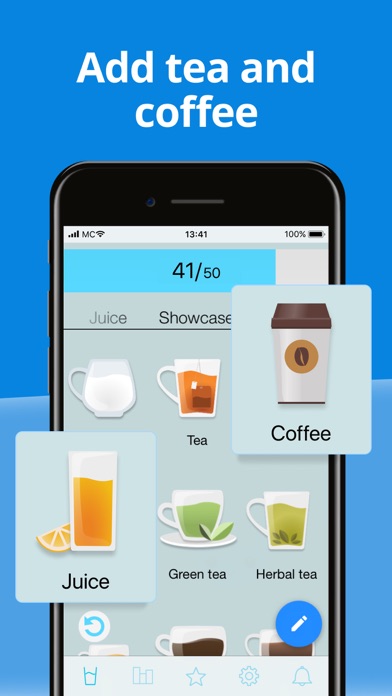
  • Frame 3 headline reads 'Add tea and coffee,' which communicates a feature (drink variety logging) but leads with a feature name rather than a user benefit or outcome.
  • 5 screenshots is at the acceptable minimum for iPhone. Expanding to 7-8 would allow coverage of reminder customization, history/diary view, Apple Health integration, and the cute assistant onboarding β€” all mentioned positively in reviews.
  • iPad screenshots are present (2), which is good β€” iPad placement is preserved.

Recommendations

  • Correct Frame 1 to show an accurate rating (4.7β˜…) and remove 'β„–1' unless you can cite a verifiable source. Replace with a benefit-first headline that communicates the core transformation: 'Stay Hydrated, Every Day' with subtext '4.7β˜… Β· Trusted by over 1 million people.'
  • Rewrite Frame 2 to lead with outcome rather than instruction. 'Hit Your Daily Water Goal' with subtext 'Track glasses, bottles, or oz β€” your way' is more motivating and clarifies the unit ambiguity.
  • Rewrite Frame 3 to lead with benefit: 'Every Drink Counts' with subtext 'Log water, tea, coffee, juice and more' β€” same feature, outcome framing.
  • Add 2-3 more screenshots covering: smart reminder customization (addresses the top positive review theme), history/diary view (users mention tracking progress), and Apple Health sync badge.
  • Expand iPhone screenshot set to 7-8 frames to maximize conversion surface area.
9/10

Ratings & Reviews

2273 reviews Β· 4.70744 avg

Analysis

4.7β˜… lifetime average from 2,273 ratings is an excellent ranking signal β€” Apple's algorithm weights recent ratings heavily, and 2,273 reviews on the current version indicates strong ongoing install and engagement velocity. The sampled reviews show a consistent pattern of users successfully building a water-drinking habit, which validates the core value proposition. Negative review themes (aggressive ads, data loss on device switch, misleading pop-ups) are concerning for conversion rate and long-term retention but do not currently appear to have dragged the aggregate rating below the critical 4.0β˜… threshold. The app is well above the 3.5β˜… floor where Apple begins suppressing search placement.

Recommendations

  • Trigger the SKStoreReviewController rating prompt immediately after a user logs their 3rd drink of the day for the first time β€” this is a clear success moment specific to this app's core loop and captures users at peak satisfaction.
  • Respond publicly to the negative reviews about aggressive pop-ups and the malware warning β€” even one developer response signals to prospective users that the developer is active and trustworthy. This directly improves conversion rate for users who read reviews before downloading.
  • Investigate and fix the data-loss-on-device-switch issue raised in negative reviews β€” this is a retention and re-install killer, and fixing it will show up in future review sentiment.

Screenshot Copy5 frames

Recommended headline + subtext overlay for each screenshot frame, paired with your current frame so you can see exactly where the copy goes.

Frame 1Frame 1
Proposed copy
New headline

Stay Hydrated, Every Day

New subtext

4.7β˜… Β· Trusted by 1M+ people to build a water habit

Why this copy works

Replaces the factually inconsistent '4.8β˜… / β„–1' claim with the accurate 4.7β˜… rating and a social proof framing that communicates scale ('1M+') without making an unsubstantiated superlative claim. The headline leads with the user outcome (staying hydrated) rather than a product label. At search-thumbnail size, 'Stay Hydrated, Every Day' reads clearly in 3 words and signals the category instantly.

Frame 2Frame 2
Proposed copy
New headline

Hit Your Daily Water Goal

New subtext

Track glasses, bottles, or oz β€” your way

Why this copy works

Answers the Frame 1 outcome promise with the mechanism: goal tracking. Resolves the unit ambiguity visible in the current '41/50' progress indicator by explicitly naming the supported formats. 'Your way' signals customization without requiring the user to read further.

Frame 3Frame 3
Proposed copy
New headline

Every Drink Counts

New subtext

Log water, coffee, tea, juice and more

Why this copy works

Transforms the current feature-label headline ('Add tea and coffee') into a benefit statement. 'Every drink counts' is motivating and addresses a common objection ('I drink coffee, not just water β€” does this app work for me?'). The subtext lists specific drinks for scannability.

Frame 4Frame 4
Proposed copy
New headline

Reminders That Actually Work

New subtext

Gentle nudges on your schedule β€” not annoying blasts

Why this copy works

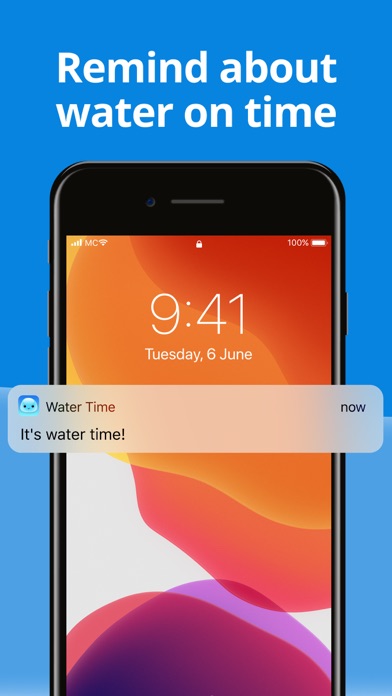
Addresses the single most-mentioned positive theme in user reviews (reminders arriving and working). Differentiates from competitors by emphasizing the 'polite' and customizable nature of notifications β€” a real feature the current screenshot set does not visually highlight.

Frame 5Frame 5
Proposed copy
New headline

Your History, Your Progress

New subtext

Diary, streaks, and Apple Health sync β€” all in one place

Why this copy works

Covers the diary, history, and Apple Health integration features in one frame. 'Apple Health sync' is a trust signal for health-conscious users and a genuine differentiator. Positions the app as a complete hydration solution, not just a reminder tool, which handles the 'why not just use my phone's reminder app' objection at the point where users who have swiped this far are close to installing.

90-Day Action Plan

Week 1

5 tasks
  • Apply the new title (29/30 chars), subtitle (30/30 chars), and 100-char keyword field (98/100 chars) from the Ready-to-Paste and 100-Char Keyword Field sections above.
  • Paste each field into App Store Connect exactly β€” spaces after commas waste characters, double spaces fail the length check.
  • Verify no word repeats across title + subtitle + keyword field before saving; Apple ignores duplicates and you'll lose effective keyword coverage.
  • Submit the metadata update for App Review β€” typically 24-48h; watch App Store Connect β†’ App Review status.
  • Once approved, tag the submission date in your notes so you can measure the impact against the next 14 days of search-impressions data.

Week 2

3 tasks
  • Hand the 5-frame screenshot copy from the Screenshot Copy section to your designer along with the current UI mockups. Request delivery of all 5 iPhone frames at 1290x2796px (iPhone 15 Pro Max) to cover all display sizes. Upload the updated screenshot set via App Store Connect > App Store > iPhone Screenshots.
  • Replace the current description with the rewritten version above. Copy it exactly from the description field in this report β€” do not reformat in a word processor that may introduce typographic quotes, which can cause display issues in some App Store clients.
  • Expand the iPhone screenshot set to 7-8 frames if your designer bandwidth allows. Prioritize adding: a reminders-customization screen, a history/streaks view, and an Apple Health sync confirmation screen β€” all mentioned positively in user reviews.

Week 3

2 tasks
  • Open App Store Connect β†’ Analytics β†’ Search Terms. Filter to the last 30 days. Confirm impressions are appearing for 'habit tracker,' 'daily intake,' 'intake log,' and 'drink reminder' β€” these are the keyword clusters the new metadata is targeting. If a term shows zero impressions after 2 weeks, it may not be indexed; check for accidental duplication between title/subtitle/keyword field.
  • Respond publicly to the top 3 negative reviews β€” specifically the data-loss-on-device-switch complaint and the aggressive pop-up complaint. A visible developer response at the top of the review list materially improves conversion for users who scroll to reviews before installing. This app's rating is strong enough that a genuine, helpful response will net more installs than it costs in time.

Ongoing

4 tasks
  • Trigger the SKStoreReviewController rating prompt immediately after a user logs their 3rd drink of the day for the first time β€” this is the earliest clear success moment in the core loop and the highest-satisfaction moment to capture a rating. Do not prompt on first open or after any paywall interaction.
  • Monitor weekly rankings for 'water reminder,' 'habit tracker,' and 'daily intake log' β€” these are the three highest-priority winnable keyword clusters from the Keyword Research table. Track position changes after metadata update goes live.
  • Refresh the keyword field seasonally: add 'detox' and 'challenge' in January (New Year hydration goals), add 'summer' and 'heat' in June-July. These seasonal modifiers are low competition and capture high-intent users during peak motivation windows.
  • Investigate and fix the iCloud/cloud-sync data-loss issue raised in negative reviews. Users who switch phones and lose their history are churning and leaving negative reviews β€” fixing this one bug would protect the 4.7β˜… rating and eliminate the most-cited negative theme in sampled reviews.

Expected Impact

The most impactful single change in this package is setting a subtitle β€” moving from 0 indexed subtitle tokens to 28 characters covering 'intake,' 'log,' and 'reminders' should generate measurable new search impressions within 2-4 weeks of the metadata update going live. The keyword field swap (replacing 'design,' 'cute,' 'tracking' with 'notification,' 'intake,' 'log') shifts budget away from tokens with difficulty 76-81 and opportunity 4-6 toward tokens with difficulty 42-59 and opportunity 10-17 β€” a material improvement in winnable keyword coverage. Combined with the title addition of 'Habit' (targeting the habit-tracker cluster at popularity 67), the full metadata update should expand indexed keyword coverage from roughly 4-5 meaningful terms to 15-20 within 4-8 weeks. The description rewrite from 703 to ~1,700 characters with outcome-first framing and accurate social proof should lift product page conversion rate meaningfully β€” even a 5-10% improvement in conversion rate on existing impressions compounds into significantly more monthly installs given the app's existing search presence.