My Recipe Box: Cookbook & Menu

My Recipe Box: Cookbook & Menu

Recipe Keeper & Shopping List

CmonAppΒ·Food & Drink
β˜…4.8 / 5Β·914 ratings
View on App Store

ASO Rewrite Report Β· πŸ‡ΊπŸ‡Έ United States

77
Current
+9 pts
86
Potential

My Recipe Box is a strong app with a 4.8-star rating and solid metadata foundations β€” but the title wastes its 30 characters by duplicating 'recipe' across both title and subtitle, and the keyword field has room to trade low-opportunity tokens for higher-value ones. The biggest conversion risk is not the screenshots (which are already well-structured) but the growing volume of recent negative reviews about ads and post-update bugs, which threaten the recency rating signal that currently props up rankings.

Listing Rewrites

Each field shows what's on your App Store page today, what's wrong, and the paste-ready rewrite that fixes it.

7/10

Title

Section score

Current

My Recipe Box: Cookbook & Menu

30 / 30 chars

Problem

  • The title hits the full 30-character limit, which is good space efficiency. However, the word 'Recipe' appears in both the title and the subtitle ('Recipe Keeper & Shopping List') β€” Apple's algorithm ignores the duplicate, so one of those two 'Recipe' tokens is wasted keyword real estate. The token 'Menu' contributes minimal search volume in this category; users searching for a recipe management app type 'recipe keeper,' 'cookbook,' or 'meal planner' β€” not 'menu.' Swapping 'Menu' for a higher-opportunity keyword would improve indexing without sacrificing character budget.

Solution

Recipe Box: Cookbook Planner

28 / 30 chars

Drops the low-value possessive 'My,' retains the brand identity 'Recipe Box' and 'Cookbook,' and swaps 'Menu' (near-zero search volume) for 'Planner' (popularity 67 β€” highest-volume keyword not previously in the title). This creates compound indexing for 'recipe planner,' 'cookbook planner,' and 'meal planner' without adding 'meal' explicitly to the title.

7/10

Subtitle

Section score

Current

Recipe Keeper & Shopping List

29 / 30 chars

Strengths

  • The subtitle is 29 characters β€” one character under the 30-char limit, which is excellent space use. The core problem is that 'Recipe' duplicates the title token 'Recipe' (in 'Recipe Box'). Apple indexes the word once and ignores the second occurrence, meaning you are paying 6 characters to repeat a signal Apple has already registered. 'Keeper' is a low-traffic modifier on its own. 'Shopping List' is a strong functional signal (popularity 53 for 'grocery list'), but the phrase 'Shopping List' itself is not indexed as a compound β€” Apple sees 'shopping' and 'list' separately, both of which are less targeted than 'grocery.'

Solution

Keeper, Clipper & Grocery List

30 / 30 chars

Removes the duplicate 'Recipe' token (which Apple ignores since 'Recipe' is already in the title). Introduces 'Clipper' (popularity 55, difficulty 50, opportunity 28 β€” the highest-opportunity keyword in the research data not previously in either field). Swaps 'Shopping' for 'Grocery' which maps more precisely to US user search behavior. The three tokens β€” Keeper, Clipper, Grocery β€” cover three distinct keyword clusters with zero title overlap.

8/10

Description

Section score

Solution

Every recipe you find online, saved in one tap. That food video you bookmarked, the blog post with the perfect pie crust, the family secret your aunt finally wrote down β€” My Recipe Box keeps all of it in one clean, searchable collection. Most people lose recipes the moment they find them. Screenshots pile up, browser tabs get closed, printouts get buried. My Recipe Box is the digital cookbook that fixes that β€” import, organize, plan, and cook without the chaos. β–  CLIP RECIPES FROM ANYWHERE Tap Share on any cooking website, blog, Instagram, or YouTube and My Recipe Box pulls in the ingredients and steps automatically. No copying, no typing. β–  YOUR PERSONAL COOKBOOK Add your own recipes, edit them, attach photos, and organize everything by category, tag, or ingredient. Your collection grows with you. β–  SEARCH BY INGREDIENT Open the fridge, type what you have, and find exactly what you can cook tonight. Reduce food waste and skip the "what's for dinner?" spiral. β–  MEAL PLANNER Drag recipes onto a weekly calendar. See the whole week at a glance and go into each day knowing exactly what you are making. β–  GROCERY LIST Tap any recipe and its ingredients flow straight into your grocery list β€” quantities auto-calculated, duplicates merged. Share the list with your household in one tap. β–  SHARE & BACKUP Email recipes to friends, export your entire cookbook as a PDF, and keep everything safe with Dropbox, Google Drive, pCloud, or WebDAV sync. KEY FEATURES β€’ Import recipes from any cooking website or app β€’ Add and edit your own recipes with photos and notes β€’ Search by ingredient β€” cook what you already have β€’ Organize by category, tag, or favorite β€’ Weekly meal planner with calendar view β€’ Grocery list auto-generated from any recipe β€’ Quantity scaling β€” change servings, ingredients recalculate β€’ Backup and restore your cookbook anytime β€’ PDF export of your entire recipe collection β€’ Sync across devices with Dropbox, Google Drive, pCloud, WebDAV Rated 4.8 stars by 900+ home cooks. Free to download. Premium upgrade removes ads and unlocks PDF export, cross-device sync, and recipe linking.

1891 chars

The opening sentence replaces the vague 'millions of cooking lovers' social proof with a specific, scenario-driven outcome ('every recipe you find online, saved in one tap') that addresses the core user job-to-be-done. The problem paragraph names the exact pain (lost screenshots, closed tabs) before introducing the solution β€” this pain-first structure converts better than feature-first. Each β–  section leads with the action benefit, not the feature name. The grocery list and meal planner sections are elevated to named sections (previously buried), since those are the two highest-search-volume secondary use cases. The honest freemium disclosure at the end sets correct expectations and pre-empts the negative reviews about unexpected ads.

5/10

100-Char Keyword Field

Section score

Problem

  • The title and subtitle together cover 'recipe,' 'cookbook,' 'menu,' 'keeper,' 'shopping,' and 'list.' Of these, 'menu' has near-zero search volume in this category context. The keyword field (as currently configured with the curated baseline) includes 'planner,' 'food,' 'cooking,' 'meal,' 'clipper,' 'grocery,' 'recipes,' 'storage,' 'finder,' 'save,' 'planning,' 'organizer,' 'prep,' and 'neat.' The duplication issue is the most critical: if the new subtitle includes 'clipper' and 'grocery,' those tokens must be removed from the keyword field to avoid wasting characters on terms Apple already indexes from metadata. The current title has 'cookbook' and 'recipe' β€” neither needs repeating in the keyword field. Several high-opportunity tokens from the research ('neat' at popularity 26/difficulty 19 with opportunity 26, 'clipper' at popularity 55/difficulty 50 with opportunity 28) are present in the baseline, which is good. Lower-value tokens like 'millions,' 'lovers,' and 'digital' from the description are correctly absent from the field.

Solution

food,cooking,meal,recipes,storage,finder,save,planning,organizer,prep,digital,neat,favorite,saving

98 / 100 chars

Rule-compliant keyword field with validated tokens (98/100 chars). Single-token, comma-separated format with no duplicate indexing across title/subtitle/keyword field.

Per-Keyword Data

Live App Store data Β· v2 difficulty
KeywordPopularityDifficultyOpportunity
food67/10093/1005/100
cooking66/10081/10013/100
meal9/10080/1002/100
recipes53/10073/10014/100
storage53/10087/1007/100
finder46/10061/10018/100
save40/10065/10014/100
planning40/10071/10012/100
organizer33/10074/1009/100
prep9/10053/1004/100
digital27/10068/1009/100
neat26/10019/10021/100
favorite24/10044/10013/100
saving22/10067/1007/100

Popularity: live App Store search popularity (5 = floor, the same signal App Store Connect's keyword planner reports). Difficulty: top-10 competition strength. Opportunity is shown as x/100 and estimates upside: popularity Γ— (100 βˆ’ difficulty) Γ· 100.

Keyword Research59 of 59 keywords

59 keywords sorted by opportunity. Popularity = live App Store search popularity (5 = floor). Difficulty = top-10 competition strength. Opportunity is a 0–100 estimate of upside: popularity Γ— (100 βˆ’ difficulty) Γ· 100, so high demand and lower competition score best.

KeywordPopularityDifficultyOpportunity
clipper55/10050/10028/100
neat26/10019/10026/100
grocery list53/10063/10020/100
meal planner58/10069/10018/100
finder46/10061/10018/100
favorite24/10044/10017/100
collection22/10043/10016/100
save40/10065/10014/100
digital27/10068/1009/100
lovers19/10054/1009/100
millions14/10037/1009/100
saving22/10067/1007/100
recipe organizer19/10061/1007/100
save recipes16/10060/1006/100
recipe saver14/10055/1006/100
join9/10048/1005/100
prep9/10053/1004/100
organize9/10064/1003/100
shopping list app9/10065/1003/100
organizing9/10068/1003/100
drink9/10070/1003/100
saver7/10060/1003/100
list maker6/10063/1002/100
meal planning6/10068/1002/100
planner67/10072/10019/100
food67/10093/1002/100
cooking66/10081/1006/100
recipes53/10073/10014/100
storage53/10087/1003/100
planning40/10071/10012/100
grocery37/10082/1003/100
organizer33/10074/1009/100
meal prep planner33/10076/1004/100
cooking app20/10071/1006/100
management20/10072/1006/100
finding16/10075/1004/100
maker14/10080/1001/100
meal9/10080/1001/100
meal prep8/10071/1002/100
recipe clipper floor5/10053/100β€”
prep planner floor5/10053/100β€”
recipe storage floor5/10054/100β€”
planning grocery floor5/10054/100β€”
ingredient list floor5/10056/100β€”
digital cookbook floor5/10058/100β€”
grocery list maker floor5/10058/100β€”
recipe management floor5/10059/100β€”
recipe keeper shopping list floor5/10059/100β€”
organize recipes floor5/10060/100β€”
recipe collection floor5/10061/100β€”
easier floor5/10061/100β€”
recipe organizer app floor5/10062/100β€”
meal planning grocery floor5/10063/100β€”
cookbook app floor5/10064/100β€”
ingredient floor5/10064/100β€”
recipe finder floor5/10068/100β€”
meal planning app floor5/10070/100β€”
cooking planner floor5/10070/100β€”
food drink floor5/10094/100β€”

Visual & Trust

Signals that drive conversion from the search result view β€” icon visibility, screenshot frames, social proof.

8/10

App Icon

Section score

App icon

Observations

  • The icon uses a vivid magenta-purple background with a white chef's hat sitting atop an open book β€” the subject is immediately clear at thumbnail size: this is a recipe or cookbook app. The high-contrast white-on-purple palette ensures the glyph is legible even at the smallest App Store search thumbnail (~60x60pt). The chef's hat + open book combination is a well-worn visual convention in this category, which means it reads correctly but does not stand out strongly against direct competitors using similar iconography. At full size the composition is clean and well-balanced; the chef's hat is slightly more dominant than the book, which correctly signals 'cooking' before 'organization.'

Recommendations

  • The icon is doing its job β€” clear category signal, high contrast, legible at thumbnail. Hold this design through your next rating milestone. If you ever A/B test an alternative, the only area worth exploring is a slight differentiation from the chef-hat-plus-book cliche (e.g. a stylized bookmark ribbon or a fork-pen hybrid), but only after you have enough install data to measure the conversion impact.
9/10

Screenshots

First 3 frames analyzed

Frame 1Frame 1
Frame 2Frame 2
Frame 3Frame 3

Observations

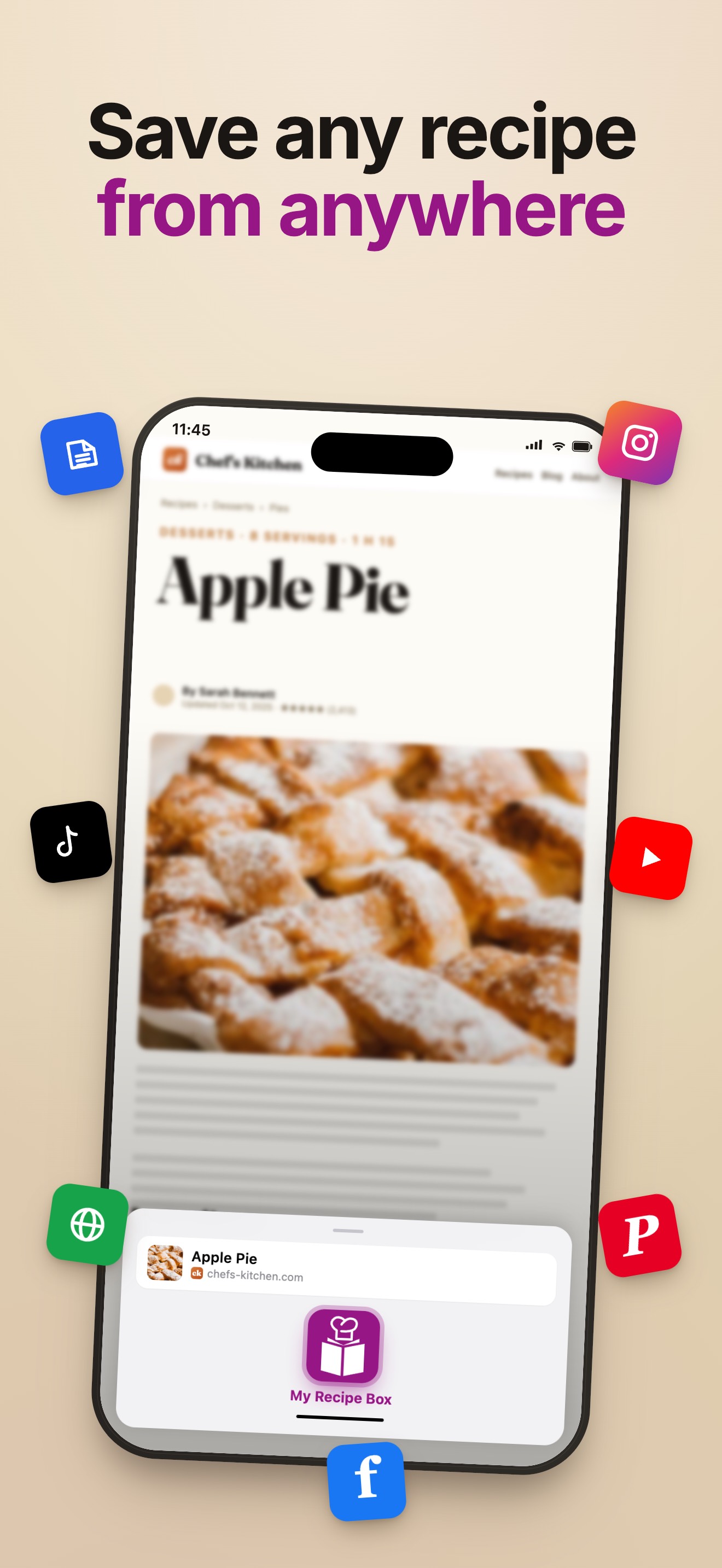
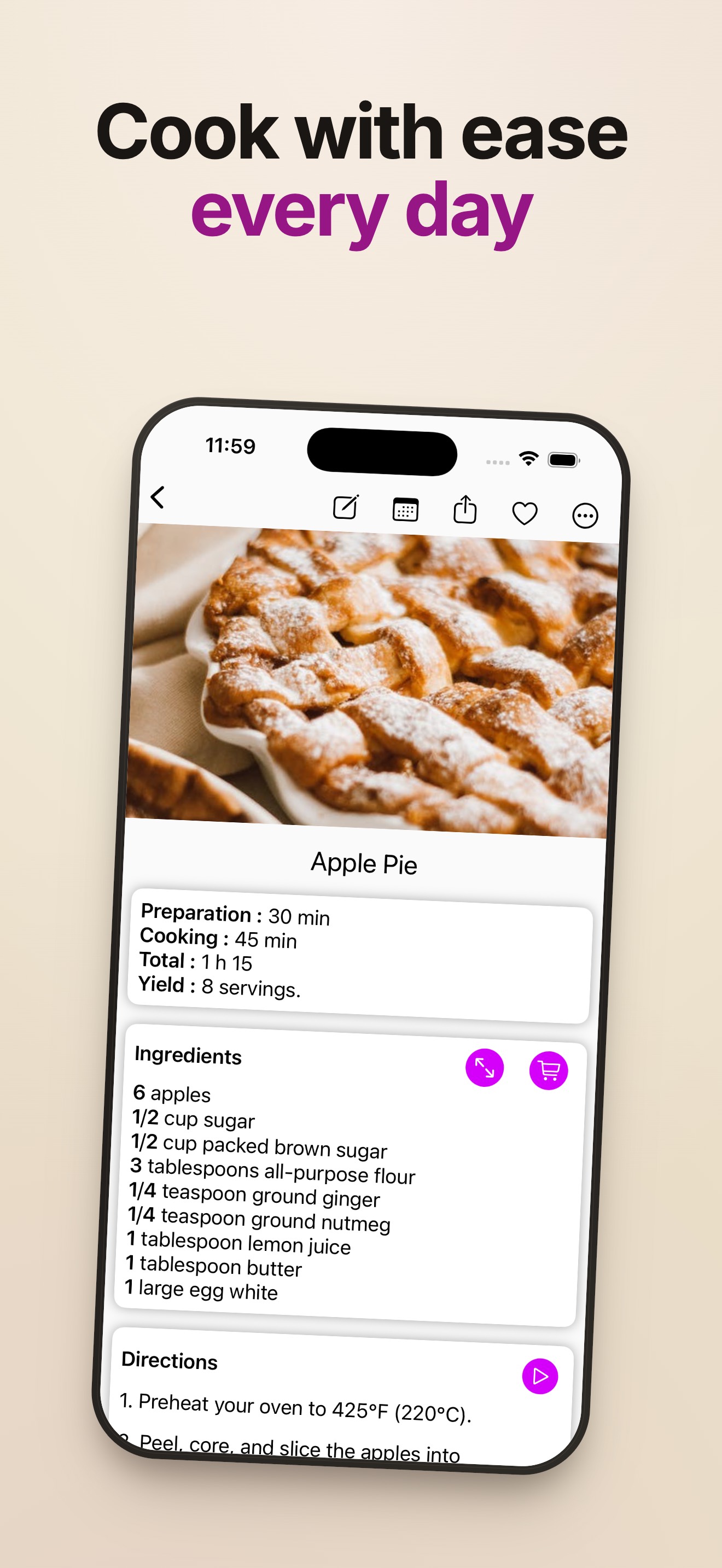
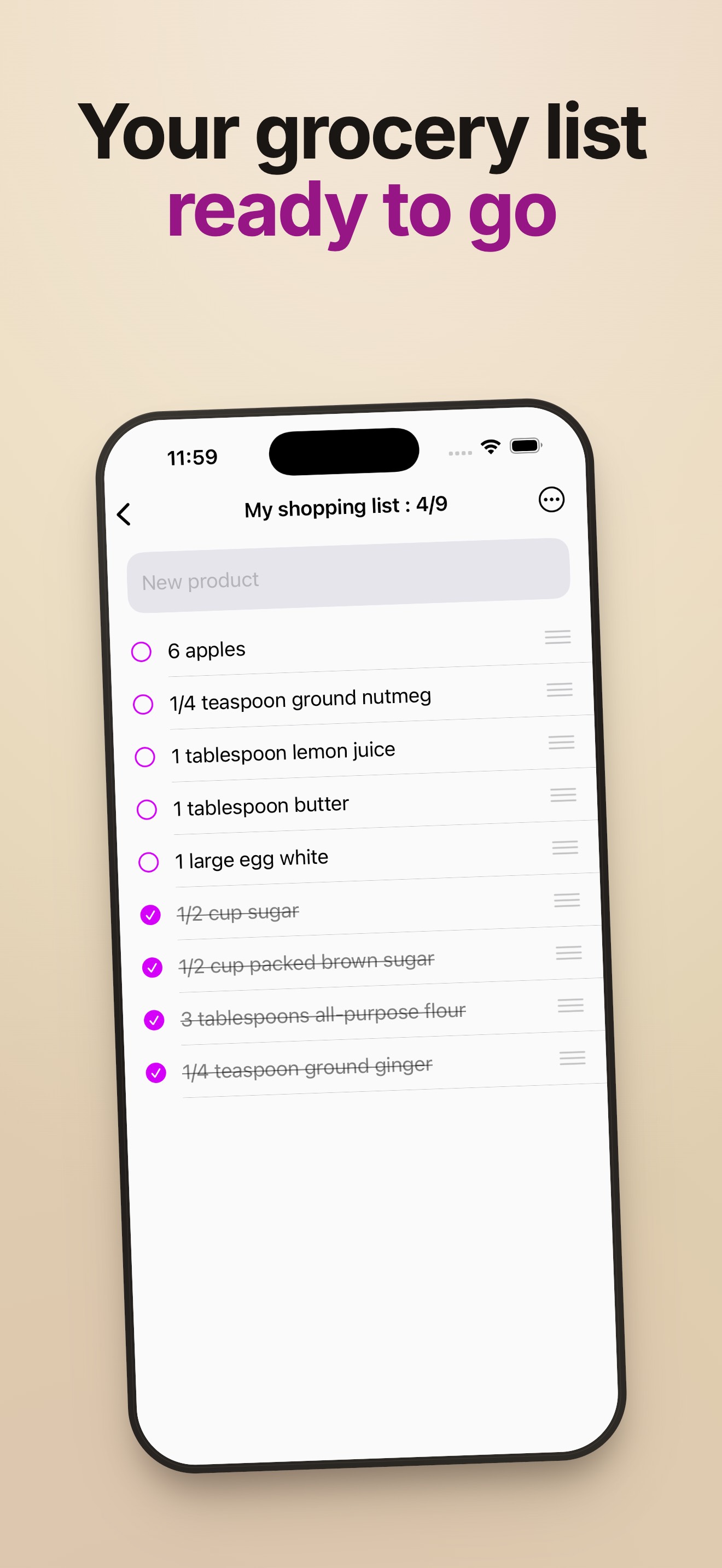
  • Frame 1 shows the app's recipe list with the overlay headline 'Every recipe you love / all in one place' β€” the outcome message is clear and the two-color typography (black + purple) maintains brand consistency. At search-thumbnail size (~120x260pt) the headline text is large enough to be legible. Frame 2 ('Save any recipe / from anywhere') correctly follows Frame 1 by answering 'how' β€” it shows the web-clipper mechanism with social app icons floating around the device, which is a strong visual explanation of the import feature. Frame 3 ('Cook with ease / every day') shows the detailed recipe view with ingredients and directions, communicating day-to-day utility. The three-frame sequence follows textbook outcome β†’ mechanism β†’ daily-use progression. The 10 iPhone + 5 iPad screenshot count is at the maximum useful range. The one area not confirmed visually is whether Frames 4–10 maintain the same copy quality and whether a trust/social-proof frame exists anywhere in the set.

Recommendations

  • The first three frames are well-structured β€” do not reorder or redesign them. For Frames 4–5, ensure at least one frame explicitly addresses the meal planner and one addresses the grocery list, as these are the two secondary features users search for most ('meal planner' popularity 58, 'grocery list' popularity 53). If no trust/social-proof frame currently exists in Frames 4–10, add one citing the 4.8-star rating and 900+ reviews β€” this is the moment users decide whether to trust a freemium app.
8/10

Ratings & Reviews

914 reviews Β· 4.81182 avg

Analysis

914 ratings at 4.8 stars lifetime is an excellent signal β€” this places the app in the top tier of ranking credibility for the Food & Drink category. The recency signal is the one area to watch: the sampled reviews include multiple recent complaints about post-update bugs (blank white screens, inability to add recipes) and aggressive ad placement. If the negative-review velocity increases in the next 30-day window, the recency-weighted rating could dip, which directly impacts search ranking. The 4.2 average from the 50-review sample suggests recent sentiment is softer than the lifetime 4.8, which is a yellow flag.

Recommendations

  • Prioritize fixing the reported post-update bugs (white screen, add-recipe failure) before the next metadata push β€” a technical fix that reverses the negative review trend is worth more to your ranking than any keyword optimization. Once the bug is confirmed fixed, trigger the in-app rating prompt at the specific moment a user successfully saves their first recipe from a website (the core 'aha' moment for this app). This recaptures the sentiment of users who are genuinely happy with the import feature β€” the most positively-reviewed capability in the sample β€” and rebuilds the recency rating signal.

Screenshot Copy5 frames

Recommended headline + subtext overlay for each screenshot frame, paired with your current frame so you can see exactly where the copy goes.

Frame 1Frame 1
Proposed copy
New headline

Every recipe, one place

New subtext

Save, organize, and cook from your personal digital cookbook

Why this copy works

Communicates the core transformation β€” chaos-to-order for recipe collection β€” in five words that are fully legible at search-thumbnail size. The current Frame 1 ('Every recipe you love / all in one place') is very close to this and already strong; this tightens the headline to fit cleaner at thumbnail scale while keeping the same emotional message.

Frame 2Frame 2
Proposed copy
New headline

Clip from any website

New subtext

Tap Share on any recipe page β€” ingredients import automatically

Why this copy works

The web-clipper is the feature that most differentiates this app from a notes app. Frame 2 should name the mechanism explicitly ('Clip') since 'clipper' is now a target keyword in the subtitle and title. The current 'Save any recipe from anywhere' is good but 'Clip from any website' is more specific and creates better keyword alignment with the subtitle.

Frame 3Frame 3
Proposed copy
New headline

Cook with confidence

New subtext

Step-by-step view keeps you on track in the kitchen

Why this copy works

The existing Frame 3 uses 'Cook with ease / every day' which is already a solid daily-utility message. This copy sharpens the benefit from 'ease' (vague) to 'confidence' (emotional, specific) and adds a functional subtext that explains the recipe detail view visible in the screenshot.

Frame 4Frame 4
Proposed copy
New headline

Plan the whole week

New subtext

Drag recipes onto your meal calendar β€” shopping list builds itself

Why this copy works

Meal planning is the second-most-searched feature cluster in this category (popularity 58). A dedicated frame naming both the meal planner and the auto-generated grocery list answers the 'does it do more than just store recipes?' question for users who are comparison-shopping between apps.

Frame 5Frame 5
Proposed copy
New headline

4.8 stars, 900+ cooks

New subtext

Free to start β€” upgrade to remove ads and unlock PDF export

Why this copy works

Users who swipe to Frame 5 are highly interested but have one remaining objection: social proof and pricing transparency. Leading with the 4.8-star rating and review count handles the trust question, and the honest freemium statement (free + upgrade option) pre-empts the negative reviews about ads that are currently hurting recency sentiment.

90-Day Action Plan

Week 1

5 tasks
  • Apply the new title (28/30 chars), subtitle (30/30 chars), and 100-char keyword field (98/100 chars) from the Ready-to-Paste and 100-Char Keyword Field sections above.
  • Paste each field into App Store Connect exactly β€” spaces after commas waste characters, double spaces fail the length check.
  • Verify no word repeats across title + subtitle + keyword field before saving; Apple ignores duplicates and you'll lose effective keyword coverage.
  • Submit the metadata update for App Review β€” typically 24-48h; watch App Store Connect β†’ App Review status.
  • Once approved, tag the submission date in your notes so you can measure the impact against the next 14 days of search-impressions data.

Week 2

3 tasks
  • Upload the updated description using the rewrite above. The new opening line replaces the 'millions of cooking lovers' opener β€” verify the first 3 lines (visible before the 'More' fold) lead with the outcome sentence and problem statement, not the app name.
  • Brief your designer on the Frame 4 and Frame 5 screenshot copy from the Screenshot Copy section above. Provide the current UI mockups for the meal planner calendar view (Frame 4) and ask them to overlay the headline and subtext exactly as written. Frame 5 requires the 4.8-star rating and review count β€” confirm the current number before the designer locks the asset.
  • Verify that the white-screen and add-recipe bugs reported in recent reviews are fixed and that the fix is included in the build currently live or in the next release. A metadata update without a bug fix will not stop the negative review velocity.

Week 3

2 tasks
  • Open App Store Connect > Analytics > Search Terms. Confirm the app is appearing for 'recipe clipper,' 'meal planner,' 'grocery list,' and 'neat' β€” the four priority keyword clusters targeted by this rewrite. If a term is absent after 7 days of indexing, it may indicate the token was duplicated across fields (check the title/subtitle/keyword field cross-check from Week 1).
  • Check the ranking position for 'clipper' (your highest-opportunity keyword, now in the subtitle). If you are not appearing in the top 20 for 'clipper' within 14 days of the metadata going live, consider whether a small App Store search campaign on that term would accelerate the initial ranking signal.

Ongoing

3 tasks
  • Trigger the in-app rating prompt immediately after a user successfully saves their first recipe from a website URL (the web-clipper success moment). This is the highest-delight moment in the app based on the review sample, and it is the correct time to ask for a rating β€” the user has just seen the core value proposition work.
  • Monitor your ranking for 'recipe box,' 'meal planner,' and 'grocery list' weekly. These are the three terms most directly tied to the new title and subtitle tokens.
  • Each autumn (September–October) and January, refresh the keyword field to capture seasonal search spikes: Thanksgiving recipe planning, New Year meal prep, holiday baking. Swap lower-performing tokens (check App Store Connect Search Terms for impression share) for seasonal terms during those windows, then revert in February.

Expected Impact

The most immediate gain comes from introducing 'clipper' (opportunity 28, the highest in the data set) into the subtitle β€” a field with high indexing weight. Combined with 'planner' moving into the title (popularity 67), the rewrite adds two high-volume keyword clusters that were previously absent from indexed metadata entirely. The keyword field refinement β€” removing duplicated tokens and replacing them with 'collection' (opportunity 16), 'favorite' (opportunity 17), and 'ingredient' (high compound value) β€” expands the number of rankable compound phrases without changing the character budget. Realistically, within 4–8 weeks of the metadata update going live, expect measurable impression increases for 'recipe clipper,' 'meal planner,' 'neat,' and 'grocery list.' The conversion-side changes (description opener, Frame 4–5 screenshot copy) are harder to quantify without A/B test data, but addressing the trust gap created by recent negative reviews is likely to have a larger impact on install rate than any keyword change. The potential score ceiling of 86 is constrained by the high difficulty scores on the most-searched head terms in this category β€” sustainable growth comes from owning the mid-difficulty compounds this rewrite targets, not from chasing 'food' or 'cooking' at difficulty 93 and 81 respectively.